Friendica: ldap_autocreateaccount not working
As described above. If a user, which is in the LDAP, tries to login to Friendica I get the following in the log:
[NORMAL]:ldapauth.php:185:ldap_autocreateaccount ldapauth: account [email protected] was not created ! : Dein Spitzname darf nur aus Buchstaben und Zahlen ("a-z","0-9" und "_") bestehen.
But in the attribute connected to the nickname in the .htconfig.php there are just letters as expected:
$a->config['ldapauth']['ldap_autocreateaccount_nameattribute'] = 'displayName';
 scroom
All 81 comments
This is because the nickname in this situation is the full address [email protected] and the user creation barfs on the on the @ symbol. I'm not sure how we should handle this, we can truncate the address before the @ symbol to get a valid username but I'm afraid of collisions between the LDAP directory and the Friendica server.
 MrPetovan
on 30 Dec 2017
MrPetovan
on 30 Dec 2017
So the value in "displayName" doesn't contain the @? Which fields are holding that specific address?
 annando
on 31 Dec 2017
annando
on 31 Dec 2017
What displayName are you talking about?
The LDAP account username contains the @ and it is directly passed to the Friendica user creation routine that chokes on the special character. A solution is to sanitize the LDAP username before passing it to User::create by keeping only the left part of an address for example.
MrPetovan
on 31 Dec 2017
I'm talking about the LDAP attribute "displayName".
annando
on 1 Jan 2018
I see what you mean now, however it appears the .ldap_autocreateaccount_nameattribute config value is never used, and the LDAP username used to authenticate is used no matter what
MrPetovan
on 1 Jan 2018
Ah okay. So this is the problem. Since you already had a look at it? Is any config value used for this?
annando
on 1 Jan 2018
Hmm ... it looks like the parameter is used: https://github.com/friendica/friendica-addons/blob/master/ldapauth/ldapauth.php#L132-L141
Problem is only that I cannot test it.
annando
on 1 Jan 2018
Yeah, me neither, but no matter what we can't trust the format of any attribute, we have to do some sanitizing anyway.
And Github seach really is subpar, I never seem to be able to get the expected results 😕
MrPetovan
on 1 Jan 2018
@MrPetovan @annando The attribute displayName did not contain the email-adress. It is in my use case used for a nickname. But the the cn of the LDAP entry contains the email-adress of the user. The LDAP-server has been mainly constructed for user managment of an email server.
scroom
on 1 Jan 2018
I see blank page for friendica on yunohost with ldapauth plugin set in addon.ini.php for 2018.09.
This is working configuration for previous version :
$a->config['system']['addon'] = 'ldapauth';

$a->config['ldapauth']['ldap_server'] = 'localhost';
$a->config['ldapauth']['ldap_searchdn'] = 'ou=users,dc=yunohost,dc=org';
$a->config['ldapauth']['ldap_userattr'] = 'uid';
$a->config['ldapauth']['ldap_autocreateaccount'] = 'true';
$a->config['ldapauth']['ldap_autocreateaccount_emailattribute'] = 'mail';
This is for 2018.09:
[ldapauth]
    // ldap hostname server - required
    ldap_server = localhost
    // dn to search users - required
    ldap_searchdn = ou=users,dc=yunohost,dc=org
    // attribute to find username - required
    ldap_userattr = uid

    // admin dn - optional - only if ldap server dont have anonymous access
    //ldap_binddn = cn=admin,dc=example,dc=com
    // admin password - optional - only if ldap server dont have anonymous access
    //ldap_bindpw = password

    // for create Friendica account if user exist in ldap
    //     required an email and a simple (beautiful) nickname on user ldap object
    //   active account creation - optional - default none
    ldap_autocreateaccount = true
    //   attribute to get email - optional - default : 'mail'
    ldap_autocreateaccount_emailattribute = mail
    //   attribute to get nickname - optional - default : 'givenName'
    ldap_autocreateaccount_nameattribute = givenName
Something have changed in addons?
 anmol26s
on 24 Sep 2018
anmol26s
on 24 Sep 2018
I'm not sure it changes anything, but I'd first try to remove the tabs in the addons.ini.php file.
MrPetovan
on 25 Sep 2018
Do you get a specific error in your PHP log?
MrPetovan
on 25 Sep 2018
By tabs you mean the comments // ?
Here is the php log:
[26-Sep-2018 10:10:39] WARNING: [pool friendica] child 3298 said into stderr: "NOTICE: PHP message: PHP Warning:  syntax error, unexpected '=' in Unknown on line 12"
[26-Sep-2018 10:10:39] WARNING: [pool friendica] child 3298 said into stderr: " in /var/www/friendica/src/App.php on line 405"
[26-Sep-2018 10:10:39] WARNING: [pool friendica] child 3298 said into stderr: "NOTICE: PHP message: PHP Fatal error:  Uncaught Exception: Error parsing config file /var/www/friendica/config/addon.ini.php in /var/www/friendica/src/App.php:408"
[26-Sep-2018 10:10:39] WARNING: [pool friendica] child 3298 said into stderr: "Stack trace:"
[26-Sep-2018 10:10:39] WARNING: [pool friendica] child 3298 said into stderr: "#0 /var/www/friendica/src/App.php(435): Friendica\App->loadConfigFile('/var/www/friend...', true)"
[26-Sep-2018 10:10:39] WARNING: [pool friendica] child 3298 said into stderr: "#1 /var/www/friendica/src/App.php(303): Friendica\App->loadAddonConfig()"
[26-Sep-2018 10:10:39] WARNING: [pool friendica] child 3298 said into stderr: "#2 /var/www/friendica/src/App.php(177): Friendica\App->reload()"
[26-Sep-2018 10:10:39] WARNING: [pool friendica] child 3298 said into stderr: "#3 /var/www/friendica/index.php(26): Friendica\App->__construct('/var/www/friend...')"
[26-Sep-2018 10:10:39] WARNING: [pool friendica] child 3298 said into stderr: "#4 {main}"
[26-Sep-2018 10:10:39] WARNING: [pool friendica] child 3298 said into stderr: "  thrown in /var/www/friendica/src/App.php on line 408"
Forget about tabs, try ldap_searchdn = "ou=users,dc=yunohost,dc=org" (with double-quotes) instead. Having an equal sign in an INI value requires quoting.
MrPetovan
on 26 Sep 2018
Ok now the Friendica login page works. But the addon is not getting added by itself in the addon table of the database like it used do in previous version.
Previous version used to add the plugin on a fresh install itself:

Now if I even add it by command INSERT INTOaddon(id,name,version,installed,hidden,timestamp,plugin_admin) VALUES (NULL, 'ldapauth', '', '1', '0', '1527602418', '0');
on refreshing the friendica login page the addon table gets empty by itself.
anmol26s
on 26 Sep 2018
When you go to the addon admin panel, is the ldap auth checked?
MrPetovan
on 26 Sep 2018
When you go to the addon admin panel, is the ldap auth checked?
You don't understand. The admin email is set in local.ini.php, database is pushed and corn job is set through bash. After this users can login through LDAP. There accounts are created as they login first time to friendica. The admin account is recognized by local.ini.php. As there in no account on fresh install so there is no way to check from admin panel as the plugin is activated or not.
When LDAP user is created and checked through local.ini.php as the new user is admin he/she is given the access.
In previous versions to this version the Ldap plugin was loaded by itself after the fresh install. Now its not getting loaded by itself and pushing a sql query to enable it in database is not working too. So on fresh install there is no way to login or registration a new account as new registration are blocked in local.ini.php. The accounts are only for users of YunoHost through LDAP or in special case created by admin for public use.
anmol26s
on 26 Sep 2018
The usual process is to enable registration in local.ini.php, create an admin account and then disable registrations again. This way you don't have to fiddle directly with the database, which isn't guaranteed to work and for which I'm not ready to provide any support because it simply is too specific.
Can you please register a normal (non-LDAP) admin account to check the addon status in the Admin panel?
MrPetovan
on 26 Sep 2018
Hi
The LDAP is inactive when a non-LDAP admin account is created. Activating it make the LDAP work normal.
Can you tell me the database queries to run so that it can be activated LDAP can be activated as fresh install?I try to run :
INSERT INTO addon (id, name, version, installed, hidden, timestamp, plugin_admin) VALUES (NULL, 'ldapauth', '', '1', '0', '1527602418', '0');
INSERT INTO hook (id, hook, file, function, priority) VALUES (NULL, 0x61757468656e746963617465, 0x6164646f6e2f6c646170617574682f6c646170617574682e706870, 0x6c646170617574685f686f6f6b5f61757468656e746963617465, '0');
INSERT INTO hook (id, hook, file, function, priority) VALUES (NULL, 0x6c6f61645f636f6e666967, 0x6164646f6e2f6c646170617574682f6c646170617574682e706870, 0x6c646170617574685f6c6f61645f636f6e666967, '0');
But the values vanishes as the friendica page is refreshed.
anmol26s
on 27 Sep 2018
Please try to add addon = ldapauth in the system section of your initial local.ini.php.
MrPetovan
on 27 Sep 2018
I have added addon = ldapauth above these line:
; ********************
; The configuration below will be overruled by the admin panel.
; Changes made below will only have an effect if the database does
; not contain any configuration for the friendica system.
; ********************
But the addon is not loaded in friendica and its the still the database looses it values which are manually entered.
anmol26s
on 27 Sep 2018
I have fixed it by adding these lines in addon.ini.php. Hopefully it will help someone.
[system]
addon = ldapauth

[ldapauth]
ldap_server = 'localhost'
ldap_searchdn = 'ou=users,dc=yunohost,dc=org'
ldap_userattr = 'uid'
ldap_autocreateaccount = 'true'
ldap_autocreateaccount_emailattribute = 'mail'
Yunohost Friendica package is up again \o/. It would be good if this Yunohost badge can be placed somewhere in the install doc for people to know.
 or just a link https://github.com/YunoHost-Apps/friendica_ynh.
anmol26s
on 27 Sep 2018
Thanks for fixing :-)
The YunoHost page is linked from the resources section in the wiki in the repository. If you like, you can write a guest-blog posting for friendi.ca about this.
 tobiasd
on 27 Sep 2018
tobiasd
on 27 Sep 2018
Links to the Docker image and the YunoHost installation are added to the INSTALL docs in #5930. Still if you like @anmol26s I would enjoy a guest-blog posting about YunoHost and installing Friendica with it.
tobiasd
on 15 Oct 2018
Is this still current?
MrPetovan
on 12 Jan 2019
Removing from milestone for inactivity.
MrPetovan
on 17 Jan 2019
Why the structure keeps on changing? The ldap login broke again.
anmol26s
on 11 Mar 2019
Which structure?
MrPetovan
on 11 Mar 2019
I see blank page for friendica on yunohost with ldapauth plugin set in addon.ini.php for 2018.09.
This is working configuration for previous version :$a->config['system']['addon'] = 'ldapauth'; $a->config['ldapauth']['ldap_server'] = 'localhost'; $a->config['ldapauth']['ldap_searchdn'] = 'ou=users,dc=yunohost,dc=org'; $a->config['ldapauth']['ldap_userattr'] = 'uid'; $a->config['ldapauth']['ldap_autocreateaccount'] = 'true'; $a->config['ldapauth']['ldap_autocreateaccount_emailattribute'] = 'mail';This is for 2018.09:
[ldapauth]
  // ldap hostname server - required
  ldap_server = localhost
  // dn to search users - required
  ldap_searchdn = ou=users,dc=yunohost,dc=org
  // attribute to find username - required
  ldap_userattr = uid

  // admin dn - optional - only if ldap server dont have anonymous access
  //ldap_binddn = cn=admin,dc=example,dc=com
  // admin password - optional - only if ldap server dont have anonymous access
  //ldap_bindpw = password

  // for create Friendica account if user exist in ldap
  //     required an email and a simple (beautiful) nickname on user ldap object
  //   active account creation - optional - default none
  ldap_autocreateaccount = true
  //   attribute to get email - optional - default : 'mail'
  ldap_autocreateaccount_emailattribute = mail
  //   attribute to get nickname - optional - default : 'givenName'
  ldap_autocreateaccount_nameattribute = givenName
Something have changed in addons?
This
anmol26s
on 11 Mar 2019
addon.config.php file looks like this. Do you have any idea how this will work again?
<?php
// Addon configuration
// Copy this configuration file to addon.config.php and edit it if you want to configure addons, see below example for the twitter addon
return [
    'ldapauth' => [
        'ldap_server' => 'localhost',
        'ldap_searchdn' => 'ou=users,dc=yunohost,dc=org',
        'ldap_userattr' => 'uid',
        'ldap_autocreateaccount' => 'true',
        'ldap_autocreateaccount_emailattribute' => 'mail',
    ],
];
Yes, the new addon config structure is now config/addon.config.php and should look like this:
<?php
return [
    ...
    'ldapauth' => [
        'ldap_server' => ...,
        'ldap_searchdn' => ...,
        'ldap_userattr' => ...,
        'ldap_autocreateaccount' => true,
        'ldap_autocreateaccount_emailattribute' => ...
   ],
   ...
];
However, either of the previous structures should work as well, either in the .htconfig.php file or in the config/addon.ini.php file.
MrPetovan
on 11 Mar 2019
Your config file looks okay.
MrPetovan
on 11 Mar 2019
This is not working.
anmol26s
on 11 Mar 2019
Do you have access to the command-line? You can verify what is the actual config value used by the system with bin/console config ldapauth ldap_server for example.
Also, you may have to add ldapauth to 'system' => ['addon' => '...'] in config/local.config.php if you moved the rest of your config over there.
MrPetovan
on 11 Mar 2019
Yes I have.
$ bin/console config ldapauth ldap_server only shows this:
ldapauth.ldap_server => localhost
anmol26s
on 11 Mar 2019
Ok good, what about bin/console config system addon?
MrPetovan
on 11 Mar 2019
bin/console config system addon
system.addon =>
anmol26s
on 11 Mar 2019
Ok, so the ldapauth addon isn't enabled anymore. You can either add ldapauth to 'system' => ['addon' => '...'] in config/local.config.php if you moved the rest of your config over there, or directly set the config value in the database with bin/console config system addon ldapauth.
MrPetovan
on 11 Mar 2019
Ok it works. I will see how it should be taken care in Yunohost.
anmol26s
on 11 Mar 2019
Thanks!
MrPetovan
on 11 Mar 2019
I'm noticing that my new users who are not in LDAP are not being added to LDAP, though they are accessing my instance just fine otherwise.
(I do have the addon in my addon.config.php all working and stuff. I'm just not able to get new users to appear in LDAP. (are they supposed to?, should they get added to the cn=friendica group i created?)
And I'm using posixAccount in my schema, It'd need to populate the uidNumber field to generate an account if it went with my defaults, so that is a question/concern i have around adding stuff, schemas and stuff.. I'd be happy if it did it at all though. =)
 victort
on 19 Nov 2019
victort
on 19 Nov 2019
The ldap_autocreateaccount feature is about creating a new Friendica account from an existing LDAP account, not the other way around.
MrPetovan
on 19 Nov 2019
OH! i stand corrected then, and have no issue as it is written.
:D :+1:
victort
on 19 Nov 2019
Ok, so the ldapauth addon isn't enabled anymore. You can either add
ldapauthto'system' => ['addon' => '...']inconfig/local.config.phpif you moved the rest of your config over there, or directly set the config value in the database withbin/console config system addon ldapauth.
bin/console config system addon ldapauth has stopped working on fresh install. Is there some changes done which brakes the activating of the Ldap plugin?
anmol26s
on 17 Apr 2020
What output does bin/console config system addon give after you run the above command?
MrPetovan
on 17 Apr 2020
What output does
bin/console config system addongive after you run the above command?
system.addon => ldapauth
anmol26s
on 18 Apr 2020
Ok so the plugin looks activated. Anything in the friendica log, anything in the PHP log?
MrPetovan
on 18 Apr 2020
Here is the error:
[error] 2687#2687: *86511 FastCGI sent in stderr: "PHP message: PHP Fatal error: Uncaught Error: Class 'Friendica\Core\Config' not found in /var/www/friendica__2/addon/ldapauth/ldapauth.php:94
anmol26s
on 20 Apr 2020
Here we go, thank you very much.
MrPetovan
on 20 Apr 2020
Hum, did you update your addons alongside your core Friendica install? Both versions should match and the error seems to come from a version discrepancy between the base install that doesn't have the Friendica\Core\Config class anymore, and the addon that still refers to it from a previous version.
MrPetovan
on 20 Apr 2020
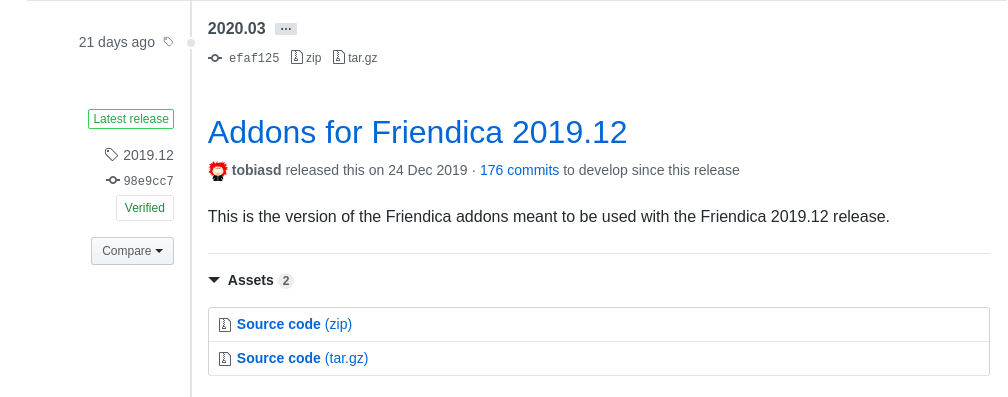
I did not saw the 2020.03 tag on top. It looks different from previous tags and having less details.
Now the ldap authentication is working. But while the Yunohost install the bin/console config system addon ldapauth is not activating the Ldap plugin.
Though bin/console config system addon shows system.addon => ldapauth
anmol26s
on 20 Apr 2020
Maybe we didn't create a full-fledged release for this tag, thanks for pointing this out.
I'm puzzled by your follow-up, how can ldap authentication work without the LDAP plugin activated? Or do you have two separate installs?
MrPetovan
on 20 Apr 2020
I'm puzzled by your follow-up, how can ldap authentication work without the LDAP plugin activated? Or do you have two separate installs?
I opened the registration changing the config file and manually activated the LDAP plugin from web interface. Note that I have checked that if you upgrade from previous versions where the LDAP plugin was already activated, then there is not a problem. But not all people will upgrade from old versions, there would be new users installing the app.
anmol26s
on 20 Apr 2020
Ah, I get it now, thank you for the elaboration. How do you verify the addon isn't activated on a fresh Yunohost install?
MrPetovan
on 20 Apr 2020
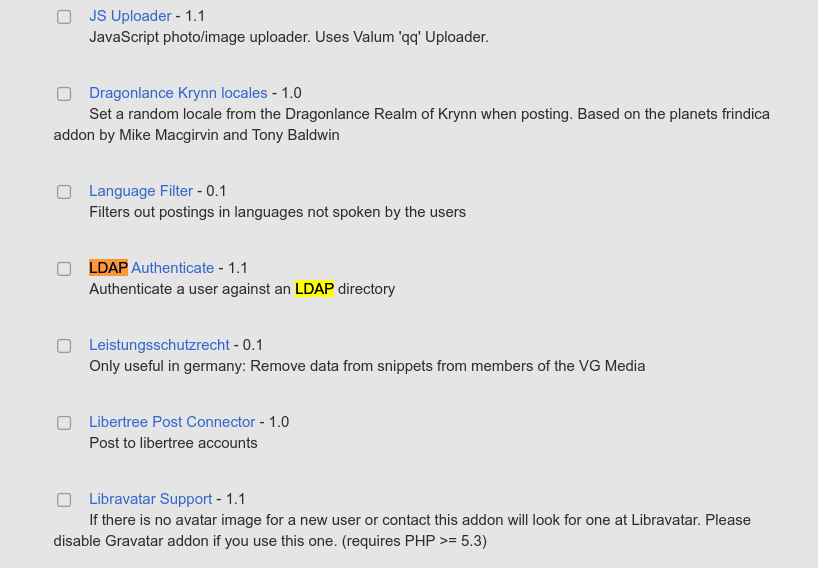
By checking the addon webpage.
And even LDAP authentication don't work.
anmol26s
on 20 Apr 2020
Any solution?
anmol26s
on 21 Apr 2020
Ah, I see we don't use the system.addon config key anymore to determine installed addons. Now you need a database row in the addon table with the following data:
- addon:
ldapauth - installed:
1 - timestamp:
NOW() - plugin_admin:
0
Let me know if you need the corresponding INSERT query.
MrPetovan
on 22 Apr 2020
Let me know if you need the corresponding INSERT query.
It would be good, if you can provide the insert query.
Thanks
anmol26s
on 22 Apr 2020
Of course! That's why I offered it:
REPLACE INTO `addon` SET
`name` = 'ldapauth',
`installed` = 1,
`timestamp` = UNIX_TIMESTAMP(),
`plugin_admin` = 0;
Verified to work.
MrPetovan
on 23 Apr 2020
Sorry for the delay.
https://github.com/YunoHost-Apps/friendica_ynh/blob/testing/scripts/install#L213
I tried it but its not working for me on yunohost. Has something further changed?
anmol26s
on 17 Oct 2020
Any update on it?
anmol26s
on 12 Nov 2020
Hi, can you confirm the addon isn't activated after the query I sent you?
MrPetovan
on 12 Nov 2020
The ldap plugin get activated but its not working.
anmol26s
on 13 Nov 2020
I'm sorry, I do not personally have a setup to test whether it's working or not, so I'm afraid this is the extent I can help you.
MrPetovan
on 16 Nov 2020
It would be good if you can tell what has changed in latest versions and how to debug this.
anmol26s
on 16 Nov 2020
That's the thing, nothing significant has changed in this addon since November 2018 when we switched config file format, and all the subsequent changes were the consequence of refactoring the core code, which shouldn't have had a functional impact on this addon. At least not without raising PHP errors as methods that were removed/renamed would trigger a fatal error.
Are you sure you have nothing in your PHP log pertaining to ldap or authentication?
MrPetovan
on 16 Nov 2020
Ok, I have checked the plugin indeed is enabled on fresh install. But there is something else failing or behaving as before in Authentication.php.
Here is the log when a ldap user try to authenticate.
[WARNING]: authenticate: failed login attempt {"action":"login","username":"[email protected]","ip":"10.61.111.1"} - {"file":"Authentication.php","line":272,"function":"withPassword","uid":"6d2315","process_id":14968}
anmol26s
on 19 Nov 2020
This log message alone isn't enough to figure out the issue. I've reworked the ldapauth addon to be more verbose about any error it encounters. It will show useful information on logger level Notice. These changes will be available on the develop branch once the PRs are merged and on stable on the next release in December.
MrPetovan
on 19 Nov 2020
PRs have been merged, please use/pull the develop branch and turn on Friendica logging at the notice level before trying to authenticate again.
MrPetovan
on 19 Nov 2020
I am on develop branch _Friendica 'Red Hot Poker' 2020.12-dev - 1369_ with develop branch of addons, but still I don't get any verbose in the log file. There is only one warning message which I have provided above.
anmol26s
on 20 Nov 2020
Recently zap had similar issue. It was fixed in this commit.
https://codeberg.org/zot/zap-addons/commit/e90317a8f72ca9861cf2cc13caa0798e75d6500d
anmol26s
on 20 Nov 2020
I am on develop branch _Friendica 'Red Hot Poker' 2020.12-dev - 1369_ with develop branch of addons, but still I don't get any verbose in the log file. There is only one warning message which I have provided above.
The database structure version 1369 dates back from September 22nd, so I'm not sure you actually have the latest changes I introduced in the two PRs from yesterday. What is your workflow to update your codebase?
Recently zap had similar issue. It was fixed in this commit.
https://codeberg.org/zot/zap-addons/commit/e90317a8f72ca9861cf2cc13caa0798e75d6500d
Unfortunately we do not share the same code at all, and as such we cannot implement this specific fix.
MrPetovan
on 20 Nov 2020
The database structure version 1369 dates back from September 22nd, so I'm not sure you actually have the latest changes I introduced in the two PRs from yesterday. What is your workflow to update your codebase?
This is the commit log on my branch. I did a fresh install from this commit.
For Friedica:
commit cc4bae6382f95b95ed0643adacbd0fcfcf16034a (HEAD -> develop, origin/develop, origin/HEAD)
Merge: 085059bd9 cea2b1307
Author: Hypolite Petovan <[email protected]>
Date:   Fri Nov 20 06:57:59 2020 -0500

    Merge pull request #9558 from annando/rendertime-limit

    Added minimal execution time for rendertime addon
For Friendica-addons:
commit 019bcb4be41ab40593b87fc990be9459ce8a0568 (HEAD -> develop, origin/develop, origin/HEAD)
Merge: 63e10521 a0344101
Author: Hypolite Petovan <[email protected]>
Date:   Fri Nov 20 06:58:30 2020 -0500

    Merge pull request #1044 from annando/rendertime-limit

    Rendertime: possibility to define a minimal value for displaying the execution times
Thank you for the elaboration. Next steps would be:
- are you sure the addon is enabled?
- are you sure your friendica log level is at notice or more verbose (info or debug)?
MrPetovan
on 20 Nov 2020
Ok, I got a database message on email. Now its on Friendica 'Red Hot Poker' 2020.12-dev - 1378.
are you sure the addon is enabled?
The domain.tld/admin shows me _Active addons ldapauth_ and the plugin is activated in addons page.
are you sure your friendica log level is at notice or more verbose (info or debug)?
I have tested with notice, info and debug. All have same warning message after an attempt is made to authenticate by a ldap user.
anmol26s
on 20 Nov 2020
Thank you, can you please verify that the addon's hooks are set up with SELECT * FROMhookWHEREfile= 'addon/ldapauth/ldapauth.php'
There should be two records for the hooks authenticate and load_config.
I have the feeling that the addon is activated but not fully since it's done manually.
MrPetovan
on 20 Nov 2020
The hook table is empty.
anmol26s
on 20 Nov 2020
I disabled the ldap plugin and re-enabled it from admin interface. Now table has hooks with authenticate and load_config.
But login still fails from a ldap user.
The logs shows same warning message.
anmol26s
on 20 Nov 2020
Is it the only message in the Friendica log? Anything before?
MrPetovan
on 20 Nov 2020
Is it the only message in the Friendica log? Anything before?
Yes, only that message again and again.
anmol26s
on 21 Nov 2020
I'm sorry, I did what I could to help you without a local LDAP server to test against, and this would probably require a hands-on approach on your specific system.
MrPetovan
on 21 Nov 2020
Related issues
 snd1
·
51Comments
snd1
·
51Comments
 AlfredSK
·
66Comments
MrPetovan
·
71Comments
AlfredSK
·
66Comments
MrPetovan
·
71Comments
 4nanook
·
51Comments
4nanook
·
51Comments
 utzer
·
67Comments
utzer
·
67Comments