Freshrss: [Feature Request] Remove duplicate feeds
Hey there, I searched around but wasn't sure if this has been suggested yet. I did a search but didn't quite find a match, so forgive me if this has already been suggested somewhere.
I noticed an odd quirk in FreshRSS where if you import multiple OPMLs that have overlapping feeds, they are imported into FreshRSS again, and it leads to multiple copies of the same feed.
As an example, I imported an Inoreader OPML to FreshRSS a few months back. Fast forward to today, where I exported a fresh OPML from Inoreader (which included some additional new feeds), and imported that into FreshRSS only to find that now FreshRSS is loaded with duplicate feeds that contain exactly the same content.
Is it possible to include an option to deduplicate these feeds?
 yllekz
All 8 comments
Are you positive that the feeds are exactly the same?
Because I've exported my feeds and tried to re-import them and I do not have duplicates. Maybe there is a small difference in the feed URL.
Could you share your OPML and your table content?
Could you also point which feed is causing the issue?
 aledeg
on 7 Jan 2021
aledeg
on 7 Jan 2021
At database level, we have a uniqueness constraint on the URL of a feed, preventing having multiple feeds with the exact same URL:
What might happen though is that the URL changes slightly, e.g. from http:// to https:// which is quite classic, and then you reimport the old version, which makes it two (and the freshly imported old version cannot be renamed again because it such an URL exists already - that is something else we should address, by the way, maybe with an auto-merge).
Please tell also which database you are using, which version of FreshRSS you are running, and on which system.
 Alkarex
on 7 Jan 2021
Alkarex
on 7 Jan 2021
Sure, here's two OPML files, one from 2020-12-16 and one from 2021-01-06.
I ran a comparison in VS Code against the two files but I did not see a lot of URL discrepancies like I was expecting (or like you described). One example is Macrumors. I see it listed thrice in the 2020-12-16 and 2021-01-06 files, but it is all the same URL (assigned to 3 categories that's all), that checks out. Another example is with The Register...still the same URL everywhere other than multiple category specifications. So I'm stumped as to why it's being re-imported unless there's something I'm not seeing here.
In the logs I am seeing a bunch of unique constraint errors. Sample below:
2021-01-07 21:31:03SQL error updateFeed: UNIQUE constraint failed: feed.url for feed 146
2021-01-07 21:31:00SQL error updateFeed: UNIQUE constraint failed: feed.url for feed 159
2021-01-07 21:30:58SQL error updateFeed: UNIQUE constraint failed: feed.url for feed 160
2021-01-07 21:30:56SQL error updateFeed: UNIQUE constraint failed: feed.url for feed 142
I'm on 1.17.0 of FreshRSS, Raspberry Pi OS. I'm using the docker image tag "ghcr.io/linuxserver/freshrss:latest"
For a database I'm not sure what I'm using. I'm trying to locate in the settings what it is, but don't recall what it is. I didn't specify one in my docker-compose. On installation check it says " You have PDO and at least one of the supported drivers (pdo_mysql, pdo_sqlite, pdo_pgsql). "
yllekz
on 8 Jan 2021
I haven't looked at how the import works, but it could be import, update to https, import the next one (which would now be different).
 Frenzie
on 8 Jan 2021
Frenzie
on 8 Jan 2021
You are probably using SQLite, but it does not matter. I think it is exactly the problem I have described above:
First import:
[notice] --- Feed http://www.computerworld.com/index.rss moved permanently to https://www.computerworld.com/index.rss
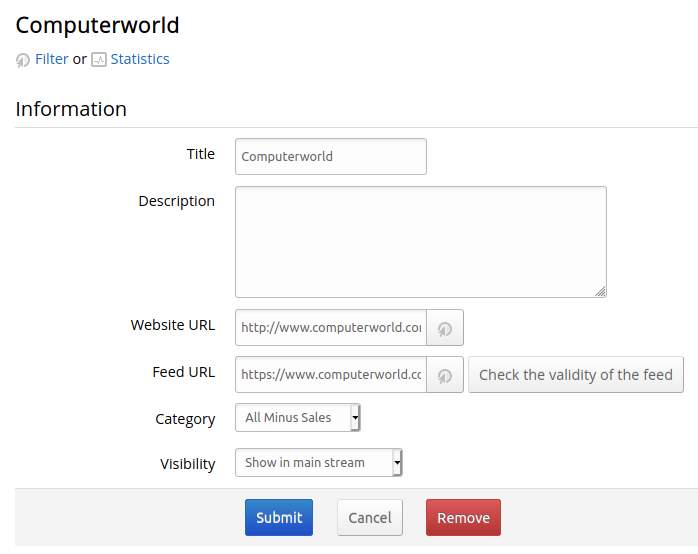
Second import, the feed http://www.computerworld.com/index.rss does not exist in database (because we have https://www.computerworld.com/index.rss) so we import it again (note the two versions of the feed URL)
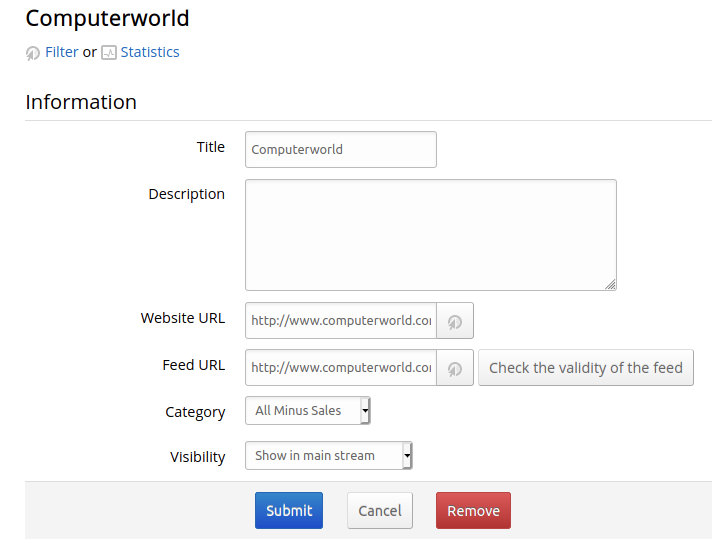
We need to add an extra logic when adding a feed to not actually add it if it is going to be redirected to an existing one
Alkarex
on 9 Jan 2021
Alkarex
on 9 Jan 2021
@yllekz You are welcome to give a try to the fix, for instance using frehshrss/freshrss:latest
Feedback welcome
Alkarex
on 9 Jan 2021
Awesome, thanks!
yllekz
on 9 Jan 2021
Related issues
 Glaived
·
5Comments
Glaived
·
5Comments
 Aasemoon
·
6Comments
Aasemoon
·
6Comments
 Sp3r4z
·
4Comments
Sp3r4z
·
4Comments
 cwldev
·
5Comments
cwldev
·
5Comments
 mbnoimi
·
4Comments
mbnoimi
·
4Comments
Most helpful comment
You are probably using SQLite, but it does not matter. I think it is exactly the problem I have described above:
First import:
Second import, the feed
http://www.computerworld.com/index.rssdoes not exist in database (because we havehttps://www.computerworld.com/index.rss) so we import it again (note the two versions of the feed URL)We need to add an extra logic when adding a feed to not actually add it if it is going to be redirected to an existing one