Freshrss: Minz: allow parallel sessions
freshrss locks up when checking for a feed(that has an error or takes a long time)
so I noticed this when I used the "actualize" button for refreshing a feed that seems to had a timeout error.
when I do that in a new tab, by right clicking on actualize button and opening in new tab, then as long as that tab is opening and trying to fetch the feed, all the freshrss cant operate correctly.
it doesn't actually lock up as in freeze in the former opened tabs. but refreshing the already opened freshrss tabs or opening a new tab to a freshrss instance would just result in a tab that waits to the first (actualizing) tab to finish either successfully or fail with a timeout and then others tabs work normally.
it seems to me that this program just uses one thread? (I am not a programmer so forgive me if I use the wrong names) that lockes up when some feed updating is going on.
so the feed updating thread just locks up whole UI too (not freezing graphically but not like a time-outing server that waits for server response ,which I think what is actually happening).
btw why it is called actualize?
what it is actualizing?
 rezad1393
All 17 comments
Actualize is Franglais for Update. I'll add it to #3068.
it seems to me that this program just uses one thread? (I am not a programmer so forgive me if I use the wrong names) that lockes up when some feed updating is going on.
@Alkarex Could that be an SQLite issue?
 Frenzie
on 3 Jul 2020
Frenzie
on 3 Jul 2020
This might also depend on the Web server configuration. @rezad1393 Please tell a bit more about your setup (FreshRSS version and type of installation, OS, Web server, type of database...)
 Alkarex
on 4 Jul 2020
Alkarex
on 4 Jul 2020
This might also depend on the Web server configuration. @rezad1393 Please tell a bit more about your setup (FreshRSS version and type of installation, OS, Web server, type of database...)
latest version 1.16.2
OS: linux(archlinux on arm)
type of DB : not sure but I thought freshrss used sqlite only. the reason I use freshrss is that it doesnt need RDBMS sql servers and only needs a file (sqlite file).
web server: nginx (again latest version available on archlinux) nginx version: nginx/1.18.0
type of installation: not sure what that is, but I have installed it locally on my lan and access it from laptop via lan.
rezad1393
on 4 Jul 2020
the reason I use freshrss is that it doesnt need RDBMS sql servers and only needs a file (sqlite file).
You can choose. SQLite, MariaDB/MySQL and PostgreSQL are all supported. SQLite has less concurrency than the others but in practice I don't think that should matter in simple scenarios like the one sketched. The DB is locked when writing but as far as I know that should take milliseconds, not seconds.
Frenzie
on 4 Jul 2020
I do not think SQLite is the culprit.
You can try the following file, to be put in ./FreshRSS/p/slow.php
<pre>
<?php
echo date('c'), "\n";
sleep(20);
echo date('c'), "\n";
Then access it from your browser https://freshrss.example.net/slow.php . Try to see whether you can load several in parallel. Try also from two distinct browsers / computers at the same time.
If the requests work in parallel, you will see the first date of one request to be between the two dates of another request.
You can also try that and use FreshRSS at the same time.
Alkarex
on 4 Jul 2020
the reason I use freshrss is that it doesnt need RDBMS sql servers and only needs a file (sqlite file).
You can choose. SQLite, MariaDB/MySQL and PostgreSQL are all supported. SQLite has less concurrency than the others but in practice I don't think that should matter in simple scenarios like the one sketched. The DB is locked when writing but as far as I know that should take milliseconds, not seconds.
I mean that I didnt need to install any server and configure it ,which is not a fun project and in many instances that was the reason I couldnt install other apps for rss (or other uses like personal selfhosted apps).
because the guides for installation of them and configuring the database was old or needed a different version of sql app that I had.
so using sqlite as a single file is very simple for me and I can be sure that I can just back it up by copying a folder, which in server modes of sql apps I didnt see a simple way to export or copy the database that would also copy all the username and so on.
because I use this for personal usage I dont need the server level of efficiency of sql servers.
rezad1393
on 4 Jul 2020
I do not think SQLite is the culprit.
You can try the following file, to be put in
./FreshRSS/p/slow.php<pre> <?php echo date('c'), "\n"; sleep(20); echo date('c'), "\n";Then access it from your browser https://freshrss.example.net/slow.php . Try to see whether you can load several in parallel. Try also from two distinct browsers / computers at the same time.
If the requests work in parallel, you will see the first date of one request to be between the two dates of another request.
You can also try that and use FreshRSS at the same time.
I dont understand the purpose of this but I did it and opened 4 of them and then refresh them one by one.
they output stuff like this
2020-07-04T09:42:56+00:00
2020-07-04T09:43:16+00:00
and they output them correctly as in first one is
2020-07-04T09:42:53+00:00
2020-07-04T09:43:13+00:00
second one is
2020-07-04T09:42:54+00:00
2020-07-04T09:43:14+00:00
and so on.
rezad1393
on 4 Jul 2020
again, my issue is with feed updates.
when a feed is updates and has an error (timeout or some other net error) then I cant refresh any freshrss tab or open a new tab of freshrss instance (Setting or subscription management for example).
I think this happens with healthy feeds too but because they don't timeout (so they time from start to finish is small) that is not noticeable.
but with bad feeds it become noticeable.
so I agree that I dont think sqlite is not the issue because this is before it need to write or read new stuff to DB.
so before feed check it reads the DB and when it is trying to "curl" (or whatever you use for http update) the feed and it timeouts then it doesn't need to actually write to DB ,unless writing the error is the issue which I doubt because that would be at the end on timeout and not in middle of http connection.
rezad1393
on 4 Jul 2020
I think I can reproduce the problem.
Could you please try to reproduce the problem from two distinct browsers / computers? (i.e. refresh on one browser / computer, and read FreshRSS from another browser / computer)
Alkarex
on 4 Jul 2020
sorry
I deleted that feed and I dont have a feed to test that has the same issue.
but I dont think the browser (firefox) is at fault here for me to test two browsers (maybe you are looking for pipeline issues? which I dont think are even used anymore)
if you have a feed that you can turn buggy with a command (not randomly) then I think you can test it but right now I dont have a feed that has that.
rezad1393
on 4 Jul 2020
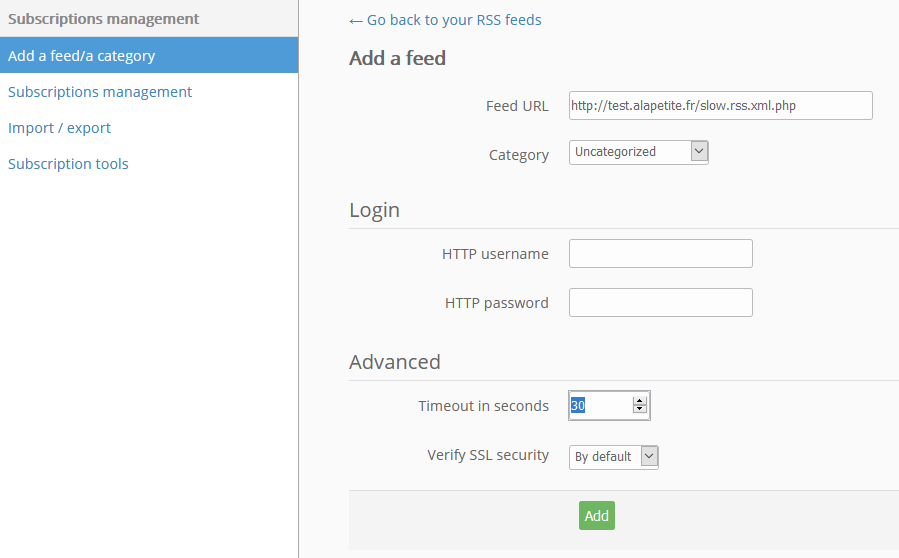
Here is an example of slow feed: http://test.alapetite.fr/slow.rss.xml.php (and you can generate new ones like http://test.alapetite.fr/slow.rss.xml.php?2 http://test.alapetite.fr/slow.rss.xml.php?3 etc.)
Yes, I believe the issue might be limited to one single session (same browser)
Alkarex
on 4 Jul 2020
Remember to increase timeout for that feed:
Alkarex
on 4 Jul 2020
first, my UI is not like yours, I dont have a add feed on the top like yours.
I have one text bar that I enter a feed in to add and it doesn't have timeout and other options before adding the feed. it only had category and HTTP auth before adding the feed.
and I think you are right. adding (so maybe updating too) of a slow feed makes opening another tab of the freshrss app wait for end of add operation , or make a refreshing freshrss app stay in refresh until the update or adding of feed ends (whether ok or fail doesn't seem to matter).
but at the same time I can access it normally via my tablet firefox.
so you were right.
any possible solution or is this a browser limitation because maybe freshrss uses local-index or some other web technology that is stored on the local browser and that gets locked up, because it is not asynchronous?
btw I couldnt test with updating you feeds because after adding the actualize works fast(maybe cache?)
but I could test with my own bad feed because I think it was blocked at that time so the timeout was infinite and update wouldnt work.
or maybe if you wait after adding you feed and out the update time as (Say 1 month) and test later (after the cache expires maybe?) you may see the same issue with your feed update too?
but it no longer matter because you seem to have find the root of issue( or got near it) without my feed.
p.s.
thanks for the prompt responses and the example feeds provided.
p.p.s:
I wont be able to answer for sometime.
if you have any other question (which I thing you dont as you seems to have found the issue?) I will answer when I'll come back.
rezad1393
on 4 Jul 2020
The UI difference is current 1.16 vs the improved new layout in upcoming 1.17. :-)
Frenzie
on 4 Jul 2020
The UI difference is current 1.16 vs the improved new layout in upcoming 1.17. :-)
now I am jealous.
rezad1393
on 4 Jul 2020
This is due to https://ma.ttias.be/php-session-locking-prevent-sessions-blocking-in-requests/
This line is blocking:
Alkarex
on 5 Jul 2020
@rezad1393 Please try https://github.com/FreshRSS/FreshRSS/pull/3096
Alkarex
on 5 Jul 2020
Related issues
 eminphi
·
5Comments
eminphi
·
5Comments
 Tealk
·
5Comments
Tealk
·
5Comments
 Paxistatis
·
3Comments
Paxistatis
·
3Comments
 uncovery
·
4Comments
uncovery
·
4Comments
 Stegemueller
·
3Comments
Stegemueller
·
3Comments