Freshrss: Extensions don't work on Windows, error 400 (Bad Request)
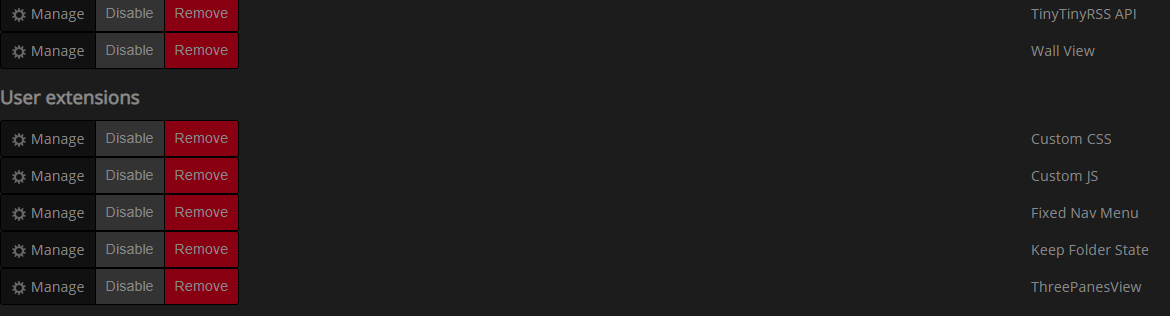
Use FreshRSS on localhost, xampp server. I installed some extensions, but they do not function. In browser console I see requests, resulted to error 400 (Bad Request).

 squromiv
All 11 comments
Hello @squromiv
What address do you have in your browser address bar when you observe this problem?
 Alkarex
on 22 Mar 2019
Alkarex
on 22 Mar 2019
I have made some research. My FreshRSS is situated on address http://localhost/FreshRSS1/p/i/
Scripts, which lead to errors in console, seem to be unvaliable for extension. At first I thought, that the problem is connected with "%2F" encoding to slashes. I added "AllowEncodedSlashes On" directive to file "httpd-vhosts.conf". But nothing changed. Same errors and extensions don`t work.
squromiv
on 22 Mar 2019
Do you see the corresponding requests in your Apache logs?
Alkarex
on 23 Mar 2019
The following information is provided in access.log. Only one extension is installed - Threepanesview.
::1 - - [23/Mar/2019:14:21:28 +0300] "GET /FreshRSS-dev/p/i/?c=javascript&a=nbUnreadsPerFeed HTTP/1.1" 304 - "-" "Mozilla/5.0 (Windows NT 6.3; WOW64) AppleWebKit/537.36 (KHTML, like Gecko) Chrome/71.0.3578.80 Safari/537.36"
::1 - - [23/Mar/2019:14:21:28 +0300] "GET /FreshRSS1/p/i/ HTTP/1.1" 304 - "-" "Mozilla/5.0 (Windows NT 6.3; Win64; x64) AppleWebKit/537.36 (KHTML, like Gecko) Chrome/73.0.3683.86 Safari/537.36"
::1 - - [23/Mar/2019:14:21:28 +0300] "GET /FreshRSS1/p/ext.php?f=xextension-threepanesview-master%2Fstatic%2Fthreepanesview.css&t=css&1549213160 HTTP/1.1" 400 - "http://localhost/FreshRSS1/p/i/" "Mozilla/5.0 (Windows NT 6.3; Win64; x64) AppleWebKit/537.36 (KHTML, like Gecko) Chrome/73.0.3683.86 Safari/537.36"
::1 - - [23/Mar/2019:14:21:28 +0300] "GET /FreshRSS1/p/ext.php?f=xextension-threepanesview-master%2Fstatic%2Fthreepanesview.js&t=js&1549213160 HTTP/1.1" 400 - "http://localhost/FreshRSS1/p/i/" "Mozilla/5.0 (Windows NT 6.3; Win64; x64) AppleWebKit/537.36 (KHTML, like Gecko) Chrome/73.0.3683.86 Safari/537.36"
I also tried another local web-server - AMMPS, but result is the same.
squromiv
on 23 Mar 2019
Tried other browsers, nothing changed. Extensions are installed, but do not function.
squromiv
on 28 Mar 2019
May be this issue echoes with #994?
I am not a programmer. Can anybody help me?
squromiv
on 29 Mar 2019
I will have a look
Alkarex
on 1 Apr 2019
@squromiv Yes, I think you are hitting exactly that problem https://github.com/FreshRSS/FreshRSS/issues/994
Could you please test https://github.com/FreshRSS/FreshRSS/pull/2348 ?
Alkarex
on 6 Apr 2019
Available in the /dev branch. Please give it a try
Alkarex
on 6 Apr 2019
No errors in browser console, extensions finally work. Thanks a lot.
squromiv
on 6 Apr 2019
Thanks for the test. A few more patches have just landed in the /dev branch before the imminent release of FreshRSS 1.14.1. Additional tests welcome on the /dev branch.
Alkarex
on 6 Apr 2019
Related issues
 linuxacademysickpig
·
3Comments
linuxacademysickpig
·
3Comments
 treyssatvincent
·
5Comments
Alkarex
·
5Comments
treyssatvincent
·
5Comments
Alkarex
·
5Comments
 javerous
·
5Comments
javerous
·
5Comments
 reinvented
·
4Comments
reinvented
·
4Comments