Freshrss: Déconnexions intempestives - "Rester connecté" ne fonctionne pas
Bonjour,
Le problème:
J'utilise FreshRSS depuis un bon moment et la case à cocher:
Rester connecté
(30 jours)
n'a jamais fonctionné (le problème existe depuis que je connais l'outil).
Les symptômes:
Des déconnections aléatoires se produisent (généralement après une mise en veille - fermeture du capot d'un PC portable).
Reproduction du bogue:
De par sa nature, le problème est difficilement reproductible puisque il est aléatoire (mais il se produit forcement plusieurs fois en une semaine).
Mon installation:
J'étais initialement en version 1.8.0 et je suis passé depuis quelque temps à la 1.12.0. Le problème est identique.
FreshRSS est installé sur:
- un conteneur LXC Debian Stretch
- Apache2 2.4.25-3+deb9u5
- PHP 7.0.30-0+deb9u1
- MariaDB 10.1.26-0+deb9u1
et son accès au réseau est fournis par le proxy inversé HAProxy, le tout en auto-hébergement derrière une connexion ADSL avec IPv4 fixe.
Autres Informations:
J'héberge pas mal d'outils WEB et FreshRSS est le seul à poser ce problème. Je pense qu'il faut se concentrer sur la partie authentification/session (à moins qu'il y ai une configuration particulière à faire de mon coté mais je n'ai rien trouvé).
J'ai quelques compétences en développement WEB (je suis un peu rouillé mais je peux m'y remettre) donc je peux apporter des modifications sur mon installation pour faire des tests si vous voulez (en me tenant la main ça devrait le faire ;D).
Je suis disponible si vous avez besoin de plus de détails, logs, captures trames réseaux...
Merci.
 ycharbi
All 58 comments
S'il vous plaît pardonner la traduction automatique. Je ne parle pas francais. J'espère que c'est compréhensible!
Quel paramètre d'authentification utilisez-vous? HTTP ou Javascript?
Utilisez-vous l'une des options de l'onglet Authentification? ("Autoriser la lecture anonyme des articles de l’utilisateur par défaut", "Autoriser le rafraîchissement anonyme des flux", etc.)
Voyez-vous des erreurs dans les journaux après une déconnexion?
 pattems
on 15 Nov 2018
pattems
on 15 Nov 2018
The authentication setting I use is "javascript".
I do not use any of these options:
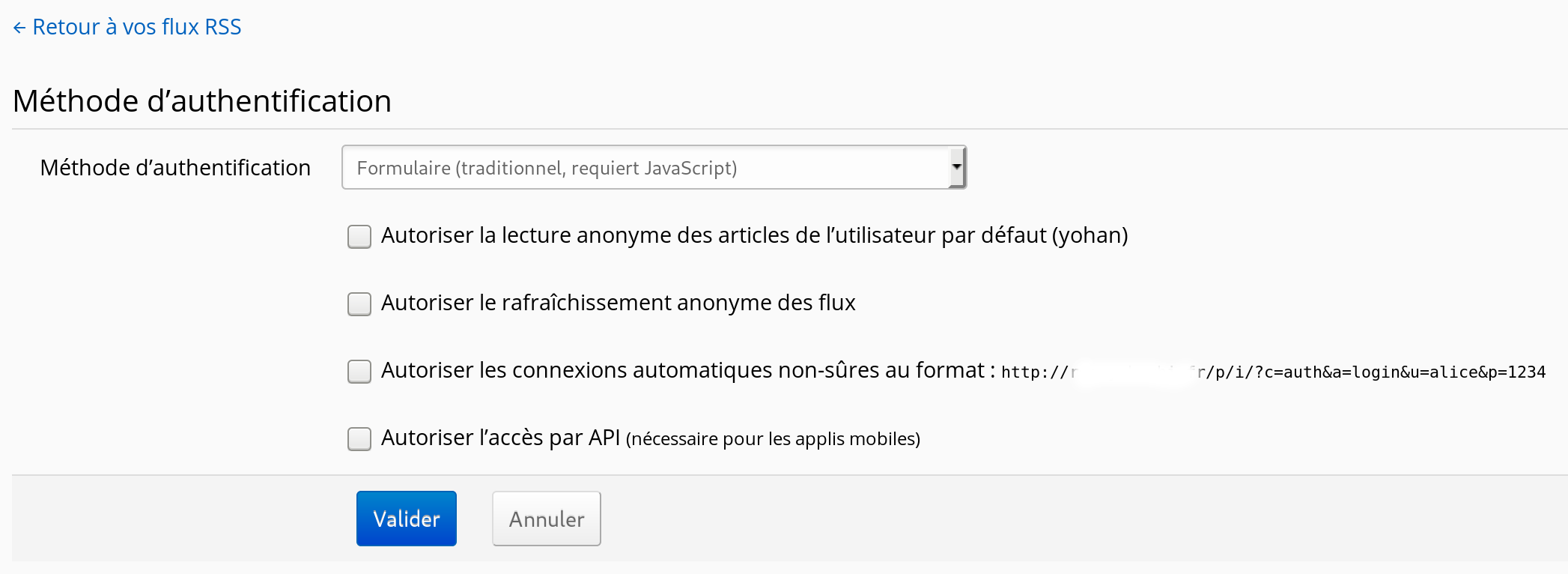
I did not notice anything in data/users/yohan/log.txt after a disconnection.
The browser I use is _Firefox 63.0.1 64 bits_ with plugin _Ublock Origin_ on Debian Sid client (on Dell XPS 15). I am also testing with a MacBook Air with OSX 10.9 - Firefox 63.0.1 64 bits (I'll tell you if it does with this platform).
ycharbi
on 15 Nov 2018
Does your cookie for the site indicate a correct 30 days? you can check that by opening the dev console on Firefox (F12, or CTRL+SHIFT+I), navigating to storage at the top, and looking in the cookies tab, like so:

Assuming that it does, and that the issue isn't that the cookie's not being assigned an incorrect date, next time you're disconnected, it would be good to check if the cookie still exists and isn't being read, or if it's been deleted.
pattems
on 15 Nov 2018
@pattems It worked quite well with the automatic translation :-)
@ycharbi Si la connexion par authentification HTTP est une options possible pour vous, cela résoudrait votre problème. La connexion par formulaire utilise un jeton (token) qui est gardé dans un cookie côté client, et dans une session PHP côté serveur. La configuration serveur peut limiter la durée de vie d'une telle session (purge au redémarrage, purge régulière...). Quand FreshRSS est ouvert dans une fenêtre, cette session est régulièrement rafraîchie et permet d'éviter son expiration pour les serveurs pratiquants des purges régulières. Beaucoup de systèmes utilisent un cookie dérivé du mot de passe, moins sûr, mais ne nécessitant pas de token côté client+serveur. Si ces déconnexions sont vraiment un problème, il serait possible de forcer le stockage des sessions serveur dans le répertoire ./data/ de FreshRSS (avec http://php.net/manual/function.session-save-path.php ) plutôt que de laisser cette tâche à l'administrateur du serveur. Je pense que ce serait une bonne idée, car vous n'êtes pas le premier à rapporter ce souci.
@pattems The short version is that the PHP configuration on the server side can also limit the duration of the session. We could implement some workarounds if this really is a problem.
 Alkarex
on 15 Nov 2018
Alkarex
on 15 Nov 2018
The problem has just happened again.
I just took a capture before reloading the page and after re-authentication.
When the problem occurs, I can not display the following items because the ascensor does not work anymore so I know that the session is lost at that moment.
Capture before reloading the page:

Capture after reloading the page and re-authentication:

ycharbi
on 15 Nov 2018
@ycharbi Something else, I see that you use a path /p/i/ but it is better to have the root of your Web server in ./FreshRSS/p/ so that your path looks like /i/
Alkarex
on 15 Nov 2018
The strange thing is that we already have a mechanism to mitigate this problem, with a cookie FreshRSS_login. But I cannot see it in your first screenshot.
Alkarex
on 15 Nov 2018
@Alkarex Merci beaucoup de votre réponse.
Je vais changer la racine mon hôte pour suivre vos recommandations.
Concernant l'authentification HTTP, j'ai déjà voulu tenter ça mais l'option est grisée chez moi:
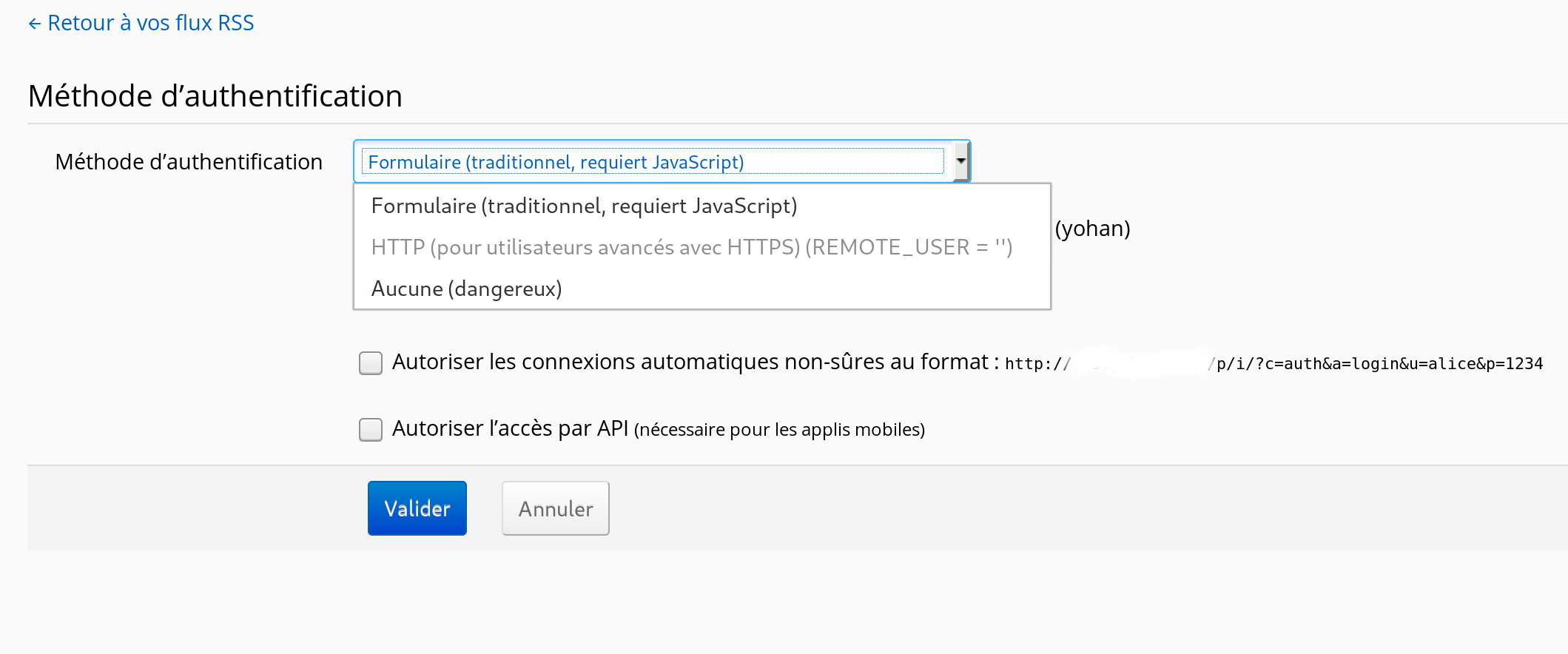
Y a t-il une configuration particulière ou un module à activer coté Apache pour changer cela ?
Au sujet de "session_save_path", il serait pas mal en effet de régler ce petit désagrément automatiquement car mis à part le problème que j'ai mentionné, FreshRSS est vraiment parfait pour mes besoins (c'est juste lourd de devoir ce ré-authentifier régulièrement mais y'a pire ;D).
ycharbi
on 15 Nov 2018
- Il serait intéressant de trouver pourquoi le cookie
FreshRSS_logina disparu - Après avoir changé la racine de l'hôte, penser à changer la valeur de
base_urldans./data/config.php - Pour que l'option authentification HTTP soit disponible, il faut que vous ayez un mot de passe HTTP (avec comme nom d'utilisateur le même que le nom de votre utilisateur FreshRSS).
- Je recommande de ne protéger que le répertoire
./i/(par exemple avec un classique .htaccess + .htpasswd) afin de permettre aux APIs de fonctionner (API mobile, WebSub...) - https://freshrss.github.io/FreshRSS/fr/users/05_Configuration.html#authentification-http
- Je recommande de ne protéger que le répertoire
Alkarex
on 15 Nov 2018
Hum, what I said in my first post is a bit obsolete, and everything is supposed to be already addressed with the FreshRSS_login cookie. So I think the question boils down to why it disappeared earlier than its expire date.
@ycharbi Do you have any extension in your Web browser, which might affect cookies?
Alkarex
on 15 Nov 2018
I agree that we need to understand why the FreshRSS_login cookie has disappeared. I will make the changes you want for us to find together.
Here is the exaustive list of my Firefox extensions:

I just tested HTTP authentication. It works but suddenly I lose the ability to manually disconnect (or there is another manipulation to do?).
ycharbi
on 15 Nov 2018
With HTTP authentication, one cannot disconnect :-)
No browser that I know of has any UI to "disconnect" at HTTP authentication level.
It would be possible to make a link to force the browser to send some other credentials, but that would be bit hacky (or you can type it yourself in the URL bar: https://invalid_user:[email protected]/ ).
Alkarex
on 15 Nov 2018
I am wondering whether maybe uBlock Origin could be the culprit.
Could you please try to log in via another plugin-free browser and see whether you can reproduce the problem?
Alkarex
on 15 Nov 2018
@ycharbi since you have two computers to test from, were you logged out on your other computer as well? Also, regarding Alkarex's suggestion that uBlock Origin might be to blame... is it indicating that anything's being blocked when you're on your server's page?
@Alkarex getting a little off-topic, but regarding your comment here https://github.com/FreshRSS/FreshRSS/issues/2125#issuecomment-439151086, following the quick instructions in the Readme.md file will give you an install where your path is ./p/i/. Perhaps a little clarification would be helpful there?
pattems
on 15 Nov 2018
@pattems Indeed, more work in the documentation is needed :-(
But in the readme https://github.com/FreshRSS/FreshRSS#example-of-full-installation-on-linux-debianubuntu it should be good
(Just as an example)
sudo ln -s /usr/share/FreshRSS/p /var/www/html/FreshRSS
@Alkarex Ok for the browser. I am installing Epiphany (Gnome web) in Flatpak on my machine. I will log in and use it normally to see what happens. I keep you informed.
I can also install a virgin OS on a PC (I have another) and do the tests on it with a virgin Firefox if that tells you.
I can also do a dedicated server in a test lab and make the changes on it as you wish.
@pattems For the second computer I had to disconnect myself because I tested the connection by HTTP (I returned to the configuration of the beginning of our conversation since - by javascript). I reconnected 10 minutes ago and I'll let you know if it happens.
ycharbi
on 15 Nov 2018
@ycharbi Very good. Additional data is welcome
Alkarex
on 15 Nov 2018
Hello,
I'll let you know about the evolution of my tests.
Currently I have 3 machines on the subject:
- Un Dell XPS 9550 sous Debian Sid Firefox 63.0.1 (with ublock) et Epiphany 3.26.2 Flatpak
- Un Dell D630 sous Debian Stretch (stable) Firefox 60.3.0esr (without all plugins)
- Un MacBook air OSX 10.9.5 Firefox 63.0.1 (with ublock) - will test with Safari 9.1.3
All Firefox on all platform (It also did with Windows 8.1 when I used it). Epiphany has not caused any problems yet (Except that it crashed yesterday so I do not know if it falsifies the test).
Here are screenshots of different platforms:
Dell XPS 9550:
Before:

After:

Dell D630:
Before:

After:

MacBook air:
I did not catch but the expiry date was updated (from 15/12 to 16/12).
ycharbi
on 16 Nov 2018
👍
By the way, you can clean the cookies with path /p/i/ which are from before you moved your server root.
Alkarex
on 16 Nov 2018
Ok i had delete it.
At the moment I have no problem with Safari (OSX) and Epiphany (Flatpak). I continue the observation.
Do you use Google Chrome usually when you develop? Can you test with Firefox if you have this bug ?
ycharbi
on 16 Nov 2018
I personally use Firefox for everything, and test on Chrome, Edge, IE.
P.S.: And I use HTTP authentication for my main FreshRSS instance.
Alkarex
on 16 Nov 2018
Btw, my main browser is Firefox on Debian Buster. It does feel like I have to log in "all the time" which is a minor annoyance, but I think it's just every few weeks. It's mostly that it happens on so many devices...
 Frenzie
on 17 Nov 2018
Frenzie
on 17 Nov 2018
Bonjour,
je viens vous faire une petite remonté de mon usage de FreshRSS 1.13.0 sur la durée.
Le problème de déconnexion est toujours présent et je ne sais pas trop comment contribuer à la résolution de ce bogue.
Si vous avez des pistes je suis disponible pour vous fournir des informations.
Hello,
I come to you a little recovery of my use of FreshRSS 1.13.0 over time.
The disconnect problem is still present and I'm not sure how to help fix this bug.
If you have tracks I am available to provide you with information.
ycharbi
on 24 Feb 2019
I cannot immediately spot a problem in the code, nor reproduce the bug myself.
Maybe there could be a bug in the auto cleaning of server-side tokens:
You could try to comment out line 276:
https://github.com/FreshRSS/FreshRSS/blob/41e58630f774d54b84f272938b294bb04d51653b/app/Models/Auth.php#L276
There could also be a bug in $limits['cookie_duration'] on line 239:
https://github.com/FreshRSS/FreshRSS/blob/41e58630f774d54b84f272938b294bb04d51653b/app/Models/Auth.php#L239
Otherwise, we need to find out whether anything deletes the long-term browser cookie
Alkarex
on 10 Mar 2019
I'm also impacted by this problem.
Things I think that may help :
- My URL to connect is like this
https://example.com/i/(not like thishttps://example.com/)
- May be there is something with cookie options like the
pathordomainoption ?
- May be there is something with cookie options like the
- I also have an HTTP Basic Auth before accessing my FreshRSS.
Let me know if I can help more.
 Massedil
on 11 Mar 2019
Massedil
on 11 Mar 2019
@Massedil Your URL looks good. If you use HTTP Basic Auth, then you can use that in FreshRSS too and avoid the login form. You just need to use the same username in HTTP Basic Auth and in FreshRSS.
Alkarex
on 11 Mar 2019
If you use HTTP Basic Auth, then you can use than in FreshRSS too and avoid the login form.
I think no, because I want one HTTP Basic Auth password for everyone and multiple FresshRSS users.
You could try to comment out line 276:
I have commented the line. I will see if it helps.
Massedil
on 11 Mar 2019
Hello, I just commented on the line self::purgeTokens();.
We'll see. Thank you.
ycharbi
on 11 Mar 2019
You could try to comment out line 276:
I have commented the line. I will see if it helps.
It seems to works this morning. No need to reconnect.
Massedil
on 12 Mar 2019
You could try to comment out line 276:
I have commented the line. I will see if it helps.
It seems to works this morning. No need to reconnect.
In fact, no, the problem is still here.
Only the FreshRSS cookie stays.
The FreshRSS_login cookie disappears.
And when I'm connected again, I can see that the "Expires" cookie date for FreshRSS_login is well in one month :

Massedil
on 13 Mar 2019
@Massedil Huuuum. It would be great if one could observe whether the cookie has disappeared before trying to log into FreshRSS, or during the FreshRSS login. If it is during the FreshRSS login, we need to check whether the corresponding file in ./data/tokens/*.txt is still there and with an appropriate modification date.
Alkarex
on 13 Mar 2019
I will try to be attentive next time.
But for me, now, if I well remember :
- I opened Firefox with my FreshRSS tab pinned.
- I could see the last (not refreshed page), surely from the Firefox's cache.
- I clicked on the FreshRSS image to reload.
- I saw the login page (so not the new feeds)
So I think the cookie disappears before trying to login.
May be at the time I tried to load the page the first time.
Massedil
on 13 Mar 2019
Ah, with the tab pinned, interesting. That gives me an idea. I will need to check what happens when the session cookie has expired in the background.
Alkarex
on 13 Mar 2019
That gives me an idea. I will need to check what happens when the session cookie has expired in the background.
Exact, if I only delete the session cookie and reload the page I can reproduce the problem.
Can you ?
Massedil
on 13 Mar 2019
Exact, if I only delete the session cookie and reload the page I can reproduce the problem.
Can you ?
No :-( If I delete the session cookie (keeping only FreshRSS_login), and then refresh the home page, the session cookie is re-created as expected.
Alkarex
on 13 Mar 2019
How to reproduce:
I'm connected and I have both
FreshRSS_loginandFreshRSScookie.I click on the FreshRSS link to reload https://freshrss.example.com/i/
I still have the 2 cookies and I can see my links (I'm connected !)
I delete only
FreshRSScookie and I let theFreshRSS_logincookieI click on the FreshRSS link to reload https://freshrss.example.com/i/
I'm now on the login page with only the recreated
FreshRSScookie. TheFreshRSS_logincookie has disapeared.
Raw header of the reply at step 6 :
Set-Cookie: FreshRSS=o[...]6; path=/i/; secure; HttpOnly
Set-Cookie: FreshRSS_login=deleted; expires=Thu, 01-Jan-1970 00:00:01 GMT; Max-Age=0; secure; httponly
Set-Cookie: FreshRSS_login=deleted; expires=Thu, 01-Jan-1970 00:00:01 GMT; Max-Age=0; secure; httponly
I confirm that commenting on line 276 changes nothing to the problem.
ycharbi
on 14 Mar 2019
Could you please double-check that the file corresponding to the value of FreshRSS_login exists in ./FreshRSS/data/tokens/*.txt
If not, please double-check the access rights on that folder.
Alkarex
on 15 Mar 2019
Could you please double-check that the file corresponding to the value of FreshRSS_login exists in ./FreshRSS/data/tokens/*.txt
If not, please double-check the access rights on that folder.
Yes, the file is well here.
- Rights for the
*.txtfile : -rw-r--r-- - Rights for the
tokensdir : drwxr-xr-x - owner of all files :
freshrssuser (my php-fpm user)
How to reproduce:
I'm connected and I have both
FreshRSS_loginandFreshRSScookie.
The filedata/tokens/e3570[...].txtis here.I click on the FreshRSS link to reload https://freshrss.example.com/i/.
The filedata/tokens/e3570[...].txtis here.I still have the 2 cookies and I can see my links (I'm connected !).
The filedata/tokens/e3570[...].txtis here.I delete only
FreshRSScookie and I let theFreshRSS_logincookie.
The filedata/tokens/e3570[...].txtis here.I click on the FreshRSS link to reload https://freshrss.example.com/i/.
The filedata/tokens/e3570[...].txthas disapeared.I'm now on the login page with only the recreated
FreshRSScookie. TheFreshRSS_logincookie has disapeared.
The filedata/tokens/e3570[...].txthas disapeared.
Raw header of the reply at step 6 :
Set-Cookie: FreshRSS=e[...]4; path=/i/; secure; HttpOnly
Set-Cookie: FreshRSS_login=deleted; expires=Thu, 01-Jan-1970 00:00:01 GMT; Max-Age=0; secure; httponly
Set-Cookie: FreshRSS_login=deleted; expires=Thu, 01-Jan-1970 00:00:01 GMT; Max-Age=0; secure; httponly
I have made a branch with additional debug information. Could you please give it a try?
https://github.com/FreshRSS/FreshRSS/pull/2274
It will generate a new file ./FreshRSS/data/users/_/log_cookie.txt
Just ask if you need help on how to use it.
Alkarex
on 16 Mar 2019
Could you please give it a try?
Yes !
For now because it is a small change, I have just downloaded and replaced the 3 raw files from github.
After copying the 3 files, it is impossible for me to log in (but the cookie log file is well created).
I think it is because I use the 1.13.1 version of FreshRSS and you made changes to the dev version, no ?
I revert the 3 files to the 1.13.1 version and I can log in again.
Let me know what I can do.
Massedil
on 17 Mar 2019
@Massedil Yes indeed, it is on the /dev version (future version 1.14.0). If you installed by git, you can just change branch. If you installed by zip, you can download https://github.com/FreshRSS/FreshRSS/archive/debug_cookie.zip
Alkarex
on 17 Mar 2019
@Alkarex
J'ai installé votre version modifié sur mon serveur. Je vous tiens au courant ;)
Merci de votre travail.
ycharbi
on 17 Mar 2019
Version : 1.13.2-dev
Login :
FreshRSS_Auth init call removeAccess
removeAccess call deleteCookie
FreshRSS_Auth giveAccess
FreshRSS_Auth giveAccess current_user: my_user_name
FreshRSS_Auth giveAccess session passwordHash: $2a$[...]te
FreshRSS_Auth giveAccess conf passwordHash: $2a$[...]te
FreshRSS_Auth giveAccess login_ok: 1
FreshRSS_Auth init
FreshRSS_Auth init login_ok: 1
FreshRSS_Auth giveAccess
FreshRSS_Auth giveAccess current_user: my_user_name
FreshRSS_Auth giveAccess session passwordHash: $2a$[...]te
FreshRSS_Auth giveAccess conf passwordHash: $2a$[...]te
FreshRSS_Auth giveAccess login_ok: 1
I now have both FreshRSS_login and FreshRSS cookie.
Removing FreshRSS cookie...
Refreshing :
FreshRSS_Auth init
FreshRSS_Auth init bad REMOTE_USER
removeAccess call deleteCookie
FreshRSS_Auth init login_ok:
FreshRSS_Auth accessControl
getCredentialsFromCookie call getCredentialsFromCookie: 60[...]e9
getCredentialsFromCookie mtime:
getCredentialsFromCookie cookie_duration: 2592000
getCredentialsFromCookie expired
FreshRSS_Auth accessControl credentials: Array
(
)

FreshRSS_Auth init call removeAccess
removeAccess call deleteCookie
Not connected !
Massedil
on 18 Mar 2019
@Massedil Thanks for the quick try. In your case, it seems to be due to the combination of authentication via form + HTTP auth. Could you please try https://github.com/Alkarex/FreshRSS/commit/bf51c82d55f6bf1af2a6464ca4f148d6c613d28f
Alkarex
on 19 Mar 2019
I inform you that the problem of disconnection has just reproduced.
ycharbi
on 20 Mar 2019
Could you please try Alkarex@
bf51c82
Yes, and it solves the problem !
Massedil
on 20 Mar 2019
@Massedil Great :-) Patch done https://github.com/FreshRSS/FreshRSS/pull/2286
In your case, it was specific to using form + HTTP auth, and is most likely distinct from @ycharbi 's case.
@ycharbi Can you so show the part of log_cookie.txt that corresponds to when you observed the problem?
Alkarex
on 20 Mar 2019
From the moment this works and the moment of automatic disconnection, I have this sequence of messages:
[Tue, 19 Mar 2019 17:40:54 +0100] [warning] --- FreshRSS_Auth init
[Tue, 19 Mar 2019 17:40:54 +0100] [warning] --- FreshRSS_Auth init login_ok: 1
[Tue, 19 Mar 2019 17:40:54 +0100] [warning] --- FreshRSS_Auth giveAccess
[Tue, 19 Mar 2019 17:40:54 +0100] [warning] --- FreshRSS_Auth giveAccess current_user: yohan
[Tue, 19 Mar 2019 17:40:54 +0100] [warning] --- FreshRSS_Auth giveAccess session passwordHash: MonMotPasseCensuréPourL'Exemple
[Tue, 19 Mar 2019 17:40:54 +0100] [warning] --- FreshRSS_Auth giveAccess conf passwordHash: MonMotPasseCensuréPourL'Exemple
[Tue, 19 Mar 2019 17:40:54 +0100] [warning] --- FreshRSS_Auth giveAccess login_ok: 1
[Tue, 19 Mar 2019 17:41:00 +0100] [warning] --- FreshRSS_Auth init
[Tue, 19 Mar 2019 17:41:00 +0100] [warning] --- FreshRSS_Auth init login_ok: 1
[Tue, 19 Mar 2019 17:41:00 +0100] [warning] --- FreshRSS_Auth giveAccess
[Tue, 19 Mar 2019 17:41:00 +0100] [warning] --- FreshRSS_Auth giveAccess current_user: yohan
[Tue, 19 Mar 2019 17:41:00 +0100] [warning] --- FreshRSS_Auth giveAccess session passwordHash: MonMotPasseCensuréPourL'Exemple
[Tue, 19 Mar 2019 17:41:00 +0100] [warning] --- FreshRSS_Auth giveAccess conf passwordHash: MonMotPasseCensuréPourL'Exemple
[Tue, 19 Mar 2019 17:41:00 +0100] [warning] --- FreshRSS_Auth giveAccess login_ok: 1
[Tue, 19 Mar 2019 17:41:00 +0100] [warning] --- initAuth bad POST
[Tue, 19 Mar 2019 17:41:00 +0100] [warning] --- removeAccess call deleteCookie
[Tue, 19 Mar 2019 17:41:01 +0100] [warning] --- FreshRSS_Auth init
[Tue, 19 Mar 2019 17:41:01 +0100] [warning] --- FreshRSS_Auth init login_ok:
[Tue, 19 Mar 2019 17:41:01 +0100] [warning] --- FreshRSS_Auth accessControl
[Tue, 19 Mar 2019 17:41:01 +0100] [warning] --- getCredentialsFromCookie call getCredentialsFromCookie:
[Tue, 19 Mar 2019 17:41:01 +0100] [warning] --- getCredentialsFromCookie bad getCredentialsFromCookie
[Tue, 19 Mar 2019 17:41:01 +0100] [warning] --- FreshRSS_Auth accessControl credentials: Array
(
)
Then, I have this message that is repeated many times when the cookie disappears (I think it's everytime javascript works):
[Tue, 19 Mar 2019 20:38:30 +0100] [warning] --- FreshRSS_Auth init call removeAccess
[Tue, 19 Mar 2019 20:38:30 +0100] [warning] --- removeAccess call deleteCookie
[Wed, 20 Mar 2019 07:43:05 +0100] [warning] --- FreshRSS_Auth init
[Wed, 20 Mar 2019 07:43:05 +0100] [warning] --- FreshRSS_Auth init login_ok:
[Wed, 20 Mar 2019 07:43:05 +0100] [warning] --- FreshRSS_Auth init session currentUser:
[Wed, 20 Mar 2019 07:43:05 +0100] [warning] --- FreshRSS_Auth accessControl
[Wed, 20 Mar 2019 07:43:05 +0100] [warning] --- getCredentialsFromCookie call getCredentialsFromCookie:
[Wed, 20 Mar 2019 07:43:05 +0100] [warning] --- getCredentialsFromCookie bad getCredentialsFromCookie
[Wed, 20 Mar 2019 07:43:05 +0100] [warning] --- FreshRSS_Auth accessControl credentials: Array
(
)
The next block:
[Wed, 20 Mar 2019 07:43:05 +0100] [warning] --- FreshRSS_Auth init call removeAccess
[Wed, 20 Mar 2019 07:43:05 +0100] [warning] --- removeAccess call deleteCookie
[Wed, 20 Mar 2019 07:43:40 +0100] [warning] --- FreshRSS_Auth init
[Wed, 20 Mar 2019 07:43:40 +0100] [warning] --- FreshRSS_Auth init login_ok:
[Wed, 20 Mar 2019 07:43:40 +0100] [warning] --- FreshRSS_Auth accessControl
[Wed, 20 Mar 2019 07:43:40 +0100] [warning] --- getCredentialsFromCookie call getCredentialsFromCookie:
[Wed, 20 Mar 2019 07:43:40 +0100] [warning] --- getCredentialsFromCookie bad getCredentialsFromCookie
[Wed, 20 Mar 2019 07:43:40 +0100] [warning] --- FreshRSS_Auth accessControl credentials: Array
(
)
@ycharbi Thanks for the logs. The relevant part is initAuth bad POST, which indicated either an HTTP_REFERER or a CSRF protection problem. To find out, could you please add these additional debugging lines? https://github.com/FreshRSS/FreshRSS/pull/2274/commits/4722a9884c8b5cb81e315a5aafa239c841b62c1e
Alkarex
on 20 Mar 2019
@Alkarex
C'est fait ;) Je vous tiens au jus.
ycharbi
on 20 Mar 2019
@ycharbi I have made a bigger change regarding some security aspects in https://github.com/FreshRSS/FreshRSS/pull/2290 , which might change what you experience. Tests welcome. I am still interested in the outcome of the previous test.
Alkarex
on 22 Mar 2019
@Alkarex
I not have any probleme for the moment.
I test on 2 PC and one smartphone for the moment.
I'll keep you informed of the results.
Tell me if you want me to test your new version and if so, how (I'm not very familiar with the Github interface).
ycharbi
on 22 Mar 2019
@ycharbi We are about to release the next version 1.14.0 of FreshRSS. If you install manually (not by git), you can test by downloading https://github.com/FreshRSS/FreshRSS/archive/dev.zip
Alkarex
on 24 Mar 2019
Thank you. I installed your new version.
I will inform you of the continuation.
ycharbi
on 24 Mar 2019
@ycharbi Any news with the new version?
Alkarex
on 31 Mar 2019
Pour le moment je ne rencontre plus le problème ! C'est très agréable. Je continue mes tests mais pour le moment tout roule pour le mieux.
Merci beaucoup pour votre travail.
At the moment I do not encounter the problem anymore! It's very nice. I continue my tests but for the moment everything rolls for the better.
Thank you very much for your work.
ycharbi
on 31 Mar 2019
Très bien. Fermons ici pour la sortie de FreshRSS 1.14.0 et n'hésitez pas à ouvrir un nouveau ticket si le problème resurgit.
Alkarex
on 31 Mar 2019
Related issues
 reinvented
·
4Comments
reinvented
·
4Comments
 Aasemoon
·
6Comments
Aasemoon
·
6Comments
 Sp3r4z
·
4Comments
Sp3r4z
·
4Comments
 Glaived
·
5Comments
Glaived
·
5Comments
 Tealk
·
5Comments
Tealk
·
5Comments
Most helpful comment
@Alkarex Ok for the browser. I am installing Epiphany (Gnome web) in Flatpak on my machine. I will log in and use it normally to see what happens. I keep you informed.
I can also install a virgin OS on a PC (I have another) and do the tests on it with a virgin Firefox if that tells you.
I can also do a dedicated server in a test lab and make the changes on it as you wish.
@pattems For the second computer I had to disconnect myself because I tested the connection by HTTP (I returned to the configuration of the beginning of our conversation since - by javascript). I reconnected 10 minutes ago and I'll let you know if it happens.