Freecodecamp: screen freezes with sass @while loop
Describe your problem and how to reproduce it:
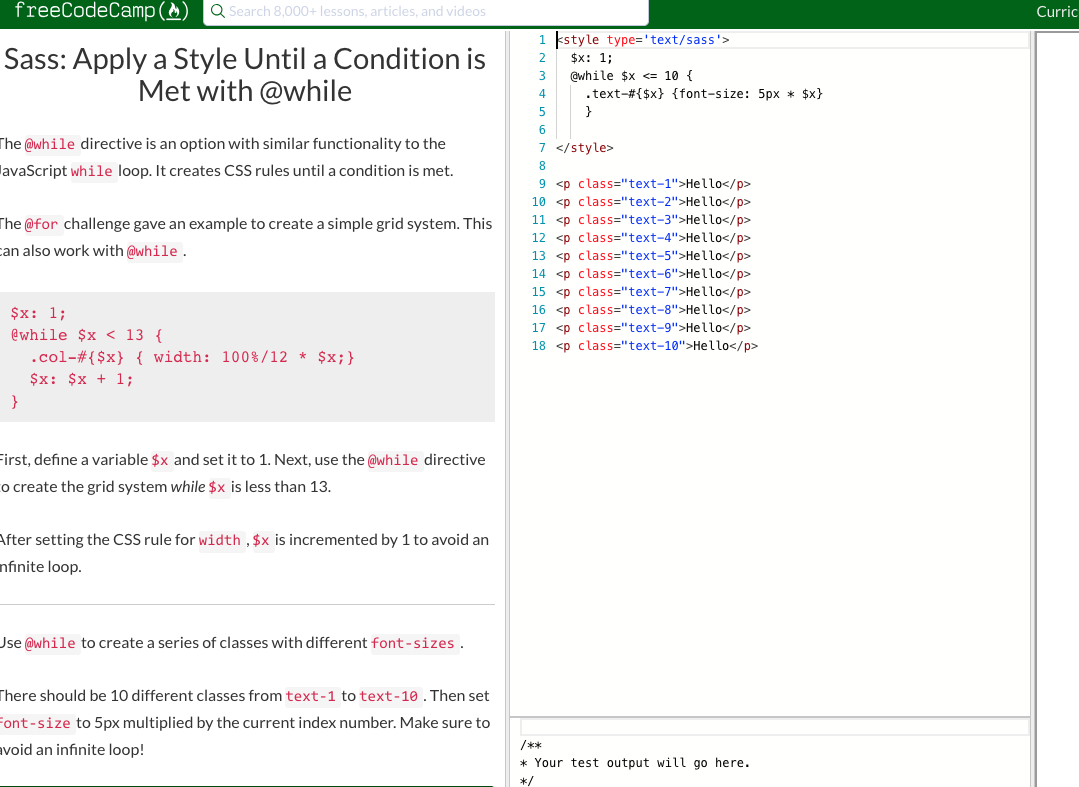
Screen continually freezes when I try to do the @while challenge for sass. No matter how many times I close the page and then re-open, it freezes.
Add a Link to the page with the problem:
https://learn.freecodecamp.org/front-end-libraries/sass/apply-a-style-until-a-condition-is-met-with-while
Tell us about your browser and operating system:
- Browser Name: Chrome
- Browser Version: Version 69.0.3497.100
- Operating System: MacOS Mojave
If possible, add a screenshot here (you can drag and drop, png, jpg, gif, etc. in this box):
 pulamusic
All 7 comments
I was finally able to do the challenge using Firefox. I am surprised Chrome let me down.
pulamusic
on 22 Oct 2018
@pulamusic according to the screenshot, you haven’t incremented the variable x so it ends up in an infinite loop and freezes your browser. I’m not sure how you passed in Firefox with the above code, so could you post a screenshot or copy of your code you used in Firefox here?
 Nirajn2311
on 22 Oct 2018
Nirajn2311
on 22 Oct 2018
Add ?run=disabled to the end of your link for it to stop automatic execution. Please close this issue
 thecodingaviator
on 23 Oct 2018
thecodingaviator
on 23 Oct 2018
@Nirajn2311 - the problem is that the code auto-runs before the user has finished typing. If they write out the solution line-by-line in order the browser will freeze unless they type very quickly.
 ArielLeslie
on 23 Oct 2018
ArielLeslie
on 23 Oct 2018
sounds like the issue is resolved for user and workarounds have been given. Issue is related to user's code and not the challenge. Infinite loops are very common in coding.
 nathanhannig
on 24 Oct 2018
nathanhannig
on 24 Oct 2018
We have been getting complaints about this in the forum for months (this is the latest of a number of Issues created).
ArielLeslie
on 24 Oct 2018
here is a forum post if it helps?
https://www.freecodecamp.org/forum/t/disable-code-auto-run-on-free-code-camp/19511
nathanhannig
on 24 Oct 2018
Related issues
 DaphnisM
·
3Comments
DaphnisM
·
3Comments
 Tzahile
·
3Comments
Tzahile
·
3Comments
 imhuyqn
·
3Comments
imhuyqn
·
3Comments
 danielonodje
·
3Comments
danielonodje
·
3Comments
 QuincyLarson
·
3Comments
QuincyLarson
·
3Comments
Most helpful comment
@Nirajn2311 - the problem is that the code auto-runs before the user has finished typing. If they write out the solution line-by-line in order the browser will freeze unless they type very quickly.