Freecodecamp: Use a Retina Image for Higher Resolution Displays Doesn't Pass On Google Chrome
Describe your problem and - if possible - how to reproduce it
The test for 'Responsive Web Design Principles: Use a Retina Image for Higher Resolution' won't pass on Google Chrome. It will pass with Safari, and it will pass with Firefox. There are matching reports on the FCC Help Forum.
<style>
  img { width: 100px; height: 100px;}
</style>

<img src="https://s3.amazonaws.com/freecodecamp/FCCStickers-CamperBot200x200.jpg" alt="freeCodeCamp sticker that says 'Because CamperBot Cares'">
The above passed with Safari (Version 11.1 (13605.1.33.1.4)), but not Chrome (67.0.3396.79 (Official Build) (64-bit)).
Add a Link to the page with the problem
Tell us about your browser and operating system
- Browser Name: Chrome
- Browser Version: 67.0.3396.79 (Official Build) (64-bit)
- Operating System: MacOS High Sierra (Version 10.13.4 (17E202))
If possible, add a screenshot here
N/A
 Dave-Melia
All 9 comments
@Dave-Melia are you still having this problem? I just tested and it worked for me on chrome - if it seems to be working for you now you could probly close this.
 moT01
on 11 Jun 2018
moT01
on 11 Jun 2018
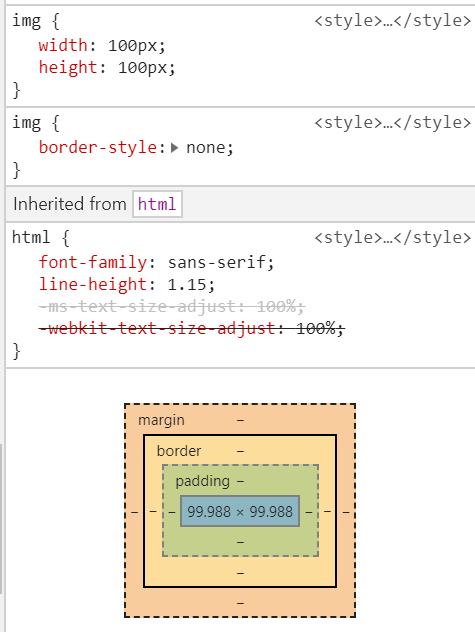
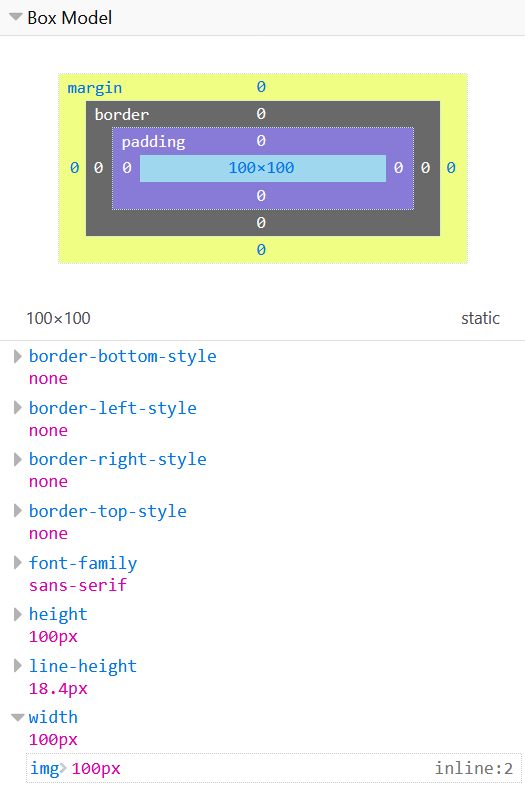
I don't know how to fix this problem, but for some reason chrome computed style width is little less than specified and firefox computes to exact 100px. And the test case checks for exactly 100px, which is probably why it fails on chrome and passes in firefox, did that for me.
Code for both results:
img {
     width: 100px;
     height: 100px;
}
Chrome:
Firefox:
 muedie
on 20 Jun 2018
muedie
on 20 Jun 2018
I am using the browser Google Chrome, Version 67.0.3396.99 (Official Build) (64-bit).
I can not pass the check. Here is my code

 robpedersendev
on 29 Jun 2018
robpedersendev
on 29 Jun 2018
I just used the browser Firefox Version 61.0 (64-bit). I was able to submit the same code and pass the check, there is definitely a bug for the chrome browser
robpedersendev
on 29 Jun 2018
If you zoom out with the browser then the challenge doesn't work. Try having the browser at 100% zoom, that fixed the issue for me
 RyanW1004
on 3 Jul 2018
RyanW1004
on 3 Jul 2018
Yuppers, zooming @ 100% rectify the issue.
Using Chrome stable ver. 69.0.xxxx
 clanmaster
on 13 Oct 2018
clanmaster
on 13 Oct 2018
@Dave-Melia It seems fine now. Please close this issue
 thecodingaviator
on 23 Oct 2018
thecodingaviator
on 23 Oct 2018
Thanks for reporting this issue, but it seems to be fixed. If you think it's still a problem you can reopen it.
Thanks, and happy coding!
moT01
on 23 Oct 2018
This issue was still occurring for me. Changing to 90% zoom in Chrome fixed the issue.
 EmmaluFox
on 9 Sep 2019
EmmaluFox
on 9 Sep 2019
Related issues
 QuincyLarson
·
3Comments
QuincyLarson
·
3Comments
 bagrounds
·
3Comments
bagrounds
·
3Comments
 ROWn1ne
·
3Comments
ROWn1ne
·
3Comments
 MelissaManning
·
3Comments
MelissaManning
·
3Comments
 raisedadead
·
3Comments
raisedadead
·
3Comments
Most helpful comment
If you zoom out with the browser then the challenge doesn't work. Try having the browser at 100% zoom, that fixed the issue for me