Freecodecamp: Beta - Links in intro challenges have smaller font
Challenge Name
Introduction to Information Security with HelmetJS Challenges
https://beta.freecodecamp.org/en/challenges/information-security-with-helmetjs/introduction-to-information-security-with-helmetjs-challenges
Quality Assurance Introduction
https://beta.freecodecamp.org/en/challenges/quality-assurance-and-testing-with-chai/quality-assurance-introduction
Advanced Node/Express Introduction
https://beta.freecodecamp.org/en/challenges/advanced-node-and-express/advanced-nodeexpress-introduction
Issue Description
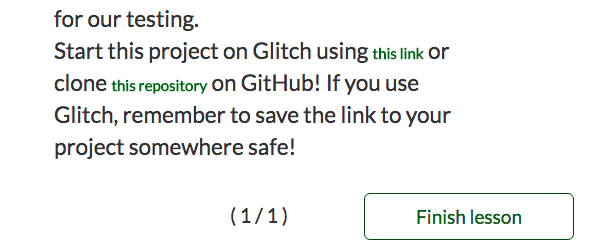
The challenge descriptions above have links with with font-size smaller than the rest of the content.
Screenshot
 ahmadabdolsaheb
All 6 comments
@raisedadead I wanna take it or prep it for first timers. Your call.
ahmadabdolsaheb
on 15 Mar 2018
This probably going to be the case for every challenge, basing on the same template. I think if you are Ok, you should take this up.
 raisedadead
on 15 Mar 2018
raisedadead
on 15 Mar 2018
Not sure if this information is useful, or even accurate, but I think that the anchor tags have their sizes set here...
And I think the rest of the text gets its size set here
EDIT: classes > elements so the a selector will have less say in the font-size than the .step-description will. Thus, assuming everything I've said above is true (and there's no guarantee of that!), then I guess the best thing to do is to add
.step-description a {
    font-size: 1.5em;
}
I'm not too sure. Good luck solving the issue!
 joker314
on 15 Mar 2018
joker314
on 15 Mar 2018
@joker314 Thanks j. I just changed .@{ns}-description a { font-size: from your comment to 1em since the size is relative to its parent which is .@{ns}-description. BTW, how did you find the files so quickly?
ahmadabdolsaheb
on 18 Mar 2018
@ahmadabdolsaheb Yay!
I first opened my developer console and took a look at the styles for the links and the normal text. I saw this:
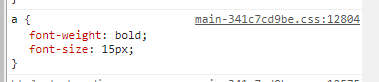
and

I then thought that maybe the grey link in the top right of both images would be a file name which contained both of those selectors. Alas, it wasn't! I would later discover those were two seperate files that would be combined.
So, what next? Well, I tried searching for the .step-description selector in the GitHub search bar. Alas, there were no results (this was actually quite surprising to me). Of course, this was because the selector was actually .@{ns}-description.
I then decided to search for font-size: 1.5em in the GitHub search bar. There were six results; and when I excluded JSON results, I got just two. One of them was a comment, and the other one had it's class name end in -decription! That was one file found.
I then tried the same technique for the a selector. I searched for font-size: 15px. There were a lot of results, though, and while I could've just looked through them to find font-weight: bold; on the previous line of the matched term; I instead just prepended it in the search bar. The top result had them one after the other, all inside an a selector! Yay, I'd found the second one!
Hope this explains it!
joker314
on 18 Mar 2018
@joker314 it does. thanks for sharing your thought process.
ahmadabdolsaheb
on 19 Mar 2018
Related issues
 SaintPeter
·
3Comments
SaintPeter
·
3Comments
 itsmikewest
·
3Comments
itsmikewest
·
3Comments
 Tzahile
·
3Comments
Tzahile
·
3Comments
 bagrounds
·
3Comments
bagrounds
·
3Comments
 robwelan
·
3Comments
robwelan
·
3Comments
Most helpful comment
Not sure if this information is useful, or even accurate, but I think that the anchor tags have their sizes set here...
https://github.com/freeCodeCamp/freeCodeCamp/blob/a33febd218859adab03d37b2030ec0b12e53393d/client/less/main.less#L284-L286
And I think the rest of the text gets its size set here
https://github.com/freeCodeCamp/freeCodeCamp/blob/68dde75add53f57a5f286daa2023240cc4cd70fd/common/app/routes/Challenges/views/step/step.less#L4-L6
EDIT:
classes > elementsso theaselector will have less say in thefont-sizethan the.step-descriptionwill. Thus, assuming everything I've said above is true (and there's no guarantee of that!), then I guess the best thing to do is to addI'm not too sure. Good luck solving the issue!