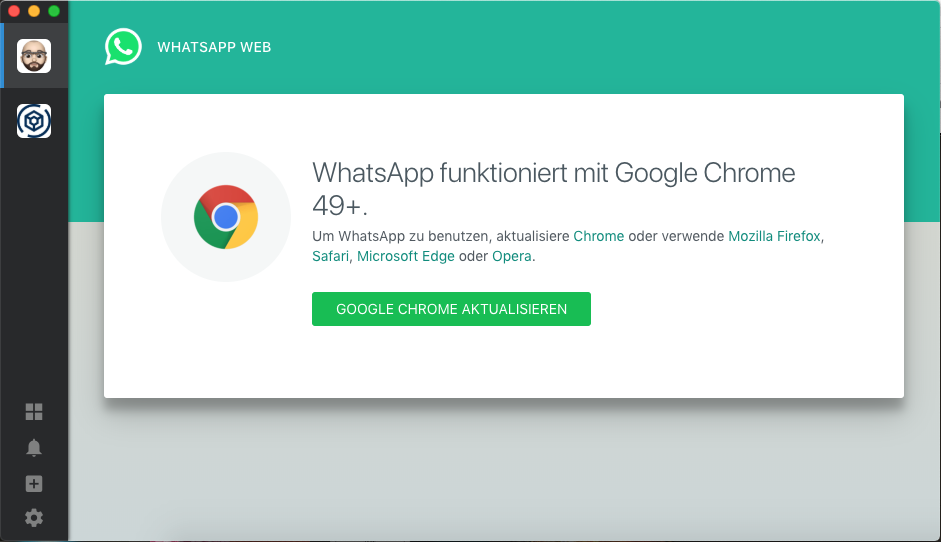
Franz: WhatsApp Service wants Chrome 49+
Describe the bug
A clear and concise description of what the bug is.
To Reproduce
Steps to reproduce the behavior:
- Start Franz App and open a WhatsApp Service
I am using the latest Franz version (5.2.0), no update available; even in beta there is no update.
Expected behavior
To see the usual WhatApp Messenger Window
Screenshots
Desktop (please complete the following information):
- OS: macOS Mojave 10.14.6
- local installed Browsers available:
- Safari 12.1.2
- Chrome (75.0.3770.142)
- Firefox 66.0.3
- Version [e.g. 22]
Smartphone (please complete the following information):
- Device: iPhone XS
- OS: latest stable iOS
- Browser: stock browser, safari
- Version: latest
Additional context
Add any other context about the problem here.
 sreuterle
All 9 comments
Here you have the known work arounds #1185
For me, reloading the browser does the trick (Cmd/Ctrl+R)
 ghost
on 24 Jul 2019
ghost
on 24 Jul 2019
I have the same problem
 romanmorozov81
on 24 Jul 2019
romanmorozov81
on 24 Jul 2019
Try Reload with Cmd+R. Worked for me.
sreuterle
on 25 Jul 2019
Try Reload with Cmd+R. Worked for me.
Not for me
 napgab
on 25 Jul 2019
napgab
on 25 Jul 2019
I am having the same issue on Windows.
 sv1266
on 1 Aug 2019
sv1266
on 1 Aug 2019
I'm on the windows version and currently I don't have a subscription but I figured out a workaround that only needs to be set once -- then it'll automatically load without any problems. I hope this works for your guys on Mac and for people with paid subscriptions:
Go to C:Users[Username]\AppData\Roaming\Franz\recipes\whatsapp (or the mac equivalent)
Open the webview.js file in an editor.
Modify the line:
if (elem && elem.innerText.toLowerCase().includes('google chrome')) {
window.location.reload();
}
}, 1000);
to:
if (elem && elem.innerText.toLowerCase().includes('google chrome')) {
window.location.reload();
}
}, 8475);
This workaround will automatically refresh the page without user interaction, but will flash the screen showing that WhtasApp wants Chrome 49+. For some reason, shorter delays don't refresh (maybe because I am on the free version.) If you have a paid subscription, it is possible that lowering this number for a shorter delay will work for you.
If this solves your problem, let me know so I an make these changes to the code in the main Recipe-WhatsApp repo.
sv1266
on 1 Aug 2019
Thank you.
This fixes it for me, but I still have to hit CMD R to remove the notice.
 starchild
on 1 Aug 2019
starchild
on 1 Aug 2019
Really! You shouldn't have to!
If you're willing to fiddle with it, try setting it to 10000 and wait 15 seconds.
It's should load without you having to do anything.
sv1266
on 1 Aug 2019
what crazy lifestyle do you have where you have a lazy 15 seconds!? lol. ok will try.
starchild
on 1 Aug 2019
Related issues
 gcarrion-gfrmedia
·
3Comments
gcarrion-gfrmedia
·
3Comments
 agodlydeciple
·
4Comments
agodlydeciple
·
4Comments
 AGonLen
·
4Comments
AGonLen
·
4Comments
 m2kk
·
4Comments
m2kk
·
4Comments
 PackElend
·
4Comments
PackElend
·
4Comments
Most helpful comment
Try Reload with Cmd+R. Worked for me.