I've removed the Franz application using the add/remove programs, as well as searching out any remaining folders/files, but it still loads every time I restart my computer. How can I truly remove Franz?
 ploveland
All 9 comments
Why, why would you do that???
 rdewolff
on 2 Mar 2019
rdewolff
on 2 Mar 2019
😂 because my work computer is shit and is too full to run my projects without blue screening 🙄
ploveland
on 3 Mar 2019
Franz can be found ...
- %appdata%\Roaming\Franz
- %appdata%\Local\Programs\Franz
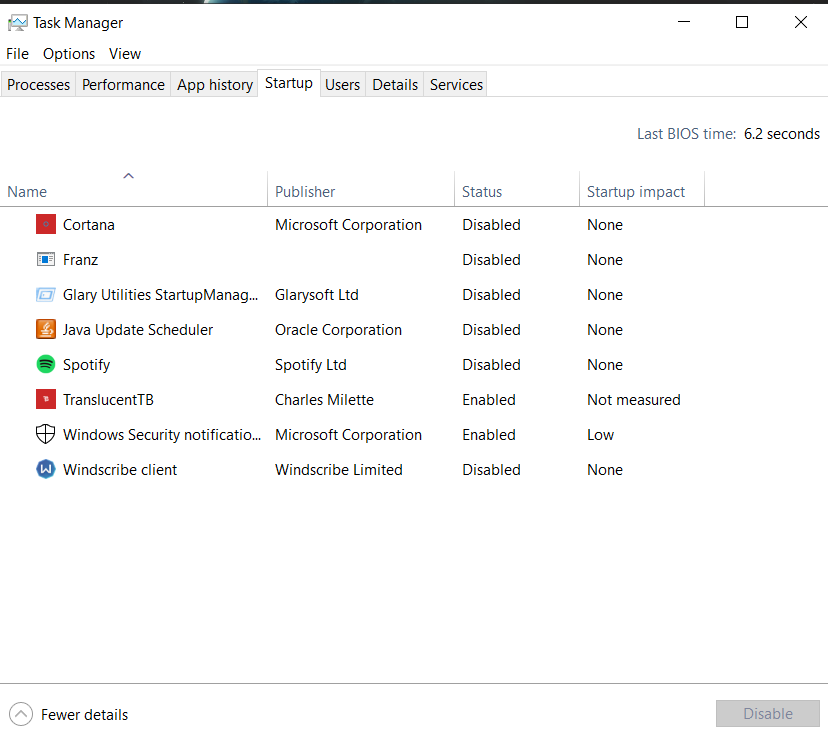
... and also in the Task Manager > Startup (right-click - disable)
 ThatGuyinIT
on 29 Mar 2019
ThatGuyinIT
on 29 Mar 2019
Why does franz not correctly removes itself? It should remove every stuff it has installed on uninstall!
 atesztoth
on 30 Jul 2019
atesztoth
on 30 Jul 2019
It's not in add/remove programs, there's no binary to execute any uninstall functions for you, and it's also not in the registry uninstall key, so I presume it's also not in WMI. This is what fuels sysadmins with rage.
 codaamok
on 31 Jul 2019
codaamok
on 31 Jul 2019
How about an Ubuntu installation?
What more I need to remove after uninstall it via System Software Manager?
 artu-hnrq
on 14 Dec 2019
artu-hnrq
on 14 Dec 2019
Eventually had to continue looking for other services to use 微信.
sudo apt remove franz
sudo apt-get purge franz
 andrewwxy
on 25 Mar 2020
andrewwxy
on 25 Mar 2020
i uninstalled franz from my windows and also deleted it from (%appdata%\Roaming\Franz) and (%appdata%\Local\Programs\Franz)
but still shows in my startup manager, i want to delete it completely
 Sharma0550
on 13 Aug 2020
Sharma0550
on 13 Aug 2020
 r3c3pt0r
Related issues
 dbfin
·
4Comments
dbfin
·
4Comments
 agodlydeciple
·
4Comments
agodlydeciple
·
4Comments
 tayfuuun
·
4Comments
tayfuuun
·
4Comments
 ArmeF97
·
4Comments
ArmeF97
·
4Comments
 gregoralbrecht
·
3Comments
gregoralbrecht
·
3Comments
Most helpful comment
Why does franz not correctly removes itself? It should remove every stuff it has installed on uninstall!