Franz: No tray icon in gnome3 ubuntu 17.10 - can't restore after closing the main window
Expected Behavior
Display a tray icon and/or dock icon when main window closed -> possibility to restore
Moreover, at start it would be nice not only to detect the running instance but to raise it's main window as well.
Current Behavior
No tray icon at all (regardless the state of the main window)
No dock icon when the main window closed.
at start Franz detects the already running instance, but not raises it's main window.
Screenshots (if appropriate):
Possible Solution
Steps to Reproduce (for bugs)
- start Franz on Ubuntu 17.10 (with default gnome3 shell) -> no tray icon
- close the main window -> no dock icon (but the process is still running)
- start franz in a terminal -> $ franz
An instance of Franz is already running. Exiting... -> main window not restored.
4.
Your Environment
- Franz Version used: 5.0.0-beta.15
- Operating System and version: Ubuntu 17.10 with gnome 3.26.1
 okarika
All 36 comments
I am seeing the same issue on Arch Linux, also with Gnome 3.26.2.
A workaround is to disable the setting "Keep Franz in background, when windows is closed" (manually translated from German).
 schmunk42
on 22 Feb 2018
schmunk42
on 22 Feb 2018
No problems for me on Arch Linux with Gnome 3.26.2. It's a problem on your side I think. Also the Franz icon is all black, so a lot of people think it's missing when it's actually here.
 closingin
on 22 Feb 2018
closingin
on 22 Feb 2018
Also the Franz icon is all black, so a lot of people think it's missing when it's actually here.
I have had this problem myself - Using a dark statusbar / tray makes it hard to find the icon. Would love to see an option to pick light/dark tray icon.
 rawzone
on 22 Feb 2018
rawzone
on 22 Feb 2018
@rawzone While waiting for this option, you can use Hardcode-Tray to change tray icons. It supports Franz.
closingin
on 23 Feb 2018
My Franz icon is white, it's the one on the right.

I also do not have a tray (only dash) - I read it was removed in Gnome.
schmunk42
on 23 Feb 2018
@schmunk42 So you have an icon.
I see that you use Numix icons, see if switching to the standard icons works. You can also enable tray icons by installing this extension.
Many commits addressing tray issues have been pushed since Beta 15, and Beta 16 is on its way. Wait for the next release to see if it's fixed.
closingin
on 23 Feb 2018
Okie, seems the source of the problem that it isn't compatible with the ubuntu gnome extension "Ubuntu AppIndicators". Using topicons plus it displayed correctly.
okarika
on 26 Feb 2018
@closingin I saw the TopIcons extension and tried it, but couldn't get it to work - I might try this again, but actually I wanted to avoid it, since it's stated on its project page, that it is unmaintained see https://github.com/phocean/TopIcons-plus
How does Franz handle the fact, that there are actually no more tray icons in GNOME? Will it support something like https://github.com/Ubuntu/gnome-shell-extension-appindicator
... this might be OT, but: How should GNOME apps - in general - handle this?
[update]
see also https://www.reddit.com/r/gnome/comments/6wqs2x/legacy_tray_alternatives/ https://blogs.gnome.org/aday/2017/08/31/status-icons-and-gnome/
schmunk42
on 27 Feb 2018
@schmunk42 As you said, OT.
@okarika I think you can close this.
closingin
on 1 Mar 2018
The general part might be OT, but
How does Franz handle the fact, that there are actually no more tray icons in GNOME?
isn't. What's your advice for users having the latest GNOME without any extensions?
schmunk42
on 1 Mar 2018
just mentioning that the AppImage produces the same behaviour
 cbluth
on 1 Mar 2018
cbluth
on 1 Mar 2018
@schmunk42 As far as I can guess, Franz will appear in the notification area when you will receive a notification. But Franz is not responsible for Gnome 3 not having a "real" tray.
I gave the advice to use TopIcons Plus for Gnome 3 users. When you choose to install Gnome 3, just consider the downsides or go for something else.
closingin
on 1 Mar 2018
But Franz is not responsible for Gnome 3 not having a "real" tray.
But Franz is requiring a tray to work properly.
schmunk42
on 2 Mar 2018
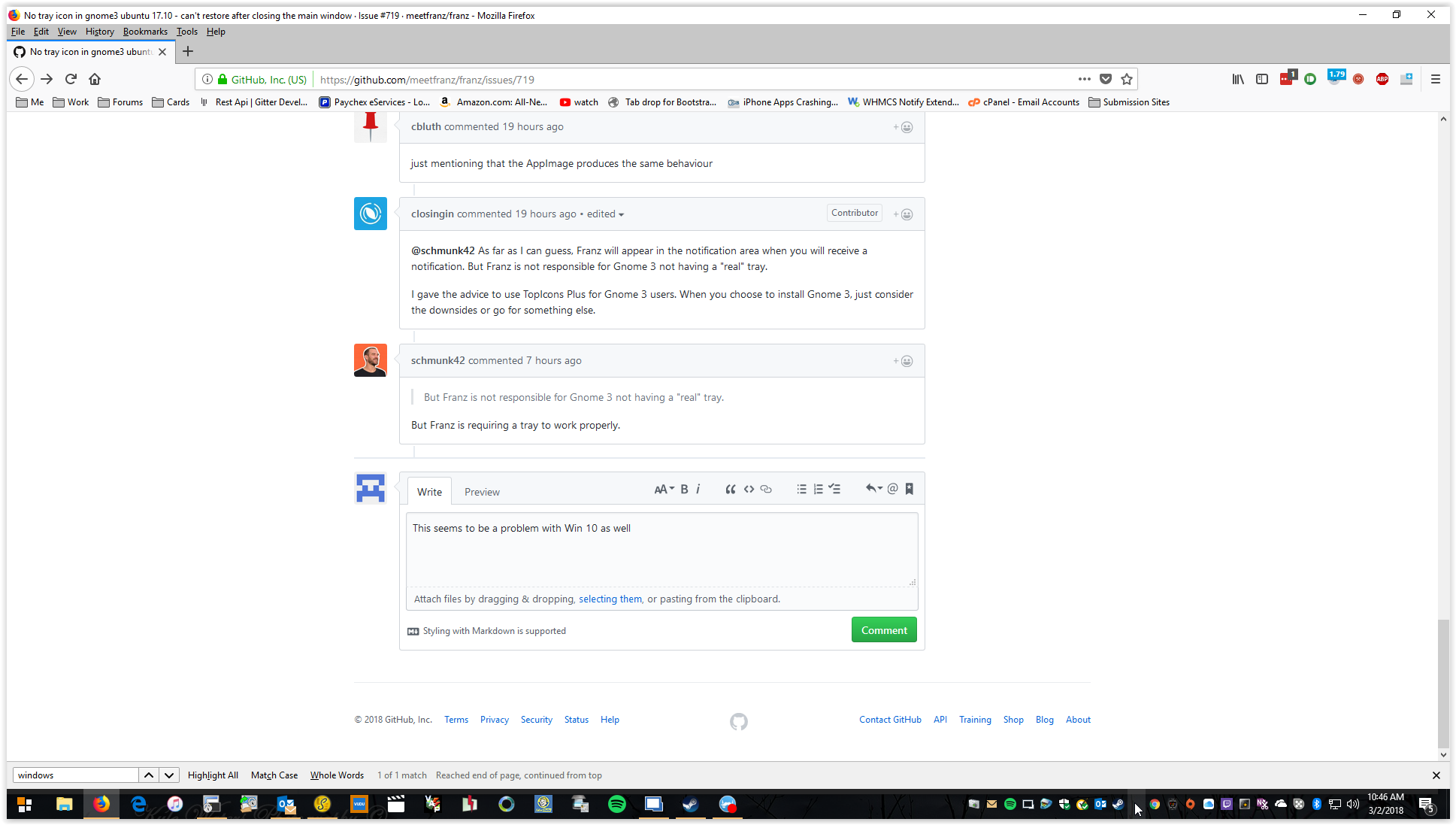
This seems to be a problem with Win 10 as well. the space is there for it, but tray icon is missing
 twhiting9275
on 2 Mar 2018
twhiting9275
on 2 Mar 2018
@twhiting9275 No problem for me on windows and archlinux. Have you checked that you're using the latest (beta16) version ?
closingin
on 6 Mar 2018
I think this is more closely related to the Desktop you are using, but anway, if you are on Arch and you close the window, how do you bring it up again?
schmunk42
on 6 Mar 2018
Not the most beautiful lines code in the world, but it should fix your problem.
Just make a bash script with the code below and change your starter (tool: menulibre) to start the bash script instead of Franz. Don't forget to make the script runnable with chmod.
`
!/bin/bash
( cmdpid=$BASHPID;
(sleep 0.5; kill $cmdpid) \
&
output=$(franz)
output2=$(wmctrl -l | grep Franz);
if [ $output2=$("") ]; then
#echo "Window is NOT open";
killall franz ; franz
else
#echo "Window IS open"
wmctrl -a franz;
fi
sleep 0.6;
)
`
It will not bring your icon back, but with that you should be able to start it without problems.
 zinknera
on 6 Mar 2018
zinknera
on 6 Mar 2018
@schmunk42 Are we really going to start this debate again ? I'm using Gnome 3 with TopIcons Plus, so I have a tray icon. And I have to remind you that Gnome 3 has a dock where the running apps are sent. So everything works normally. In case you still want to have an easy way to go to Franz, I also use Dash to Dock.
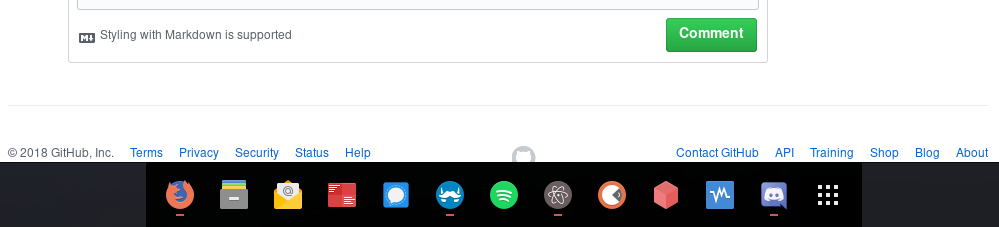
@okarika Your problem seems to be solved, so you can close this issue.
closingin
on 6 Mar 2018
@closingin Sorry, I did not consider installing an umaintained extension as a "solution" to this issue. Apparently this is obvious, since it's not even documented anywhere.
And I have to remind you that Gnome 3 has a dock where the running apps are sent.
I suggest you to re-read 2. of "Steps to reproduce" of the initial posting.
At least users like @zinknera are trying to solve the actual problem.
But anyway I won't bug you anymore, since I've Researched A Much Better Operating eXtension for my needs.
schmunk42
on 7 Mar 2018
@schmunk42 I didn't want to offend you by saying this. It's just that this seems to be a really specific problem that has to be fixed on Ubuntu's side. The weird thing is that this only happens on Ubuntu, I mean there's no problem with Gnome 3 on Arch Linux. So it's kinda hard to debug.
Normally the problem with the window has been fixed with version 5.0.0-beta16, but apparently the icon is still missing as you tell me. Can you confirm that it still occurs on the latest version ?
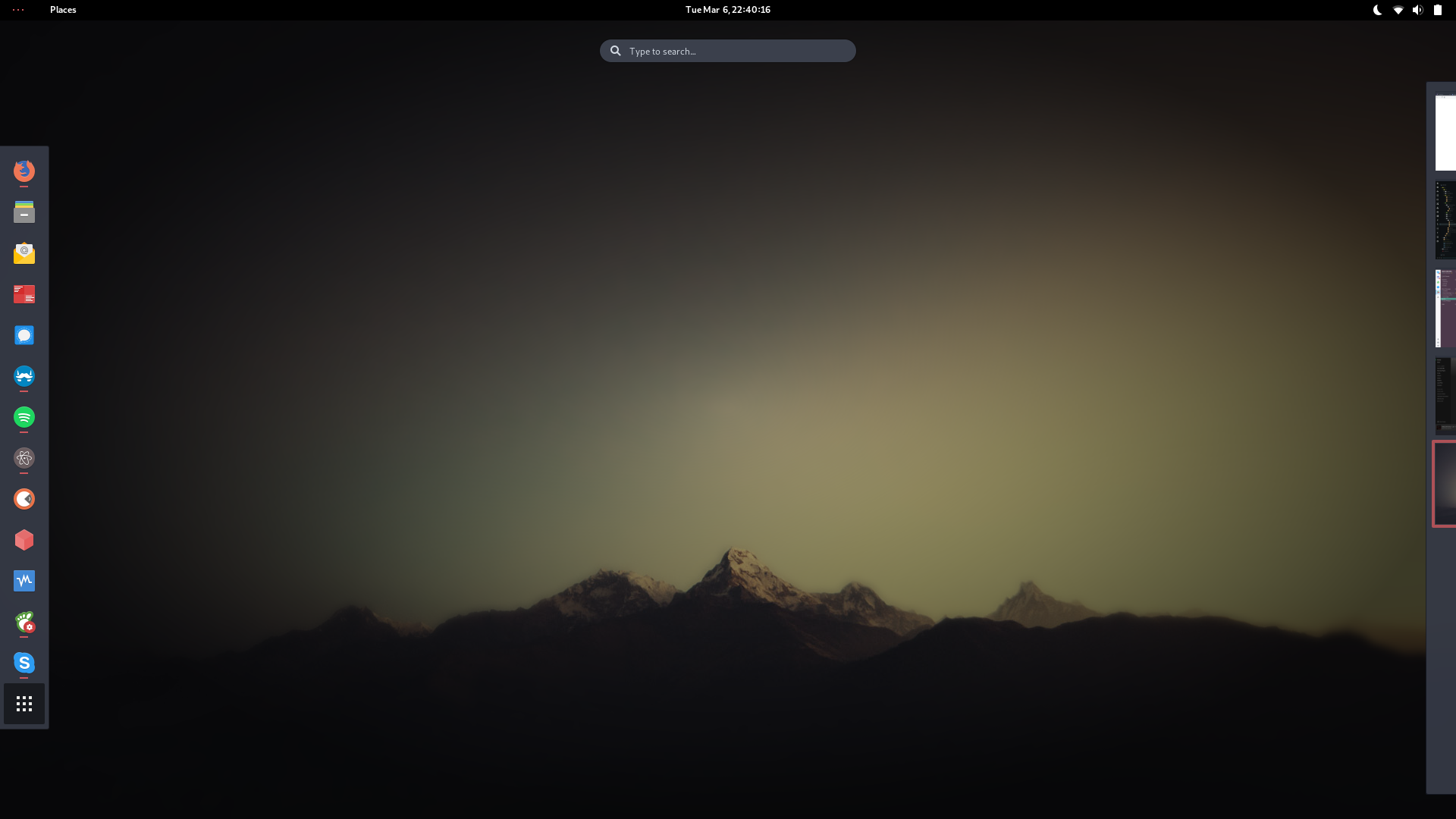
As you can see on this screenshot, the default dash on Gnome 3 (I disabled all my extensions) still has the Franz icon with the "running" indicator, whether the application is minimized or not. That's the way Gnome 3 works, this dash can be considered as its tray, I guess.
By the way, you didn't tell me if switching back to the normal icons fixed your problem ?
closingin
on 7 Mar 2018
I mean there's no problem with Gnome 3 on Arch Linux.
I just created a new user on my machine (Arch + Gnome + no extensions at all) to try this one last time (with 5.0.0-beta.16) and it is still the same.
As you can see on this screenshot, the default dash on Gnome 3 (I disabled all my extensions) still has the Franz icon with the "running" indicator, whether the application is minimized or not.
It is not about minimizing it is about closing the application - icon disappears, you can not launch it again via "Activities" or command line, because "an instance is already running". You can just killall franz.
By the way, you didn't tell me if switching back to the normal icons fixed your problem ?
Also tried "Adwalta" - no changes.
It's all described in this issue, that's why I asked how you bring up Franz when you have closed it.
schmunk42
on 7 Mar 2018
@schmunk42 pardon me for the introduction into this discussion, I think that you are going kind of too far here. I understand your concerns, but I agree with @closingin that this seems to be more of a GNOME issue rather than a Franz issue. Let me summarize:
- You want to use plain vanilla GNOME
- GNOME does not allow for systray icons
- Franz has a systray icon that is not shown in gnome because of GNOME's poor decisions (one of many poor decisions they made in the past)
- GNOME, with its poor decision making, forces you to have a specific behavior when using apps, which is that you never close apps but you keep them open in a gazillion workspaces (indeed, there should not be a minimize button by default on GNOME -- or did they add it in subsequent versions?)
- Now, if you close Franz, Franz thinks you are able to restore it by using the tray icon which is not available in GNOME, so you are stuck.
If that is correct (I think it is), then the best way of proceeding is for you to open a new issue related to this specific problem. It is not because of the tray icon missing, but it's because you can't restore it if you close it, which kind of misled the conversation here.
Anyway, @okarika never replied to your very first comment, @schmunk42 : What happens if you deselect the option in settings called "Keep Franz in background when closing the window"?
 alecive
on 7 Mar 2018
alecive
on 7 Mar 2018
that this seems to be more of a GNOME issue rather than a Franz issue.
Depends on if Franz supports (a default) GNOME installation or not - I don't know how all the other DEs handle this, I know that KDE has a tray icon, but there are dozens more.
GNOME, with its poor decision making, forces you to have a specific behavior when using apps, which is that you never close apps but you keep them open in a gazillion workspaces (indeed, there should not be a minimize button by default on GNOME -- or did they add it in subsequent versions?)
From what I've seen on almost every Desktop is that there are three buttons: close, minimize, maximize - but no "send to background" or acutally "minimize and pretend to be closed", but yes - some apps behave like this on "close".
Now, if you close Franz, Franz thinks you are able to restore it by using the tray icon which is not available in GNOME, so you are stuck.
Correct.
then the best way of proceeding is for you to open a new issue related to this specific problem.
I don't see how this is in any point different to what's described in the OP, besides that fact that it (also) occurs on Ubuntu.
Let me know, if I miss a point here WHY this should be specifc to Ubuntu and not to Gnome 3.26.
What happens if you deselect the option in settings called "Keep Franz in background when closing the window"?
I described this workaround in https://github.com/meetfranz/franz/issues/719#issuecomment-367681617 - IMHO it would be a proper solution to this issue to disable this by default and add a help text below this setting about possible issues.
schmunk42
on 7 Mar 2018
@schmunk42 I agree on all of what you said. And I am aware of your comment (it is why I was asking why @okarika didn't give feedback on that). But again, IF that solution works, it means that the issue can be solved with a default Franz installation, so there is no issue here, right?
For what concerns if to have that option turned on by default or not, my two cents here:
- I believe it makes sense to have it ON by default for the majority of OSes and DEs (which have trays)
- I don't believe it makes sense to have OS-specific or DE-specific flavors of this (i.e. having it turned OFF on GNOME only), because it becomes a maintenance nightmare.
But again, this is a completely different discussion that should be tackled in another issue (and this one should be closed). And, again ONLY IF your solution works (which we technically don't know).
alecive
on 7 Mar 2018
I managed to reproduce this bug in the end. But as @alecive explained (way better than I did), I think that this is a normal Gnome behavior.
- You click on "close"
- The Gnome dash thinks the window has been closed
- The Gnome dash removes the process associated to this icon from its list
- Either the icon is removed from the dash or set as "not running" if it's pinned to the dash
That really looks like a Gnome problem to me. It's true that Franz may consider a workaround for this bug (is it even possible ?), but imo it's a lot of work for something they shouldn't have to fix. We should bring @haraldox to this discussion for a decision.
By the way, Gnome indeed added back a minimize button, but if my memories aren't failing it's disabled by default (you have to enable it in Gnome Tweaks). I guess they added it because it is possible to get a taskbar (again by enabling a pre-installed extension).
closingin
on 7 Mar 2018
After a short research, my suggestion is:
diff --git a/src/index.js b/src/index.js
index 897943a..e0bbf0b 100644
--- a/src/index.js
+++ b/src/index.js
@@ -30,7 +30,7 @@ if (isWindows) {
 const isSecondInstance = app.makeSingleInstance((argv) => {
   if (mainWindow) {
     if (mainWindow.isMinimized()) mainWindow.restore();
-    mainWindow.focus();
+    mainWindow.show();

     if (process.platform === 'win32') {
       // Keep only command line / deep linked arguments
Is there any drawbacks with this approach?
 bogus34
on 31 Mar 2018
bogus34
on 31 Mar 2018
Same issue on ubuntu 16.04.
Franz disappearing -> I had to disable "keep Franz in background...".
Franz does not appear in tray.
Version: 5.0.0-beta.17
Release: 1.8.4 / linux / x64
 KeeeN
on 9 Apr 2018
KeeeN
on 9 Apr 2018
Since ubuntu 17.10 (maybe even in 17.04), manyl Linux distributions now will not have system tray support anymore since it's a deprecated framework. (GNOME, Ubuntu, elementary OS, etc...)
Instead of showing the error message An instance of Franz is already running. Exiting... when trying to open Franz, why not just open the window? (kinda like bogus34's approach, although i haven't tested it).
Example of how elementary handles background tasks in apps: https://elementary.io/docs/human-interface-guidelines#background-tasks
Re: "Either the icon is removed from the dash or set as "not running" if it's pinned to the dash"
This happens because window managers are just that, they handle application windows and not processes like it does on MacOS. So it's not really a bug on GNOME's side, but it's just a different methodology
 Philip-Scott
on 16 Apr 2018
Philip-Scott
on 16 Apr 2018
I have the same issue in Gnome3 and Arch linux.
 rvega
on 10 May 2018
rvega
on 10 May 2018
Same here in Debian
 KnisterPeter
on 30 May 2018
KnisterPeter
on 30 May 2018
ubuntu 18.04, same issue. Other apps minimize to tray (synthing-gtk, yakuake, truecrypt) but not franz.
I think the issue with saying its a gnome issue, is that out of the box it doesn't appear to work on ubuntu the most popular linux distribution, along with anything else using gnome 3.
 scs3jb
on 23 Jun 2018
scs3jb
on 23 Jun 2018
Same issue as @scs3jb
Everything else correctly minimizes (variety, mailspring, etc), but it seems that franz is in the background sleeping for some reason. Not sure how to even use franz anymore.
 lhoggatt17
on 6 Sep 2018
lhoggatt17
on 6 Sep 2018
Instead of showing the error message
An instance of Franz is already running. Exiting...when trying to open Franz, why not just open the window?
I'm wondering the same thing, it makes no sense
 paddotk
on 11 Oct 2018
paddotk
on 11 Oct 2018
For Ubuntu 18 (dont know for other versions or distros) install Ubuntu appindicators
https://extensions.gnome.org/extension/615/appindicator-support/
 BertDuyck
on 17 Oct 2018
BertDuyck
on 17 Oct 2018
See: https://github.com/meetfranz/franz/issues/786#issuecomment-438227456
 rubensa
on 13 Nov 2018
rubensa
on 13 Nov 2018
This issue has been automatically marked as stale because it has not had recent activity. It will be closed if no further activity occurs. Thank you for your contributions.
![stale[bot] picture](https://avatars3.githubusercontent.com/in/1724?v=4&s=40) stale[bot]
on 13 Nov 2019
stale[bot]
on 13 Nov 2019
Related issues
 m2kk
·
4Comments
m2kk
·
4Comments
 sach160
·
4Comments
sach160
·
4Comments
 AGonLen
·
4Comments
AGonLen
·
4Comments
 dbfin
·
4Comments
dbfin
·
4Comments
 G419
·
3Comments
G419
·
3Comments
Most helpful comment
After a short research, my suggestion is:
Is there any drawbacks with this approach?