Feature Description
Optimize Franz for Linux.
Motivation and Context
Even though the Franz Linux community isn't the biggest in numbers, we are not going to exclude them.
Providing a Linux build however requires a vast knowledge of the major desktop environments and their pitfalls. This is something we constantly struggled with in the past while trying to provide a certain quality level.
What needs to be done
- [ ] Check dependencies to get development build running on Linux
- [ ] Test builds on major desktop environments, especially:
- [ ] Recipe download/installation
- [ ] Notifications
- [ ] Tray icons
- [ ] Window behavior (minimizing, restoring, ...)
 adlk
adlk
All 29 comments
Would help if I add ubuntu build instructions? I can make a PR updating the README.md with steps to reproduce it
 GustavoKatel
on 17 Oct 2017
GustavoKatel
on 17 Oct 2017
@GustavoKatel It would be very interesting, just as I can test the features in Ubuntu as well
 matheus-souza
on 17 Oct 2017
matheus-souza
on 17 Oct 2017
Working on it :+1:
GustavoKatel
on 17 Oct 2017
There you go. Please let me know if it works for you @matheus-souza
GustavoKatel
on 17 Oct 2017
@GustavoKatel, @matheus-souza Have you been able to run yarn build?
adlk
on 18 Oct 2017
Huh it seems that the electron-builder is using the mac icns icons, therefore requires an extra dependency (libicns - which happens that I have installed). I can make a second PR removing this dependency and including a better linux packaging configuration. Is that ok?
GustavoKatel
on 18 Oct 2017
I haven't had the time fire up a Linux VM yet to test it but did your update to the electron-builder config do the trick?
If so, then I'm going to add the Linux environment to travis in the next few days and we can proceed on this topic.
adlk
on 18 Oct 2017
Yes. I had to manually set the icon for the linux tag. I created the build-helpers/images/icons directory and placed a 1024x1024 png icon there. It should be fine for now
GustavoKatel
on 18 Oct 2017
In Arch x64, I had an warning: Command failed: /home/fabricio/.cache/electron-builder/AppImage/AppImage-09-07-16-linux/xorriso
Solved instaling xorriso by running sudo pacman -S xorriso and setting the ENV export USE_SYSTEM_XORRISO=true
After this yarn build was successful, but AppImage do not have icons
 fabricionaweb
on 18 Oct 2017
fabricionaweb
on 18 Oct 2017
That's weid. AppImage is supposed to vendor a xorriso bin. Can you check if /home/fabricio/.cache/electron-builder/AppImage/AppImage-09-07-16-linux/xorriso exists and can be executed?
ls -lh /home/fabricio/.cache/electron-builder/AppImage/AppImage-09-07-16-linux/xorriso
GustavoKatel
on 20 Oct 2017
Tested installation of Franz 5.0.0 beta 10, Kubuntu 17.10
No installation problems at all, well done.
 mroeling
on 20 Oct 2017
mroeling
on 20 Oct 2017
Hi, I was trying to build Franz 5 for Debian 64 Bit, but I have a bad installation of Npm and Nodejs and I ca't build it, Can someone build it and send it to me PLS. Thk you
 ghost
on 23 Oct 2017
ghost
on 23 Oct 2017
I've send my Kubuntu 17.10 build through WeTransfer: https://we.tl/jIoWg9R5fS
mroeling
on 23 Oct 2017
@mroeling REALLY THANK YOU
ghost
on 23 Oct 2017
@adlk since you are already using travis, why don't you have a travis build for linux as well? It seems to me that that would be the best first step to add linux support. At least, if travis works on Ubuntu 14.04, you can say that it does the job on Ubuntu 14.04.
 alecive
on 23 Oct 2017
alecive
on 23 Oct 2017
@fabricionaweb I had the same issue and you solution worked perfectly.
@GustavoKatel The xorriso bin fetched with AppImage exists and is executable, however the issue xorriso isn't the issue itself, but the required library libreadline.so
Error: Exit code: 127. Command failed: /home/max/.cache/electron-builder/AppImage/AppImage-09-07-16-linux/xorriso <...>
/home/max/.cache/electron-builder/AppImage/AppImage-09-07-16-linux/xorriso: error while loading shared libraries: libreadline.so.6: cannot open shared object file: No such file or directory
Not sure where electron/xorriso looks for that library, but it is installed on my system. However the installed version is 7.0.x . Not sure if the so.6 means that bundled xorriso it is looking for version 6?
Anyway, installing and using a systemwide installed xorriso and using it as fabriciona suggested works as a workaround
Edit: Also missing the icon btw.
 maxanier
on 24 Oct 2017
maxanier
on 24 Oct 2017
I've finally been able to set up travis to build for linux as well:
Here is the very first build:
http://franz-travis.s3-website.eu-central-1.amazonaws.com/?prefix=138/
I haven't done any testing yet but I'm glad that we are moving forward.
adlk
on 25 Oct 2017
That's great! I tried to install it on Ubuntu 14.04 and it went fine:
[alecive@malakim]$ sudo dpkg -i franz_5.0.0-beta.11_amd64.deb
[sudo] password for alecive:
Selecting previously unselected package franz.
(Reading database ... 353230 files and directories currently installed.)
Preparing to unpack franz_5.0.0-beta.11_amd64.deb ...
Unpacking franz (5.0.0-beta.11-138) ...
Setting up franz (5.0.0-beta.11-138) ...
Processing triggers for desktop-file-utils (0.22-1ubuntu1.1) ...
Processing triggers for mime-support (3.54ubuntu1.1) ...
Processing triggers for gnome-menus (3.10.1-0ubuntu2) ...
Processing triggers for bamfdaemon (0.5.1+14.04.20140409-0ubuntu1) ...
Rebuilding /usr/share/applications/bamf-2.index...
Processing triggers for hicolor-icon-theme (0.13-1) ...
but then it fails on run:
[alecive@malakim]$ franz
(node:10522) UnhandledPromiseRejectionWarning: Unhandled promise rejection (rejection id: 1): Error: Cannot find module '../screen'
(node:10522) DeprecationWarning: Unhandled promise rejections are deprecated. In the future, promise rejections that are not handled will terminate the Node.js process with a non-zero exit code.
Thanks!
alecive
on 25 Oct 2017
@alecive thanks for the heads up. Any chance you are running a self-built version to it parallel?
This error is usually caused by forcing Franz to be a single instance app. It checks if there is already another instance and quits.
adlk
on 25 Oct 2017
Installed and run normally on Ubuntu 14.04 :smiley:
matheus-souza
on 25 Oct 2017
@adlk yes there was franz 4.0 running. I closed it and now it works flawlessly, thanks so much!
alecive
on 25 Oct 2017
@adlk I am actually having a number of problems when running it though. I will be opening separate issues to address them!
alecive
on 25 Oct 2017
From the feedback I'm getting so far I feel comfortable enough to officially release Franz 5 for Linux with beta 12. https://github.com/meetfranz/franz/milestone/2
adlk
on 26 Oct 2017
The application icon was missing for me in Gnome 3. Apparently, the only mandatory size is 48x48: https://developer.gnome.org/ThemedIcons/ (Application icons).
I fixed the issue by creating a 48x48 version (from the shipped 1024x1024), saving it as /usr/share/icons/hicolor/48x48/apps/franz.png and running:
sudo gtk-update-icon-cache /usr/share/icons/hicolor
This is on Antergos (Arch) but I guess it should work the same for any Gnome 3 install.
 e11o
on 22 Nov 2017
e11o
on 22 Nov 2017
I am using the App Image in Fedora 26 and the App Icon isnt showing after I have installed the app. Is this something I can change?
 marct83
on 29 Nov 2017
marct83
on 29 Nov 2017
@marct83 This is a known issue which should be fixed with the next beta.
adlk
on 29 Nov 2017
@adlk 5.0.0-beta.15 is out but the icon is still not showing for me on Fedora 27. Same for you @marct83?
 francesco-beccaria
on 22 Jan 2018
francesco-beccaria
on 22 Jan 2018
The same for me happens with the AppImage for Beta 18.
The icon appears properly in my Favorites and in the app-menu, but the icon for the RUNNING application, is a generic one.
 brhahlen
on 12 Apr 2018
brhahlen
on 12 Apr 2018
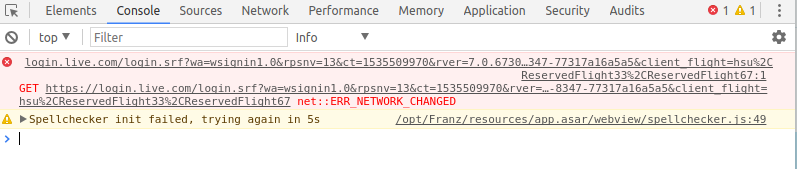
Skype login Problem
- Env: Ubuntu 18.04 64bit
 toanqng
on 29 Aug 2018
toanqng
on 29 Aug 2018
Related issues
 gregoralbrecht
·
3Comments
gregoralbrecht
·
3Comments
 gcarrion-gfrmedia
·
3Comments
gcarrion-gfrmedia
·
3Comments
 hello-jason
·
4Comments
hello-jason
·
4Comments
 m2kk
·
4Comments
m2kk
·
4Comments
 kingjr
·
3Comments
kingjr
·
3Comments
Most helpful comment
From the feedback I'm getting so far I feel comfortable enough to officially release Franz 5 for Linux with beta 12. https://github.com/meetfranz/franz/milestone/2