Framework: Push issues on layout visibility change (8.1.0+)
I've been experiencing a bug when using Push with every 8.1.x version so far.
I've tried using all Push modes and transport options. Same results.
I tried getting help on the forum, but no one has answered so far.
Everything works as expected if I use Vaadin 8.0.7.
When using 8.1.x, every time a Layout is hidden, pushed and made visible again, an exception is thrown on client side console and the DOM gets deformed/corrupted.
com.vaadin.client.communication.MessageHandler
SEVERE: Error sending hierarchy change events
com.google.gwt.event.shared.UmbrellaException: Exception caught: (TypeError) : bx(...) is null
No server side exceptions are thrown.
If it helps, what I'm doing is this:
- View loads a Grid with entities.
- When an element in the Grid is selected, a Layout is shown (which allows editing the entity). This Layout is animated.
- If an element in the Grid is selected after this, the Layout is hidden and UI.getcurrent().push() is called in order to hide it on the client side.
- The Layout if filled with the information from the selected element in the Grid and is set visible again. This is when the client exception is thrown and DOM gets broken.
- If I hide a Button, Label or other Components and use Push, it works as expected. This bug seems to affect Layouts only.
Regards.
 rodolforfq
All 24 comments
You might try to change your compiler options for the widgetset to PRETTY or DETAILED (from OBF). As of now, it's quite hard to tell what "bx" is supposed to be.
 pwilkin
on 4 Sep 2017
pwilkin
on 4 Sep 2017
The message in the forum post ("An extension can not be moved from one parent to another.") indicates that the problem probably isn't a layout in itself but some extension attached to it. Thus, it would be helpful to know what exactly is in the layout, and especially which extensions (potentially coming from a Grid, a selection component, a context menu, BrowserWindowOpener, drag & drop, FileDownloader or some add-on) are used in it.
Ideally, a reduced example of how to reproduce the issue would make it much easier to fix. Most likely it is some specific type of a component or extension in the layout that causes the issue.
In any case, better logs (with the widgetset compilation options suggested by pwilkin) would be useful.
 hesara
on 5 Sep 2017
hesara
on 5 Sep 2017
I have the exact same problem. see thread: https://vaadin.com/forum/#!/thread/16660986
I've enabled superdevmode and included the logging.
 stevebor1
on 5 Sep 2017
stevebor1
on 5 Sep 2017
I was able to reproduce by toggle the visibility of the component within the thread. Looks like something is getting out of sync during re-rendering of the html.
As a work-around, I am simply toggling the visibility via css for now do it doesn't redraw.
stevebor1
on 5 Sep 2017
I've tried making a minimal reproducible example:
protected void init(VaadinRequest request) {

    VerticalLayout both = new VerticalLayout();

    VerticalLayout grs = new VerticalLayout();
    both.addComponent(grs);
    Grid<GridRowBean> grid = new Grid<>();
    grid.setItems(new GridRowBean("bla", 1.0), new GridRowBean("foo", 2.0));
    Column<GridRowBean, String> col1 = grid.addColumn(GridRowBean::getFirst);
    col1.setId("col1");
    col1.setCaption("BOOBOO");
    Column<GridRowBean, Double> col2 = grid.addColumn(GridRowBean::getSecond);
    col2.setId("col2");
    col2.setCaption("BLABLA");
    grid.getDefaultHeaderRow().getCell("col1").setComponent(new Button("TEST"));
    grs.addComponent(grid);

    Button b = new Button("Hide/Show");
    both.addComponent(b);
    b.addClickListener((cl) -> {
        new Thread(() -> {
            try {
                Thread.sleep(500);
                access(() -> {
                    grs.setVisible(!grs.isVisible());
                    push();
                });
            } catch (Exception e) {
                throw new RuntimeException(e);
            }
        }).start();
    });

    Button b2 = new Button("Add row");
    both.addComponent(b2);
    b2.addClickListener((cl) -> {
        new Thread(() -> {
            try {
                Thread.sleep(500);
                access(() -> {
                    List<GridRowBean> els = grid.getDataProvider().fetch(new Query<>()).collect(Collectors.toList());
                    els.add(new GridRowBean(UUID.randomUUID().toString(), System.currentTimeMillis() / 3600.0));
                    grid.setItems(els);
                    push();
                });
            } catch (Exception e) {
                throw new RuntimeException(e);
            }
        }).start();
    });
    setContent(both);
}
However, it seems to work just fine with 8.1.3. Anything specific here?
pwilkin
on 5 Sep 2017
I'll explain my specific layout composition, hope it helps.
I have a parent VerticalLayout which contains everything.
There is a HorizontalLayout with some TextFields and a Button which triggers a database query (and shows a results Grid).
The results Grid is contained in a VerticalLayout (named "resultadosBusqueda").
While the database query is ran, I show a Spinner
Here is my code:
btnBuscarLogs.addClickListener(e -> { //Search button click event
       resultadosBusqueda.setVisible(false); //VerticalLayout is hidden
       spinner.setVisible(true); //Spinner (addon) is shown
       UI.getCurrent().push(); //Layout hiding and Spinner showing are pushed to client.

       UI.getCurrent().access(() -> { //Databasequery is ran, Grid is shown when done and Spinner is hidden.
            mostrarGridResultados();
            spinner.setVisible(false); //UI.getCurrent.push() is not used here (using automatic mode).
        });
});

 private void mostrarGridResultados() {
        listaResultados = daoBitacoras.getLogs();
        if (!Objects.isNull(listaResultados) && !listaResultados.isEmpty()) {
            gridResultados.setItems(listaResultados); //Grid is fed the result list.
            gridResultados.setCaption("Resultados - Se encontraron " + listaResultados.size() + " coincidencia(s)"); //Grid caption is changed to show number of results.
            resultadosBusqueda.setVisible(true); //VerticalLayout is shown.
        } else { // Notification is shown if there are no results to show.
            Notificaciones.mostrarNotificacionError("Error", "No hay coincidencias");
        }
    }
Again, this fails on every 8.1.+ version and works wonders on 8.0.7
I also stopped using the Spinkit add-on, but the same keeps happening.
rodolforfq
on 5 Sep 2017
@pwilkin code seems similar. Biggest difference would be I hide the Layout, push it, then use access() to update the components and show the Layout again, all in one request.
rodolforfq
on 5 Sep 2017
If you are using automatic mode, then why ever call push() manually? The only reason I know for doing that is if you have code that does some layout-related stuff and then enters a processing loop, but that's bad design anyway - you should be using some sort of scheduled thread for heavy processing anyways.
I had this (this = the sample code) on automatic push mode, but changed to manual because I figured that might be the culprit.
Also, you're saying the spinner is an addon? Try disabling the spinner and see if it helps.
pwilkin
on 5 Sep 2017
@pwilkin I tried disabling the Spinner addon but it still fails.
I also tried manual mode and all the transport options to no avail.
The reason I use push() is because I need to push the Spinner to the client while the query runs.
I suposse I could make a thread that runs the query and save me the push() call. I will give that a try and see how it goes. Thanks for all the help so far! :)
rodolforfq
on 5 Sep 2017
I will try to get some test code based off my usage, but the problem is not present in 8.0.6, only after updating to 8.1.x.
stevebor1
on 5 Sep 2017
I tested my sample using 8.1.3.
@rodolforfq if I have a moment, I'll try to recreate your layout and see if I can reproduce the problem.
pwilkin
on 5 Sep 2017
I will try to get some test code based off my usage, but the problem is not present in 8.0.6, only after updating to 8.1.x.
@stevebor1 Same here. My code (which shows a Spinner on screen while the data processing happens in another thread and is later updated via access() method), works perfectly well up to 8.0.7 version.
Could this be related to changes made on #9707 and #9693?
rodolforfq
on 5 Sep 2017
Hm, are you running your server with the -ea VM argument?
If not, try to turn it on (enable assertions) and see if your code triggers any assertion failed exceptions on access locks.
pwilkin
on 5 Sep 2017
@pwilkin Just tried that. Nothing is shown on console on either 8.0.7 nor 8.1.3 versions.
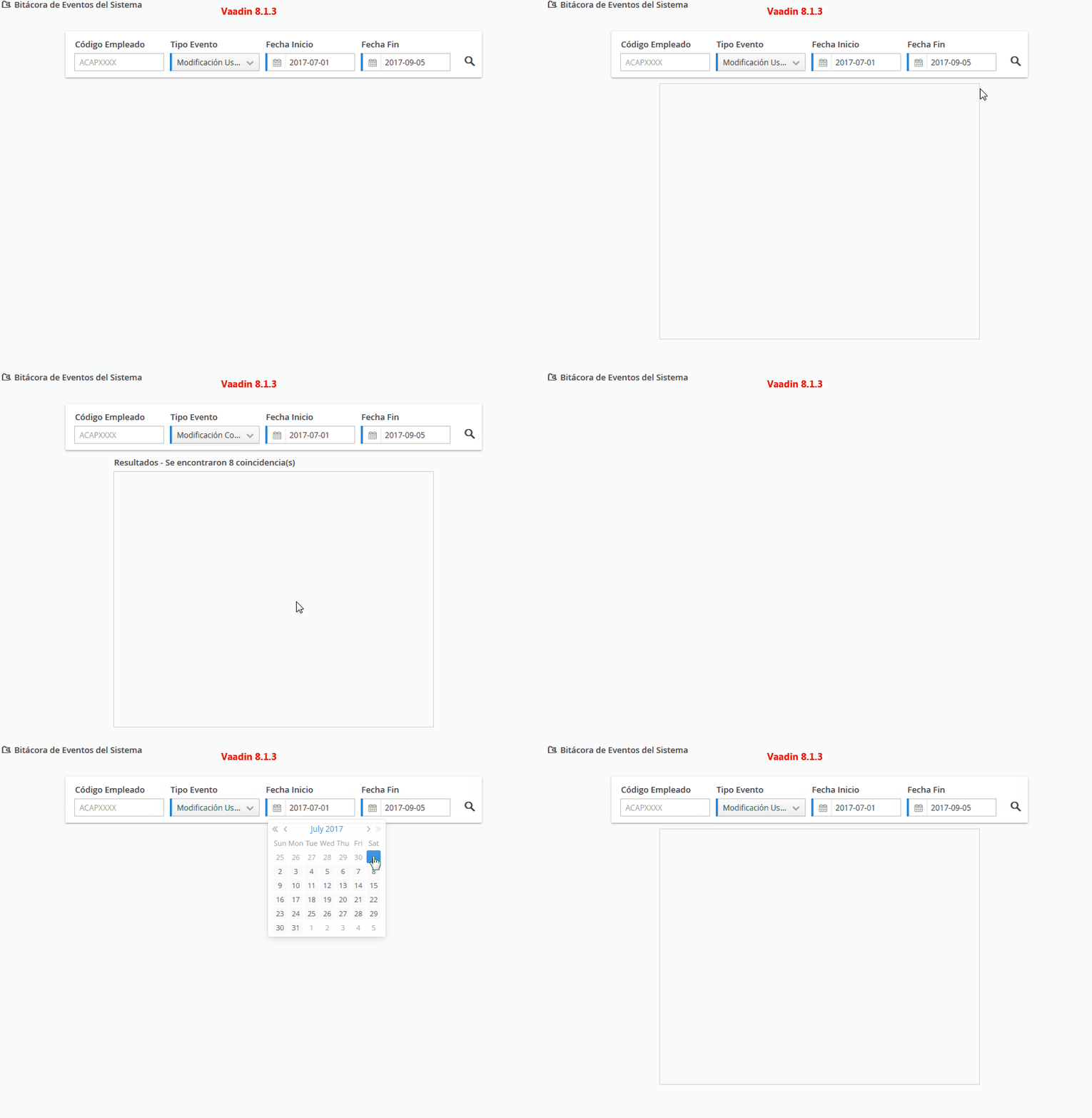
I made two gifs so you can see exactly what happens on both Vaadin versions, using the exact same code.
On 8.0.7, everything works well. You will notice the Spinner doesn't seem to always show (because its hidden almost immediately when the database query runs quickly)

On 8.1.3, it works well the first time (see the left-to-right animation. This happens when the view is first loaded/refreshed). After the layout is first shown, it just keeps on failing to render correctly again.
rodolforfq
on 5 Sep 2017
Okay, can you try disabling the animation for the data loading?
pwilkin
on 5 Sep 2017
@pwilkin Just tried disabling the Spinner. Still same issue.

rodolforfq
on 5 Sep 2017
Try disabling the slide-in animation.
pwilkin
on 5 Sep 2017
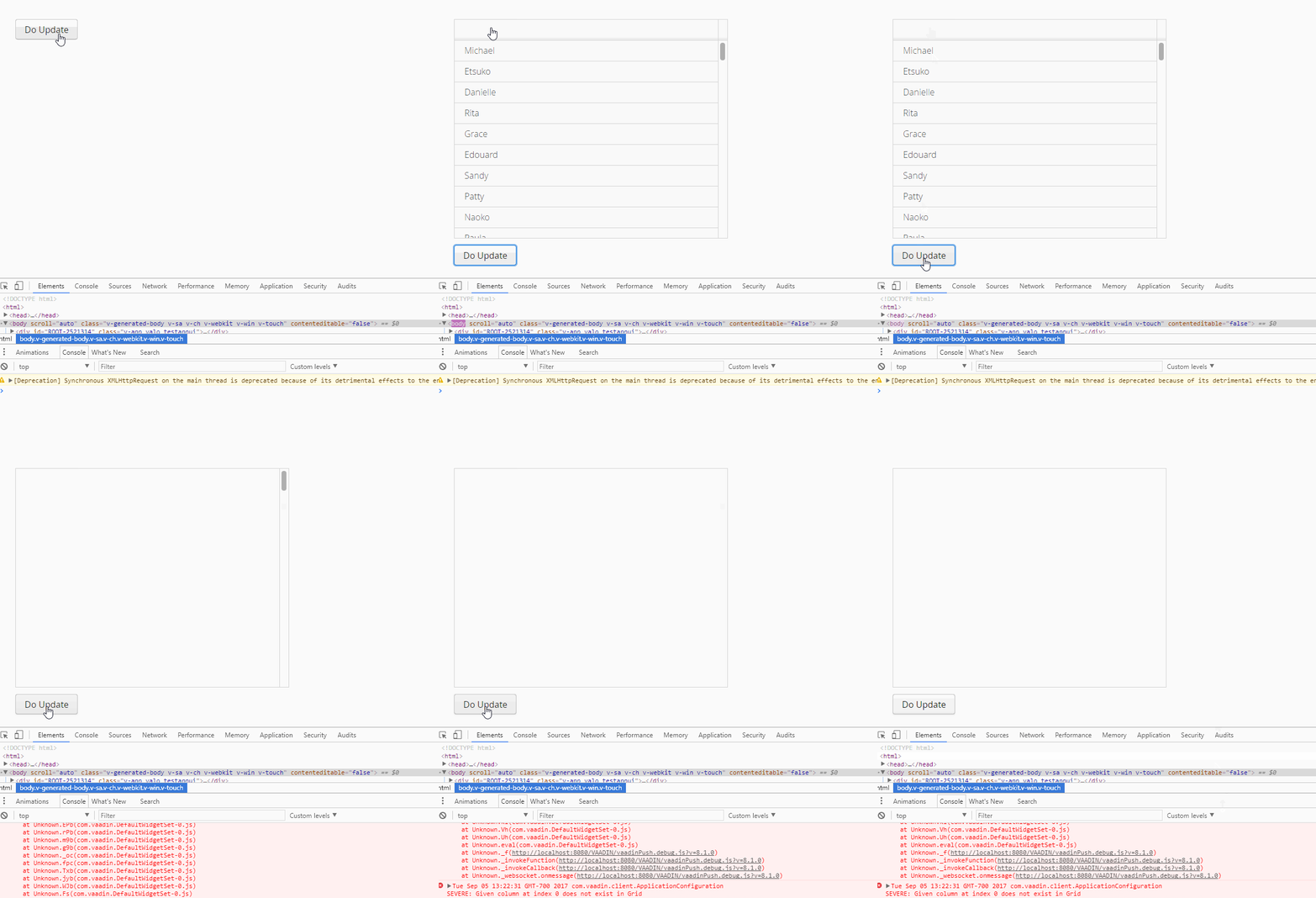
Simple app that reproduces the issue
stevebor1
on 5 Sep 2017
@pwilkin Tried that. Still the same.
Mind you, that animation is just SASS
@include animation(valo-animate-in-slide-up 800ms 10ms backwards, valo-animate-in-fade 600ms 100ms backwards);
rodolforfq
on 5 Sep 2017
I did some testing with stevebor1's testapp, with these findings so far:
- the issue seems to have been introduced between 8.1.0.alpha7 and 8.1.0.alpha8, apparently by the fix #9305
- the actual crash happens in ColumnConnector.updateRenderer(), apparently when getRendererConnector() cannot find a renderer from the column state (TBC)
hesara
on 6 Sep 2017
A quick workaround to test until this is properly fixed: copy the sources of UidlWriter from the Vaadin version you are using to the project (in the package com.vaadin.server.communication so that it is on the classpath before Vaadin JARs) and add the line uiConnectorTracker.cleanConnectorMap(); to the end of the finally block at the end of write(...) (around line 308).
hesara
on 6 Sep 2017
Thans @hesara and everyone!
rodolforfq
on 6 Sep 2017
Marking this with milestone 8.2.0.alpha1 for now, but we can probably also pick this to 8.1.x.
hesara
on 7 Sep 2017
Check also #10136
 TatuLund
on 7 Oct 2017
TatuLund
on 7 Oct 2017
Related issues
 lanmaster
·
3Comments
lanmaster
·
3Comments
 anasmi
·
5Comments
anasmi
·
5Comments
 FSchliephacke
·
4Comments
FSchliephacke
·
4Comments
 vaadin-bot
·
6Comments
vaadin-bot
·
6Comments
 ahmadazimi
·
3Comments
ahmadazimi
·
3Comments
Most helpful comment
A quick workaround to test until this is properly fixed: copy the sources of UidlWriter from the Vaadin version you are using to the project (in the package com.vaadin.server.communication so that it is on the classpath before Vaadin JARs) and add the line
uiConnectorTracker.cleanConnectorMap();to the end of the finally block at the end of write(...) (around line 308).