Foundation.mozilla.org: Instagram to fo'mo
There are been two request:
1) Instagram grid on fo'mo
From Audrey: A page which allows us to create multiple links related to our Instagram content that looks like our instagram feed, e.g. Wired, that would help drive more traffic and engagement from Instagram.
More about this project in the interview doc.
2) News Beat on fo'mo
From Jen: Have a web home for our weekly News Beat where people can see the current News Beat, an archive or older ones, how to sign up to receive them in their email each week, and the legal language we've been asked to include. In time, this site might be able to evolve to allow the web version of the News Beat to become more interactive.
@natalieworth could also do the interview doc with Jen to asset the needs of her request.
Then explore a few options!
Some reference for CMS ideas:
- could make an image grid for the Instagram layout
- could add a newsletter snippet on the side of the grid (example of snippet https://foundation.mozilla.org/en/newsletter/)
- could create a category called "News beat" and then all the posts would show up on a page like this https://foundation.mozilla.org/en/blog/category/advocacy/
 kristinashu
All 15 comments
@natalieworth @sabrinang I was wondering for the component number 2 (News Beat on fo'mo) if Pulse could be a tool for that. We have a Pulse component that could show only elements that have a specific tag (e.g. Advocacy page uses this component). It may be a way to give the content team the power to update in Pulse, add tags and it will automatically be displayed on our site.
 taisdesouzalessa
on 24 Mar 2020
taisdesouzalessa
on 24 Mar 2020
Follow-up with Audrey/ Jen on:
- can we just have 1 link tree page that houses all of our instagram content (instead of having a separate News Beat vs. Instagram category in Wagtail)
- for external links, is it possible to make the image clickable? (e.g. The Verge article)
- what do we want the category name to be?
cc @sabrinang
 natalieworth
on 1 Apr 2020
natalieworth
on 1 Apr 2020
They way I see the user flow is:
-> Click on the link in our Instagram bio
-> They are linked to our link tree page on fo'mo
-> On the link tree page, users can click on an image (using the image grid component) (super rough example page)
-> They will then be linked to either an external article or a News Beat blog post.
-> Then from the News Beat blog post, users could click on the "News Beat" category name or an other News Beat in the related posts section.
Does that make sense, any concerns?
kristinashu
on 1 Apr 2020
Thanks Kristina, I continued to iterate on your rough example on what we can do with the components on wagtail: https://foundation.mofostaging.net/en/initiatives/insta-test/ for Instagram grid on fo'mo.
Example 1
I liked the 3-up on desktop to mimic insta but I don't like the gap it makes on mobile
Example 2
Straight forward and image centric but 4-up will look different than insta grid layout
Example 3
Could be useful to be able write more text and can link back to specific insta post and date in byline in desired
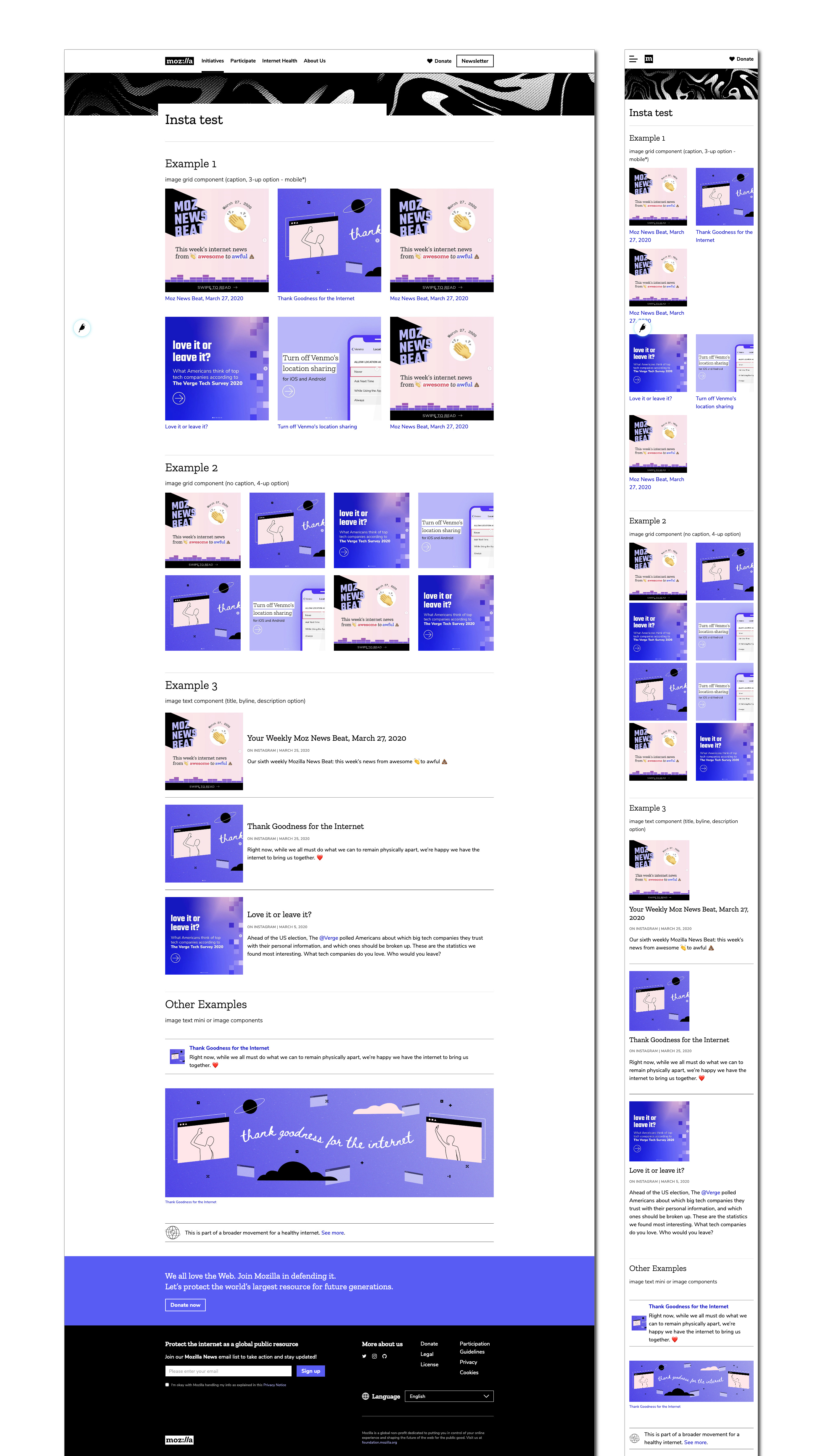
I'm leaning towards 2 / 3 depending on how Audrey is thinking about formatting these posts. Redpen here: https://redpen.io/kwdacfa61825cae479 if you want to drop comments here or there.
@kristinashu @Audreymofo any thoughts or feedback?
 sabrinang
on 2 Apr 2020
sabrinang
on 2 Apr 2020
Thanks Kristina also for creating the Moz News Beat category for the blog: https://foundation.mozilla.org/en/blog/category/moz-news-beat/
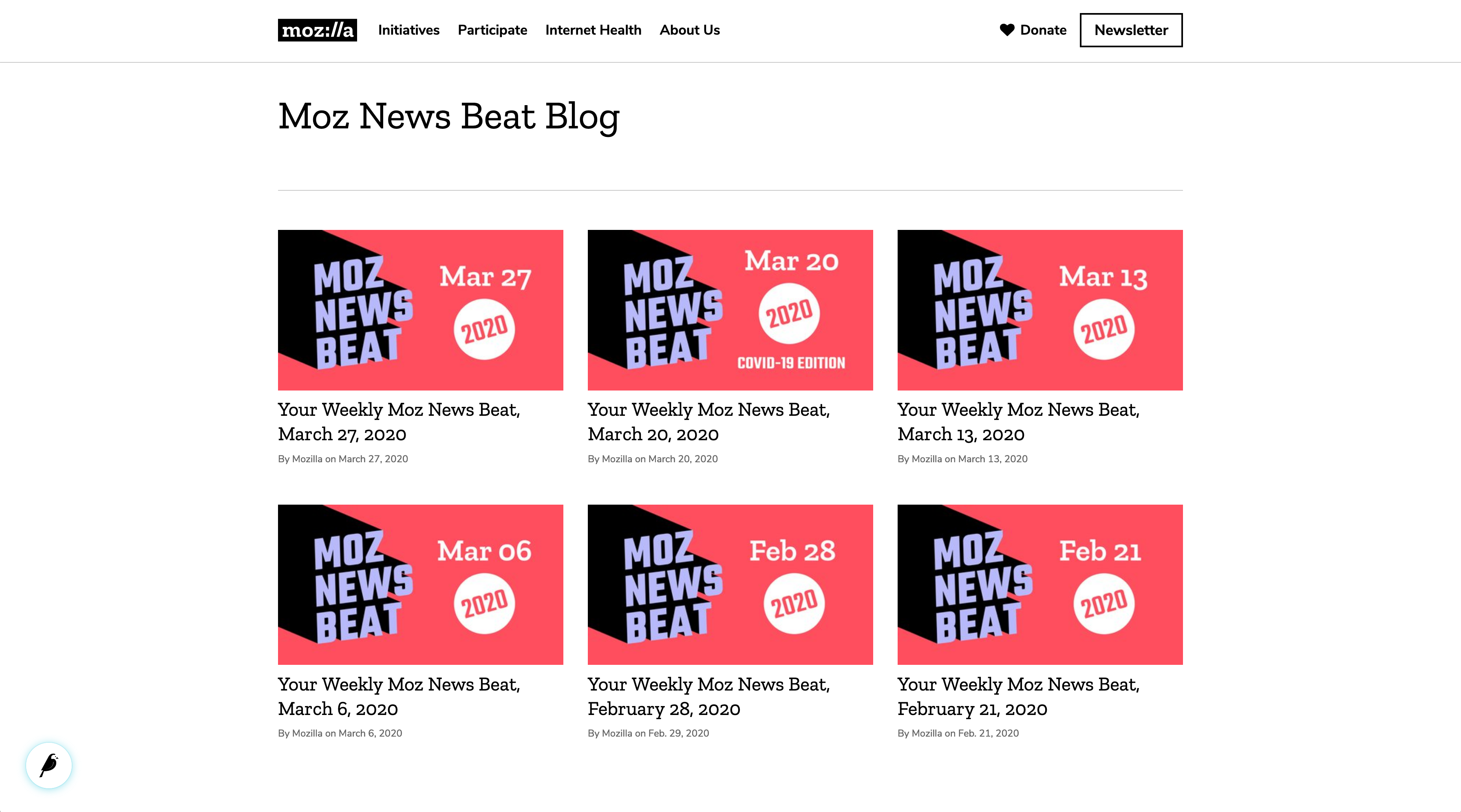
Just updating here that legal language is planned to be included and it'll be in the curatorial guideline piece formatted as a blog post itself to be placed by the bottom(so it does not sit on the top of the page). @caltrider is working on language for the top of the page and curatorial guidelines (to include legal stuff).
sabrinang
on 2 Apr 2020
These are great, it's nice to see all the options! The bannered campaign page template you used would allow us to have a newsletter signup on the side if we want. If we don't need the signup, or it's just too busy, then we _could_ use the regular Opportunity template.
kristinashu
on 3 Apr 2020
Thanks Sabrina! Since most people will see the Instagram link on their
mobiles, I'd like to prioritise how it looks there - and I agree, while I
prefer the grid that mirrors Insta, it looks bad on mobile.
Unless it's possible to make the grid three-across on mobile, my second
favourite option is example 3 which looks nice both on desktop and mobile
and, as you say, has the added benefit of adding text. Should we go with
that one?
On Fri, Apr 3, 2020 at 12:23 AM Kristina notifications@github.com wrote:
These are great, it's nice to see all the options! The bannered campaign
page template you used would allow us to have a newsletter signup on the
side if we want. If we don't need the signup, or it's just too busy, then
we could use the regular Opportunity template.—
You are receiving this because you were mentioned.
Reply to this email directly, view it on GitHub
https://github.com/mozilla/foundation.mozilla.org/issues/4375#issuecomment-608143133,
or unsubscribe
https://github.com/notifications/unsubscribe-auth/AOPDQKCYSG6YIQTL6H3BP5LRKUNAZANCNFSM4LPUNFMA
.
--
Audrey Hingle
+44 (0) 7738 095865
 Audreymofo
on 3 Apr 2020
Audreymofo
on 3 Apr 2020
I'm just realizing the grid options will be tricky to update. When we add a new post to the top row it will mess up the number of images in that row. So Example 3 is probably the most flexible.
kristinashu
on 3 Apr 2020
@Audreymofo @kristinashu I iterated on example 3 in redpen framed in various ways:
- bannered page with email snippet
- bannered page without email snippet
- opportunity page (no banner)
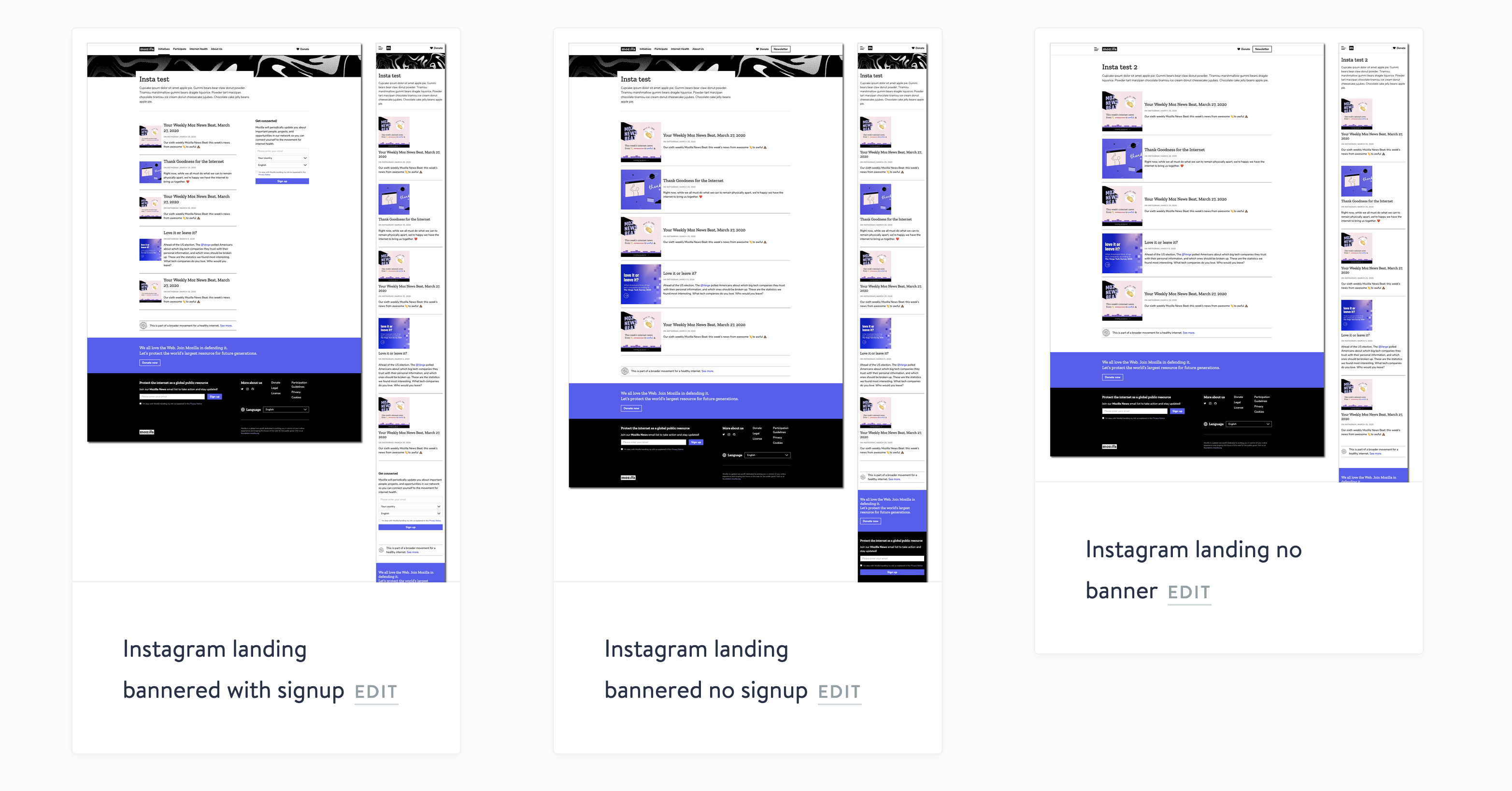
Do we want to highlight email here? Do you prefer a top banner or none? What intro copy do you want include?
sabrinang
on 3 Apr 2020
Nice, thank you Sabs! Looks wise, I like the opportunity page (no banner) version but it's up to you and Audrey. If we went with that version then we could put the newsletter signup link in the intro text, similar to what Jen did for the News Beat blog page.
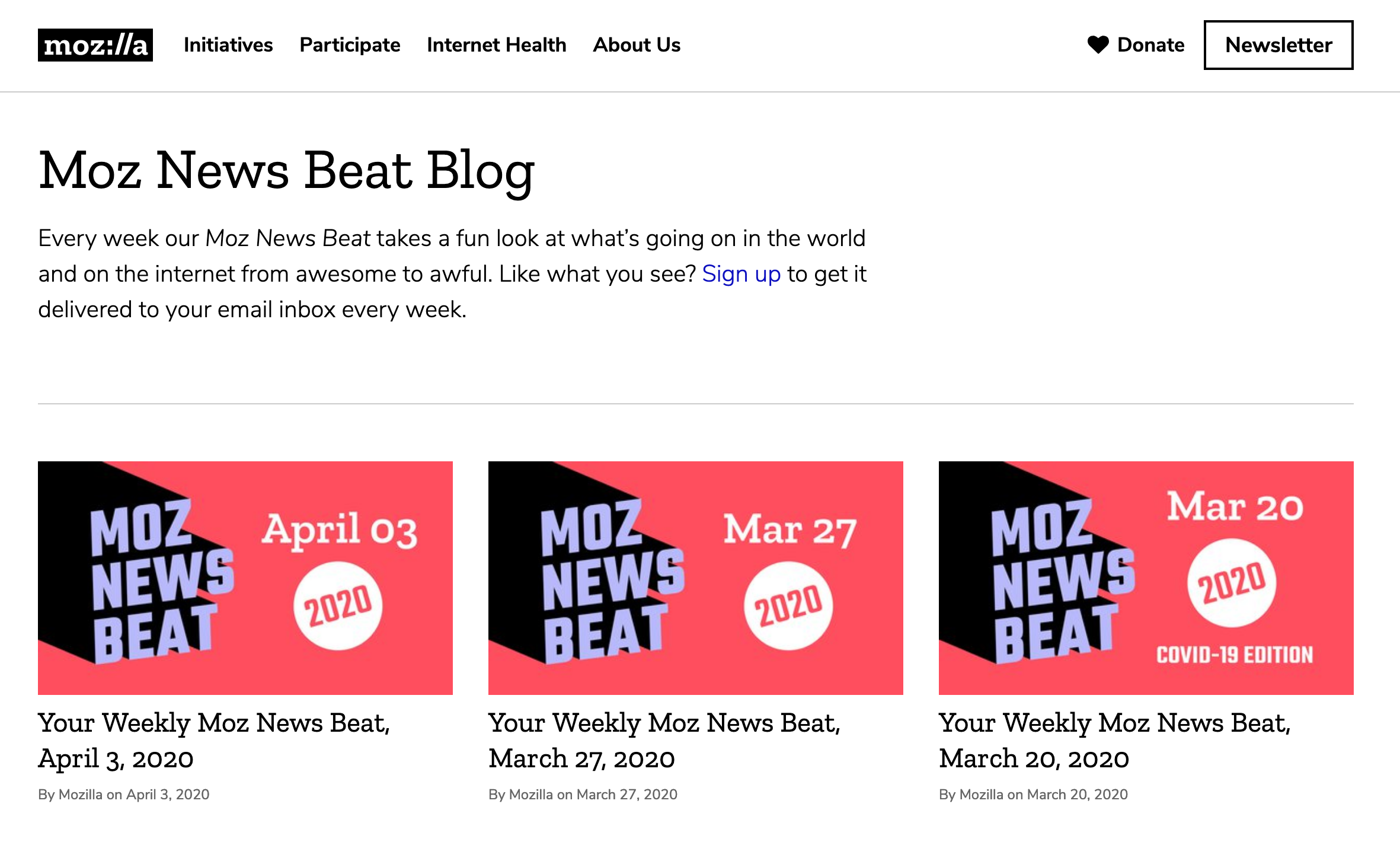
kristinashu
on 4 Apr 2020
Let’s go with the opportunity page no banner version. I think it looks best on mobile.
At the top, can we say
Click on the image to read the full story. Want more from Mozilla? Subscribe to our newsletter or follow us on Twitter.
Sent from my iPhone
On 3 Apr 2020, at 23:08, Kristina notifications@github.com wrote:
Nice, thank you Sabs! Looks wise, I like the opportunity page (no banner) version but it's up to you and Audrey. If we went with that version then we could put the newsletter signup link in the intro text, similar to what Jen did for the News Beat blog page.—
You are receiving this because you were mentioned.
Reply to this email directly, view it on GitHub, or unsubscribe.
Audreymofo
on 6 Apr 2020
@Audreymofo I updated the Instagram landing page as draft on production cms: https://foundation.mozilla.org/cms/pages/815/edit/preview/
Redpen here. I updated the intro copy from above and copy pasted over posts from Dec 2019. Please feel free to log-in and change the title, links currently go back to corresponding instagram post as placeholder but you'll want to edit them to link it to original source. There's two posts with placeholders as I couldn't find the image in the instagram gdrive folder and included a instagram cta at the bottom as an option.
sabrinang
on 7 Apr 2020
Thanks Sabs! Is this closable after? @sabrinang @kristinashu
natalieworth
on 7 Apr 2020
Thanks Both! I've updated the links and some of the copy - am I OK to
publish and update the link in our Instagram bio? Do we need to do anything
else?
On Tue, Apr 7, 2020 at 4:50 AM Natalie Worth notifications@github.com
wrote:
Thanks Sabs! Is this closable after? @sabrinang
https://github.com/sabrinang @kristinashu
https://github.com/kristinashu—
You are receiving this because you were mentioned.
Reply to this email directly, view it on GitHub
https://github.com/mozilla/foundation.mozilla.org/issues/4375#issuecomment-610158011,
or unsubscribe
https://github.com/notifications/unsubscribe-auth/AOPDQKCR4YJQCZZQPOZTG4LRLKPJZANCNFSM4LPUNFMA
.
--
Audrey Hingle
+44 (0) 7738 095865
Audreymofo
on 7 Apr 2020
I don't think there's anything else needed from us so whenever you're ready to publish feel free :)
sabrinang
on 7 Apr 2020
Related issues
kristinashu
·
5Comments
sabrinang
·
5Comments
taisdesouzalessa
·
5Comments
 benhohner
·
4Comments
benhohner
·
4Comments
 hannahkane
·
3Comments
hannahkane
·
3Comments