Foundation-emails: Error while inlining for production
Hello,
I have created a new project with ink mail. All is good while running npm start but when I try to run npm run build, build fail 😢
Previous projects were running fine. Here are the version used in this project :
- MAC OS El Capitan 10.11.6
- Node 5.1.1
- NPM 3.7.2
- Foundation CLI 2.1.0
- Foundation Email 2.2.1
And the log from NPM
npm-debug.txt
Bonus track, debug from terminal:
'sass' errored after 5.03 s
Error in plugin 'gulp-uncss'
Message:
    Unexpected EOF
Details:
    domainEmitter: [object Object]
    domain: [object Object]
    domainThrown: false
Any help would be appreciated :D
 peacepostman
All 21 comments
Update
When commenting this code :
    .pipe($.if(PRODUCTION, $.uncss(
      {
        html: ['dist/**/*.html']
      })))
Everything works fine :/
peacepostman
on 22 Nov 2016
@peacepostman that worked for me. Any idea why this is causing the build to fail?
 josefarrugia
on 29 Nov 2016
josefarrugia
on 29 Nov 2016
I'm getting a similar problem but mine is saying:
`[11:36:51] 'sass' errored after 18 s
[11:36:51] Error in plugin 'gulp-uncss'
Message:
_RegisterApplication(), FAILED TO establish the default connection to the WindowServer, _CGSDefaultConnection() is NULL.
Details:
domainEmitter: [object Object]
domain: [object Object]
domainThrown: false
`
 nitrokevin
on 30 Nov 2016
nitrokevin
on 30 Nov 2016
@nitrokevin have you tried updating your version of node? Once done, delete your node_modules directory and do a npm install.
josefarrugia
on 30 Nov 2016
Yep I updated and started from scratch but the problem was the same
nitrokevin
on 30 Nov 2016
I'm also seeing the same error as the original poster. (Starting from scratch with a new project via foundation new --framework emails just a few hours ago.)
 zacwasielewski
on 30 Nov 2016
zacwasielewski
on 30 Nov 2016
I had the same issue and was able to fix it. It ended up being a strange whitespace character in my html. I had to keep deleting portions of my html to narrow it down to a specific line.
 mrwade
on 9 Feb 2017
mrwade
on 9 Feb 2017
@mrwade Was this in the HTML itself, like with a specific tag, or was it something in an scss file somewhere?
 davehoran
on 9 Feb 2017
davehoran
on 9 Feb 2017
It was in some text (in the html) that I had copied and pasted in from somewhere else. After hunting down the weird whitespace character (not visible in my editor) and removing it, the build was able to complete successfully.
mrwade
on 10 Feb 2017
Yes to weird characters. Over here we've increasingly been finding weird characters coming in when copying from Sketch or Zeplin or Google Docs or Word. After a lot of pain, I finally found StringEncode for Sublime: https://packagecontrol.io/packages/StringEncode
This package allows you to highlight a block of text, then hit "Safe HTML Entitize" - it will catch any special characters and convert them to their HTML code.
It is an extremely useful package for finding "weird characters" that are breaking your build process, or showing up funny on certain OS / Browser combinations.
 Jon-Westbrook
on 1 Mar 2017
Jon-Westbrook
on 1 Mar 2017
I can confirm, that this problem was caused by weird characters (unicode 2028) in my html files.
 michalchovanak
on 22 May 2017
michalchovanak
on 22 May 2017
I can confirm it too, in my configuration the weird character was caused by copy/paste from sketch.
peacepostman
on 22 May 2017
In my case, the issue seems to be caused by the version of node that I'm using.
Doing some more tests over here. node -v v8.6.0
0 info it worked if it ends with ok
1 verbose cli [ '/Users/renatocarvalho/.nvm/versions/node/v8.6.0/bin/node',
1 verbose cli   '/Users/renatocarvalho/.nvm/versions/node/v8.6.0/bin/npm',
1 verbose cli   'run',
1 verbose cli   'build' ]
2 info using [email protected]
3 info using [email protected]
4 verbose run-script [ 'prebuild', 'build', 'postbuild' ]
5 info lifecycle [email protected]~prebuild: [email protected]
6 info lifecycle [email protected]~build: [email protected]
7 verbose lifecycle [email protected]~build: unsafe-perm in lifecycle true
8 verbose lifecycle [email protected]~build: PATH: /Users/renatocarvalho/.nvm/versions/node/v8.6.0/lib/node_modules/npm/bin/node-gyp-bin:/Users/renatocarvalho/Development/evino-mailing/node_modules/.bin:/Users/renatocarvalho/.rvm/gems/ruby-2.4.2/bin:/Users/renatocarvalho/.rvm/gems/ruby-2.4.2@global/bin:/Users/renatocarvalho/.rvm/rubies/ruby-2.4.2/bin:/Users/renatocarvalho/.nvm/versions/node/v8.6.0/bin:/usr/local/bin:/usr/bin:/bin:/usr/sbin:/sbin:/Users/renatocarvalho/.rvm/bin
9 verbose lifecycle [email protected]~build: CWD: /Users/renatocarvalho/Development/evino-mailing
10 silly lifecycle [email protected]~build: Args: [ '-c', 'gulp --production' ]
11 silly lifecycle [email protected]~build: Returned: code: 1  signal: null
12 info lifecycle [email protected]~build: Failed to exec build script
13 verbose stack Error: [email protected] build: `gulp --production`
13 verbose stack Exit status 1
13 verbose stack     at EventEmitter.<anonymous> (/Users/renatocarvalho/.nvm/versions/node/v8.6.0/lib/node_modules/npm/lib/utils/lifecycle.js:289:16)
13 verbose stack     at emitTwo (events.js:125:13)
13 verbose stack     at EventEmitter.emit (events.js:213:7)
13 verbose stack     at ChildProcess.<anonymous> (/Users/renatocarvalho/.nvm/versions/node/v8.6.0/lib/node_modules/npm/lib/utils/spawn.js:40:14)
13 verbose stack     at emitTwo (events.js:125:13)
13 verbose stack     at ChildProcess.emit (events.js:213:7)
13 verbose stack     at maybeClose (internal/child_process.js:927:16)
13 verbose stack     at Process.ChildProcess._handle.onexit (internal/child_process.js:211:5)
14 verbose pkgid [email protected]
15 verbose cwd /Users/renatocarvalho/Development/evino-mailing
16 verbose Darwin 17.0.0
17 verbose argv "/Users/renatocarvalho/.nvm/versions/node/v8.6.0/bin/node" "/Users/renatocarvalho/.nvm/versions/node/v8.6.0/bin/npm" "run" "build"
18 verbose node v8.6.0
19 verbose npm  v5.3.0
20 error code ELIFECYCLE
21 error errno 1
22 error [email protected] build: `gulp --production`
22 error Exit status 1
23 error Failed at the [email protected] build script.
23 error This is probably not a problem with npm. There is likely additional logging output above.
24 verbose exit [ 1, true ]
 renatocarvalho
on 4 Oct 2017
renatocarvalho
on 4 Oct 2017
Do you have a virtual machine to try an older version of node?
On Oct 4, 2017 4:16 PM, "Renato Carvalho" notifications@github.com wrote:
In my case, the issue seems to be caused by the version of node that I'm
using.Doing some more tests over here. node -v v8.6.0
1 verbose cli [ '/Users/renatocarvalho/.nvm/versions/node/v8.6.0/bin/node',
1 verbose cli '/Users/renatocarvalho/.nvm/versions/node/v8.6.0/bin/npm',
1 verbose cli 'run',
1 verbose cli 'build' ]
2 info using [email protected]
3 info using [email protected]
4 verbose run-script [ 'prebuild', 'build', 'postbuild' ]
5 info lifecycle [email protected]~prebuild: [email protected]
6 info lifecycle [email protected]~build: [email protected]
7 verbose lifecycle [email protected]~build: unsafe-perm in lifecycle true
8 verbose lifecycle [email protected]~build: PATH: /Users/renatocarvalho/.nvm/versions/node/v8.6.0/lib/node_modules/npm/bin/node-gyp-bin:/Users/renatocarvalho/Development/evino-mailing/node_modules/.bin:/Users/renatocarvalho/.rvm/gems/ruby-2.4.2/bin:/Users/renatocarvalho/.rvm/gems/ruby-2.4.2@global/bin:/Users/renatocarvalho/.rvm/rubies/ruby-2.4.2/bin:/Users/renatocarvalho/.nvm/versions/node/v8.6.0/bin:/usr/local/bin:/usr/bin:/bin:/usr/sbin:/sbin:/Users/renatocarvalho/.rvm/bin
9 verbose lifecycle [email protected]~build: CWD: /Users/renatocarvalho/Development/evino-mailing
10 silly lifecycle [email protected]~build: Args: [ '-c', 'gulp --production' ]
11 silly lifecycle [email protected]~build: Returned: code: 1 signal: null
12 info lifecycle [email protected]~build: Failed to exec build script
13 verbose stack Error: [email protected] build:gulp --production
13 verbose stack Exit status 1
13 verbose stack at EventEmitter.(/Users/renatocarvalho/.nvm/versions/node/v8.6.0/lib/node_modules/npm/lib/utils/lifecycle.js:289:16)
13 verbose stack at emitTwo (events.js:125:13)
13 verbose stack at EventEmitter.emit (events.js:213:7)
13 verbose stack at ChildProcess.(/Users/renatocarvalho/.nvm/versions/node/v8.6.0/lib/node_modules/npm/lib/utils/spawn.js:40:14)
13 verbose stack at emitTwo (events.js:125:13)
13 verbose stack at ChildProcess.emit (events.js:213:7)
13 verbose stack at maybeClose (internal/child_process.js:927:16)
13 verbose stack at Process.ChildProcess._handle.onexit (internal/child_process.js:211:5)
14 verbose pkgid [email protected]
15 verbose cwd /Users/renatocarvalho/Development/evino-mailing
16 verbose Darwin 17.0.0
17 verbose argv "/Users/renatocarvalho/.nvm/versions/node/v8.6.0/bin/node" "/Users/renatocarvalho/.nvm/versions/node/v8.6.0/bin/npm" "run" "build"
18 verbose node v8.6.0
19 verbose npm v5.3.0
20 error code ELIFECYCLE
21 error errno 1
22 error [email protected] build:gulp --production
22 error Exit status 1
23 error Failed at the [email protected] build script.
23 error This is probably not a problem with npm. There is likely additional logging output above.
24 verbose exit [ 1, true ]—
You are receiving this because you commented.
Reply to this email directly, view it on GitHub
https://github.com/zurb/foundation-emails/issues/637#issuecomment-334276212,
or mute the thread
https://github.com/notifications/unsubscribe-auth/AAnKJJszBq_QP5FXVObFO4gO6XvDgRBhks5so-eagaJpZM4K5JEy
.
davehoran
on 5 Oct 2017
I used this online tool to fix my non-ascii characters.
 Pamps
on 28 Apr 2018
Pamps
on 28 Apr 2018
Thanks @Pamps that's a really useful tool finding the invisible non-ascii characters!
 simonda86
on 1 Mar 2019
simonda86
on 1 Mar 2019
I used this online tool to fix my non-ascii characters.
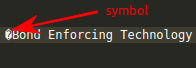
I've just found and removed all that symbols in my HTML code.
And error has solved
 Andrew-Dyachenko
on 20 May 2019
Andrew-Dyachenko
on 20 May 2019
If you're using VS Code, and running into bad character issues, I recommend using the extension "Highlight Bad Chars": https://marketplace.visualstudio.com/items?itemName=wengerk.highlight-bad-chars .
I configured this extension to always highlight bad characters with an obnoxious pink color that is impossible to miss. Works great, you see them right away, and can convert them to an HTML equivalent.
Jon-Westbrook
on 20 May 2019
Yes, I'm. Thank U for lifehack. Installed it now.
Andrew-Dyachenko
on 20 May 2019
const clean = require('gulp-clean');
function mergeCss(){
folders.map((element) => {
return src(
[
template/${element}/assets/**/css.css,
template/${element}/assets/**/index.css,
template/${element}/assets/**/cart.css,
template/${element}/assets/**/webfont.css,
'template/**/lazyloaded.css'])
.pipe(concatCss("/assets/css.css"))
.pipe(print())
.pipe(dest(out/${element}));
})
}
The merged css error is as follows
domainEmitter: [object Object]
domain: [object Object]
domainThrown: false
css annotation problem ( /color: #fff/;)
.footer_a h4 { margin-top: 0px; font-weight: 400; font-size: 14px; text-transform: uppercase; /color: #fff/; margin-bottom: 30px; }
Solve the problem Remove css comments
.footer_a h4 { margin-top: 0px; font-weight: 400; font-size: 14px; text-transform: uppercase; color: #fff margin-bottom: 30px; }
 sbuteryd
on 25 Dec 2019
sbuteryd
on 25 Dec 2019
Hi @sbuteryd,
this is about another issue.
 DanielRuf
on 25 Dec 2019
DanielRuf
on 25 Dec 2019
Related issues
 tayvano
·
5Comments
tayvano
·
5Comments
 matchatype
·
3Comments
matchatype
·
3Comments
 LyLuX
·
5Comments
LyLuX
·
5Comments
 seansmyth
·
5Comments
seansmyth
·
5Comments
 frecklebit
·
5Comments
frecklebit
·
5Comments
Most helpful comment
Yes to weird characters. Over here we've increasingly been finding weird characters coming in when copying from Sketch or Zeplin or Google Docs or Word. After a lot of pain, I finally found StringEncode for Sublime: https://packagecontrol.io/packages/StringEncode
This package allows you to highlight a block of text, then hit "Safe HTML Entitize" - it will catch any special characters and convert them to their HTML code.
It is an extremely useful package for finding "weird characters" that are breaking your build process, or showing up funny on certain OS / Browser combinations.