Foundation-emails: Partials in subfolders?
If I need to have some partials in a subfolder of the /partials/ folder, how do you reference them in the index.html?
For example, say I have this partial:
/partials/campaigns/thankyou/hero.html
If I do this in the main page:
{{> campaigns\thankyou\hero}}
and run npm run build, I get a Panini rendering error (the partial could not be found).
It would be of great help if this was possible, so that one could organize campaign-specific partials separate from the standard/base modules of their template. (think of it like having campaign-specific partials folders, where you need to duplicate an existing partial, but customize it to that specific campaign)
 cossssmin
All 16 comments
You can access the partial with just the file name. So even though your partial is here /partials/campaigns/thankyou/hero.html you can access it with this {{> hero}}
 rafibomb
on 21 Jul 2016
rafibomb
on 21 Jul 2016
Sorry, this does not work.
I had another hero.html in the root of partials, so just to avoid conflicts, I did this:
- create a partial at:
partials/testcampaign/hero2.html - use
{{> hero2}}to access it in theindex.htmlpage
Browser reloads, Panini returns this error:

None of these work, either:
{{> campaign/hero2}}{{> "campaign/hero2"}}{{> campaign\hero2}}{{> "campaign\hero2"}}
Virtually no way of specifying the path, that I can think of, works. Panini always errors out.
cossssmin
on 21 Jul 2016
currently I fix my partial naming specific suffixes:
campaign1_hero2.html, campaign2_hero2.html
accept subfolders but never repeat the name of a partial.
but I'd love to use: {{> "campaign1\hero2"}}, {{> "campaign2\hero2"}}
 ralts00
on 26 Jul 2016
ralts00
on 26 Jul 2016
@hellocosmin I'm not able to reproduce your bug either. @rafibomb's solution works for me as well.
Here's a test structure:
--partials
----author
----rafi.html
------test
--------tim.html
Then I brought them in using {{> rafi.html}} and {{> tim.html}}.
Both are rendering as expected.
Going to close this down here. If you're still seeing issues. Looks like we'll be taking a look at this PR soon which might handle your use case: https://github.com/zurb/panini/pull/73
Thanks!
 tdhartwick
on 15 Sep 2016
tdhartwick
on 15 Sep 2016
I don't understand why this was closed, as this wouldn't work if the partial has the same name, so if I have
src/partials/text-01
src/partials/01-feb/text-01
src/partials/02-feb/text-01
There is no way to target the 02-feb one for example and yes I could re-name to text-02 but this is not what is needed here.
Can we not use a folder structure with partials?
 nick-bettondesign
on 2 Feb 2017
nick-bettondesign
on 2 Feb 2017
+1
 ivanbanov
on 1 Dec 2017
ivanbanov
on 1 Dec 2017
@tdhartwick Do we have an answer for this yet? still unsure as to why this was closed when the answer was never actually solved or even answered.
Like I have stated above if the partial has the same name
src/partials/text-01.html
src/partials/newsletter/text-01.html
There is no way to target the newsletter/text-01.html partial for example.
Can we not use a folder structure that is useful with partials?
nick-bettondesign
on 1 Dec 2017
@nick-bettondesign now I'm using the version 2.0.0-alpha.2 with Gulp and it's working well.
Branch https://github.com/zurb/panini/tree/v2.0
There is a issue with the discussion and the commit with the solution
https://github.com/zurb/panini/issues/22#issuecomment-294207840
Also, here is my Gulp task for templates, maybe it can help
const panini = require('panini/gulp');
const inky = require('inky');
const $ = require('gulp-load-plugins')();
const { browserSync } = require('./server');
const { ifEnv } = require('../envs');
const { CSS_INJECT_PLACEHOLDER } = require('./style-inliner');

// Use Panini.create to make refrsh possible
// https://github.com/zurb/panini/issues/45#issuecomment-313451499
function task() {
  const relativeTemplatesPath = `${__dirname}/src`.replace(/.*src\//, './src/');
  const paniniInstance = panini.create();

  return paniniInstance(relativeTemplatesPath, {
      pageLayouts: {
        default: 'default',
        marketing: 'marketing'
      }
    })
    .pipe(ifEnv.dev(() =>
      $.changedInPlace({
        firstPass: true
      })
    ))
    .pipe(ifEnv.dev($.plumber))
    .pipe(inky())
    .pipe($.replace(
      CSS_INJECT_PLACEHOLDER,
      `
        ${CSS_INJECT_PLACEHOLDER}
        <link rel="stylesheet" type="text/css" href="../styles.css">
      `
    ))
    .pipe($.rename({
      extname: ".html"
    }))
    .pipe(gulp.dest(PATHS.dir.dist.base))
    .pipe(browserSync.stream());
}
Folder structure
|_ src
  |_ pages
  |_ partials
    |_ default
      |_ footer.hbs
    |_ marketing
      |_ header.hbs
The just use in your templates
{{> marketing/header }}
{{> default/footer }}
@ivanbanov but this still wouldn't allow you to have
|_ default
      |_ header.hbs
 |_ marketing
      |_ header.hbs
and then if you wanted to use marketing > header.hbs it would just give you the default > header.hbs
nick-bettondesign
on 3 Jan 2018
This is especially tricky and annoying when you have support for multiple languages..
inside the pages we have folders that are named en, pt, de, da, etc.. and it only makes sense to have the same structure inside the partials with all the files inside those folders with exactly the same name. This issue has to be reopened...
 lipis
on 29 Jan 2018
lipis
on 29 Jan 2018
@nick-bettondesign yeah, it allows, Im using it without problems
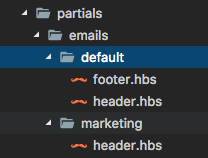
and the render is exactly what I'm expecting
ivanbanov
on 29 Jan 2018
@ivanbanov but this is the same header.hbs file with same content - if you wanted different content but to use the same partial for structure it would use the first header.hbs that it comes to.
Therefor if you removed the header.hbs under marketing but still call it {{> header}} it will still work so the seconded header.hbs is not needed in your example.
nick-bettondesign
on 30 Jan 2018
@lipis: Like you, I have separate emails set up for different languages. Here's how I've worked around the challenges that presents without using separate partials:
- Added a language variable to the yaml section of each email:
---
lang: en
---
- Set up a few common translations in a file called
data/translations.yml. Basically, I created an ID for the type of text I'm trying to pull:
- lang: en
  btn-plan: 'Choose Your Plan'
  btn-email: 'Email Us!'
- lang: es
  btn-plan: 'Elija Su Plan'
  btn-email: 'Correo Electrónico'
- Created a translate.hbs mixin that my templates and partials can pull from. This particular mixin only translates two types buttons at the moment...but could easily be modified to add more options:
{{~#each translations~}}
    {{~#ifequal this.lang ../email.lang~}}
        {{~#switch ../text~}}
            {{~#case "btn-plan"~}}
                {{~this.btn-plan~}}
            {{~/case~}}
            {{~#case "btn-email"~}}
                {{~this.btn-email~}}
            {{~/case~}}
        {{/switch}}
    {{~/ifequal~}}
{{~/each~}}
The tilde (~) characters are used for collapsing the whitespace.
Note: I originally referenced this article to help me figure out that mixin.
This allowed me to insert code like this into my templates. I'm passing the ID of the element that I want to translate:
<button target="_blank" href="{{btnLink}}" class="large radius m-b-0">{{~> translate text='btn-plan' ~}}</button>
Not sure if that's the most efficient way to do everything, but it works. Handlebars and yaml are really irritating code to deal with.
 callaginn
on 9 Feb 2018
callaginn
on 9 Feb 2018
Thanks for the reply.. but we ended up using the v2 and it works nicely.. (except the autorefresh for partials).. the project is open sourced so you can take ideas from there.. https://github.com/wireapp/wire-emails
The translations are also done automatically via Crowdin
lipis
on 10 Feb 2018
@lipis , huge thanks! I've taken a look at your changes, and even was able to fix auto refresh for partials. Now everything works nicely indeed :)
All necessary changes are here: https://github.com/zurb/foundation-emails-template/pull/57
 zetorama
on 13 May 2019
zetorama
on 13 May 2019
Using handlebars and express I managed to get partials to show in sub folders by adding lines in the server.js file about where the partials are located.
```
hbs.registerPartials(__dirname + '/views/partials/headers'); //Designates partial subfolder
hbs.registerPartials(__dirname + '/views/partials/footers'); //Designates partial subfolder
hbs.registerPartials(__dirname + '/views/partials/'); //Designates where partials are
 masparasol
on 25 Apr 2020
masparasol
on 25 Apr 2020
Related issues
 jasonmarkle
·
4Comments
jasonmarkle
·
4Comments
 andreimoment
·
4Comments
andreimoment
·
4Comments
 camaech
·
5Comments
camaech
·
5Comments
 LyLuX
·
5Comments
LyLuX
·
5Comments
 dnglr
·
5Comments
dnglr
·
5Comments
Most helpful comment
I don't understand why this was closed, as this wouldn't work if the partial has the same name, so if I have
src/partials/text-01
src/partials/01-feb/text-01
src/partials/02-feb/text-01
There is no way to target the 02-feb one for example and yes I could re-name to text-02 but this is not what is needed here.
Can we not use a folder structure with partials?