Forem: UI Regression: title input box clips text
Describe the bug
Can you please look into this regression on the UI? I'm using Chrome (latest) for Windows 10 and the text box for the title is clipped.

To Reproduce
Expected behavior
No clipped text
Screenshots
Desktop (please complete the following information):
- OS, version: Windows 10
- Browser, version: Chrome 84 (latest)
Smartphone (please complete the following information):
- Device:
- OS, version:
- Browser, version:
Additional context
Suggested fix: the textarea box with class "crayons-textfield" has height set to 27px. Removing that attribute fixed the sizing for me. (perhaps using an absolute arbitrary pixels is not properly sizing the box on different platforms)
 richardeschloss
All 24 comments
Thanks for the issue! We'll take your request into consideration and follow up if we decide to tackle this issue.
To our amazing contributors: issues labeled type: bug are always up for grabs, but for feature requests, please wait until we add a ready for dev before starting to work on it.
To claim an issue to work on, please leave a comment. If you've claimed the issue and need help, please ping @forem/oss and we will follow up within 3 business days.
For full info on how to contribute, please check out our contributors guide.
![github-actions[bot] picture](https://avatars2.githubusercontent.com/in/15368?v=4&s=40) github-actions[bot]
on 31 Aug 2020
github-actions[bot]
on 31 Aug 2020
Hey @richardeschloss , thanks for the report. It definitely should not look like this. Since I can't repro that bug on my local (or prod) environment, would you mind helping me out a little with this?
- Make sure you do hard refresh - maybe there's some caching issue there.
- If that doesn't help, can you open Developer Tools in Chrome? You should be able to do so with CTRL+ALT+I on Windows (I think...)
- There will be a tab called "Console" - could you check if there are any errors reported?
Also, if you have an option, are you able to test that also on other browsers?
 ludwiczakpawel
on 1 Sep 2020
ludwiczakpawel
on 1 Sep 2020
Hmm, I can repro it like this: start with the browser maximized, then unmaximize, then maximize again. It'll be clipped
Another way to repro...even with the browser maximized, switch active tabs... start on dev.to, switch to a different tab, then back to dev.to.
Refreshing the page helps make the clipping go away.
richardeschloss
on 1 Sep 2020
Hey @richardeschloss, I can't reproduce this on Windows 10, Chrome 85 :( What's your screen resolution? Also, do you see any errors in your browser console?
 Zhao-Andy
on 1 Sep 2020
Zhao-Andy
on 1 Sep 2020
Display resolution: 1366 x 768. No errors show in the console. On a 15" HP laptop, Windows 10, updated Chrome to 85, disabled all browser extension. The steps to repro are the same. I can check if my graphics drivers need updating.
richardeschloss
on 1 Sep 2020
I can't repro that either but I'll try to do it on other machines I have around.
ludwiczakpawel
on 1 Sep 2020
try reducing the browser window size... keep reducing it. I think eventually it'll show since the 27px is fixed.
richardeschloss
on 1 Sep 2020
Hmm, I see that we have the height hard-coded to 60px, so not sure where that 27px is coming from.

Is this what you see in the rendered markup @richardeschloss ?
Also, any idea why we have a height set to 60px in an inline style attribute @ludwiczakpawel ?
 nickytonline
on 1 Sep 2020
nickytonline
on 1 Sep 2020
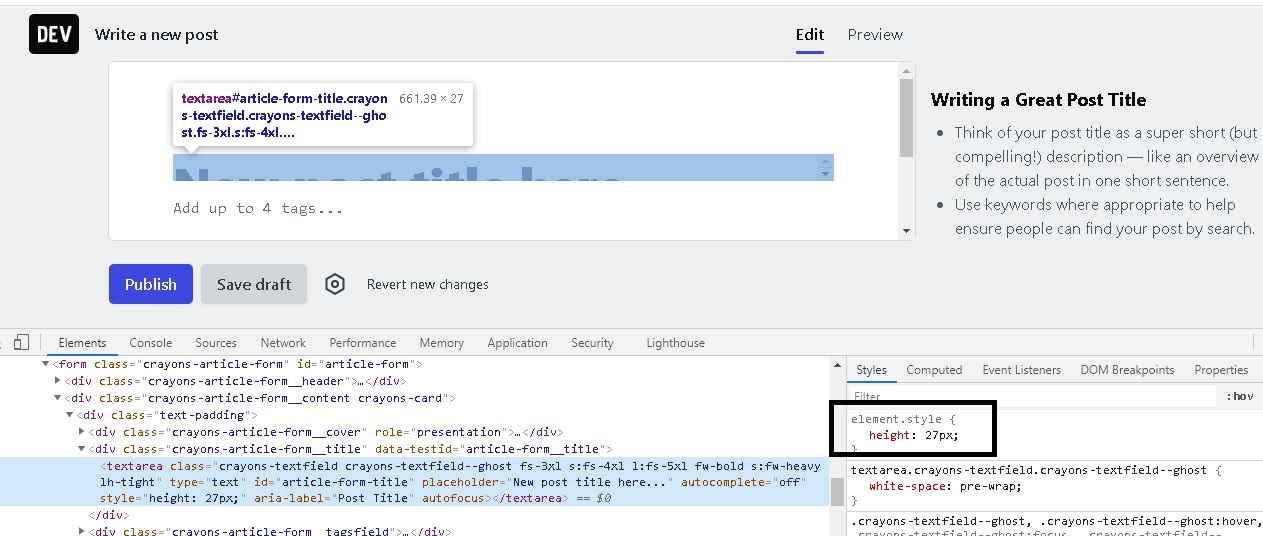
When I change the 27 to 60, the problem goes away. Also, when I remove the height attribute entirely, the problem goes away.
richardeschloss
on 1 Sep 2020
I have a feeling this is a caching issue that maybe only some users are seeing. Thoughts @rhymes
nickytonline
on 1 Sep 2020
I can't reproduce it either, but I'm also not sure how the thing works. I see the 60px only in the HTML version:
but I can't see it in the JSX component:
How does it stay there?
 rhymes
on 2 Sep 2020
rhymes
on 2 Sep 2020
@rhymes the way it works:
We load the whole "Write a post" view with .html.erb and replace it with Preact component asap - it's some sort of a trickery we do to have that "blazing fast" feeling.
In Preact version we use JS to calculate the height of the Title field - that's where '60px' is coming from - it's calculated with JS. So if the value is '27px' then it means that something is off with JS. Btw. we don't do that calculation in .html.erb version of the view because there's no point.
But why the hell do we use any JS to calculate the height of the field in the first place? That's because title is actually a textarea that can wrap text to the next line. If we used classic input it wouldn't wrap the text and entire view would look weird. (cc @nickytonline that's why height is set in style attribute - it's not hardcoded though :))
but I can't see it in the JSX component
It's another component - this is where the magic is coming from: https://github.com/forem/forem/blob/f023c6174f9706eb60249a7fe7a369817a754270/app/javascript/article-form/components/Title.jsx#L3
ludwiczakpawel
on 2 Sep 2020
So there might be a bug in that component?
ps. could you add this great explanation of yours to https://docs.dev.to/frontend/preact/ or https://docs.dev.to/faqs/ or even as inline comment in https://github.com/forem/forem/blob/f023c6174f9706eb60249a7fe7a369817a754270/app/javascript/article-form/components/Title.jsx#L3
It's a pity to keep it "buried" in a github issue :)
rhymes
on 2 Sep 2020
I'm less familiar with tailwind but...what does "lh-tight" in the className do? Does that set a line-height style to be tight and does that "tightness" interact with what the "preact-textarea-autosize" is trying to do?
richardeschloss
on 2 Sep 2020
@richardeschloss lh-tight class sets the line-height to be 1.25. It may indeed be taken into consideration while calculating height of the field but it should definitely not cause any harm to the layout, especially like you have in the screenshot...
So except some potential bug in the Textarea component I've mentioned earlier, I do have one more theory: does your machine do anything special with fonts? Have you somehow overwritten default fonts on your machine or something like that?
ludwiczakpawel
on 3 Sep 2020
For fonts, not that I can recall. I don't think I did, but I can try to remember.
richardeschloss
on 3 Sep 2020
Some more information. I made sure to uninstall LibreOffice (which is the only thing I think could have changed default fonts). I have pretty lightweight system here. Browser extensions disabled for testing.
I have some more screenshots that may help.
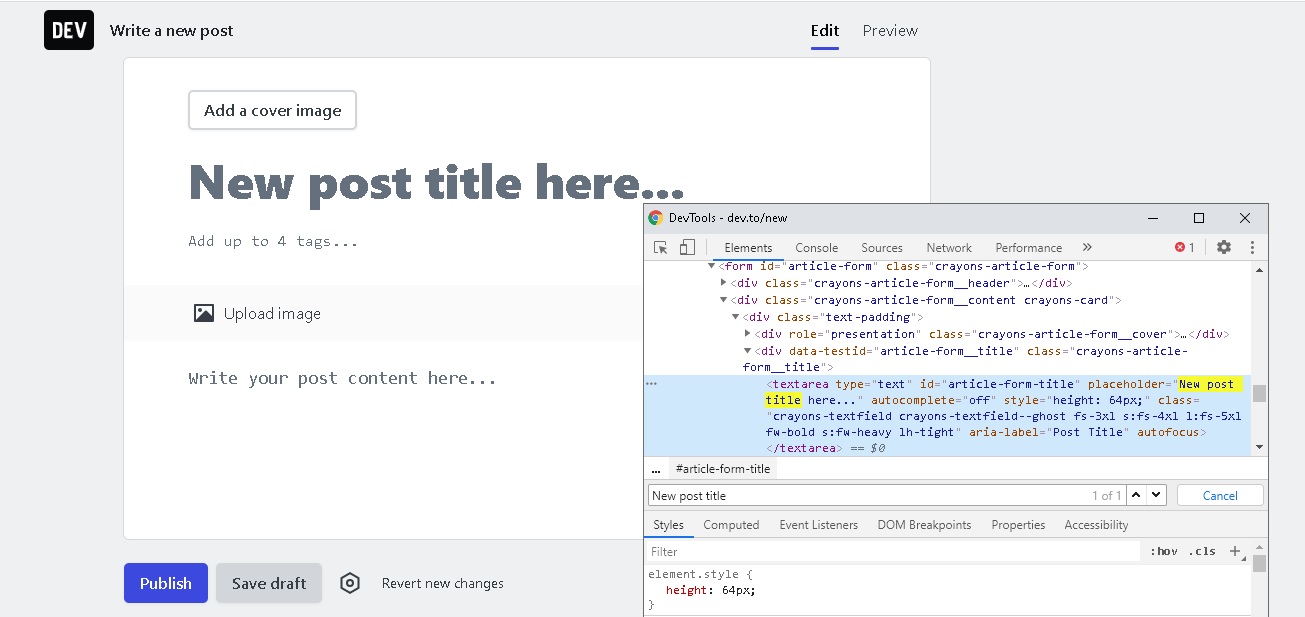
This is the view on initial page load (everything looks fine. height set to 64 px)
But then when I click on the title text area, the height changes to 27 px:
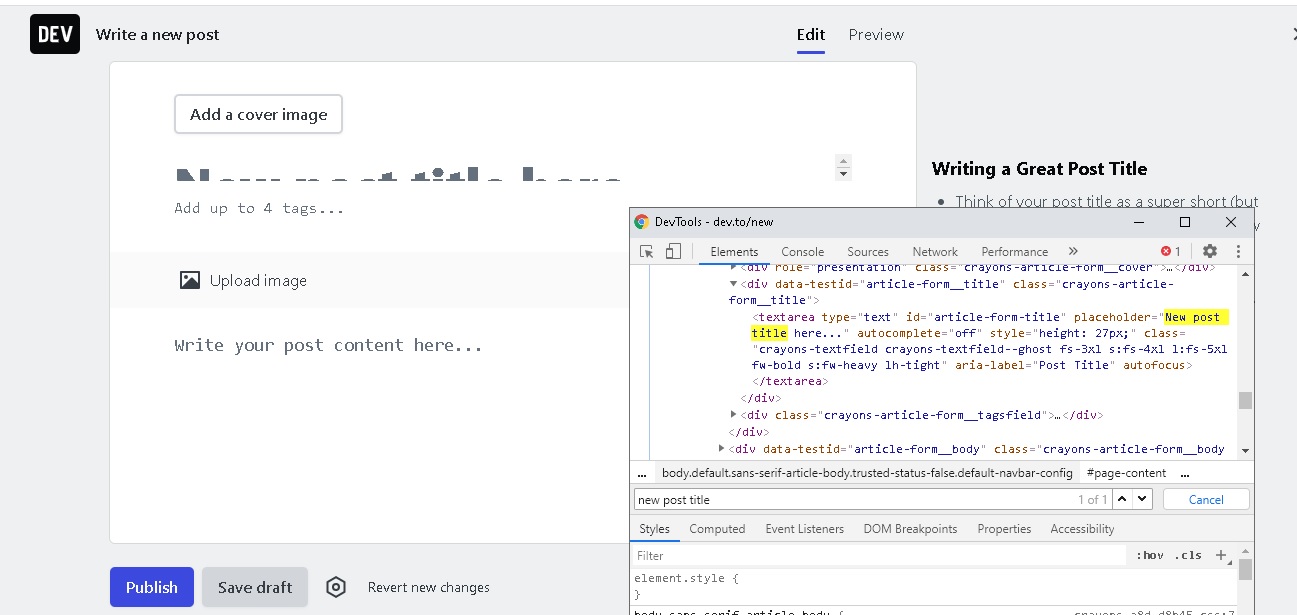
Does this help?
richardeschloss
on 4 Sep 2020
I still can't repro that bug on my local env and neither of us (other team members) can. Not sure what to do here.. 🤷♂️
ludwiczakpawel
on 9 Sep 2020
I was able to reproduce this with Firefox 80 (no extensions) on macOS Mojave #10261
Edit: Also want to add that the problem persists for me even after a hard reload.
 Coteh
on 9 Sep 2020
Coteh
on 9 Sep 2020
I have a thought...what version of the preact-textarea-autosize is being used? So, the one that's published in npm appears to point to a github repo which is 4 years old. It seems like the forked version has had more maintenance:
https://github.com/Andarist/react-textarea-autosize (fork) --> at npm at 8.2.0
https://github.com/evenius/react-textarea-autosize (npm) --> at npm at 4.0.7 (it seems like forem is on this one)
richardeschloss
on 10 Sep 2020
I have a thought...what version of the preact-textarea-autosize is being used? So, the one that's published in npm appears to point to a github repo which is 4 years old. It seems like the forked version has had more maintenance:
cc @nickytonline maybe you could help here?
ludwiczakpawel
on 10 Sep 2020
Thanks for the suggestion @richardeschloss. I'll take a peek at this.
nickytonline
on 10 Sep 2020
Same issue here.
Same env, same screen resolution.
 CrazyOptimist
on 16 Oct 2020
CrazyOptimist
on 16 Oct 2020
I can also reproduce this in Chrome 86 on a new Mac (and very unlikely to be cached). It happens when I open and close the DevTools, and when I click on the "Add up to 4 tags" or "Write your post content here" fields to move focus from the "New post title here" field. It does seem like the hardcoded height: 27px is causing it, so the solution would be to track down whatever is causing that value to update.
 marcysutton
on 18 Nov 2020
marcysutton
on 18 Nov 2020
Related issues
 ghost
·
22Comments
ghost
·
22Comments
 samfieldscc
·
21Comments
samfieldscc
·
21Comments
 omenking
·
30Comments
omenking
·
30Comments
 Gbahdeyboh
·
43Comments
Gbahdeyboh
·
43Comments
 mstruve
·
42Comments
mstruve
·
42Comments
Most helpful comment
Thanks for the suggestion @richardeschloss. I'll take a peek at this.