Forem: Images in emails are not responsive in Gmail
Describe the bug
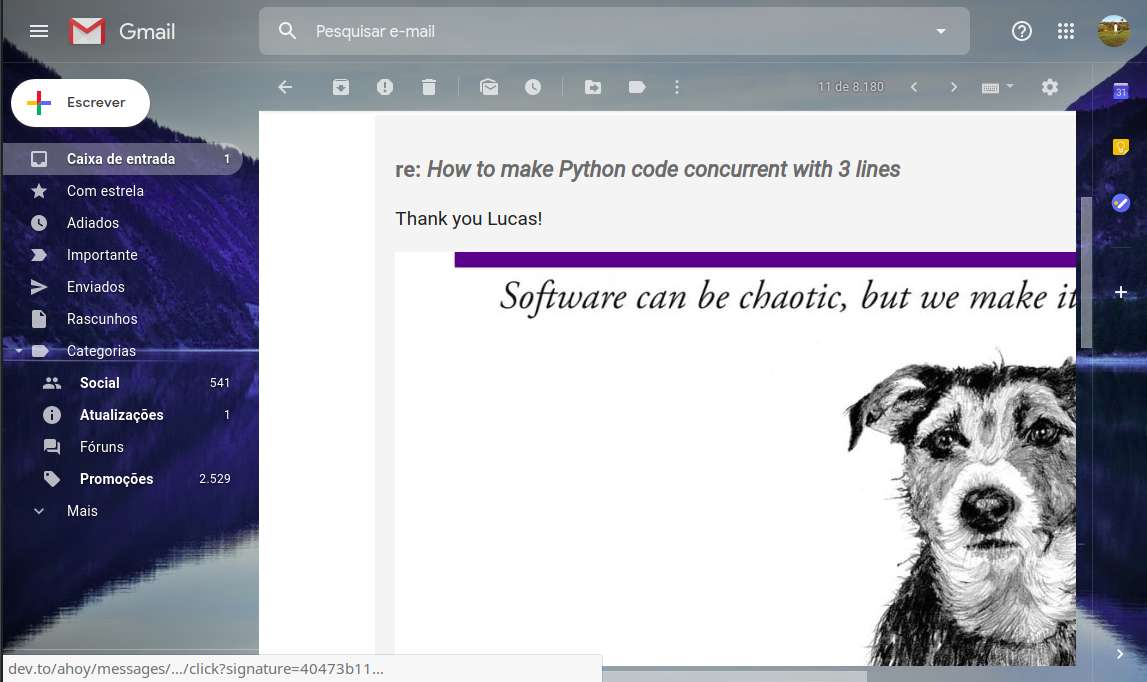
Images in comment notification emails can be large and not display in a scaled manor.
To Reproduce
Steps to reproduce the behavior:
- Comment on a post.
- Have someone else reply to your comment with an embedded image.
- Look at the comment notification email in Gmail on the web.
Expected behavior
I would expect that the image would be no wider than the width of the displayed email.
Screenshots

Desktop (please complete the following information):
- OS: Ubuntu 18.10
- Browser: Chrome
- Version: 71.0.3578.98 (Official Build) beta (64-bit)
Additional context
The particular comment I was notified about: https://dev.to/rhymes/comment/7kna
Potential solutions: https://stackoverflow.com/questions/10711638/how-to-dynamically-resize-an-image-inside-an-email-client
 abraham
All 23 comments
Thanks for the detailed issue!
 pkfrank
on 23 Dec 2018
pkfrank
on 23 Dec 2018
From what I can tell the email is just the comment in its raw form.
Which on the website is styled the CSS but it's not inline so doesn't make it to the email.
 Link2Twenty
on 3 Jan 2019
Link2Twenty
on 3 Jan 2019
Thanks for contributing to this issue. As it has been 90 days since the last activity, we are automatically closing the issue in 7 days. This is often because the request was already solved in some way and it just wasn't updated or it's no longer applicable. If this issue still requires attention, please respond with a comment. Happy Coding!
![stale[bot] picture](https://avatars3.githubusercontent.com/in/1724?v=4&s=40) stale[bot]
on 8 Apr 2019
stale[bot]
on 8 Apr 2019
I think this is still an issue.
abraham
on 8 Apr 2019
i will like to work on this
 Shorpee
on 29 Sep 2019
Shorpee
on 29 Sep 2019
@Shorpee go for it!
 jessleenyc
on 30 Sep 2019
jessleenyc
on 30 Sep 2019
Hi, is this issue still need help?
 luchiago
on 15 Jan 2020
luchiago
on 15 Jan 2020
@luchiago if you want we can test it together: you need to leave a comment and I can reply to it with an image. You have to have email notifications enabled first of course. Let me know if you're willing to do this experiment. We can use one of my articles or yours so not to disturb others
 rhymes
on 16 Jan 2020
rhymes
on 16 Jan 2020
@rhymes I would like to do this test. Sorry for taking so long to answer.
I left a comment on your article. Also, a good example in the article.
luchiago
on 21 Jan 2020
Replied with this https://dev.to/rhymes/comment/khga
rhymes
on 22 Jan 2020
We do still have a problem. I'll work on that @rhymes
luchiago
on 22 Jan 2020
Thank you!
rhymes
on 22 Jan 2020
@rhymes How can I test this locally?
luchiago
on 9 Feb 2020
@luchiago not easily as development is not configured to deliver emails. We do use the following configuration in production:
I think that if you want to test actual emails you'd have to subscribe to the free tier on Sendgrid - https://sendgrid.com/pricing/ - and copy such configuration in config/development.rb for your tests
rhymes
on 10 Feb 2020
Actually @luchiago , you can preview emails. Check out the doc at https://docs.dev.to/backend/previewing-emails/. What you have to do is respond to a comment on your local setup and make sure your background job is running (your Redis instance) then head to the email preview link and you should see it.
 maestromac
on 10 Feb 2020
maestromac
on 10 Feb 2020
@maestromac Thanks for the tip. But I think shouldn't work when I reply to my own post. I've already made the changes but I can't test.
luchiago
on 22 Mar 2020
@luchiago Try making a comment to any post. The preview page will show the latest comment that was emailed out.
maestromac
on 23 Mar 2020
@luchiago Try making a comment to any post. The preview page will show the latest comment that was emailed out.
@maestromac But the mail notification, in this case, is when somebody replies my post with an image and I receive the notification in my mail box
luchiago
on 25 Mar 2020
@luchiago Oh I see now. try this.
- create a comment one post other than your with an image on it.
- Open up
NotifyMailerPreviewand make the following change on line 4,NotifyMailer.new_reply_email(Comment.find(1))toNotifyMailer.new_reply_email(Comment.last) - Navigate to http://localhost:3000/rails/mailers/notify_mailer/new_reply_email and you should see it now
maestromac
on 26 Mar 2020
@maestromac @rhymes I'm not able to upload an image in the reply comment. All the tools are up (elastic, sidekiq, redis) and I have ImageMagick installed. Any ideas?
luchiago
on 26 Mar 2020
@luchiago Hmm i'm not too sure. Have you tried using an image from elsewhere? Does that work for you?
maestromac
on 26 Mar 2020
@luchiago Hmm i'm not too sure. Have you tried using an image from elsewhere? Does that work for you?
Without uploading?
luchiago
on 29 Mar 2020
@luchiago yup, because this bug can happen with any large images, or so I assume.
maestromac
on 30 Mar 2020
Related issues
 lightalloy
·
22Comments
lightalloy
·
22Comments
 SeanKilleen
·
32Comments
SeanKilleen
·
32Comments
 Gbahdeyboh
·
43Comments
Gbahdeyboh
·
43Comments
 treeternity
·
22Comments
treeternity
·
22Comments
 benhalpern
·
54Comments
benhalpern
·
54Comments