== Installing dependencies ==
Warning: the running version of Bundler (1.16.1) is older than the version that created the lockfile (1.16.3). We suggest you upgrade to the latest version of Bundler by running gem install bundler.
https://github.com/thepracticaldev/acts_as_follower.git (at master@288690c) is not yet checked out. Run bundle install first.
Warning: the running version of Bundler (1.16.1) is older than the version that created the lockfile (1.16.3). We suggest you upgrade to the latest version of Bundler by running gem install bundler.
Fetching gem metadata from https://rails-assets.org/..
Fetching gem metadata from https://rubygems.org/........
Fetching https://github.com/thepracticaldev/acts_as_follower.git
Fetching https://github.com/bufferapp/buffer-ruby.git
Fetching https://github.com/stympy/faker.git
Fetching https://github.com/thepracticaldev/fix-db-schema-conflicts.git
Fetching gem metadata from https://rails-assets.org/..
Using rake 12.3.1
Fetching CFPropertyList 2.3.6
Installing CFPropertyList 2.3.6
Fetching concurrent-ruby 1.0.5
Installing concurrent-ruby 1.0.5
Fetching i18n 1.0.1
Installing i18n 1.0.1
Fetching minitest 5.11.3
Installing minitest 5.11.3
Fetching thread_safe 0.3.6
Installing thread_safe 0.3.6
Fetching tzinfo 1.2.5
Installing tzinfo 1.2.5
Fetching activesupport 5.1.6
Installing activesupport 5.1.6
Fetching builder 3.2.3
Installing builder 3.2.3
Fetching erubi 1.7.1
Installing erubi 1.7.1
Fetching mini_portile2 2.3.0
Installing mini_portile2 2.3.0
Fetching nokogiri 1.8.3
Installing nokogiri 1.8.3 with native extensions
Gem::Ext::BuildError: ERROR: Failed to build gem native extension.
current directory: /tmp/bundler20180808-9660-1qfocfpnokogiri-1.8.3/gems/nokogiri-1.8.3/ext/nokogiri
/usr/bin/ruby2.5 -r ./siteconf20180808-9660-znv2no.rb extconf.rb
mkmf.rb can't find header files for ruby at /usr/lib/ruby/include/ruby.h
extconf failed, exit code 1
Gem files will remain installed in /tmp/bundler20180808-9660-1qfocfpnokogiri-1.8.3/gems/nokogiri-1.8.3 for inspection.
Results logged to /tmp/bundler20180808-9660-1qfocfpnokogiri-1.8.3/extensions/x86_64-linux/2.5.0/nokogiri-1.8.3/gem_make.out
An error occurred while installing nokogiri (1.8.3), and Bundler cannot continue.
Make sure that gem install nokogiri -v '1.8.3' succeeds before bundling.
In Gemfile:
ahoy_email was resolved to 0.5.0, which depends on
rails was resolved to 5.1.6, which depends on
actioncable was resolved to 5.1.6, which depends on
actionpack was resolved to 5.1.6, which depends on
actionview was resolved to 5.1.6, which depends on
rails-dom-testing was resolved to 2.0.3, which depends on
nokogiri
== Command ["bundle install"] failed ==
Feature Request or Task
User Story / Description
Definition of Done
Installation complete
Bug Report
Current Behavior
Fails see above
Expected Behavior
Mobile & Desktop Screenshots/Recordings
Additional Info (device/browser, helpful links)
Ubuntu 18.04, everything worked except bin/setup
 treeternity
All 22 comments
The output suggests that you are using system Ruby. Do you have ruby-dev package installed?
 katafrakt
on 9 Aug 2018
katafrakt
on 9 Aug 2018
Try updating bundler.
 Nirajn2311
on 9 Aug 2018
Nirajn2311
on 9 Aug 2018
For Ubuntu try running sudo apt install ruby-all-dev though using rbenv is most likely an easier solution.
 sofubi
on 10 Aug 2018
sofubi
on 10 Aug 2018
As Thomas mentioned, it's recommended to use rbenv. see the pre-requisites section of the README.
 nickytonline
on 10 Aug 2018
nickytonline
on 10 Aug 2018
DigitalOcean's documentation on doing this is super helpful p.s.!
sofubi
on 10 Aug 2018
It'd be great to link that post from DO into the docs. Also, this relates to #306.
nickytonline
on 10 Aug 2018
@nickytonline good idea! I actually ran into a small issue last night setting the environment up so I figure maybe it would be good to share that as well.
sofubi
on 10 Aug 2018
Hey @treeternity, the documentation has been updated for Linux installing. Check it out!
sofubi
on 16 Aug 2018
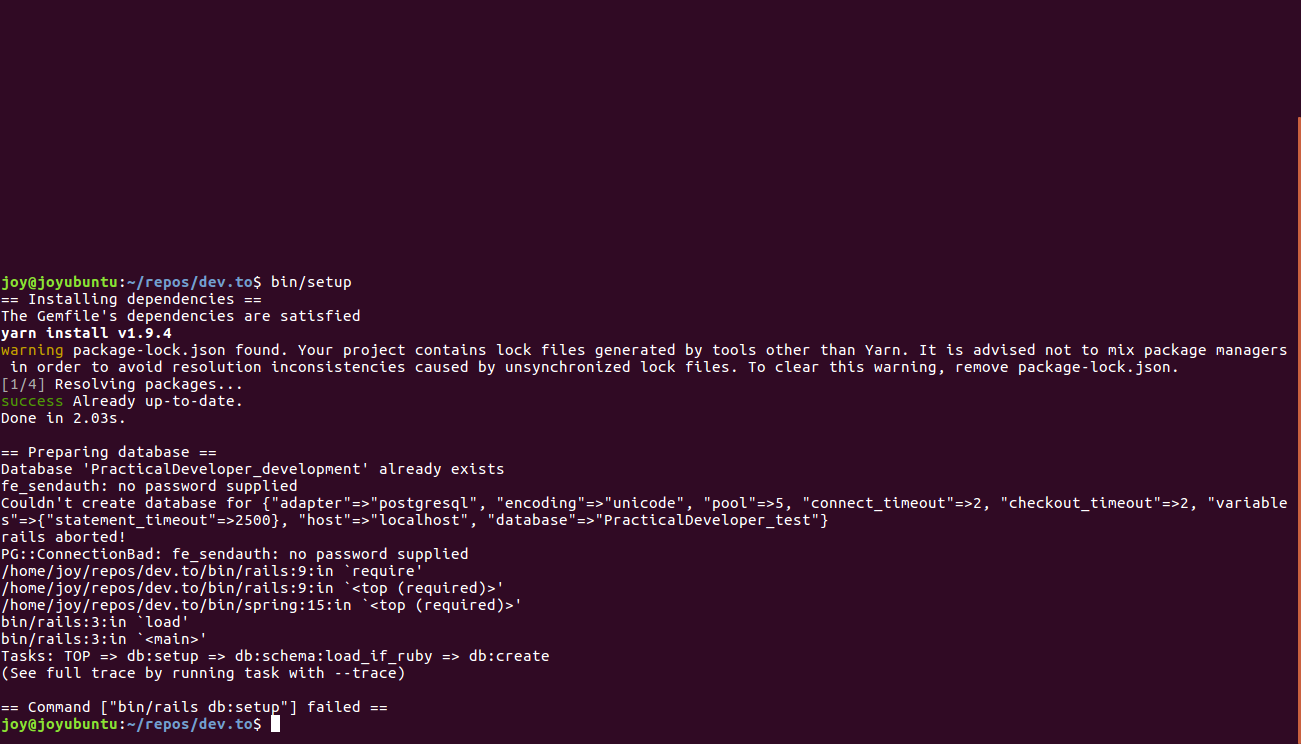
Followed the steps to setup the repo,and getting this error when running bin/setup.
I'm on ubuntu 16.04 and followed the steps of installation in the README.md.
 joybh98
on 16 Aug 2018
joybh98
on 16 Aug 2018
@joybhalla did you follow the last bit of the PostgreSQL installation which details commenting out the host: localhost line (under the test database) of the /config/database.yml file?
sofubi
on 16 Aug 2018
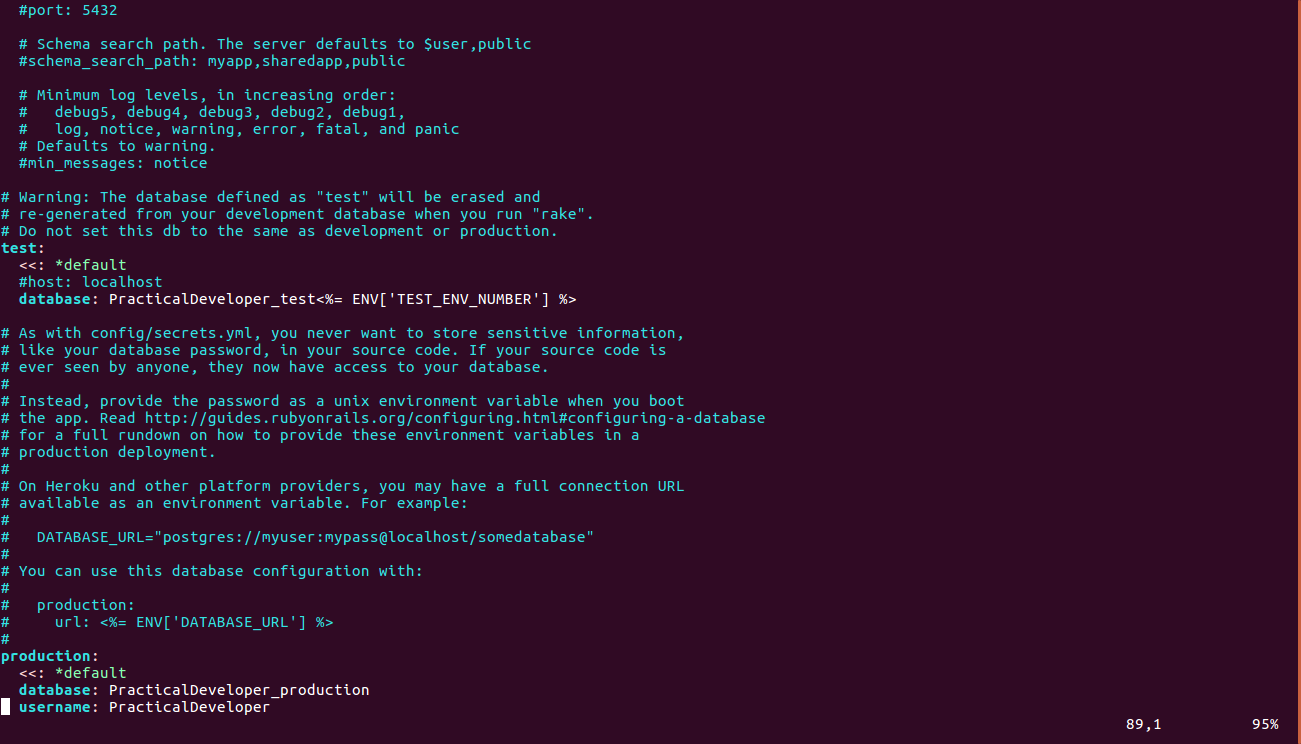
yup,still getting the same error
joybh98
on 16 Aug 2018
@JoyBhalla I was getting the same error. I solved that by adding username and password to the database.yml. Maybe you can try doing that.
development:
    <<: *default
    username: POSTGRESSQL_USERNAME
    password: POSTGRESSQL_PASSWORD
test:
    <<: *default
    username: POSTGRESSQL_USERNAME
    password: POSTGRESSQL_PASSWORD
If you already have done this then something else is causing the issue. Let me know, I will look up more.
To give you more information, I am using ubuntu 18.04.
 joshi-chinmay
on 16 Aug 2018
joshi-chinmay
on 16 Aug 2018
You probably setup a password for your default user. Issue psql test on the command line. You shouldn't be able to connect. Specify the password in the database.yml
 rhymes
on 16 Aug 2018
rhymes
on 16 Aug 2018
@joshi-chinmay I feel like the documentation should encourage people to use DATABASE_URL, this way any single variation of the combination: host, username, password, params work and can be unique for user and people don't have to change database.yml at all
rhymes
on 16 Aug 2018
Editing databse.yml is perfectly fine. However, it should not be checked in into version control, so this is a real issue here.
katafrakt
on 16 Aug 2018
I've tried various solutions,I will keep on trying, I was considering making a script file that could be used to ease the process (provided it makes the task easier),what do you guys think?
joybh98
on 16 Aug 2018
@katafrakt that's why I prefer using environment variables. My projects don't even have a database.yml file. I just use DATABASE_URL:
If you have an empty config/database.yml file but your ENV['DATABASE_URL'] is present, then Rails will connect to the database via your environment variable
See https://edgeguides.rubyonrails.org/configuring.html#connection-preference
@JoyBhalla try with the environment variable:
- open your application.yml
- add:
DATABASE_URL: postgresql://localhost/PracticalDeveloper_development2
replace my example connection string with the value with your setup
@maestromac I feel like the doc should talk about this option, using the db url, in the readme... what do you think? This way people can customize how they connect to Postgres without modifying database.yml
Some examples of connection strings taken from https://www.postgresql.org/docs/9.6/static/libpq-connect.html:
postgresql://
postgresql://localhost
postgresql://localhost:5433
postgresql://localhost/mydb
postgresql://user@localhost
postgresql://user:secret@localhost
postgresql://other@localhost/otherdb?connect_timeout=10
@rhymes that's a good idea, I think there should be a bit about setting ENV variables to help with this as well.
@joybhalla, have you had any different results or still no password supplied?
@katafrakt makes a good point, version control should be addressed when making any changes to database.yml.
I'd be happy to make any changes that seem necessary!
sofubi
on 16 Aug 2018
@rhymes Yeah that's a good idea, DATABASE_URL setup can be an option in the docs.
we can add DATABASE_USERNAME and DATABASE_PASSWORD env vars into database.yml so there's less alteration in the long run.
@thomaslawton91 btw Installation section has has been added on our GitDocs.
 maestromac
on 16 Aug 2018
maestromac
on 16 Aug 2018
@rhymes DATABASE_URL can be the option. True. We can add that.
@maestromac keeping DATABASE_USERNAME and DATABASE_PASSWORD can be also done.
Maybe we can support documentation for both the options. And then the user can decide which option to pick.
joshi-chinmay
on 17 Aug 2018
After removing everthing related to the project from my computer, i started the process again as mentioned in the documentation and i was able to set it up on my computer.
No errors now
joybh98
on 17 Aug 2018
Glad to hear it's working @JoyBhalla !! Thank you all for helping him out.
Closing this.
maestromac
on 17 Aug 2018
Related issues
 lightalloy
·
22Comments
lightalloy
·
22Comments
 Defman21
·
29Comments
Defman21
·
29Comments
 mstruve
·
42Comments
mstruve
·
42Comments
 SeanKilleen
·
32Comments
SeanKilleen
·
32Comments
 samfieldscc
·
21Comments
samfieldscc
·
21Comments
Most helpful comment
After removing everthing related to the project from my computer, i started the process again as mentioned in the documentation and i was able to set it up on my computer.
No errors now