Fomantic-ui: [Menu][Grouped icons] grouped icons in submenu not behave like simple icon
Bug Report
Steps to reproduce
- https://jsfiddle.net/b5og0sxL/
- Grouped icons in first menu are ok.
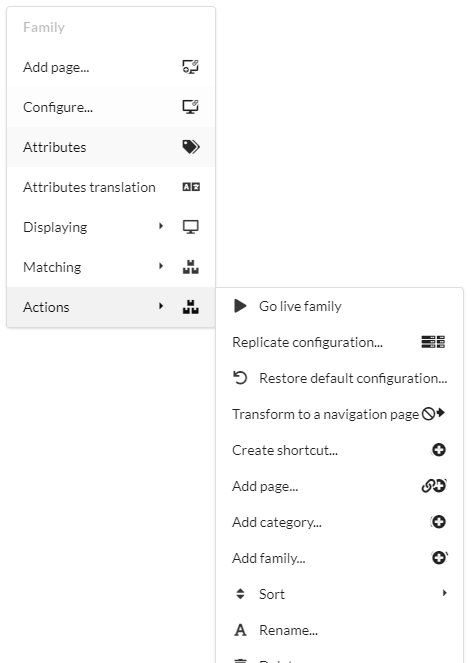
- Grouped icons in sub menu "Actions" do not behave like simple icon
Expected result
- Position should be left.
- Corner icons should be respected
Actual result
- Position is right instead of left.
- Corner icon rules are not respected.
Testcase
https://jsfiddle.net/b5og0sxL/
Screenshot (when possible)
Version
2.7.7
 Ikaer
Ikaer
All 5 comments
I've temporarly fix it with following css rules:
https://jsfiddle.net/b5og0sxL/2/
Ikaer
on 14 Aug 2019
👍1
@Ikaer Yes open another issue because they seem unrelated to this one.
 hammy2899
on 25 Sep 2019
hammy2899
on 25 Sep 2019
Fixed by #1536 Sorry, it took so long
 lubber-de
on 25 Jun 2020
lubber-de
on 25 Jun 2020
❤1
Hi,
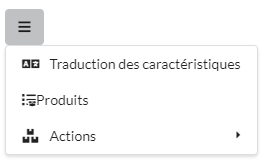
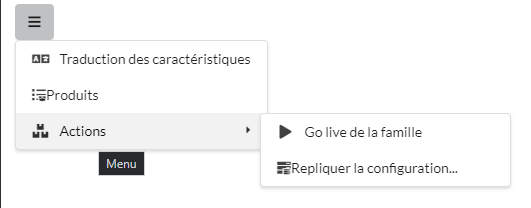
Sorry to reopen this, but we still have an issue with the grouped icons and menu when those icons are on left side. The padding is not applied between the icons and the text.
TestCase
https://jsfiddle.net/fndmr6os/
Screenshots
Version
2.7.8
Ikaer
on 13 Nov 2020
Sorry to reopen this, but we still have an issue with the grouped icons and menu when those icons are on left side. The padding is not applied between the icons and the text.
Fixed by #1766
lubber-de
on 13 Nov 2020
Was this page helpful?
0 / 5 - 0 ratings
Related issues
 PhilippGrashoff
·
3Comments
PhilippGrashoff
·
3Comments
 ocharles
·
4Comments
ocharles
·
4Comments
 dutrieux
·
3Comments
dutrieux
·
3Comments
 peili0413
·
3Comments
peili0413
·
3Comments
 davekc
·
4Comments
davekc
·
4Comments