Focus-android: Create initial UI for home screen tips
Why/User Benefit/User Problem
Home screen tips can help users learn about features of the app they may not be familiar with.
What / Requirements
Display a Toast-like message embedded in the home screen that will show different tips each time the user launches the app.
Acceptance Criteria (how do I know when I’m done?)
- Tips UI is shown on home screen with a new tip each launch
- Tips UI Is built in an abstract way so that it can read from a server-side list in the future. (updating server side is outside the scope of this ticket)
- Telemetry pings are included to know if users are being viewed / clicked.
- Don't display tips users already demonstrate a knowledge of using
- Deep link if possible
Follow #2816 for more discussion about tips.
 sblatz
All 27 comments
@sblatz thanks for splitting this from the bigger ticket. I think this needs to be answered as part of this work: https://github.com/mozilla-mobile/focus-android/issues/2816#issuecomment-409320473
Also, your acceptance criteria should contain telemetry to track a certain tip being viewed and clicked.
 Sdaswani
on 1 Aug 2018
Sdaswani
on 1 Aug 2018
See comment below; this is outdated
sblatz
on 2 Aug 2018
I was able to add deep linking to several of the tips. When the user taps on the tip, it sends them to one of two places:
- If it is a setting they can toggle / modify, it opens that settings fragment
- Otherwise, they are sent to a sumo page detailing how to use the feature
Due to this implementation we need to consider the following:
- We should likely update the SUMO articles to have the redesign so users are not confused by an outdated article.
- Tips need to indicate that a user can tap on them, but remain subtle so as not to distract unnecessarily.
- Tips should be reworded to forgo explaining the steps to use them, and should instead give a brief overview of the feature.
- We may want certain tips to have a "higher priority" (i.e. make default browser shows up more frequently than any other tip).
- We need a settings toggle to disable the tips (I'm unsure what subheading this should fall under and what strings I should use for this). Perhaps we should even make a tip that lets people disable the tips so we don't annoy users.
@BrianNJones I'll need your help getting these strings updated (as mentioned in item 3 and 5).
@brampitoyo If you could help with the redesign and settings menu (items 2 and 5) that'd be great!
@Sdaswani We should potentially loop SUMO in on this (item 1). Also curious about your thoughts on item 4.
sblatz
on 6 Aug 2018
@sblatz I will loop in SUMO for item 1 cc @jonisavage .
As for item 4, I think when we build 'server side control' into this system, we can have the priority set on the server side. For now, I think round robin is fine - the important thing is to instrument everything so we can test which tips work better than others.
Sdaswani
on 6 Aug 2018
@sblatz how can @jonisavage get a build to update the SUMO article?
Sdaswani
on 7 Aug 2018
@sblatz I agree to all your points:
Since we have the ability to link directly to SUMO, we need to think when it’s right to link to them, and when it’s right to just explain the steps. SUMO is more explanatory, but will consume bandwidth.
While making links look clickable is fairly simple, coming up with strings that have the right level of explanation will be important. If it links to SUMO, it can say “Learn more”. If it performs an action, it can say “Set default browser”.
Would it be possible to hide a tip when we know that the user has used (tapped on) the feature in the past? This is important, because if we only show tips that are relevant and useful, there won’t be a need to have a toggle to disable tips (or a tip to disable tips).
 brampitoyo
on 7 Aug 2018
brampitoyo
on 7 Aug 2018
Thanks @brampitoyo . On point 3, I know @sblatz has disabled tip that are already clearly known to the user (he can describe this more).
As for the tips, when can we expect you and @BrianNJones to finalize the copy of the tips?
Sdaswani
on 7 Aug 2018
I’m meeting @BrianNJones tomorrow to talk about this. Hopefully, this means that we can finalise the copy this week.
brampitoyo
on 7 Aug 2018
I sent an APK to @jonisavage and detailed the SUMO articles we need updated.
@brampitoyo I like point 2, "Learn more" seems like a nice way to give some brief info while linking to a more detailed SUMO article. On point 3: yes. Currently if a user has a feature enabled or has used it in the past (based on a global flag) they will not be presented the tip anymore.
sblatz
on 7 Aug 2018
@brampitoyo @sblatz
Proposed strings for 6 features. (@sblatz I'm not clear on why we'd want to bounce user to SUMO if we can provide clear instructions for use; see below)
Tracking Protection (deep link to Settings)
Site behaving unexpectedly?
Try turning off Tracking Protection
Add to Home screen (explain usage)
Get one-tap access to sites you use most
Menu > Add to Home screen
Set as default browser (deep link to Settings)
Open every link in Firefox Focus
Set Focus as default browser
Add to autocomplete (explain usage)
Autocomplete URLs for sites you use most
Long-press any URL in the address bar
Open link in new tab (explain usage)
Open a link in a new tab
Long-press any link on a page
Desktop site (explain usage)
Rather see the full desktop site?
Menu > Request desktop site
?s/etc; happy to talk.
 BrianNJones
on 9 Aug 2018
BrianNJones
on 9 Aug 2018
@BrianNJones I agree we would rather explain the usage in the tip but for consistency it seems all tips will be clickable so if the tip isn’t clear we may as well load the SUMO page? This would cover the case where despite our attempt to explain in the tip they can get the full schpeal.
Sdaswani
on 9 Aug 2018
So am I to understand we want to explain the tip _as well_ as link to the SUMO page? i.e. have a "learn more" button or something similar? Perhaps this is a question for @brampitoyo when he returns.
Based on these strings, we still need item 2 from @brampitoyo here for this to be finalized, as I'm not sure how to show this to the users in a "clearly clickable" fashion.
sblatz
on 9 Aug 2018
@sblatz I remember @brampitoyo saying they link / deep link should be underlined, like any other hyperlink. So I would use all of @BrianNJones copy I would just make the last line underlined and clickable into the Settings page or SUMO. Try to get that committed before tomorrow and we can make changes later.
Sdaswani
on 9 Aug 2018
@jonisavage do we have a SUMO article for long pressing on the URL bar to add to autcomplete? I found this one, but it only mentions using the settings menu.
I'm going to link to this one for now, but ideally that explanation should also be added to the SUMO article (along with updating it for the redesign).
sblatz
on 9 Aug 2018
@Sdaswani @sblatz, totally get what you're saying Susheel, but do think we need to consider the "odd interruptive" quality of inviting users to bounce to a SUMO article, directly from the home screen, after they've opened/erased, presumably to complete a task. There's an element of "you said you want to do this, but how about THIS" that's jarring.
BrianNJones
on 10 Aug 2018
@BrianNJones:
- I open Focus or erase my session.
- I see the tip and I find it interesting, and it has a familiar link.
- I click the link and I get more info about the tip (or I’m taken to the settings screen to act on the tip).
I see intent in steps 2 and 3 so I’m confused about taking them away from their intention?
Sdaswani
on 10 Aug 2018
@Sdaswani, agree that's one use case, but think this one is more likely. (And I'm not falling on sword about this one; but do believe we need to think hard about content that is potentially interruptive. Where I keep getting hung up is here: Focus is a fast, light tool for browsing. But at the point where the tool actually enables the thing it's designed to do, we're inviting user to take an off-ramp to somewhere that likely has zero to do with the reason they've opened the app. Not suggesting it's a deal-breaker, but we're in slippery slope territory.)
- I open Focus or erase my session TO COMPLETE A SEARCH
- I see the tip and find it interesting, and it has a familiar link
- I complete my original search (original intent)
- I see the tip again in later session (?)
BrianNJones
on 10 Aug 2018
@BrianNJones A few points here. First, tips can easily be disabled by users in the settings, so if you find them distracting you can turn them off (in fact, I think this should be one of our tips). Second, while I agree it's _possible_ I get distracted by a tip, if I have a quick search to make, it's very easy to ignore a slightly faded text.
IIRC, @mcomella had similar concerns about it potentially "getting in the way," as users would expect it to just say "Browse. Erase. Repeat."
Perhaps this should be something we very gently roll out to users to see the initial feedback since it could result in a negative reaction?
sblatz
on 10 Aug 2018
@colintheshots can advise on putting this behind a flag on fretboard, but for this PR, I suggest you push it to master. Please create another ticket about 'A/B testing tips' that will get into triage next week @sblatz .
Sdaswani
on 10 Aug 2018
Here is the current design I have right now.

sblatz
on 10 Aug 2018
I didn't know about long-pressing the URL but I'll update the article. Thanks for letting me know.
 jonichan
on 10 Aug 2018
jonichan
on 10 Aug 2018
@sblatz @Sdaswani This looks really good! Clarifying a few points below:
Should tips link to SUMO?
TL;DR – Most of the time, we can either deep link to the feature, or explain how to do it well enough in just two lines. So, no need to link to SUMO.
Explanation
@BrianNJones wrote:
Focus is a fast, light tool for browsing. But at the point where the tool actually enables the thing it's designed to do, we're inviting user to take an off-ramp to somewhere that likely has zero to do with the reason they've opened the app.
@sblatz wrote:
[…] we want to explain the tip as well as link to the SUMO page?
I agree with Brian. So, we want to do just one of the above: deep link, explain, or link to SUMO – pick one, but not two or all.
For tips to have the most benefit and least interruption, we generally want to ask questions in this order:
- Can we deep link to Settings and other places?
This allows users to directly execute a task, in the same place where that task is located. - If not, can we inform users how to accomplish the task in two lines?
There are tasks that require specific conditions to trigger, so it doesn’t make sense to access them from the start screen. While telling the user is more indirect than showing, telling on the start screen at least doesn’t redirect them somewhere else. - If not, link to an informational article on SUMO.
Once in a blue moon, there are features that the user must first understand before using. When this is the case, then a SUMO link becomes necessary. Since our features are generally designed to be understood easily, we hope that “Reading the manual” – which interrupts the user’s browsing – is only rarely necessary.
Feedback on the tips strings?
TL;DR – All good, other than slight correction on Tracking Protection.
Explanation
@BrianNJones wrote:
Tracking Protection (deep link to Settings)
Site behaving unexpectedly?
Try turning off Tracking Protection
This is the only tip which is somewhat inaccurate, and it was my fault for not clarifying it.
Turning Tracking Protection toggles off by going to Settings will switch protection off for all sites. This may fix site compatibility issues, but will almost certain mean slower and less private browsing overall.
What we may like to suggest instead, is to turn off Tracking Protection situationally and on a per-site basis – only when the user sees problematic sites.
To do this, go inside the menu and toggle Tracking Protection off.
Brian, do you think that it’s a good idea to explain the usage of Tracking Protection, rather than link to the Settings page?
Are tips interruptive?
TL;DR – It’s a dilemma:
- To users who open Focus already knowing exactly where they want to search or browse, and will type straight away, showing tips is interruptive to their activities.
- Yet at the same time, two lines of tip text can be overlooked visually, so even when the tips is shown, the user may not be aware that they should read there.
The answers are twofold:
- Only show tips to users who have time to pay attention to them (ie. not to users who will start typing straight away).
- When we do show a tip, give users enough signal to look at the tips.
Explanation
Using the existing screen area previously occupied by “Browse. Erase. Repeat.” for tips is good. Now, how we need to let users know that:
- This area is now occupied by tips
- When tapped, some tips can link somewhere else when tapped
There are a couple of ways to do this:
- (Optional) When the app is first launched, the first tip shown should always be “Browse. Erase. Repeat.”. The user will see new tips after they erase for the first time.
- After the user erases, the initial text will still be “Browse. Erase. Repeat.”. The tips is still there. It’s just going to fade in when the user is not typing straight away. This has a few benefits:
a. By fading them in, we gently let users know that they should look there. Unfortunately, two lines of text on the start screen are not very prominent. The animation will greatly help bring attention to each tip.
b. Before we show each tip, we wait a few seconds to make sure that the user is not typing or doing anything else. By doing this, we make sure that only users who are potentially interested will see the tips. A number of our users will just start typing straight away, and that’s fine. They don’t need to be interrupted.
Demo animation:
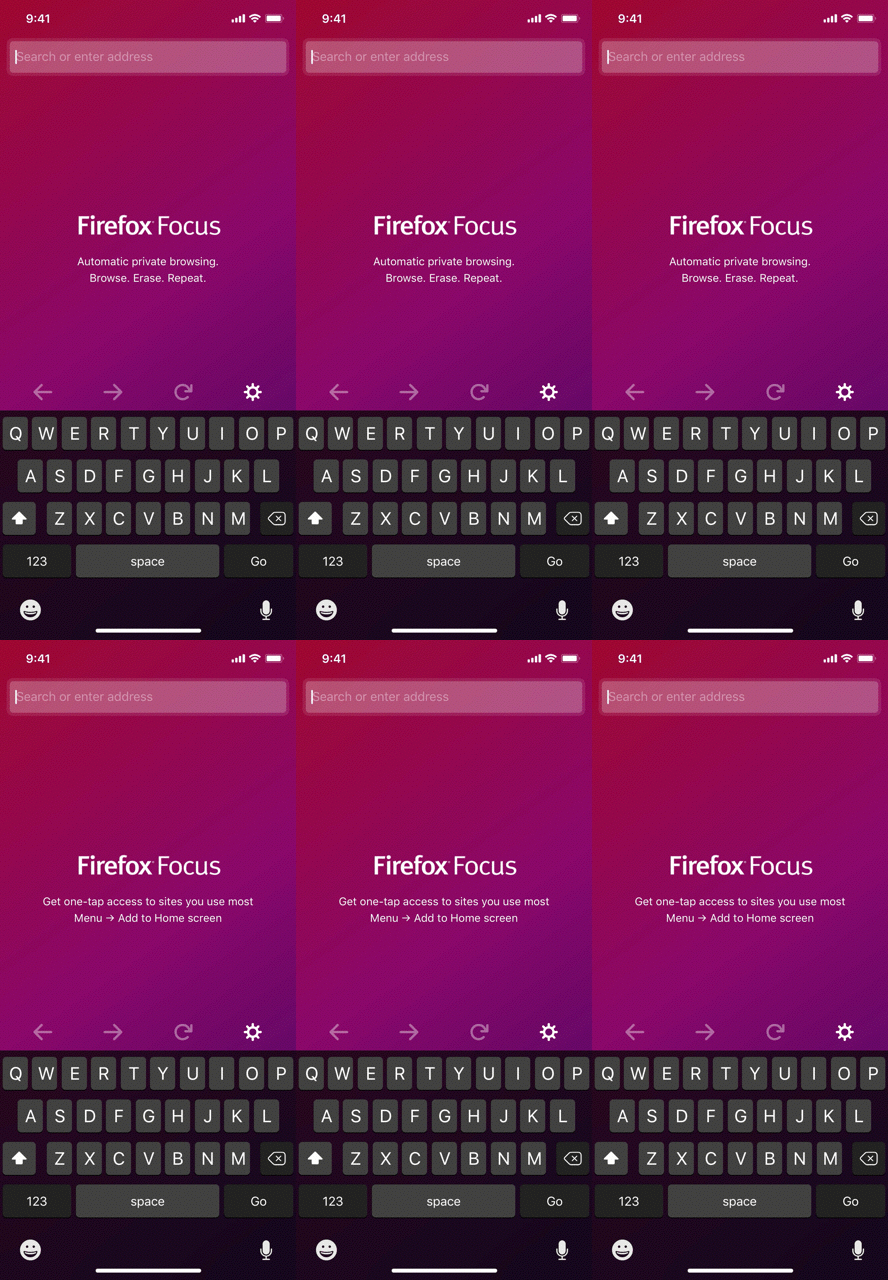
We should fade the tips in after waiting for 2 seconds at “Browse. Erase. Repeat.”. This gives enough time for users who start typing straight away to skip it, and gives users who wait a visual indication that a new tip is ready to be read.
Otherwise, the tip itself doesn’t have to be faded (ie. it can be coloured at 100% opacity), and should still be underlined.
Does this address some of our questions? Does it make the implementation a bit clearer?
@sblatz and others who are implementing this issue, I’m happy to talk through everything with you!
brampitoyo
on 13 Aug 2018
Thanks @brampitoyo! I believe we have to make some changes based on this, so once @sblatz is back online on the 27th he can make the necessary changes.
Sdaswani
on 19 Aug 2018
@Sdaswani Yes. We’d need to make some changes, but not by drastically altering existing functionalities. Most importantly, all the messages and basic behaviours have been implemented. I expect further changes to be quick and easy.
brampitoyo
on 20 Aug 2018
@brampitoyo Really appreciate the explanation you laid out! I absolutely love the idea of animating different tips in. In regards to your first change:
(Optional) When the app is first launched, the first tip shown should always be “Browse. Erase. Repeat.”. The user will see new tips after they erase for the first time.
I believe @Sdaswani wanted to make sure users saw the tips, even on the first launch, so we will likely forego this for now, especially since we're waiting before even showing a tip to begin with, I don't think this would be necessary. I think in order to keep exposure high (which was the whole point of this feature), we should maybe have a lower threshold on time spent waiting before the first tip is displayed (or perhaps none at all), with subsequent tips having a slightly longer delay before finally showing "Browse. Erase. Repeat." again.
@Sdaswani All of this functionality would be pretty straightforward to change given the current implementation.
sblatz
on 21 Aug 2018
Thanks @sblatz - I definitely want the tips to be seen, and note that @bbinto is considering putting this feature under an A/B campaign to gauge any user dissatisfaction.
Sdaswani
on 21 Aug 2018
@vesta0 here is the current program for home screen tips: https://github.com/mozilla-mobile/focus-android/wiki/Homescreen-Tips
do you want anything to change, per https://github.com/mozilla-mobile/focus-android/issues/3039#issuecomment-412384274
Sdaswani
on 31 Aug 2018
Related issues
 abusedcharacter
·
5Comments
abusedcharacter
·
5Comments
 antlam
·
6Comments
antlam
·
6Comments
 zekooooo
·
7Comments
zekooooo
·
7Comments
 jonalmeida
·
7Comments
jonalmeida
·
7Comments
 maykonchagas
·
7Comments
maykonchagas
·
7Comments
Most helpful comment
I’m meeting @BrianNJones tomorrow to talk about this. Hopefully, this means that we can finalise the copy this week.