Focus-android: Appending to search suggestion in the Toolbar
Why/User Benefit/User Problem
When entering a search term, sometimes a suggestion that pops up adds more value to it but you may also want to continue adding more details. Having an icon that allows you to append a suggestion to the end of your search term _without_ starting the search will allow a user to better scope their searches.
What / Requirements
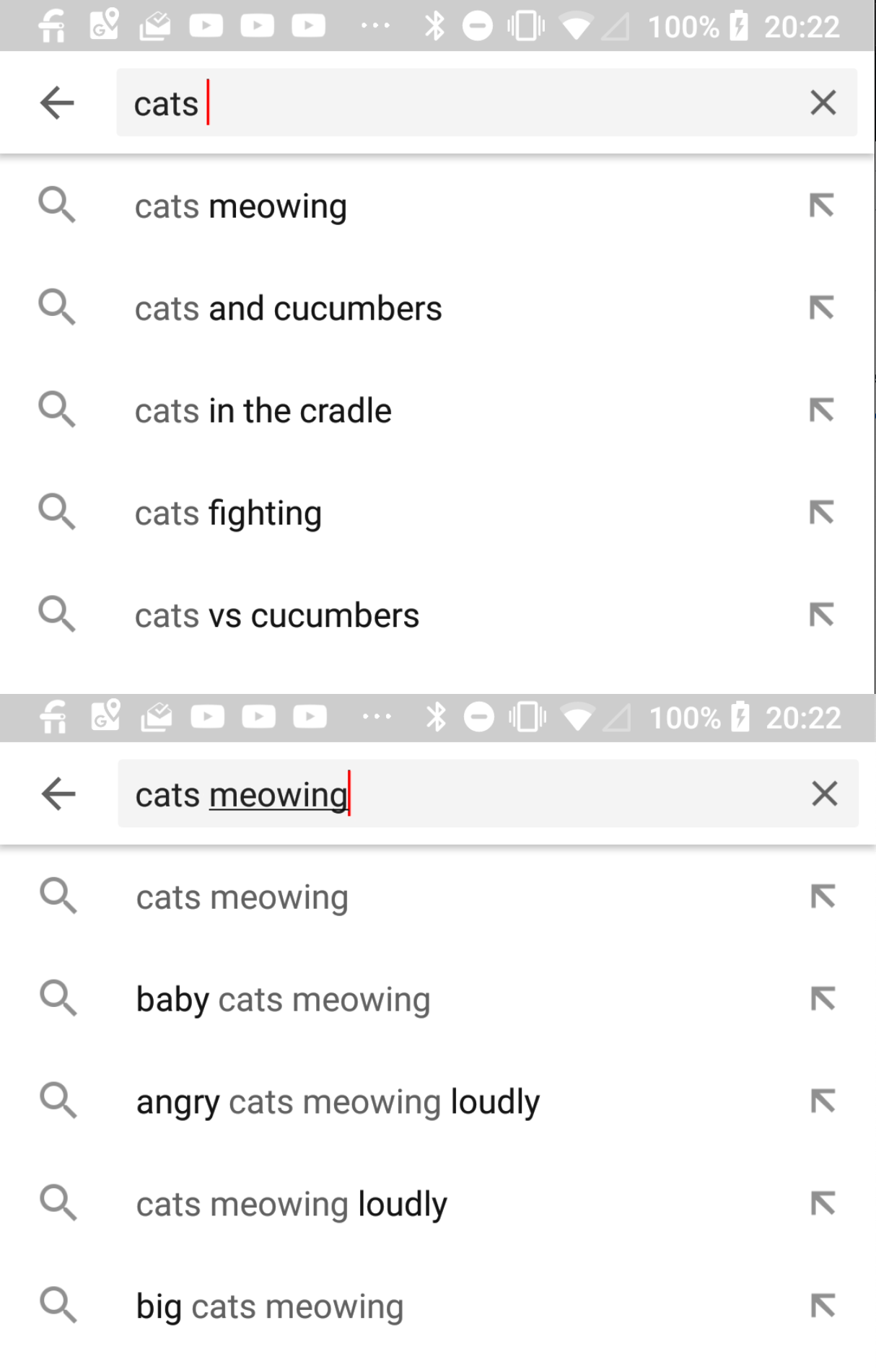
An icon at the side of each search suggestion that allows you click it and having your search term + the suggestion appended into the Toolbar.
Below is an example of a search term, and after clicking the arrow on the right of 'cats meowing':
Acceptance Criteria (how do I know when I’m done?)
N/A?
 jonalmeida
All 7 comments
This is a good suggestion, @brampitoyo to consider, @ekager thinks it wouldn't be a terrible amount of eng work (but she is not committing to that estimate).
 Sdaswani
on 16 Oct 2018
Sdaswani
on 16 Oct 2018
This might also be a good Hacktoberfest issue if we come up with a good UX for it.
jonalmeida
on 16 Oct 2018
This could be a good one. It fits with our mission of getting users to where they want to go faster.
But note that it just brings us up to parity with other browsers, and isn’t unique to us.
Do we know why Fennec doesn’t do this already?
 brampitoyo
on 16 Oct 2018
brampitoyo
on 16 Oct 2018
@brampitoyo @jonalmeida @Sdaswani Can i work on this ?
 bansalayush
on 25 Oct 2018
bansalayush
on 25 Oct 2018
@bansalayush , this does not have any UX finalized or product decision so it is not ready to be worked on.
 ekager
on 25 Oct 2018
ekager
on 25 Oct 2018
At the moment, it doesn’t seem clear that tapping on the arrow will append to the keyword (instead of searching the keyword straight away).
I don’t have any research to back it up, but maybe you can help!
@bansalayush If you’d like to assist, I’d love to see how other browsers do “append keyword suggestion” in their UI.
More importantly, I’d like to know whether this “append” UI is commonly used, and whether a lot of people use it (this last question may be hard to answer, though – so don’t worry about it if you can’t find anything).
At first glance, and just after doing a fairly basic search around the web, “append keyword suggestion” suggests a feature that’s not used by most users – only by expert or technical ones. If this is the case, then should either not implement it, or put it as a menu item under the “Search” category within Settings – where those who need it can enable it.
brampitoyo
on 29 Oct 2018
Fennec lets you tap and hold.
 Poopooracoocoo
on 25 Sep 2019
Poopooracoocoo
on 25 Sep 2019
Related issues
 zekooooo
·
7Comments
zekooooo
·
7Comments
 Benestar
·
7Comments
Benestar
·
7Comments
 runboy93
·
5Comments
runboy93
·
5Comments
 mcomella
·
5Comments
mcomella
·
5Comments
 callahad
·
8Comments
callahad
·
8Comments
Most helpful comment
At the moment, it doesn’t seem clear that tapping on the arrow will append to the keyword (instead of searching the keyword straight away).
I don’t have any research to back it up, but maybe you can help!
@bansalayush If you’d like to assist, I’d love to see how other browsers do “append keyword suggestion” in their UI.
More importantly, I’d like to know whether this “append” UI is commonly used, and whether a lot of people use it (this last question may be hard to answer, though – so don’t worry about it if you can’t find anything).
At first glance, and just after doing a fairly basic search around the web, “append keyword suggestion” suggests a feature that’s not used by most users – only by expert or technical ones. If this is the case, then should either not implement it, or put it as a menu item under the “Search” category within Settings – where those who need it can enable it.