Focus-android: Multitasking within Focus, switching between sites
Tasks
- [x] Finalize UX spec
- [x] Land strings so that L10N team can translate them
- [x] Refactor app architecture to support multiple sessions
- [x] Implement new Floating Action Button UI for opening and switching between tabs
- [x] Add option to open a new tab to the context menu
- [x] Add telemetry probes for all actions
- [x] Verify whether we need additional telemetry (Number of tabs per session?)
- [x] Testing: Do we still send all telemetry correctly?
- [x] Testing: Custom tabs and other edge cases (Share to Focus, First run etc.)
Follow-up bugs
- #1230 - In new tab, trackers blocked setting is not remembered upon revisiting.
- #1231 - New tab shows more than first subdomain
#1239 - Animation when switching tabs#1240 - Remove Focus from "recent apps" when history was erased while in background#1241 - Back button behavior#1242 - UI/UX polish- #1245 - Update sheet expand/discard animation
 bbinto
All 35 comments
See also: #751 - Support for tabs.
 pocmo
on 17 Jul 2017
pocmo
on 17 Jul 2017
There's a lot to do for 2.0 already. I think this is going to be one of the larger UX efforts (to get right at that) and I might suggest pushing this to after.
 antlam
on 17 Jul 2017
antlam
on 17 Jul 2017
We agreed to move this to the next major update (3.x)
bbinto
on 18 Jul 2017
Please stick with tabs for the multitasking aspect. Please do not invent a new UX concept just for this. Tabs are awesome. Thank you!
 andreicristianpetcu
on 21 Jul 2017
andreicristianpetcu
on 21 Jul 2017
Thanks @andreicristianpetcu
Could you share some more helpful insight into what you most often use tabs for (on mobile) exactly?
antlam
on 21 Jul 2017
While not exactly a use case for tabs, I have been viewing certain websites that require popup/pop-up.
Without tabs, websites just redirect to the ads (instead of opening up another tab/window) and it is sometimes impossible to advance to the next page of the intended website when you Go Back.
 truboxl
on 24 Jul 2017
truboxl
on 24 Jul 2017
@antlam I am a heavy reddit user and most of my browsing is on Reddit or starts from there. I usually start several tabs in parallel from various bookmarks. I have named bookmarks for refi (Reddit Firefox), remo Reddit Mozilla or rena (Reddit News All). Since Reddit loads slow, I open several tabs and wait for them to load.
I either open them by typing the name of the bookmark in the URL or I just click on the Activity Stream pinned items if it is on the list. If I find something interesting I open a new tab with that Reddit post.
Forgot to mention: I use Firefox Nightly for this workflow and I would like to replicate it on Firefox Focus.
Does this help? Do you want a video? :D
andreicristianpetcu
on 25 Jul 2017
@antlam friendly reminder to add the mocks here :)
bbinto
on 3 Aug 2017
EDIT: deprecated designs
As @pocmo is continuing to figure out the plumbing here, here's an update of the latest. Finalized flow and specs to follow.
Top row: non-collapsed FAB
Second row: collapsed FAB
Both options will allow for a "Open in new tab" option in the long-press dialog
antlam
on 5 Aug 2017
I think it is better to use the title of the page instead of the hostname as a tab identifier. You might have several tabs for the same web site. This is how Fennec does it now. Consistency would be nice :)
andreicristianpetcu
on 5 Aug 2017
Thanks @andreicristianpetcu ! When I was designing the tabs tray on Fennec, it made sense for us to use page titles. But we'll have to figure what works best in this case. We'll be sure to iterate and improve on this as we go.
antlam
on 10 Aug 2017
Attaching V1 designs
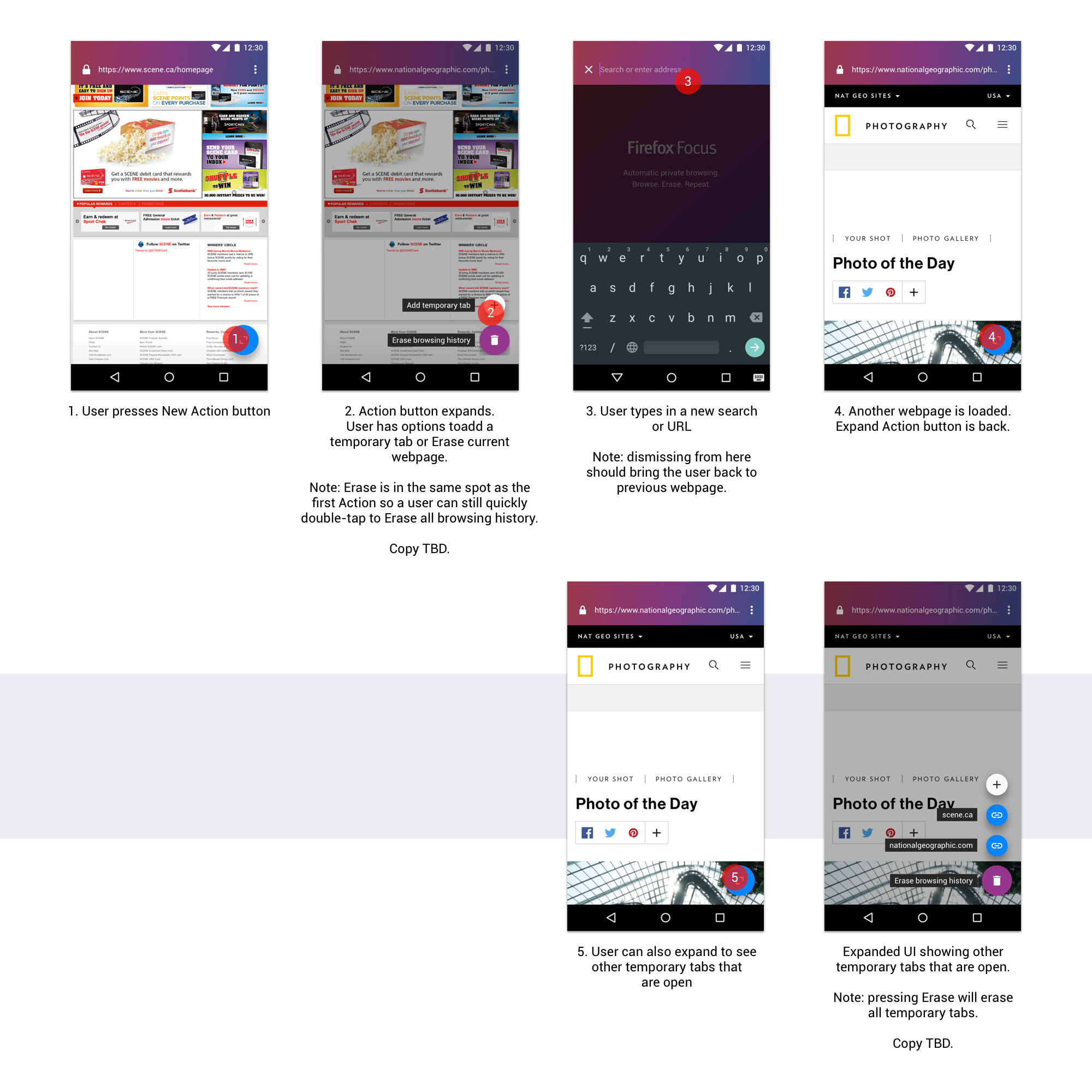
Additional notes for context
- let's look at this as the first step of a multi-step, iterative design process.
- the goal is to move us towards a better default browser experience, but not necessarily replicate Firefox/Fennec's features
- A typical flow of a Focus user currently ends with Erase (Browse. Erase. Repeat.)
- From telemetry, we know that there is a 50/50 split between users erasing with the FAB vs the notification
- There are still some details that we can nuance further, like copy, iconography, edge cases, etc
Things to consider
- Comparatively, how well (or not) does this help users in shopping and banking use cases?
- How might we continue layering on top of this idea in subsequent versions?
- With our new Add to Home screen feature, how do users leverage/adapt these to solve their use cases?
antlam
on 10 Aug 2017
@antlam thanks, still missing in this issue is
- how many tabs one user can open
- what happens if user reached max tabs and tries to open another one coming from another app
(basically, all we've talked about in our slack chat, would be great to have this listed/outlined in the specs doc as well)
bbinto
on 10 Aug 2017
My recommended instructional copy is "Open temporary tab" - think "open" is better than "add".
 mheubusch
on 11 Aug 2017
mheubusch
on 11 Aug 2017
@bbinto good point! And @pocmo also raised those issues too. We'll continue to update this.
Number of Temporary tabs, I'd suggest starting with a max of 5:
- There are a few written articles on the web that suggests this is approx. equivalent to the mental capacity of a user when using the web to perform a specific task
- I think I remember we saw a similar pattern in Firefox re: the number of tabs people kept open (obviously there were very few people leaving 99 tabs open)
- 5/6 tabs (give or take 1 or 2) seems like a sensible amount to help in a "comparison shopping" use case
- the design guidelines for the FAB component max out at 6 items. 1 Main Action, 5 Secondary Actions
what happens if user reached max tabs:
- we were going to simply disable the option if the max has been reached. But I just got an idea. will post updates today!
Side note:
- we should also measure this to see what the distribution looks like for users per session. I.e. how many Temporary tabs do most users open when performing a task in Focus?
antlam
on 11 Aug 2017
Below is a just-finished specs for multitasking that @antlam and I have been working on today. It should help address issues that @bbinto wrote, as well as other issues, too:
- how many tabs one user can open
- what happens if user reached max tabs and tries to open another one coming from another app
Although it doesn’t reflect our final visual design (which will be posted later on), it should be the source of truth for interaction design and flow.
Last updated: 30 August 2017
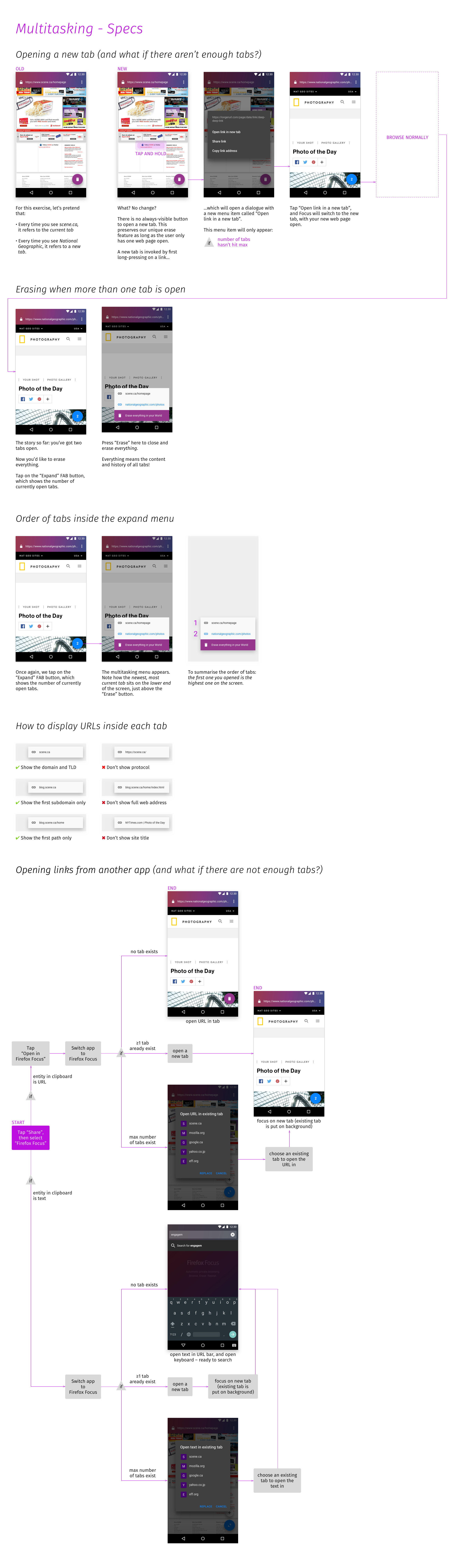
 brampitoyo
on 11 Aug 2017
brampitoyo
on 11 Aug 2017
Thanks! That's a great spec. :)
@mheubusch @antlam @brampitoyo I added a list of strings I think we need to the first comment. Please have a look and let me know if something is missing or whether we need to change some.
pocmo
on 11 Aug 2017
Thanks for listing the strings, @pocmo - here are my recommendations:
Accessibility string for the new floating action button (FAB): Expand
Label for the FAB: Erase browsing history
Accessibility string for the "+" button: Open tab
Accessibility string for the "X" button when typing new tab's address: Close tab
Context menu entry: Open link in new tab
Dialog title: Open link in selected tab
Dialog action: OPEN
Dialog action: CANCEL
(@antlam : I've been playing with messaging to explain the 5-tab limit, but am thinking we should go with what i have and if we can test or get feedback about needing this to be clearer I can revisit. Also, I removed reference to "temporary" in the tabs - while they are not always visible, they are persisting in the background and i don't want to mislead. if we find that people expect tabs to have tabbed browsing, we can consider something like floating tabs or tab-less tabs, but for now wanted to keep things simple. )
mheubusch
on 12 Aug 2017
Please don't do this.
I will probably be alone in urging you to stick with the single tab model. But I seriously believe it's FFF's best feature.
I downloaded this browser to avoid adverts and tracking. But I kept using it because it changed the way I browsed. I used to have real trouble controlling my browsing habits: I would never stick to my original task, but open up scores of tabs as my curiosity would get the better of me. Oh, what about this topic? Hmm, that makes me want to search for that. Oh, I shall have to read that link later. And before I knew it I'd spent an hour on the internet, laid on the sofa, having _done_ absolutely nothing.
Focus changed that: it keeps me _focused_ on a single task. When the task ends, I might start another one, a new search or an article, but only if I remember and only if I still care enough to bother looking it up. This means new search tasks have to pass a higher interest threshold. I only continue if the content is _really_ compelling.
The effect is transformative. It puts me back in control. It makes me feel like I'm the one controlling the browsing, not some website's psychological trickery or an algorithm's UX dark patterns.
Focus works well because it is the simplest and least distracting browser for Android that isn't technologically crippled. The search-read-restart-repeat flow puts me in the habit of destroying my browser data as soon as possible. And the fact I finish pages with nowhere to go puts me back in control of my free time. Please keep the focus in Firefox Focus.
 jbreckmckye
on 12 Aug 2017
jbreckmckye
on 12 Aug 2017
Or can add in settings
multiple tabs options who is activated by default
With the label that it can break some webpages if is desactivated
 xrxrxr
on 13 Aug 2017
xrxrxr
on 13 Aug 2017
@brampitoyo your spec doc is amazing, so helpful, and thanks for addressing pretty much all of my concerns/questions.
@antlam's comment:
we should also measure this to see what the distribution looks like for users per session. I.e. how many Temporary tabs do most users open when performing a task in Focus?
I assume @pocmo will add telemetry so we can have a nice histogram for analysis.
In general, I believe once we have a first working implementation in the product, we will be able to test it out and "feel" it and address anything we might have missed...can't wait!
bbinto
on 14 Aug 2017
@jbreckmckye Thank you for your comment. You are definitely not alone with that. There have been a lot of discussions around if and how we should support multitasking. If you look at our current spec you will see that we won't introduce management of single tabs in a session and limit the number of total concurrent tabs. Hopefully this will still support your use case of a limited focused browsing session.
pocmo
on 16 Aug 2017
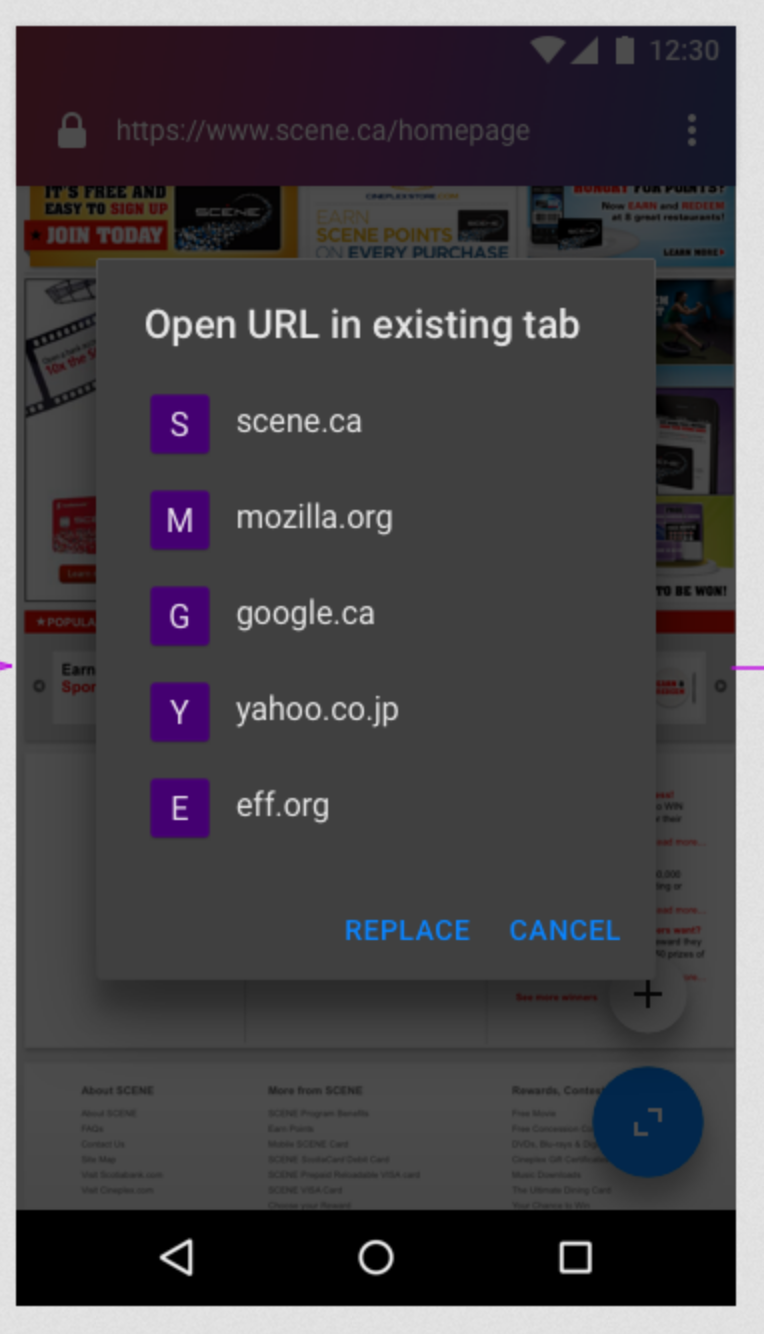
@antlam @brampitoyo Per guidelines I think this dialog doesn't require any actions (replace/cancel). Compare with our dialog to select a new default search engine.
pocmo
on 16 Aug 2017
@antlam @brampitoyo Per guidelines I think this dialog doesn't require any actions (replace/cancel). Compare with our dialog to select a new default search engine.
We might not need that dialog anymore if we're away from the "mini expanded FAB bubbles" UI.
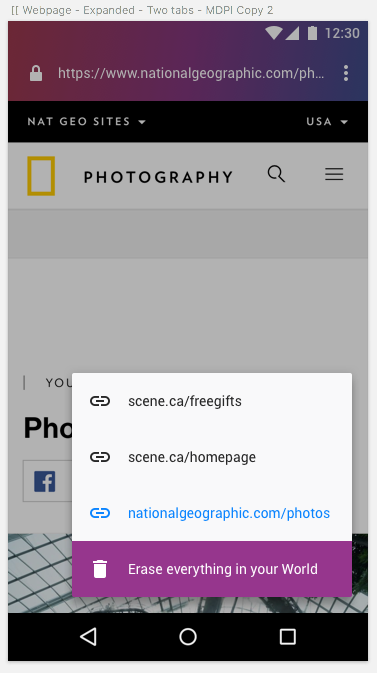
Here's what I've been going with recently in terms of visual design: the expanded sheet.
antlam
on 19 Aug 2017
@pocmo trying to understand if there are more strings needed as you added the label "needs strings" back
bbinto
on 24 Aug 2017
Yeah, I think we might need new strings for the sheet above ("Erase everything in your World") and maybe for the tab counter floating button (for accessibility only).
pocmo
on 24 Aug 2017
@bbinto since erasing is an all or nothing thing, (ie you can only erase or not erase, you cannot erase only 1 tab at a time) my recommendation for the button is: Erase browsing history
The a11y string should be: Tabs open: <#>
mheubusch
on 24 Aug 2017
@lime124 am also sharing a design comp @antlam shared with me - not sure if we need other design elements (like a close button or X on each tab's line in the multitasking menu or if you can't close them one at a time.
EDIT by antlam: screenshot deprecated
mheubusch
on 24 Aug 2017
not sure if we need other design elements (like a close button or X on each tab's line in the multitasking menu or if you can't close them one at a time.
I'll post finalized visual specs later but I don't think we need a close button or an X on each tab's line since we aren't supporting single-close in the first iteration
antlam
on 27 Aug 2017
Wouldn't it make more sense to show the blue <> button (as in the previous mockup) when not expanded and the garbage bin only in the expanded menu? In my opinion the additional tab count button adds too much clutter to the page if it is expanded by default.
For closing tabs, maybe we can just swipe them away in the expanded sheet?
 Benestar
on 28 Aug 2017
Benestar
on 28 Aug 2017
I’ve updated my multitasking specs with the latest round of UI that @antlam had designed. The spec reflects the decisions made at the meeting we’ve just had, and should represent the latest design.
brampitoyo
on 29 Aug 2017
Telemetry probes are documented in the wiki. I added additional events for opening new tabs and actions that can be performed in the tabs tray. Additionally open and erase events (also already existing!) will report the position of the currently selected tab and the total number of tabs as telemetry extras.
pocmo
on 30 Aug 2017
I'll close this bug (all tasks are done) and file follow-up bugs for additional work that might be needed (to have separate discussions; No-Jun already filed some too).
pocmo
on 30 Aug 2017
I’ve updated my multitasking specs with the latest round of UI that @antlam had designed. The spec reflects the decisions made at the meeting we’ve just had, and should represent the latest design.
Thanks @brampitoyo ...where can I find them?
Update: found them, sorry!
@pocmo just reviewed the Telemetry wiki, and <3 it. Thanks.
I can't wait to see if these numbers will go down now: https://mozilla.slack.com/archives/C4D7TER5G/p1503063134000541
bbinto
on 30 Aug 2017
Logging conversations from various threads here:
V1, unlimited number of tabs for now, monitor histogram
V2, revisit and refine purpose of multitasking using tabs/other means #1248
antlam
on 30 Aug 2017
Related issues
 runboy93
·
5Comments
pocmo
·
4Comments
runboy93
·
5Comments
pocmo
·
4Comments
 abusedcharacter
·
5Comments
abusedcharacter
·
5Comments
 danilodorgam
·
5Comments
pocmo
·
6Comments
danilodorgam
·
5Comments
pocmo
·
6Comments
Most helpful comment
We might not need that dialog anymore if we're away from the "mini expanded FAB bubbles" UI.
Here's what I've been going with recently in terms of visual design: the expanded sheet.