Add support for tags in the foam workspace.
Each note would be able to define tags in 2 ways:
- by having a
tagsproperty in YAML
- syntax for this property will be lose, so all of the following will yield the same result:
tags: tag1, tag2tags: tag1 tag2tags: #tag1 tag2tags: [tag1, #tag2]
- by having
#taganywhere in the file
- [ ] Support defining tags via YAML
- [ ] Support defining tags via
#tag - [ ] Add a new tag panel which lists all the tags in the workspace in alphabetical order
- [ ] Clicking on a tag in the panel will trigger a search for the tag in the workspace
- [ ] Cmd+Clicking on a tag in the text will trigger a search for the tag in the workspace
- [ ] (extra) style tags in text (check interaction with Markdown Notes)
 riccardoferretti
All 14 comments
I was led here by the necessity to move from categories to tags in my work (inspired by Zettelkasten).
I think that the tag should be denoted in the note file itself. Example:
# Super Awesome Title

---
@tags: t1, t2, t3
---

Note description
We can prepend the tags line with a special marker (e.g. @) to declare it as metadata.
This metadata could then be extracted to the foam.json file to create a list (or map to allow descriptions) of tags (furthermore, the janitor could then generate a special file containing all tags).
The metadata symbol could also be configured in foam.json or in the settings.json, in this case is a matter of "what really should be the purpose of foam.json".
Personally, I hate YAML, it's whitespace rules are awkward and hard to debug. I also believe that since Foam already makes plenty use of JSON, we should keep everything in the same format, in the name of simplicity.
 jmg-duarte
on 30 Oct 2020
jmg-duarte
on 30 Oct 2020
I think YAML front-matter is the best place to keep all metadata (including tags) about a note. But using # in front-matter may render the resulting YAML invalid. # is used for comments in YAML and the following line will definitely be invalid YAML (which may cause problems if the user wants to view the file in another editor).
tags: [tag1, #tag2]
Other than that, it would also be great if the tags in YAML front-matter had auto-complete functionality.
 canpolat
on 1 Nov 2020
canpolat
on 1 Nov 2020
thx for the info @canpolat! I didn't know about that, will review the YAML docs and give an update about the specs for this PR
riccardoferretti
on 2 Nov 2020
this is addressed by #311
riccardoferretti
on 6 Nov 2020
tags don't seem to be working for me
Have the foam template workspace running with recommended extensions
- foam for vscode (v0.6.0; v0.7.0 hasn't shown up yet)
- markdown all in one
- markdown links
- markdown notes
throwing down #various tags #allovertheplace and the "tag explorer" stays empty. Same with yaml. Any suggestions?
Code OSS 1.51.1
Linux x64
 digitalsignalperson
on 26 Nov 2020
digitalsignalperson
on 26 Nov 2020
Are you writing #tag or just tag?
A quinta, 26 de nov de 2020, 04:07, digitalsignalperson <
[email protected]> escreveu:
tags don't seem to be working for me
Have the foam template workspace running with recommended extensions
- foam for vscode
- markdown all in one
- markdown links
- markdown notes
throwing down #various tags #allovertheplace and the "tag explorer" stays
empty. Same with yaml. Any suggestions?Code OSS 1.51.1
Linux x64—
You are receiving this because you commented.
Reply to this email directly, view it on GitHub
https://github.com/foambubble/foam/issues/302#issuecomment-734061612,
or unsubscribe
https://github.com/notifications/unsubscribe-auth/ADVCBSYU6LKAJB4EHQYZ3CTSRXIB5ANCNFSM4TCNNAXA
.
jmg-duarte
on 26 Nov 2020
definitely with the #
e.g.
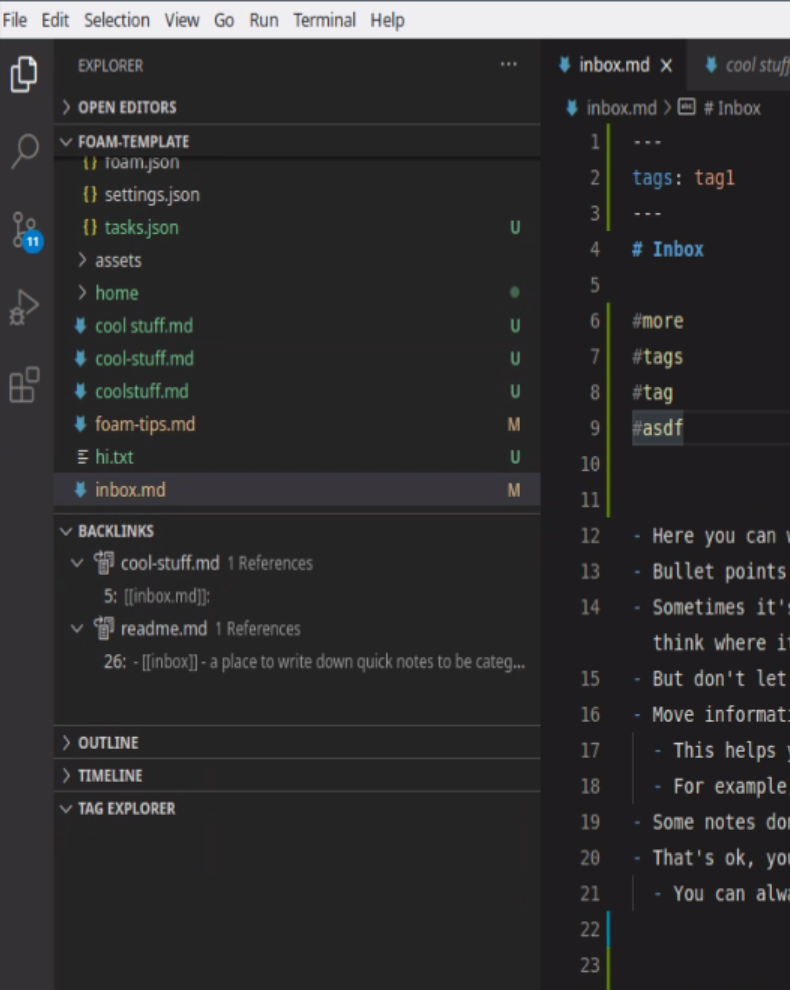
digitalsignalperson
on 26 Nov 2020
To appear in the tag explorer you need to write the tags in the MD frontmatter
Like you have that tags: tag1, the trully odd part is why it doesn't appear, are you using the latest version?
jmg-duarte
on 26 Nov 2020
hmm the PR said
- [x] Support defining tags via YAML
- [x] Support defining tags via #tag
- [x] Add a new tag panel which lists all the tags in the workspace in alphabetical order
so I imagined defining tags by #tag would also appear in the panel (at least that's the behavior I'd like; similar behaviour in e.g. Obsidian)
I'm on v0.6.0 and code says all extensions up to date. Caveat this is linux with Code OSS so it's looking at https://open-vsx.org/extension/foam/foam-vscode
digitalsignalperson
on 26 Nov 2020
You're right (reopening the issue)
@riccardoferretti do you have insights on the problem?
jmg-duarte
on 26 Nov 2020
I have actually experienced this locally for the first time yesterday.
From a cursory look, I think the problem is in the use of matchAll in the extractTags function, but I am not sure and more investigation is necessary
riccardoferretti
on 26 Nov 2020
I tweaked the parsing code, this fixed it on my machine
https://github.com/foambubble/foam/pull/382
tbh, I am still a bit baffled as to why the tests were passing before, but what I have there is the right way to deal with the iterator in any case
riccardoferretti
on 26 Nov 2020
I'd be down to test. Any links on how to build/test a vscode extension from github? My googling not helping
digitalsignalperson
on 27 Nov 2020
Check the docs/contribution-guide.md if you have questions let me know as
we want to improve the guide.
If you are not on the Foam discord you can follow the link in the top of
the readme. In the discord you can place your questions in #foam-vscode
A sexta, 27 de nov de 2020, 03:08, digitalsignalperson <
[email protected]> escreveu:
I'd be down to test. Any links on how to build/test a vscode extension
from github? My googling not helping—
You are receiving this because you modified the open/close state.
Reply to this email directly, view it on GitHub
https://github.com/foambubble/foam/issues/302#issuecomment-734616633,
or unsubscribe
https://github.com/notifications/unsubscribe-auth/ADVCBS73O7PQC5SOFOYUYKLSR4J4JANCNFSM4TCNNAXA
.
jmg-duarte
on 27 Nov 2020
Related issues
 ituri
·
3Comments
ituri
·
3Comments
 WoutV
·
5Comments
WoutV
·
5Comments
 clementoriol
·
4Comments
clementoriol
·
4Comments
 amorriscode
·
6Comments
amorriscode
·
6Comments
 Josh2K
·
3Comments
Josh2K
·
3Comments