Currently, the backlinks section in the left sidebar is pretty minimalist in terms of info and context. Being able to see more details and context around all the notes that link to your current note is one of the most powerful aspects of networked notetaking.
Perhaps the following requests should be broken out into separate issues:
The backlinks section should given its own dedicated window (similar to the graph view) as opposed to part of the left side bar. This would allow more info to be displayed and explored as well as make the functionality more expandable in the future.
Could the backlinks section be expanded such that is shows more than only the line that the link appeared on? With only one line (or even just a snippet of that line) very little context is provided. In particular, if the link is part of a bulleted list, it would allow the line to be expanded to show bullets nested below.
Ideally, the content in the backlinks section would be editable so that a user need not click between notes to add / edit content when working on a topic/note.
 Josh2K
All 3 comments
@Josh2K thanks for the feedback and ideas! The current version of Backlinks is implemented by Markdown Notes extension, so these suggestions would be better served there. I'll however answer what I can from the point of view of Foam.
The backlinks section should given its own dedicated window
You can already do this in VS Code by dragging the Backlinks explorer to the bottom pane:
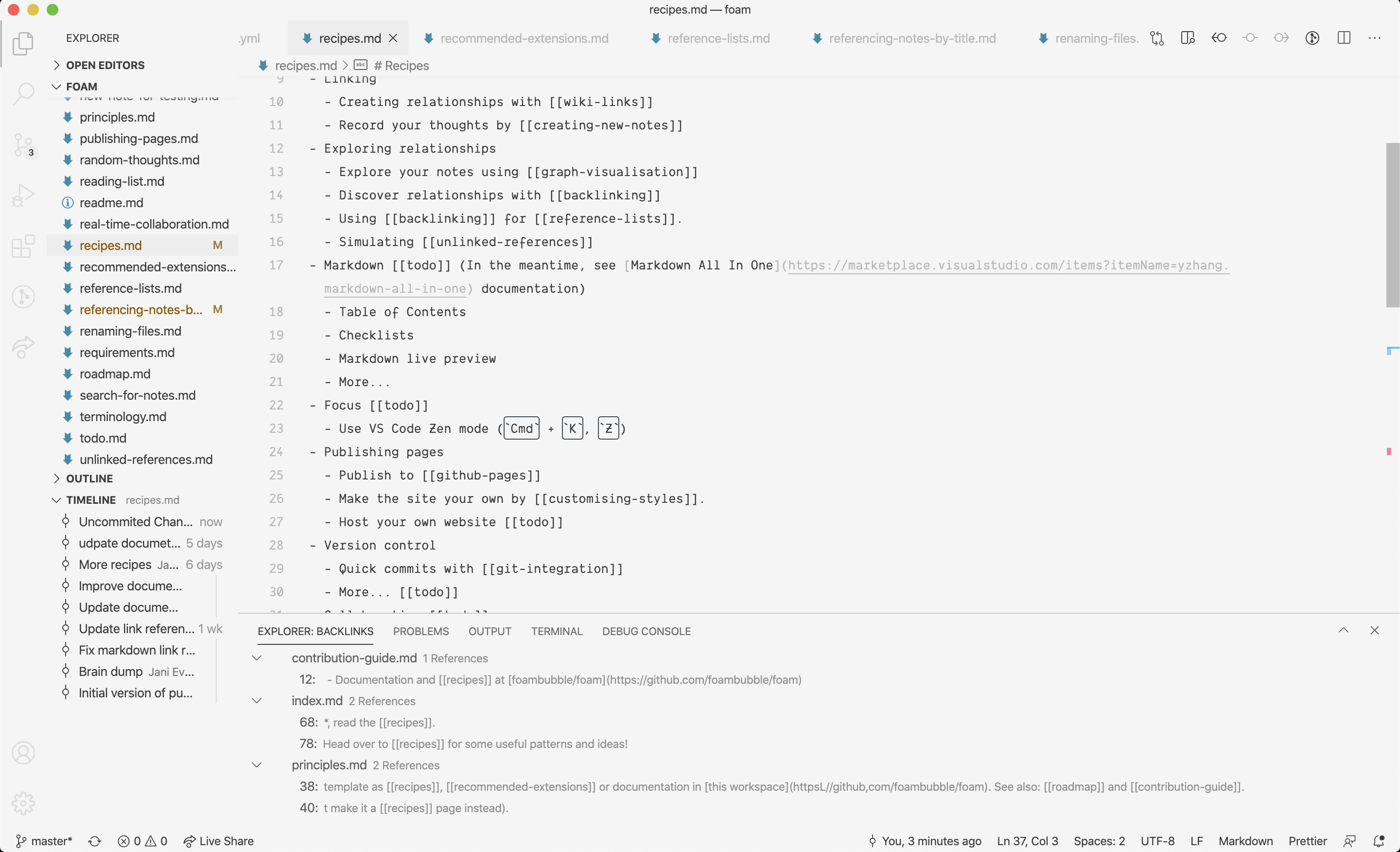
Could the backlinks section be expanded such that is shows more than only the line that the link appeared on
I would also prefer this, but I haven't decided between trying to contribute this to Markdown Notes, or implement my own. I have a vision of a grand unified Foam extension that provides a polished, integrated user experience across all features, but realistically that is going to be months away.
In the meantime, you could open this as a feature request for Markdown Notes.
Ideally, the content in the backlinks section would be editable so that a user need not click between notes to add / edit content when working on a topic/note.
This is a great idea! Technically a bit more involved, but definitely goes into my idea bank for Grand Unified Foam.
 jevakallio
on 30 Jun 2020
jevakallio
on 30 Jun 2020
Just want to +1 this idea. Of course take the direction you see fit, but I love this extension and will humbly make the recommendation that Backlink support be a primary feature within it, instead of relying on Markdown Notes.
After using Roam extensively, the most useful aspect of Linked References / Backlinks is how they interact with indented bulleted lists.
- [[Topic A]]
- This is a note on Topic A
- This is another notes that kinda has to do with [[Another Thing]]
When I am on the page for "Topic A", I really need to see the underlying data in context. Having to click through, for me, removes about ~50% of the value of the extension. I'm not sure if there's an alternative method, but I'm open to trying things!
I also think editable "backlink" context is wonderful, but less important than showing the extra context in the first place. I didn't even discover I could do that in Roam until day 3, and it's a nice to have.
 ztratar
on 7 Jul 2020
ztratar
on 7 Jul 2020
Yep, big +1 here too. I second @ztratar here. This is actually so useful that I ended up re-structuring how I organized my documents in Roam, specifically to make the backlinks be informative instead of not. I can live without it, but it is super, super super useful.
 steveklabnik
on 8 Jul 2020
steveklabnik
on 8 Jul 2020
Related issues
 jetk
·
6Comments
jetk
·
6Comments
 lsx7
·
7Comments
lsx7
·
7Comments
 coffenbacher
·
5Comments
coffenbacher
·
5Comments
 amorriscode
·
6Comments
amorriscode
·
6Comments
 WoutV
·
5Comments
WoutV
·
5Comments
Most helpful comment
Just want to +1 this idea. Of course take the direction you see fit, but I love this extension and will humbly make the recommendation that Backlink support be a primary feature within it, instead of relying on Markdown Notes.
After using Roam extensively, the most useful aspect of Linked References / Backlinks is how they interact with indented bulleted lists.
When I am on the page for "Topic A", I really need to see the underlying data in context. Having to click through, for me, removes about ~50% of the value of the extension. I'm not sure if there's an alternative method, but I'm open to trying things!
I also think editable "backlink" context is wonderful, but less important than showing the extra context in the first place. I didn't even discover I could do that in Roam until day 3, and it's a nice to have.