I would like to find a way to tag my bubbles, and make it easy to search/preview bubbles with certain tags.
Is there any similar features?
 KJTang
All 15 comments
You can, with Markdown Notes:
https://github.com/kortina/vscode-markdown-notes#find-all-references-to-tag
Does this do what you want? I haven't included it in the documentation since it's not how I personally use tags, but if this is helpful I'll include it in the Recipes documentation.
 jevakallio
on 30 Jun 2020
jevakallio
on 30 Jun 2020
It's not the type of tag in my thought...
I want to tag on the file, for example, I wrote notes for movies I've watched, and tag them with tag movie,
then I may use a command to filter files with movie from all files.
It can help me quick find some certain notes.
Although it can be done with vscode search, maybe we can do more?
such as highlight them in the markdown links graph.
KJTang
on 30 Jun 2020
@KJTang I have the same need. I would like to have in the sidebar all the tags so I would be able to filter files based on each tag.
I found this plugin https://marketplace.visualstudio.com/items?itemName=SimVet.markdown-tags where you can have all the tags from your files (tags should be like in your file like this example --> https://gitlab.com/SimVet/markdown-tags/-/blob/master/example/file3.md)
But unfortunately this plugin doesn't work very well.
Currently I use some regex search like this #(\S+)\s? to find all tags starting with # and following with a string
 lennondtps
on 2 Jul 2020
lennondtps
on 2 Jul 2020
@KJTang I have the same need. I would like to have in the sidebar all the tags so I would be able to filter files based on each tag.
I found this plugin https://marketplace.visualstudio.com/items?itemName=SimVet.markdown-tags where you can have all the tags from your files (tags should be like in your file like this example --> https://gitlab.com/SimVet/markdown-tags/-/blob/master/example/file3.md)But unfortunately this plugin doesn't work very well.
Currently I use some regex search like this
#(\S+)\s?to find all tags starting with#and following with a string
@lennondtps Yes, I used search to find tags too, but I come up with a new thought, which is we don't need tags actually.
If we create files for each tag, then other files just need link to it.
In this way, the markdown links graph can also support to display them. Maybe this is the most suittable style for tags in foam😀.
KJTang
on 2 Jul 2020
If we create files for each tag, then other files just need link to it.
@KJTang this is how I use this actually. I have [[todo]] tags that link to an empty-ish page, and I use the backlinks from that page to browse them.
I wouldn't mind improving support for tags. I'd just need to understand, how they should work. I like @lennondtps's sidebar idea, but before I go and put that on the roadmap, I'd like to prototype it somehow to see if it's actually a good UX or now. @lennondtps, do you know of any existing app that has this?
jevakallio
on 2 Jul 2020
If we create files for each tag, then other files just need link to it.
@KJTang this is how I use this actually. I have [[todo]] tags that link to an empty-ish page, and I use the backlinks from that page to browse them.
I wouldn't mind improving support for tags. I'd just need to understand, how they should work. I like @lennondtps's sidebar idea, but before I go and put that on the roadmap, I'd like to prototype it somehow to see if it's actually a good UX or now. @lennondtps, do you know of any existing app that has this?
Sure! Zettlr and obsidian have these feature. for example: https://obsidian.md/features
lennondtps
on 3 Jul 2020
Roam makes [[wiki links]] and #tags be the same thing, except that they're rendered differently. Wiki links like links, but tags be with the # and in a lighter gray.
 steveklabnik
on 8 Jul 2020
steveklabnik
on 8 Jul 2020
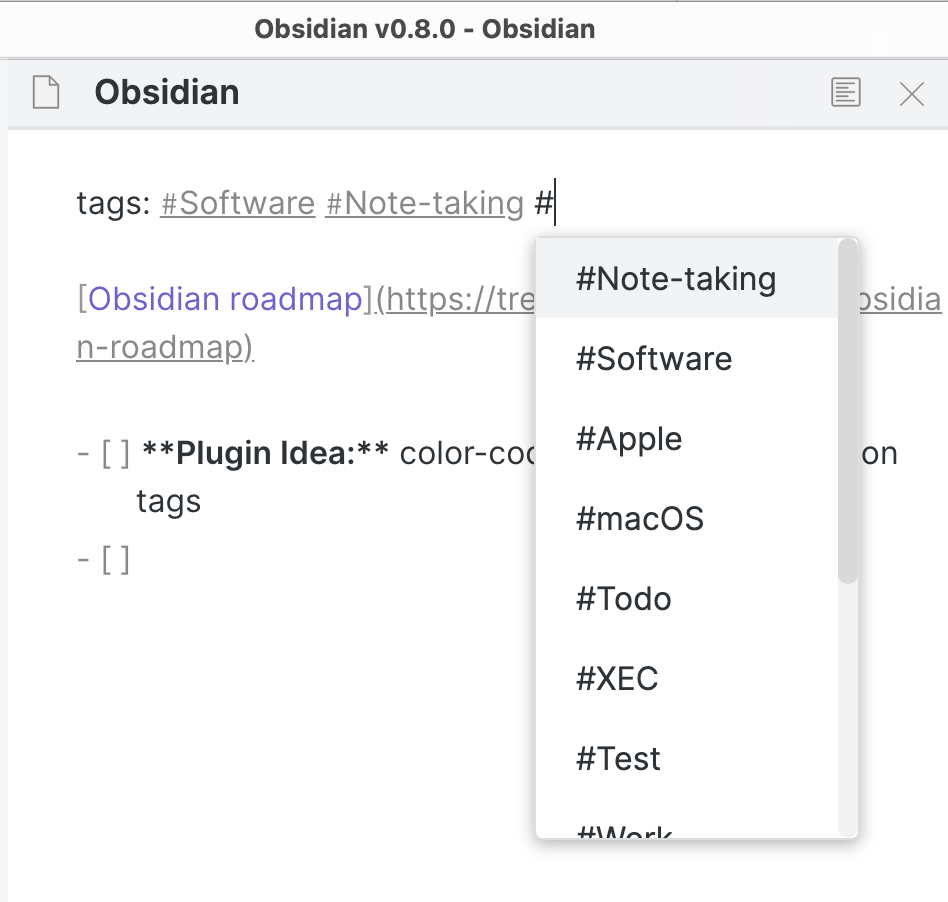
Pretty surprised, that the lack of proper #tags support does note get more attention from the Foam users and developers side. Here are some images of how #tags are organised in Obsidian:
_(sidebar panel)_
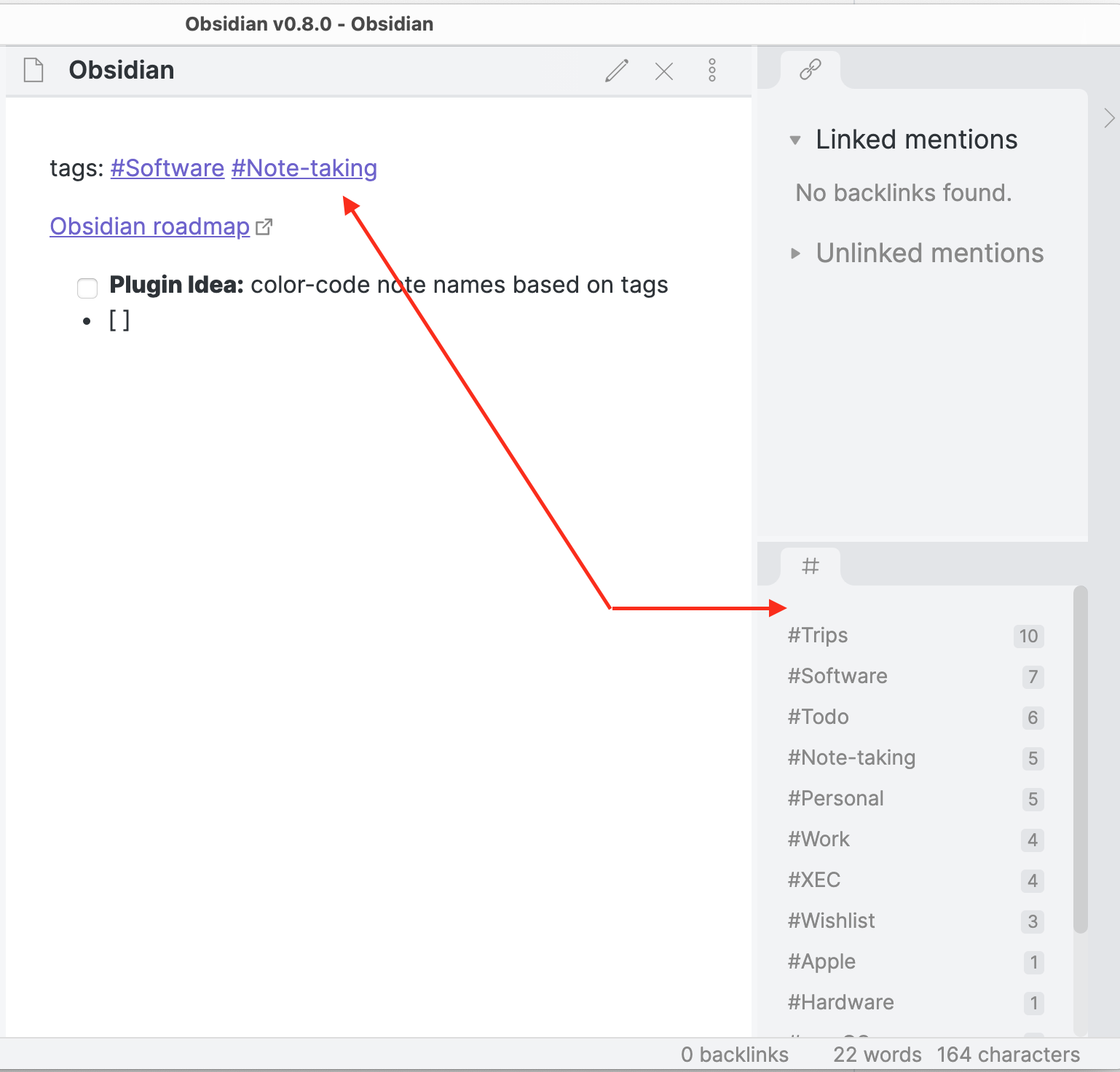
_(filtering by tag)_

(tags autocompletion)
 VKondakoff
on 21 Jul 2020
VKondakoff
on 21 Jul 2020
One thought regarding tags and graphs is instead of the tag being a node, it serves as a filter. The reason being that you'll just end up with a senseless hairball if each tag is a page/node. There could be a scrolling menu somewhere with checkboxes to filter notes that have that tag on and off. In a sense, its the same functionality as using tags anywhere else - the tag isn't a page so much as a filter for a search list.
Could also go a bit further and use set certain tags as "categories", which could have a color associated with it. Only one of these tags could be (optionally) applied to any given note.
You'd end up with a graph with various colors, likely segmented into different regions if the categories have been appropriately used. And then you can filter that graph using tags.
 nixsee
on 24 Jul 2020
nixsee
on 24 Jul 2020
Well, because we don't have a built-in tags support in foam I want to share how I manage them.
- Each tag places in a separate file name of which starts with
#. Like#idea.md,#work.mdetc. - Each file-tag must have a file-tag name at the first line and the next lines must be empty or have a short description of the tag itself. For example -
#idea.mdfile content:
#idea

Mark notes-ideas by this tag
- Use tags as plain markdown links at the end of the file or directly in note description.
I have a bunch of advantages when using this layout:
- Because each tag file starts with
#symbol - they are displaying always-first in visual studio explorer and have alphabetical-sorting order. - When I need to find related notes linked with tag - I can use backlinks to find some.
- Also I can see tags on graph links.
Maybe this workflow is intuitive, but I want to share it. I think it is useful.
 picolino
on 4 Oct 2020
picolino
on 4 Oct 2020
Well, because we don't have a built-in tags support in foam I want to share how I manage them.
- Each tag places in a separate file name of which starts with
#. Like#idea.md,#work.mdetc.
Just to clarify for anyone who also likes this solution. For me the # at the beginning of the wiki-link breaks the ctrl+left-click "open definition" feature. You have to name your tag notes like this to get it working again: #\[tag-name].md. You then have to name your .md file "#tag-name.md" but in your workspace refer to it as [[#\tag-name.md]] (or without the ".md" depending on your settings) for it to properly ctrl+left-click. This breaks Foam and Markdown Notes autocomplete feature for creating new [[ ]] notes though.
Also, to search your workspace for tags, you press ctrl+shift+f (WIN) to search "#\[tag-name].md."
 astrelochnik
on 14 Oct 2020
astrelochnik
on 14 Oct 2020
thanks @picolino, it's a very good idea to build a convention to work around the current limitation in foam!
per @astrelochnik's comment and #288, I would suggest not using the # character though, as it has deep semantic meaning in markdown.
I like the suggestion by @ingalless (in #288) of using ~, I tested it and it doesn't break the linking/autocompletion.
 riccardoferretti
on 15 Oct 2020
riccardoferretti
on 15 Oct 2020
most of this issue (which I realize covers several feature requests) has been addressed by #311
riccardoferretti
on 9 Nov 2020
still not sure how should i add tags to a file with #311
anyone can give an example here?
 shelper
on 16 Dec 2020
shelper
on 16 Dec 2020
hi @shelper, does this help? https://github.com/foambubble/foam/blob/master/docs/features/tags.md
riccardoferretti
on 17 Dec 2020
Related issues
 amorriscode
·
6Comments
amorriscode
·
6Comments
 srid
·
3Comments
srid
·
3Comments
 Josh2K
·
3Comments
Josh2K
·
3Comments
 doodlewhale
·
4Comments
doodlewhale
·
4Comments
 jetk
·
6Comments
jetk
·
6Comments
Most helpful comment
Pretty surprised, that the lack of proper

#tagssupport does note get more attention from the Foam users and developers side. Here are some images of how#tagsare organised in Obsidian:_(sidebar panel)_
_(filtering by tag)_

(tags autocompletion)
