fluxion not restarting network-manager service at cleanup
Bug Report
Summary
wifi adapter not scanning for wifi to connect to browse internet after running the script.
What is the current behaviour?
fluxion isn't restarting network-manager properly.
How to reproduce
If the current behaviour is a bug, please provide the steps to reproduce it.
- start the script
- start deauth attack
- exit the script
- try reconnecting to wifi using that adapter to browse internet.
What do you think the expected behaviour should be?
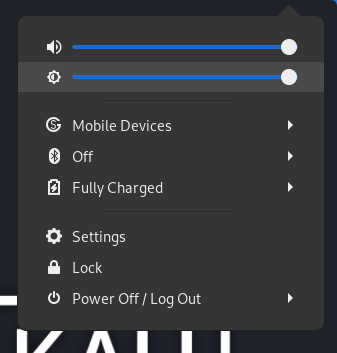
after exiting, trying to connect to wifi normally would be like this:

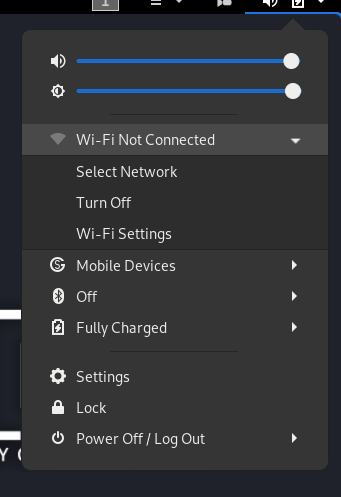
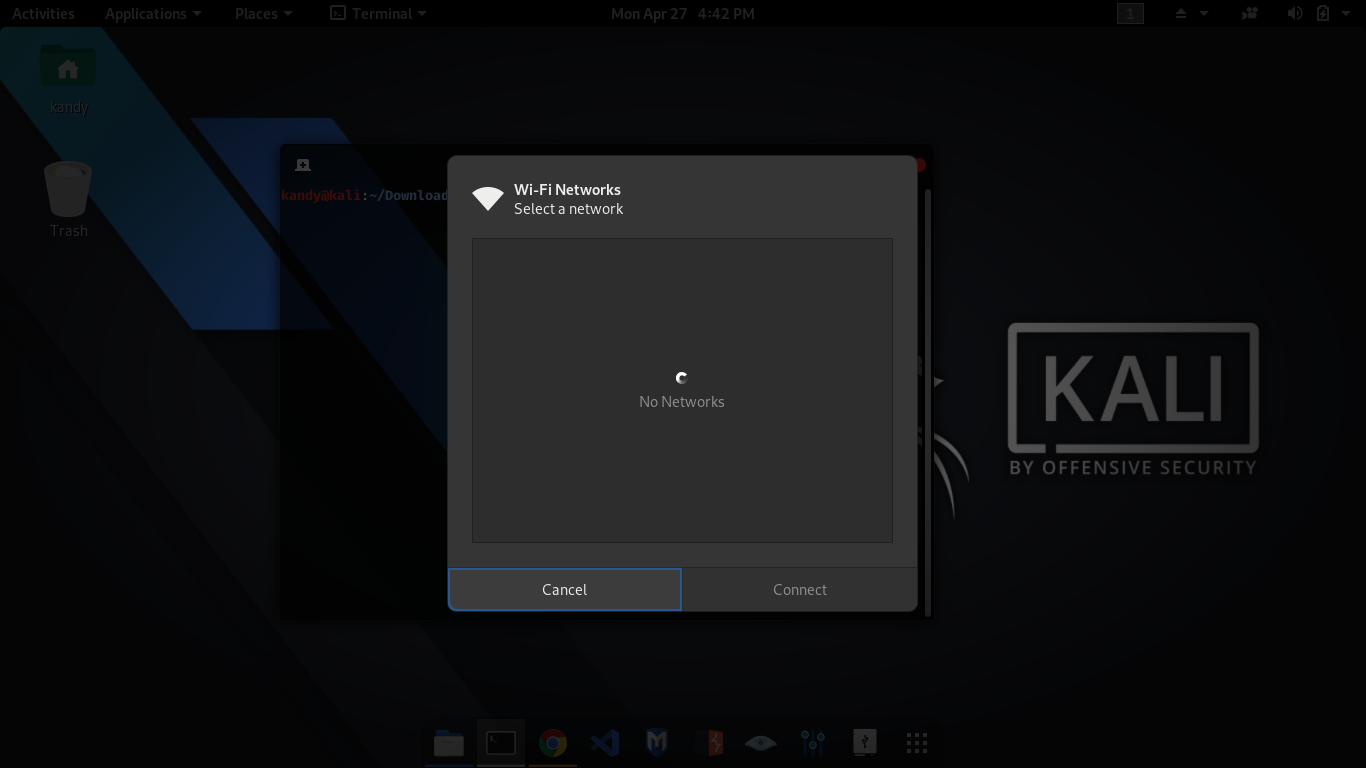
(not showing the wifi networks. keeps loading forever.)
If this is a feature request, what is the motivation or use case for the added feature?
Specs
FLUXION Info
FLUXION V6.7
BASH Info
GNU bash, version 5.0.16(1)-release (x86_64-pc-linux-gnu)
Copyright (C) 2019 Free Software Foundation, Inc.
License GPLv3+: GNU GPL version 3 or later http://gnu.org/licenses/gpl.html
This is free software; you are free to change and redistribute it.
There is NO WARRANTY, to the extent permitted by law.
Path: /usr/bin/bash
Interface (wlan0) Info
Device: phy0
Driver: brcmsmac
Chipset:
Master Modes Yes
Injection Test: ioctl(SIOCSIWMODE) failed: Device or resource busy
Injection is working!
read failed: Network is down
wi_read(): Network is down
read failed: Network is down
wi_read(): Network is down
read failed: Network is down
wi_read(): Network is down
XTerm Infos
Version: XTerm(353)
Path: /usr/bin/xterm
Test: XServer/XTerm success!
HostAPD Info
hostapd v2.9
User space daemon for IEEE 802.11 AP management,
IEEE 802.1X/WPA/WPA2/EAP/RADIUS Authenticator
Copyright (c) 2002-2019, Jouni Malinen j@w1.fi and contributors
Path: /usr/sbin/hostapd
Aircrack-ng Info
EXIT
Aircrack-ng 1.6 - (C) 2006-2020 Thomas d'Otreppe
https://www.aircrack-ng.org
Pyrit Info
Traceback (most recent call last):
File "
ImportError: No module named scapy
Pyrit 0.5.1 (C) 2008-2011 Lukas Lueg - 2015 John Mora
https://github.com/JPaulMora/Pyrit
This code is distributed under the GNU General Public License v3+
Scapy Version:
Warning: Pyrit has been reported to be incompatible with scapy version 2.4.0 and above. Consult the wiki for further information. This should not affect you, if you don't choose to use pyrit in the script.
System Info
Chipset: Linux version 5.5.0-kali2-amd64 ([email protected]) (gcc version 9.3.0 (Debian 9.3.0-10)) #1 SMP Debian 5.5.17-1kali1 (2020-04-21)
Chipset
Chipset: brcmsmac
No information if chipset support ap mode
Chipset support monitor mode
Don't reseve all required information
Expected behavior
after _restarting_ network-manager service manually the issue was fixed.
 kandarpgautam
All 25 comments
Which deauth attack are you referring to? Afaik, fluxion has 2 types of attack. One is handshake snooper and the other one is captive portal attack.
For both attacks to be fruitful, you may need to do deauth attack which is done automatically.
Questions regarding your issue
- Did you manually run airmon-ng check kill before starting fluxion?
- Did you set any CLI flag while starting fluxion to kill network manager?
- Which deauth attack are you referring to? The one in handshake or captive portal?
- How did you exit the script? By pressing ctrl + c? Or using exit option in fluxion?
Answering the above makes it easier to debug the issue
 xpz3
on 27 Apr 2020
xpz3
on 27 Apr 2020
i am refering to handshake snooper attack.
Did you manually run airmon-ng check kill before starting fluxion?
no
Did you set any CLI flag while starting fluxion to kill network manager?
no, i didn't kill network-manager. i restarted it when my adapter wasn't showing me the list of wifi. and after restarting network-manager with command : service network-manager restart issue gets resolved.
Which deauth attack are you referring to? The one in handshake or captive portal?
handshake snooper
How did you exit the script? By pressing ctrl + c? Or using exit option in fluxion?
by pressing 2 when deauth was in process. and then waited for it to terminate properly that took around not more than 30 seconds.
kandarpgautam
on 27 Apr 2020
there's some additional thing that might help you. check this video. i recorded my session.
https://gofile.io/?c=zmPLnv
kandarpgautam
on 27 Apr 2020
Going roughly through the code, while running handshake attack, the network manager isn't killed unless explicitly setting the kill flag while running fluxion.
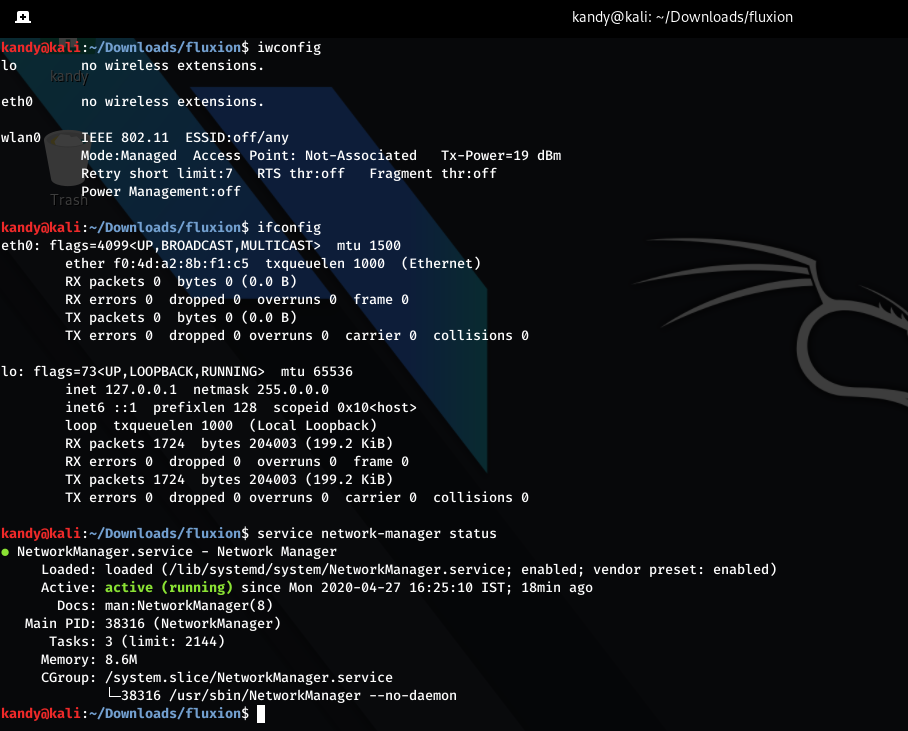
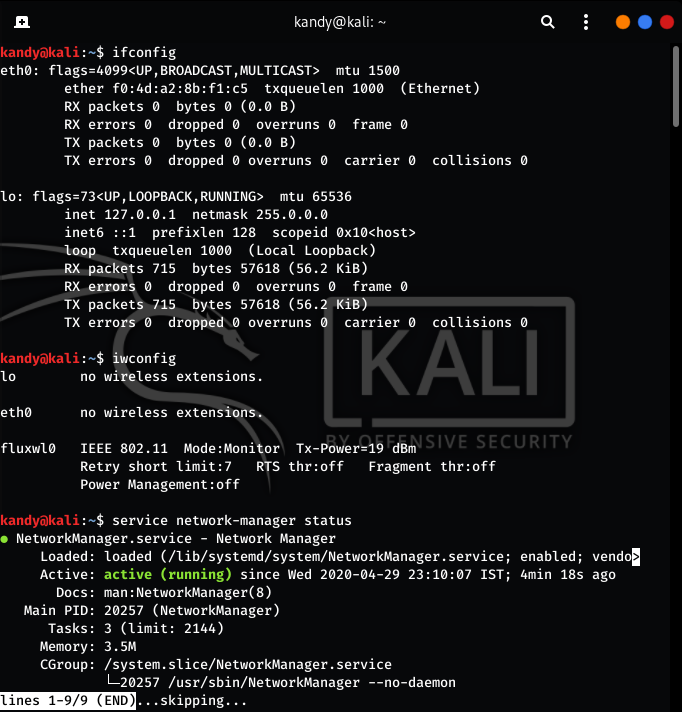
Can you show service network-manager statusand iwconfig outputs after you reproduce the issue of no network? Show output before restarting network-manager manually
xpz3
on 27 Apr 2020
ok here it is.....

kandarpgautam
on 27 Apr 2020
So as you can see network manager isn't killed and the wifi interface has been restored. If you see the top right corner, the wifi is connected to a network too. You can check ifconfig output if refreshing your browser doesn't load your page
xpz3
on 27 Apr 2020
@xpz3 no, that's misleading. the page i reloaded after the attack while it was connected like that. this time it shows connected, but most of the time it won't be connected. also i checked the list again (of wifi), i neither can switch, nor it scans or shows me more options.
kandarpgautam
on 27 Apr 2020
When you are unable to connect to a network after exciting fluxion, show the screenshot of network manager status, iwconfig and ifconfig
xpz3
on 27 Apr 2020
ok here it is:
- after attack, look it's not connected.
- also it's not able to scan for new APs.
- card not showing in ifconfig
- video of me running script
(this is all you need now.. you are on your own until i'm back.)
https://gofile.io/?c=zmPLnv
solution that you can try: restart the network-manager via script at the end.
kandarpgautam
on 27 Apr 2020
@MPX4132 so the problem is not related to killing network manager as he said. Its not killed. The interface is down.
xpz3
on 27 Apr 2020
I said i was able to fix it with sudo service network-manager restart
And it allowed me to access internet again. So if you include that in script, you will be able to do the same.
Ps: maybe fluxion script disables interface at some point and doesn't re-enable it. Ifconfig wlan0 up might give same results as network-manager restart. But restarting network manager is still a good option.
kandarpgautam
on 27 Apr 2020
After the attack fluxion tries to restore the interface to its original state. So that's the correct thing to do if given an option rather than restarting the network manager because that can disrupt other things too. I was just finding out what the real issue was. Now that we know it, let @MPX4132 decide what solution is appropriate. Both does work. But if fluxion restarts network manager, its without user's knowledge. They are trying to avoid that as much as possible or else network manager would have been killed for every attack for consistency.
xpz3
on 27 Apr 2020
I raised another issue and closed it... Can u read it? What's happening is.. when it starts deauthenticating, even after getting handshake.. it doesn't stop.
kandarpgautam
on 27 Apr 2020
It dumps a pretty message on xterm window,valid hash has been found.Close this window.You need to close the xterm window and move on to captive portal attack.
 usama7628674
on 27 Apr 2020
usama7628674
on 27 Apr 2020
@usama7628674 but the other 2 windows were opening again and again
kandarpgautam
on 27 Apr 2020
So the problem is that interface deallocation failed, or something? I'm not sure I'm following what's happened in this thread.
 MPX4132
on 27 Apr 2020
MPX4132
on 27 Apr 2020
While restoring interfaces, just make sure its previous state is also restored. Here for this guy, we can see that wlan0 interface is down. So thats his issue of wifi not getting connected i think.
Edit - I thought network manager could do that automatically without the service being restarted
xpz3
on 27 Apr 2020
@xpz3 right. It can be done with ifconfig wlan0 up maybe. I didn't try it. If you want me to try that, i can. But what i do is service network-manager restart and it fixes the issue.
@MPX4132
Second issue that i encountered (which i closed now, because i was trying to make sure if that's an actual issue or not or it's just my linux or card's problem.) Was when i start deauth attack, it doesn't stop. Even after capturing the handshake.
No window is closed. I don't know why that happened. I sent you a video of me running the script. You can see that i had to exit to stop those windows from popping up again and again.
I have a cousin who press ctrl+c on 3rd terminal(on bottom left) when 2 of the windows (1 at the top left, and 1 at bottom right) closes automatically when it captures the handshake. I will also look into the code and if i find something, i will report it here.
kandarpgautam
on 29 Apr 2020
The issue in this thread can be solved by bringing the interface to its original state (UP) i think. Since fluxion isn't killing network manager, its better not to restart it because a lot of people might be using fluxion and they might be expecting the same behaviour from fluxion. Let the devs decide on that.
Regarding the other issue on other thread try handshake capture with target tracking turned off. It looks like a bug. When asked for target tracking, select skip and try again
xpz3
on 29 Apr 2020
@xpz3 can a single card do target tracking and send deauthenticating Packets at the same time as well?
Because i selected wlan0 for both.
When you said, choose skip option, i recalled that someone i know uses the same steps. I will try it and let you know.
kandarpgautam
on 29 Apr 2020
Target tracking is meant to be used with an additional card. If you select same card it will cause issues. So either skip it or select another card for target tracking
xpz3
on 29 Apr 2020
I think then depending upon no. Of cards connected, Fluxion should automatically decide at that point. I will try it with choosing the skip option. If there's less than 2 cards.. but fluxion can skip it automatically. Something like this:
nmcli d | grep -c wifi or ip link show | grep -c wlan or whatever you like and think is appropriate (to count interface and then simple if condition to check the count)
kandarpgautam
on 29 Apr 2020
@xpz3 i tried running the script again. I wanted to ask you .. in which directory do you store capture file?
kandarpgautam
on 29 Apr 2020
At this point i seriously don't know Why's all this happening. I will look into the code. _Original state is not being restored properly._
I ran this script 2 times without restarting the network manager and it did this:
After 1st run:
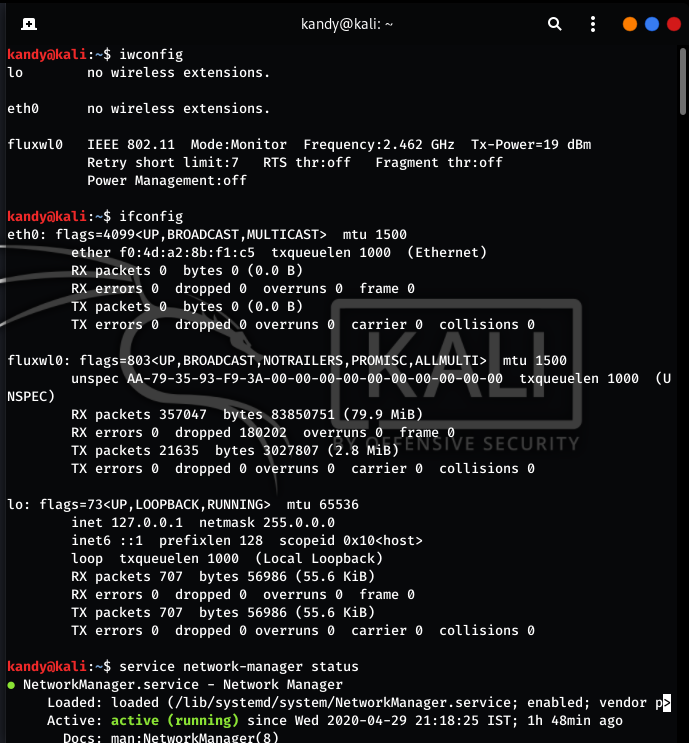
After 2nd run:
kandarpgautam
on 29 Apr 2020
Ok, there's a small bug i could find in the code regarding this. Ill inform the dev.
xpz3
on 29 Apr 2020
Related issues
 EOS123
·
3Comments
kandarpgautam
·
15Comments
EOS123
·
3Comments
kandarpgautam
·
15Comments
 Geczy
·
16Comments
Geczy
·
16Comments
 Gabo1203
·
14Comments
Gabo1203
·
14Comments
 brunoaduarte
·
7Comments
brunoaduarte
·
7Comments