Fluxion: Stuck at Starting Captive Portal access point service...
Bug Report
Summary
Cannot get Fluxion starts the Captive Portal AP, it always gets stuck at that step of the attack.
I know this issue has been treated many times, but I've been unable to solve and that's why I'm asking for your help.
What is the current behaviour?
Stuck at this point (for ages...)

How to reproduce
Just follow the Fluxion guide to attack: first got the handshake using the only-monitor mode (slower but I was surer that it would work).

After that, I started the second part of the attack, but it always gets stuck, no matter what option I choose (hostapd, airbase-ng, pyrit, cowpatty verification, SSL certificate, disconnected, any language...).
If the current behaviour is a bug, please provide the steps to reproduce it.
I do not really think it is a bug but a misbehaviour or incompatibility between certain components or drivers (despite mine are supposed to be supported).
What do you think the expected behaviour should be?
Fluxion should open windows in order to follow the Captive Portal access point attack, but it does not.
If this is a feature request, what is the motivation or use case for the added feature?
Specs
root@kali:~/fluxion/scripts# ./diagnostics.sh wlan0
./diagnostics.sh: línea 13: ../lib/ChipsetUtils.sh: No existe el fichero o el directorio
FLUXION Info
FLUXION V4.15
BASH Info
GNU bash, versión 4.4.23(1)-release (x86_64-pc-linux-gnu)
Copyright (C) 2016 Free Software Foundation, Inc.
Licencia GPLv3+: GPL de GNU versión 3 o posterior http://gnu.org/licenses/gpl.html
This is free software; you are free to change and redistribute it.
There is NO WARRANTY, to the extent permitted by law.
Path: /bin/bash
Interface (wlan0) Info
Device: phy0
Driver: 8812au
Chipset: Realtek Semiconductor Corp. RTL8812AU 802.11a/b/g/n/ac WLAN Adapter
Master Modes Yes
Injection Test: Injection is working!
XTerm Infos
Version: XTerm(333)
Path: /usr/bin/xterm
Test: XServer/XTerm success!
HostAPD Info
hostapd v2.6
User space daemon for IEEE 802.11 AP management,
IEEE 802.1X/WPA/WPA2/EAP/RADIUS Authenticator
Copyright (c) 2002-2016, Jouni Malinen j@w1.fi and contributors
Path: /usr/sbin/hostapd
Aircrack-ng Info
EXIT
(null) - (C) 2006-2018 Thomas d'Otreppe
https://www.aircrack-ng.org
Pyrit Info
Pyrit 0.5.1 (C) 2008-2011 Lukas Lueg - 2015 John Mora
https://github.com/JPaulMora/Pyrit
This code is distributed under the GNU General Public License v3+
Scapy Version: 2.4.0
Warning: Pyrit has been reported to be incompatible with scapy version 2.4.0 and above. Consult the wiki for further information. This should not affect you, if you don't choose to use pyrit in the script.
System Info
Chipset: Linux version 4.17.0-kali1-amd64 ([email protected]) (gcc version 7.3.0 (Debian 7.3.0-25)) #1 SMP Debian 4.17.8-1kali1 (2018-07-24)
Chipset
Chipset: 8812au
./diagnostics.sh: línea 111: check_chipset: no se encontró la orden
There you can see all my other specs. As seen above, everything is up to date and compatible (except Pyrit, but I don't really think that might be the cause of this matter).
Expected behavior
Fluxion should open windows in order to follow the Captive Portal access point attack, but it does not.
I've read almost every post available about this issue, including this one about my specific driver (which hasn't been updated in about a year) trying to unsuccessfully solve the problem.
Any comment would be of extreme help.
Thanks in advance!
 lordxiniog
All 52 comments
@lordxiniog Maybe you will get luck with this tool.It has many features including evil twin method like fluxion.
 usama7628674
on 3 Aug 2018
usama7628674
on 3 Aug 2018
I'm facing the same issue, it's stuck there for decade and freezes the system. I'm using the latest Fluxion version on Ubuntu 18.04, Dell n5110 computer.
 ZiedHf
on 3 Aug 2018
ZiedHf
on 3 Aug 2018
@ZiedHf Run the diagnostic script and paste the output here.
usama7628674
on 3 Aug 2018
@usama7628674 please stop commenting you don't have any idea. I'm pretty sure this is a driver problem and additional this issue could be connected that you use Ubuntu. In like 3h I'm back at home and I will run this in a VM. Let's see
 deltaxflux
on 3 Aug 2018
deltaxflux
on 3 Aug 2018
@deltaxflux I just commented cuz I've read people having luck with airgeddon that does support some realtek chipsets and yes I know about ubuntu stuff.
usama7628674
on 3 Aug 2018
@ZiedHf @lordxiniog couldn't replicate your exact issue but found some other problems with ubuntu / systemd-resolved.
 rad4day
on 3 Aug 2018
rad4day
on 3 Aug 2018
Thanks for the suggestion, @usama7628674. I'll give it a try.
Thank all of you meanwhile.
lordxiniog
on 3 Aug 2018
Yeah, definitely a bug. Fixed in futher releases.
deltaxflux
on 7 Aug 2018
Seems to not be fixed in 5.0
rad4day
on 8 Aug 2018
I was able to find out the password cracking the .cap file using Airgeddon (actually, I think I used aircrack, but am not sure) and a dictionary, though.
But it would be nice that it were solved in further versions.
Thanks to all the developers by the way.
lordxiniog
on 8 Aug 2018
@lordxiniog So you didn't use evil twin method of airgeddon.Did your chipset(RTL8812AU) work properly with airgeddon?
usama7628674
on 8 Aug 2018
@usama7628674, Indeed I tried, but I got some errors as well (I can send you screenshots if needed, though I don't think this is the appropriate channel to do so).
However, I did use the Offline password tool recovery from Airgeddon to get the pass.
lordxiniog
on 8 Aug 2018
I got the same problem stuck at Starting AP service. But I successfully use evil twin method of Airgeddon without any change.
My OS is Kali 2018.04 (4.15.0-kali2-amd64), and WIFI driver is ath9k, chipset (Qualcomm Atheros AR9285 Wireless Network Adapter)
@usama7628674 @deltaxflux
 Gvain
on 26 Aug 2018
Gvain
on 26 Aug 2018
@Gvain Yes fluxion throws kernal bug but airgeddon is right.I wonder why?
usama7628674
on 26 Aug 2018
Having same issue in latest release.
 anuselesscharacter
on 6 Sep 2018
anuselesscharacter
on 6 Sep 2018
@usama7628674 bro that's not the comment I expected.
anuselesscharacter
on 6 Sep 2018
Ok, I will take a look on it. You tried fluxion 5.6 ?
deltaxflux
on 6 Sep 2018
yes.
anuselesscharacter
on 6 Sep 2018
https://github.com/FluxionNetwork/fluxion/issues/212
Your wifi adapter's chipset is NOT compatible with hostapd.
 hasanalizxc
on 16 Oct 2018
hasanalizxc
on 16 Oct 2018
Can you help me with this ?
root@kali:~/fluxion/scripts# ./diagnostics.sh wlan0
FLUXION Info
FLUXION V5.6
BASH Info
GNU bash, version 4.4.12(1)-release (x86_64-pc-linux-gnu)
Copyright (C) 2016 Free Software Foundation, Inc.
License GPLv3+: GNU GPL version 3 or later http://gnu.org/licenses/gpl.html
This is free software; you are free to change and redistribute it.
There is NO WARRANTY, to the extent permitted by law.
Path: /bin/bash
Interface (wlan0) Info
Device: phy0
Driver: iwlwifi
Chipset: Intel Corporation Centrino Ultimate-N 6300 (rev 35)
Master Modes Yes
Injection Test: ./diagnostics.sh: line 65: /usr/sbin/aireplay-ng: Input/output error
Failed
XTerm Infos
Version: XTerm(331)
Path: /usr/bin/xterm
Test: XServer/XTerm success!
HostAPD Info
hostapd v2.6
User space daemon for IEEE 802.11 AP management,
IEEE 802.1X/WPA/WPA2/EAP/RADIUS Authenticator
Copyright (c) 2002-2016, Jouni Malinen j@w1.fi and contributors
Path: /usr/sbin/hostapd
Aircrack-ng Info
Aircrack-ng 1.2 rc4 - (C) 2006-2015 Thomas d'Otreppe
http://www.aircrack-ng.org
Pyrit Info
./diagnostics.sh: line 88: /usr/bin/python2: Input/output error
./diagnostics.sh: line 89: /usr/bin/pyrit: Input/output error
Scapy Version:
Warning: Pyrit has been reported to be incompatible with scapy version 2.4.0 and above. Consult the wiki for further information. This should not affect you, if you don't choose to use pyrit in the script.
System Info
Chipset: Linux version 4.14.0-kali3-amd64 ([email protected]) (gcc version 7.2.0 (Debian 7.2.0-18)) #1 SMP Debian 4.14.12-2kali2 (2018-01-11)
Chipset
Chipset: iwlwifi
Don't reseve all required information
 merlon2018
on 28 Nov 2018
merlon2018
on 28 Nov 2018
You have an issue with your Linux install, commands are failing. This has nothing to do with fluxion itself.
 strasharo
on 28 Nov 2018
strasharo
on 28 Nov 2018
@strasharo I've installed linux 2018.1 using unetbootin do I have to change any options ? Also is my chipset compatible with fluxion's attacks. Thank you for your answers :)
merlon2018
on 29 Nov 2018
I've figured this out. There's some problem with the way fluxion tries to place wireless adapters in monitor mode. I've once this problem before while coding a script. I don't know whether the fluxion uses iwconfig or airmon-ng for monitor mode support. Make sure you guys put your wireless card in monitor mode explicitly with airmon-ng before using fluxion and also that your card is supported by hostapd nl80211 driver. A cheaper wireless adapter like TP-Link WN722N v1 would work fine.
 hash3liZer
on 10 Dec 2018
hash3liZer
on 10 Dec 2018
using kali 2018.4 / Fluxion 5.6 / TP 722N V2.
it took me day and night to install all drivers but still cant get monitor mode to work.
at the end i got a working driver which is; https://github.com/kimocoder/rtl8188eus for my (uname -r
4.18.0-kali3-amd64)
Still the same, this bug isn't fixed yet?
I've done those: apt-get update && apt-get upgrade && apt-get dist-upgrade :/
anyway i found that TPW722N v2 uses realtek, maybe that's the problem, i commanded it throu amazon and gave me this one, i'm gonna try to buy 'alfa awus036ach' hope it'll work
(OFF TOPIC)
root@kali:~# pip2 uninstall scapy
Not uninstalling scapy at /usr/lib/python2.7/dist-packages, outside environment /usr
Can't uninstall 'scapy'. No files were found to uninstall.
root@kali:~# pip2 install scapy==2.3.3
Collecting scapy==2.3.3
Downloading https://files.pythonhosted.org/packages/ac/14/c792a14b9f8bc4bb9c74c0594c167a2da36e31964098d9e27202142cbd7d/scapy-2.3.3.tgz (1.4MB)
100% |████████████████████████████████| 1.4MB 967kB/s
Building wheels for collected packages: scapy
Running setup.py bdist_wheel for scapy ... done
Stored in directory: /root/.cache/pip/wheels/d0/77/f6/8ae2585228dbb244d7160ba2db790e25122856a959b4d4abc8
Successfully built scapy
Installing collected packages: scapy
Found existing installation: scapy 2.4.0
Not uninstalling scapy at /usr/lib/python2.7/dist-packages, outside environment /usr
Can't uninstall 'scapy'. No files were found to uninstall.
Successfully installed scapy-2.3.3
root@kali:~# cd /usr/lib/python2.7/dist-packages/
root@kali:/usr/lib/python2.7/dist-packages# ls (i found scapy)
root@kali:/usr/lib/python2.7/dist-packages/scapy# version 2.4.0
i wanted to install v2.3 that works with pyrit but seems i can get it to work, any help?
(OFF TOPIC)
BACK TO TOPIC
HERE IT DIAG
FLUXION Info
FLUXION V5.6
BASH Info
GNU bash, version 4.4.23(1)-release (x86_64-pc-linux-gnu)
Copyright (C) 2016 Free Software Foundation, Inc.
License GPLv3+: GNU GPL version 3 or later http://gnu.org/licenses/gpl.html
This is free software; you are free to change and redistribute it.
There is NO WARRANTY, to the extent permitted by law.
Path: /usr/bin/bash
Interface (-i) Info
Device: Unknown
basename: missing operand
Try 'basename --help' for more information.
Driver: Unsupported
Chipset:
Master Modes Yes
Injection Test: aireplay-ng: option requires an argument -- 'i'
Failed
XTerm Infos
Version: XTerm(340)
Path: /usr/bin/xterm
Test: XServer/XTerm success!
HostAPD Info
hostapd v2.6
User space daemon for IEEE 802.11 AP management,
IEEE 802.1X/WPA/WPA2/EAP/RADIUS Authenticator
Copyright (c) 2002-2016, Jouni Malinen j@w1.fi and contributors
Path: /usr/sbin/hostapd
Aircrack-ng Info
EXIT
Aircrack-ng 1.5.2 - (C) 2006-2018 Thomas d'Otreppe
https://www.aircrack-ng.org
Pyrit Info
Pyrit 0.5.1 (C) 2008-2011 Lukas Lueg - 2015 John Mora
https://github.com/JPaulMora/Pyrit
This code is distributed under the GNU General Public License v3+
Scapy Version: 2.4.0
Warning: Pyrit has been reported to be incompatible with scapy version 2.4.0 and above. Consult the wiki for further information. This should not affect you, if you don't choose to use pyrit in the script.
System Info
Chipset: Linux version 4.18.0-kali2-amd64 ([email protected]) (gcc version 7.3.0 (Debian 7.3.0-29)) #1 SMP Debian 4.18.10-2kali1 (2018-10-09)
Chipset
Usage: grep [OPTION]... PATTERN [FILE]...
Try 'grep --help' for more information.
Chipset:
Invalid input, chipset appears invalid
 ElPrinz
on 1 Jan 2019
ElPrinz
on 1 Jan 2019
My first post here, and I have exactly the same problem with Fluxion 5.9 version.
I have Alfa 036ach, everything works regarding capturing handshakes, while stucks at "starting captive portal". Used on laptop or RPI - the same thing keeps showing. Please, fix this bug, since the tool is overall great, just one fix is needed!
 LegalAngel
on 14 Jun 2019
LegalAngel
on 14 Jun 2019
I have same problem with Fluxion 5.9 Everything else is working perfectly. Tried WN722N v1 and Alfa 036NH, both the same result so no adapter issue.
 DarkPowerXz
on 5 Jul 2019
DarkPowerXz
on 5 Jul 2019
same problem. stucks at "starting captive portal".
fluxion 5.9.
OS: Linux kali 4.19.0-kali4-amd64 #1 SMP Debian 4.19.28-2kali1 (2019-03-18) x86_64 GNU/Linux
wifi chip: 8812au
 hebinglong
on 5 Jul 2019
hebinglong
on 5 Jul 2019
hmmm,, shame,.
it is not working with latest Alfa
ALFA Network AWUS1900
Invalid input, chipset appears invalid
HostAPD Info
hostapd v2.9
User space daemon for IEEE 802.11 AP management,
IEEE 802.1X/WPA/WPA2/EAP/RADIUS Authenticator
Copyright (c) 2002-2019, Jouni Malinen j@w1.fi and contributors
Path: /usr/sbin/hostapd
Aircrack-ng Info
EXIT
Aircrack-ng 1.5.2 - (C) 2006-2018 Thomas d'Otreppe
https://www.aircrack-ng.org
Pyrit Info
Pyrit 0.5.1 (C) 2008-2011 Lukas Lueg - 2015 John Mora
https://github.com/JPaulMora/Pyrit
This code is distributed under the GNU General Public License v3+
Scapy Version: 2.4.2
Warning: Pyrit has been reported to be incompatible with scapy version 2.4.0 and above. Consult the wiki for further information. This should not affect you, if you don't choose to use pyrit in the script.
System Info
Chipset: Linux version 5.2.0-kali2-amd64 ([email protected]) (gcc version 8.3.0 (Debian 8.3.0-19)) #1 SMP Debian 5.2.9-2kali1 (2019-08-22)
Chipset
Chipset:
Invalid input, chipset appears invalid
root@kali:/rpms/fluxion/scripts#
root@kali:/rpms/fluxion/scripts# lsusb
Bus 004 Device 002: ID 0bda:8813 Realtek Semiconductor Corp. RTL8814AU 802.11a/b/g/n/ac Wireless Adapter
 wice222
on 3 Oct 2019
wice222
on 3 Oct 2019
The chipset is not supported.
deltaxflux
on 3 Oct 2019
I saw that and highlighted at the beginning of my post,
Question is, what chipsets are supported then with 5Ghz support if latest Alfa is not supported?
wice222
on 3 Oct 2019
Here's a fix:
Make sure you run "airmon-ng check kill" before you run fluxion.
Or I think "./fluxion.sh -k" should do the trick as well. But try the above command.
 icnahom
on 8 Feb 2020
icnahom
on 8 Feb 2020
Here's a fix:
Make sure you run "airmon-ng check kill" before you run fluxion.
Or I think "./fluxion.sh -k" should do the trick as well. But try the above command.
You are save my time. Thank you!
 quycao
on 18 Feb 2020
quycao
on 18 Feb 2020
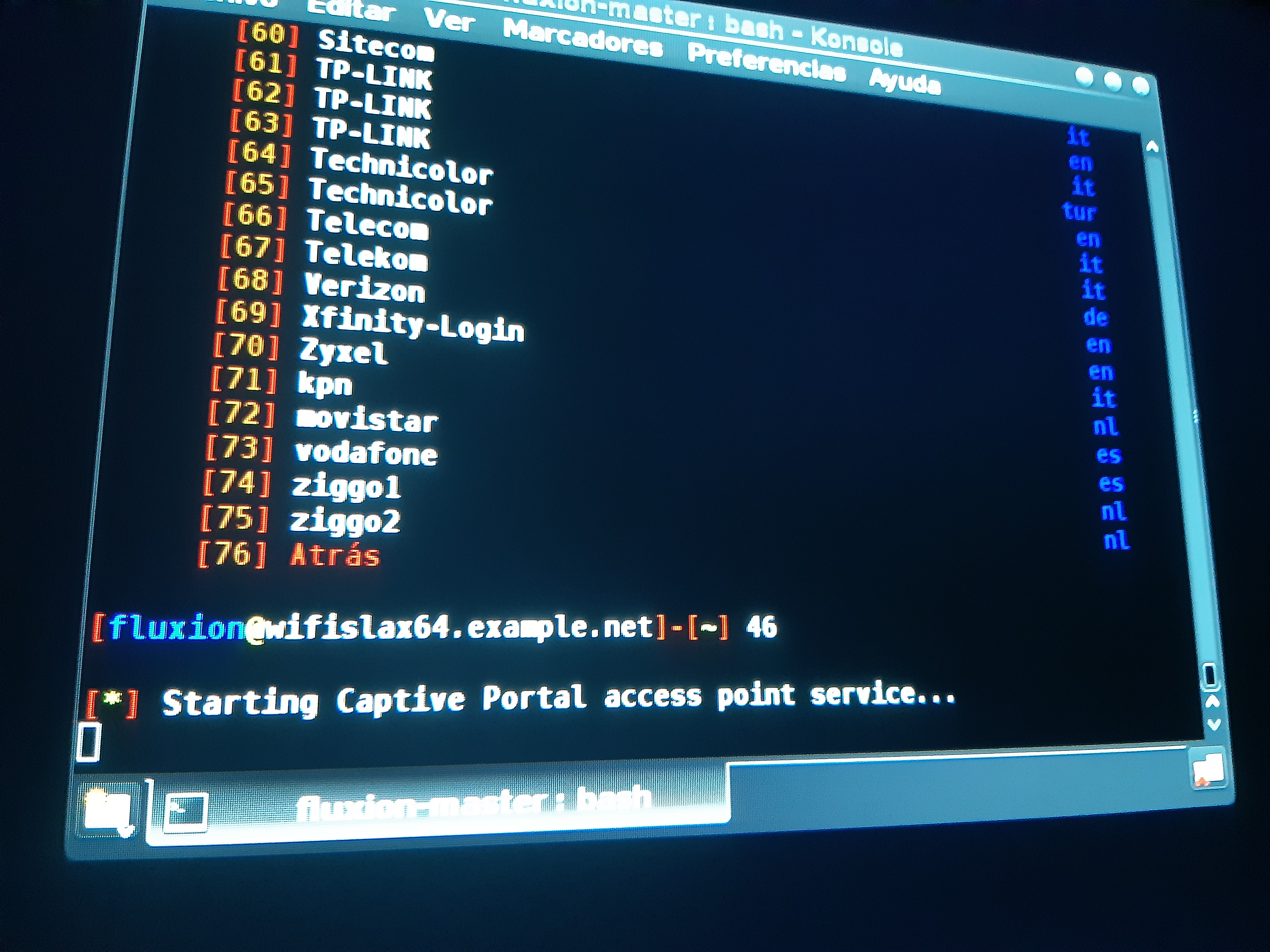
Hi, I got the same problem. Any option? How dono Fix it. Im using wifislax and fluxion 6.5
 miracle224
on 9 Apr 2020
miracle224
on 9 Apr 2020
Before starting fluxion restart your pc/laptop and then in a terminal run the command
airmon-ng check kill
After that run fluxion
 xpz3
on 9 Apr 2020
xpz3
on 9 Apr 2020
Thx, I dont it is work, cruz i got another problem. Idk why handshake does not capture de file.
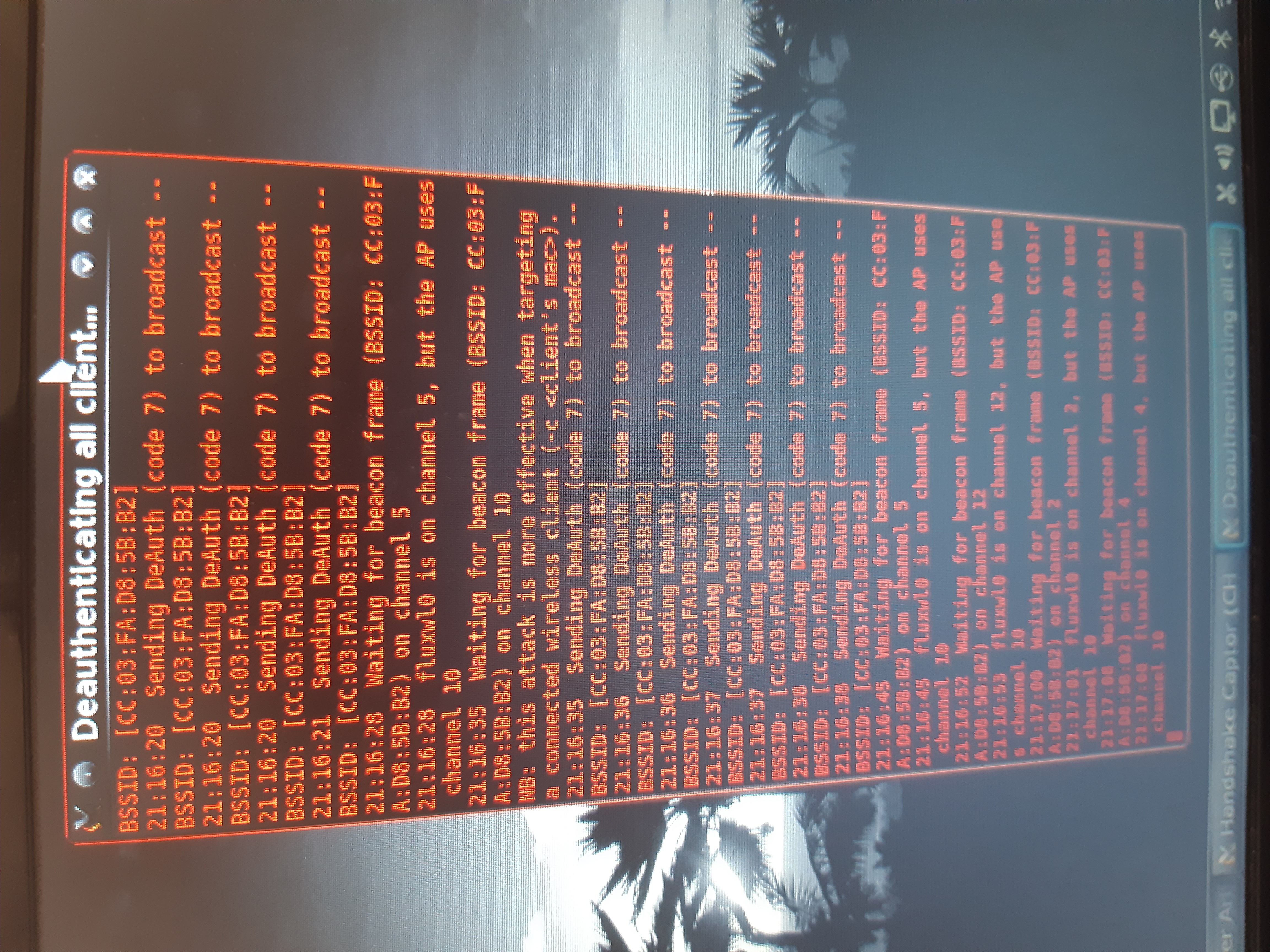

Yesterday it did. Even that I used fluxion 2 and I could get handshake quickly corrupted but quick. Any sugges?
miracle224
on 9 Apr 2020
Try restarting the pc or vm then run airmon-ng check kill and then try handshake again. Handshake capture works only if the target ap has clients connected to it.
xpz3
on 9 Apr 2020
Thx u máster, its work 100%. Another cuestión. Is there any guide for edit Index of the sites?
miracle224
on 9 Apr 2020
same problem here i did everything but it doesn't fix...
 BlackNight192
on 4 Jul 2020
BlackNight192
on 4 Jul 2020
Estou com o mesmo problema
 thiago3384
on 11 Nov 2020
thiago3384
on 11 Nov 2020
same problem, I'll listen.
 blank29
on 17 Nov 2020
blank29
on 17 Nov 2020
@blank29 if you are having issues starting the captive portal and the above mentioned fixes do not help. this is usually a cause of the the chipset in the wifi adapter you are using not supporting VIF or AP mode. If thats the case you would have to either see if you can find a driver/firmware that can make that adapter work or look into getting a new adapter all together that is known to work properly for wifi hacking
 cjb900
on 17 Nov 2020
cjb900
on 17 Nov 2020
@ blank29 jika Anda mengalami masalah saat memulai portal tawanan dan perbaikan yang disebutkan di atas tidak membantu. ini biasanya karena chipset di adaptor wifi yang Anda gunakan tidak mendukung mode VIF atau AP. Jika itu masalahnya, Anda harus melihat apakah Anda dapat menemukan driver / firmware yang dapat membuat adaptor itu berfungsi atau mencari adaptor baru yang semuanya berfungsi dengan baik untuk peretasan wifi.
actually I don't really understand what you mean. because this is the 3rd day i use kali linux. but if you can teach me patiently, I will be very grateful and hope to be friends with you. yesterday I tried to hack wifi with aircrak, using wordlist and it worked fine. but brutforce was very inefficient in my opinion, so I looked for other ways. and I found fluxion on the internet, when I tried it for the first time, it was stuck in the initial process (wifi scan). until finally resolved with the command airmon-ng check kill. but now there is another problem in the captive portal, I still think the problem is in fluxion. sorry for the developers, this is because to get a handshake with aircrack is very easy, but in fluxion it has problems as I explained earlier.
blank29
on 17 Nov 2020
so getting a handshake has nothing to due with fluxion creating the captive portal. To do that you have to have a wifi adapter/chipset that supports AP mode(used to create the fake AP with the captive portal) and support VIF (which is used to both deauth at the same time as creating the fake AP). If the wifi adapter you are using does not support both of those there is no way for fluxion to get past the "starting captive portal access point service". So just because your wifi adapter works for other types of wifi hacking does not mean it will work for an evil twin attack which is what fluxion is performing.
cjb900
on 17 Nov 2020
Oh, I see. thanks, then I'll try Airgedon. Or maybe you can tell me what to do to solve this. I followed this video when running fluxion .. https://youtu.be/mnsx6dIoGyU
blank29
on 18 Nov 2020
Well since you were unable to create the captive portal with fluxion you most likely will run into issues with airgeddon as well. But without knowing what wifi adapter you have I can't say for sure on that. Can you post a screenshot of sudo airmon-ng && sudo iw list | grep "Supported interface modes" -A 8 from a terminal
cjb900
on 18 Nov 2020
sorry i'm at work right now, will try to come back later tonight. oh yes I remembered ... when I use windows 10, I can use wifi and turn on the hostpot, I think this is a process related to how the fluxion captive portal works, is it true ??? but until now I can't turn on the hostpot at kali linux while using wifi .. wifi always turns off when I try to open the hostpot, and it fails. is it true that all this is related ?? thanks for your time.
blank29
on 18 Nov 2020
Well, the drivers/firmware from Windows to Linux does not always have the same feature parity. So just because you are able to do something in Windows does not always mean you will be able to in Linux. So I'm not surprised you can create a hotspot in Windows and not in Kali.
cjb900
on 18 Nov 2020
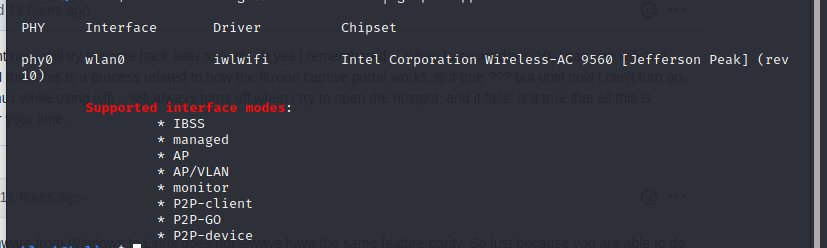
Well since you were unable to create the captive portal with fluxion you most likely will run into issues with airgeddon as well. But without knowing what wifi adapter you have I can't say for sure on that. Can you post a screenshot of
sudo airmon-ng && sudo iw list | grep "Supported interface modes" -A 8from a terminal
blank29
on 18 Nov 2020
So based of the supported interfaced that adapter supports AP and VIF. So in theory it should work. But I don't have this adapter so I have no way to test this. Also being that its an internal wifi adapter they are notoriously problematic. Some have nothing but problems with them and others have no issues at all. They also have limited range for when deauthing and creating an AP so they are not recommended unless the AP you are attacking is right next to you. You can try running airmon-ng check kill before running fluxion and see if that helps. If not you are going to have to look into getting a USB wifi adapter. I have listed some known supported ones below
Atheros AR9271 <- present in TP-Link TL-WN722N v1 or Alfa AWUS036NHA (2.4Ghz - USB)
Ralink RT2770 <- present in Alfa AWUS051NH (2.4Ghz/5Ghz - USB)
Ralink RT3070 <- present in TP-Link TL-WN7200ND or Alfa AWUS036NH (2.4Ghz - USB)
Ralink RT3572 <- present in Alfa AWUS052NHS (2.4Ghz/5Ghz - USB)
Ralink RT5372 <- present in D-Link DWA-137 (2.4Ghz - USB)
Ralink RT5572 <- present in Panda PAU09 (2.4Ghz/5Ghz - USB)
Realtek RTL8723BE <- present in Realtek RTL8723BE card (2.4Ghz - PCIe)
cjb900
on 18 Nov 2020
finally you come, I have run airmon-ng check kill yesterday. and it's disappointing .... but if you have time now I'll try and report whatever happens.
blank29
on 18 Nov 2020
well if everything you have tried does not get it to work and the only issue is that it will not get past "Starting captive portal". You can try and make sure everything in kali is up to date with sudo apt update && sudo apt upgrade -y && sudo apt dist-upgrade -y and see if that makes any difference. You could also try a different OS like Parrot OS and see if that works. But that's not a guarantee either. As mentioned before I don't have this adapter so unless there is someone else here with that exact card and has been able to get it to work you are just going to have to look into getting an external USB wifi adapter. As mentioned before internal wifi adapters are notoriously problematic for some and most of the time there is no easy fix other than to switch to a known good card/chipset.
cjb900
on 18 Nov 2020
I have tried everything but failed, but then I changed targets .. it worked fine. thanks for the time ... nice to meet you
blank29
on 18 Nov 2020
Related issues
 yuginiwa
·
9Comments
yuginiwa
·
9Comments
 djmeero
·
3Comments
djmeero
·
3Comments
 Geczy
·
16Comments
Geczy
·
16Comments
 calee4nyaboy
·
16Comments
calee4nyaboy
·
16Comments
 EOS123
·
3Comments
EOS123
·
3Comments
Most helpful comment
Seems to not be fixed in 5.0