Hi
I'm using flutter_svg in my apps, but I need to use in a simple web page that will be created with Flutter Web.
Does flutter_svg supports Flutter for Web or it will support soon? This is in your plans?
 emersonsiega
All 82 comments
I'd like to test this. I'm pretty sure some features flutter SVG needs are not yet implemented for web though
 dnfield
on 11 Jun 2019
dnfield
on 11 Jun 2019
So enough support is now in the tooling to make sense of testing this.
Unfortunately, a bunch of features used by Flutter SVG are not implemented currently in the Web's dart:ui implementation. In particular, Canvas.drawPicture.
It may be possible to hack around this and get at least some SVGs working, but there are definitely other APIs missing as well. I'd rather wait for web to catch up.
dnfield
on 20 Jun 2019
With Flutter 1.9, seems Flutter for web is more "official". Do you have plan to make this great package to be usable in Flutter for Web?
 Kimi-Arthur
on 14 Sep 2019
Kimi-Arthur
on 14 Sep 2019
There are still many methods missing to support this package. But once HtmlView lands, it will be pretty easy to do SVG on the web with flutter.
dnfield
on 14 Sep 2019
Hey @dnfield HtmlView as lands (I'm using it already for file upload) :) any way to make it come true ? ^^ Because currently I'm getting:
Skipping compiling lisa_flutter|lib/main_web_entrypoint.dart with ddc because some of its
transitive libraries have sdk dependencies that not supported on this platform:
flutter_svg|lib/svg.dart
flutter_svg|lib/src/utilities/http.dart
flutter_svg|lib/src/picture_provider.dart
Even if it's just a branch on the repo it will be helpful to at least be able to compile for the web.
 jaumard
on 15 Sep 2019
jaumard
on 15 Sep 2019
Hi Guys,
your package is very famous and this issue It's very important. I have the same issue and also su flutter in github there are many issue on this point.
thank guys
 pjcau
on 17 Sep 2019
pjcau
on 17 Sep 2019
We'd have to do similar work to what was done to the image classes in Flutter so that we only conditionally export things that depend on dart:io.
I'm not really seeing the priority of this at this point. There are many features of dart:ui that flutter_svg depends on that are still not implemented by the web. Right now the most critical one is probably Canvas.drawPicture: https://github.com/flutter/engine/blob/master/lib/web_ui/lib/src/ui/canvas.dart#L806
It may make sense to just have this plugin forward to HtmlWidget and draw an SVG that way, although I'm not sure how compositing will work there.
dnfield
on 17 Sep 2019
I've pushed a branch up that at least compiles for web, but the example doesn't render anything. The first error in the callstack is around Canvas.drawPicture.
https://github.com/dnfield/flutter_svg/tree/web
This is very rough right now - I would not actually comment out the code for a real release.
dnfield
on 17 Sep 2019
I've ended up doing this on my side https://github.com/mylisabox/remote_ui/tree/master/packages/remote_image_button/lib/src/widgets full abstraction of this module to just use an ImageElement with the SVG URL. At least SVGs are still visible by native img tag
jaumard
on 17 Sep 2019
Based on what I understand of HtmlWidget, that's probably the way to go here (/cc @hterkelsen).
I'm not sure when I'll get to this right now, but I'd be happy to reivew a PR :)
dnfield
on 20 Sep 2019
@jaumard out of curiosity I tried your solution but even the newest master state of Flutter doesn't seem to know ImageElement:
14:40:24.248 10 info flutter.tools packages/...svg/image_svg_web.dart:40:23: Error: The method 'ImageElement' isn't defined for the class '_ImageSvgWebState'.
14:40:24.248 11 info flutter.tools - '_ImageSvgWebState' is from 'package:.../src/svg/image_svg_web.dart' ('packages/.../src/svg/image_svg_web.dart').
14:40:24.248 12 info flutter.tools Try correcting the name to the name of an existing method, or defining a method named 'ImageElement'.
14:40:24.248 13 info flutter.tools final element = ImageElement(src: widget.url, height: widget.height.toInt(), width: widget.width.toInt());
Are you using a fork - or https://github.com/flutter/flutter_web?
 jonasbark
on 25 Sep 2019
jonasbark
on 25 Sep 2019
No I'm not using the fork, ImageElement is coming from dart:html import, did you add it ?
jaumard
on 25 Sep 2019

Fun fact: when you have the option above turned on in IntelliJ Flutter settings then it magically removes the 'dart:html' import upon saving.
Thanks for the hint, @jaumard !
jonasbark
on 25 Sep 2019
Ha yeah ^^ because the analyzer doesn't recognize dart:html and it's usage so it's considered as not used and disappear :)
Hopefully they will fix this soon ^^
jaumard
on 25 Sep 2019
any update on fixing drawPicture function as flutter web will be stable soon?
 amreniouinnovent
on 12 Dec 2019
amreniouinnovent
on 12 Dec 2019
@amreniouinnovent This is the wrong repo for fixing drawPicture. you want to ask the flutter team for that.
 stefanrusek
on 12 Dec 2019
stefanrusek
on 12 Dec 2019
@stefanrusek As I know the repo owner is a part of the Flutter team so he didn't open a flutter issue for adding drawPicture to Flutter Web or we need to support him "flutter issue thumb ups" if he needs it or maybe he will just use HtmlWidget.
 amorenew
on 12 Dec 2019
amorenew
on 12 Dec 2019
@dnfield I tried Flutter 1.13 for macOS Alpha support
But Flutter SVG is not working
So Web not working because dart UI is not fully supported on Web but why macOS is not supported?
Skia render engine should be cross-platform as I know?!
what is the difference between Skia and dart UI?
amreniouinnovent
on 16 Dec 2019
Shouln't we open an issue in the Flutter repo?!I understand @dnfield could work on it but having it supported within the SDK would be awesome!
 NicolasDionB
on 16 Dec 2019
NicolasDionB
on 16 Dec 2019
I'm going to look at web more seriously soon.
I'm surprised it has issues on macOS, that should be a separate issue though.
dnfield
on 16 Dec 2019
Here's the example app running on macOS:
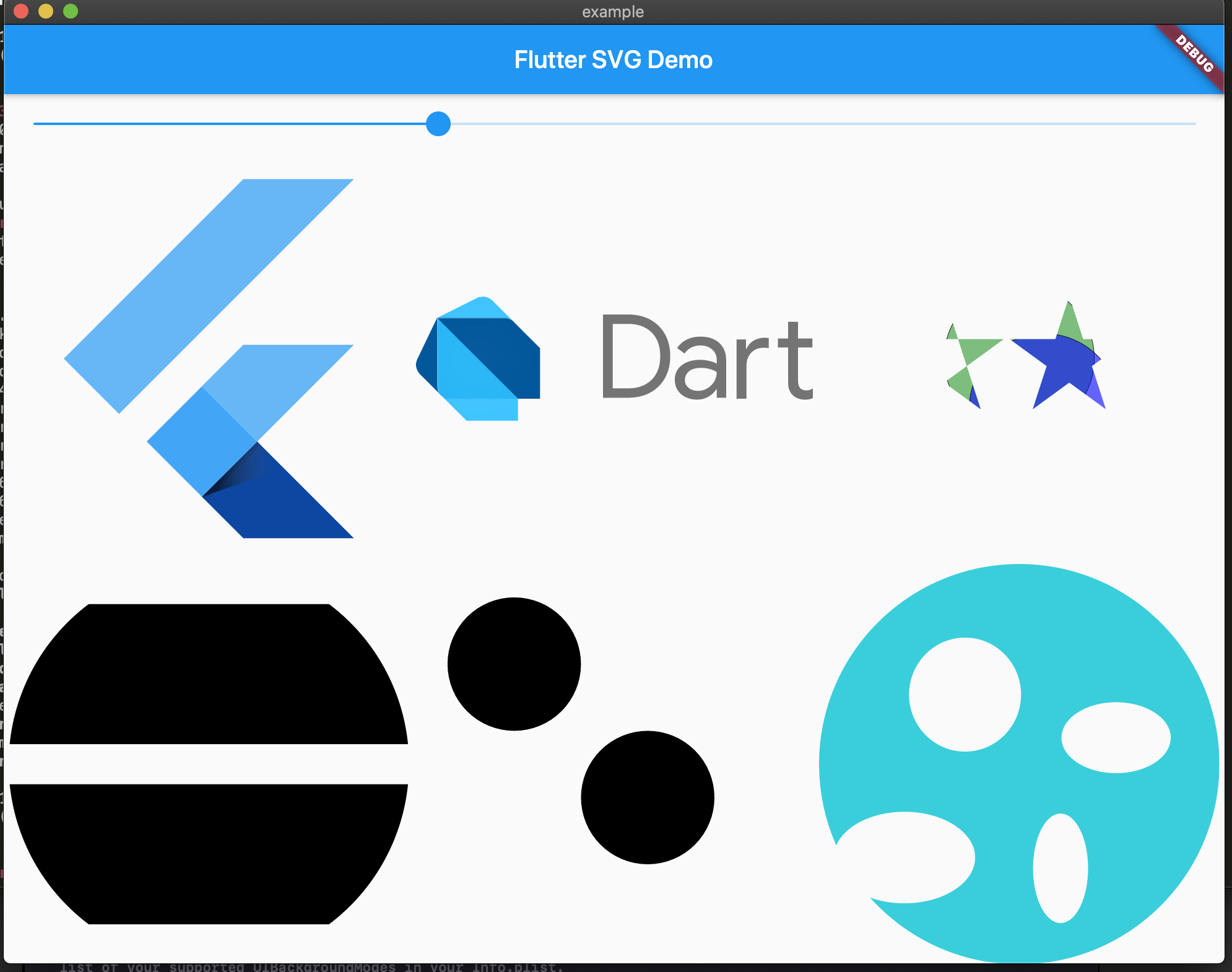
I got an error when trying to load a network based SVG but it doesn't seem to be related to this library.
dnfield
on 16 Dec 2019
Cool I will give it another try
amorenew
on 16 Dec 2019
@dnfield I confirm it works on macOS Alpha
Well Done.
amreniouinnovent
on 18 Dec 2019
I have found a temporary workaround if you absolutely need to have svg in web (emphasis on temporary). You need the flare_flutter package. Import your svg into rive.app(the Flare app but Rebranded) and export the .flr file. Then you can use FlareActor with that .flr file instead of the svg.
This is tedious and limited(probably slower as well) but I have been able to create a website that heavily relies on svgs and with ~50 svg's drawn at the same time, it is still performant. You can control the color of the svg, but each svg will needs its own controller. There might be other issues so consider this as a last alternative.
 noejac123
on 7 Jan 2020
noejac123
on 7 Jan 2020
Flutter web supports the HtmlElementView widget which allows embedding of HTML. This could be used instead of waiting for dart:ui to catch up.
 passsy
on 9 Jan 2020
passsy
on 9 Jan 2020
@passsy there's already a draft PR that uses that to display svgs: https://github.com/dnfield/flutter_svg/pull/230
jonasbark
on 10 Jan 2020
I'm suffering without flutter_svg. Let it come
 omertoast
on 13 Jan 2020
omertoast
on 13 Jan 2020
What about dart:svg, can this be used for the web implementation?
 flowhorn
on 23 Jan 2020
flowhorn
on 23 Jan 2020
I have found a temporary workaround if you absolutely need to have svg in web (emphasis on temporary). You need the flare_flutter package. Import your svg into rive.app(the Flare app but Rebranded) and export the .flr file. Then you can use FlareActor with that .flr file instead of the svg.
This is tedious and limited(probably slower as well) but I have been able to create a website that heavily relies on svgs and with ~50 svg's drawn at the same time, it is still performant. You can control the color of the svg, but each svg will needs its own controller. There might be other issues so consider this as a last alternative.
I thought of that, but I was hoping I could avoid such a work-around.
 bean5
on 15 Feb 2020
bean5
on 15 Feb 2020
Could you use universal_io instead of the official dart:io library?
 TheOneWithTheBraid
on 4 Mar 2020
TheOneWithTheBraid
on 4 Mar 2020
@JasMich I do not believe that is a good solution. I would like to avoid adding unnecessary dependencies to this library, and my last evaluation of universal_io was that it did some sketchy seeming things that I would want to avoid in this library.
There's also a very basic question about how to do this properly for the web. My assumption was that we should just use HtmlWidget, but subsequent discussions with @yjbanov and @hterkelsen is that that might not really be the right approach.
dnfield
on 4 Mar 2020
The other issue is that dart:io isn't our big problem, it's that the web engine is just missing a lot of implementation that is used for SVGs - and the browser has a much more capable SVG parsing and rendering engine than whatever we can write in Dart here :)
dnfield
on 4 Mar 2020
If HTML does it better, can't you drop down to using that at a low level? Just use kIsWeb Boolean from foundation.dart to detect the web platform.
bean5
on 8 Mar 2020
@bean5 there is already a PR that does exactly that (but using conditional imports): https://github.com/dnfield/flutter_svg/pull/230
jonasbark
on 8 Mar 2020
Cool. I'm not a fan of conditional imports, but I'm not sure we can get around it for platform-specific things like this right now.
I hope it gets accepted! I'm fine with specifying size. Small price to pay for this!
bean5
on 8 Mar 2020
Unfortunately, a bunch of features used by Flutter SVG are not implemented currently in the Web's dart:ui implementation. In particular, Canvas.drawPicture.
@dnfield Have you tried using --dart-define=FLUTTER_WEB_USE_SKIA=true (the canvaskit backend)? We should have nearly 100% feature parity with mobile Flutter. It does come with a cost: we have to download a 2.5MB gzipped (or 2MB brotli) WebAssembly blob, but it may be acceptable for some use-cases.
 yjbanov
on 13 Mar 2020
yjbanov
on 13 Mar 2020
@yjbanov - Still mostly get unimplemented errors in the example app.
I'm currently working on refactoring the providers so that they can be used to acquire the raw SVG data more easily, and then see if I can have a web file for the widgets that throws some unimpleemnted errors for decoding and passes through the widgets to HTML elements.
dnfield
on 13 Mar 2020
I'm a bit confused though - fr example,
https://github.com/flutter/engine/blob/0ef67b5e74c6a43915b72fc7ec682deed762206c/lib/web_ui/lib/src/ui/canvas.dart#L894 is throwing, even though I see https://github.com/flutter/engine/blob/0ef67b5e74c6a43915b72fc7ec682deed762206c/lib/web_ui/lib/src/engine/compositor/canvas_kit_canvas.dart#L284
I'm trying to do
flutter run -d chrome --dart-define=FLUTTER_WEB_USE_SKIA=true
In my examples project. Is something missing?
dnfield
on 13 Mar 2020
Quick update - flutter_svg mostly "just works" if you use CanvasKit. There's a bug in CanvasKit right now where it doesn't like getting null as the first param to saveLayer - https://skia-review.googlesource.com/c/skia/+/277097 fixes that. There's also an unimplemented conical gradient, which flutter/engine#17146 addresses.
I'd still need to refactor the httpGet logic, which should be fairly simple. But that means most of the public API of this library will just work using Flutter Web with CanvasKit.
We could still explore making a simpler pass through for non-CanvasKit web apps - the road to getting full support there is less clear to me.
dnfield
on 14 Mar 2020
9d80abd makes the httpGet utility function work on web, as long as you're not doing a CORS request on a network SVG. That revision also adds web support to the example, and all of the example SVGs in the example app work except the ones without proper CORS headers on the network requests and the ones using TwoPointConicalGradient which will require the linked engine pr to land.
dnfield
on 15 Mar 2020
9d80abd makes the
httpGetutility function work on web, as long as you're not doing a CORS request on a network SVG. That revision also adds web support to the example, and all of the example SVGs in the example app work except the ones without proper CORS headers on the network requests and the ones using TwoPointConicalGradient which will require the linked engine pr to land.
Are you sure you linked the correct commit? As far as I can tell only the web target was added to the example.
jonasbark
on 15 Mar 2020
Ah, sorry about that, it's 9c45c2e - I missed pushing up the files in that directory :)
dnfield
on 15 Mar 2020
35970c251899cf366084e9bb8eeea24a48b4fbe8 undoes a temporary experiment with that :)
dnfield
on 15 Mar 2020
@passsy
Created an example project that uses your suggested HtmlElementView:
https://github.com/masewo/flutter_svg_web_example
 masewo
on 22 Mar 2020
masewo
on 22 Mar 2020
A major downside of using HtmlElementView is that it will fail in some surprising ways - getting an SVG that isn't CORS friendly for decoding, trying to draw an SVG directly to canvas, etc. It's really only a good replacement for SvgImage.network - in which case you can really just use Image.network from th framework with your SVG.
dnfield
on 22 Mar 2020
@dnfield What stops this library from first supporting SvgImage.asset and then later support SvgImage.network? I'm more than happy with a solution which only works for a subset of all SVG features.
My only use case is to show SVG icons from assets. Nothing fancy, a single path like this one here:
<?xml version="1.0" encoding="UTF-8"?><!DOCTYPE svg PUBLIC "-//W3C//DTD SVG 1.1//EN" "http://www.w3.org/Graphics/SVG/1.1/DTD/svg11.dtd"><svg xmlns="http://www.w3.org/2000/svg" xmlns:xlink="http://www.w3.org/1999/xlink" version="1.1" width="24" height="24" viewBox="0 0 24 24"><path d="M11.83,9L15,12.16C15,12.11 15,12.05 15,12A3,3 0 0,0 12,9C11.94,9 11.89,9 11.83,9M7.53,9.8L9.08,11.35C9.03,11.56 9,11.77 9,12A3,3 0 0,0 12,15C12.22,15 12.44,14.97 12.65,14.92L14.2,16.47C13.53,16.8 12.79,17 12,17A5,5 0 0,1 7,12C7,11.21 7.2,10.47 7.53,9.8M2,4.27L4.28,6.55L4.73,7C3.08,8.3 1.78,10 1,12C2.73,16.39 7,19.5 12,19.5C13.55,19.5 15.03,19.2 16.38,18.66L16.81,19.08L19.73,22L21,20.73L3.27,3M12,7A5,5 0 0,1 17,12C17,12.64 16.87,13.26 16.64,13.82L19.57,16.75C21.07,15.5 22.27,13.86 23,12C21.27,7.61 17,4.5 12,4.5C10.6,4.5 9.26,4.75 8,5.2L10.17,7.35C10.74,7.13 11.35,7 12,7Z" /></svg>
As @masewo shows it is a rather small addition to this library which results in a huge benefit for all of us.
passsy
on 23 Mar 2020
It's that network would work and assets wouldn't.
But as of now this library works with the CanvasKit backenf, right?
dnfield
on 23 Mar 2020
@dnfield Do you know if an asset SVG can be a network SVG on flutter web because we are hosting all the assets as resources on the webserver? (e. g. https://myhost/assets/assets/images/poll.svg)
masewo
on 23 Mar 2020
It's that network would work and assets wouldn't.
I really can't follow you. Here's a screenshot of the project from @masewo.
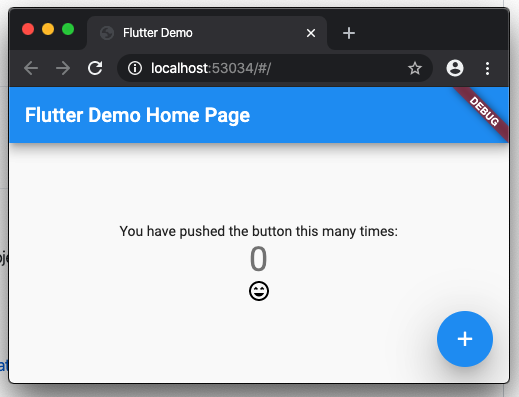
It shows a SVG from assets on web. What doesn't work here?
passsy
on 23 Mar 2020
Ahh I see now. Ok. I was mixing up different efforts, sorry about that.
Here's the problem as I see it: flutter_svg has a larger API surface that people are actively using - and some people want to use it for web. I'd rather avoid compromises around that wherever possible in this package - in particular, I'd like to avoid landing a change here that would effectively fork the API for web and non-web, with lots of throw UnimplementedError for web.
CanvasKit makes most of that possible - I've landed a few changes already that make this more or less work on CanvasKit based web applications.
We could add a new library in this package, e.g. package:flutter_svg/cross_platform_widget_only.dart or something, which _only_ exposed new API that selectively delegated to this package or to a PlatformView/Image.network otherwise. That does not solve the core problem in this bug though - people using flutter_svg today would have to refactor their code and may find it's impossible to achieve what they were acheiving before.
dnfield
on 23 Mar 2020
We could add a new library in this package, e.g. package:flutter_svg/cross_platform_widget_only.dart or something, which only exposed new API that selectively delegated to this package or to a PlatformView/Image.network otherwise. That does not solve the core problem in this bug though - people using flutter_svg today would have to refactor their code and may find it's impossible to achieve what they were acheiving before.
This seems like a good approach given the previous statements IMO. That way it gives people at least a path to move forward while the rest of the API is figured out. That being said I'm a bit biased as a non network (E.g. loading from assets) web solution fixes my particular use case.
 ATeal
on 26 Mar 2020
ATeal
on 26 Mar 2020
@dnfield Could you give us an estimated date to have it working? thanks for your work!
 ghost
on 30 Mar 2020
ghost
on 30 Mar 2020
I'm trying the @masewo approach with https://github.com/masewo/flutter_svg_web_example
It seem to be working quite well, just a few notes:
I can't seem to be able to get rid of Bad state: Future already completed from the FutureBuilder
You want to add ..draggable=false to the ImageElement which seems to be true by default
Other than that the results are quite consitent.
 ayushin
on 9 Apr 2020
ayushin
on 9 Apr 2020
I have to say this thread is very confusing, I spent about a day trying to find an acceptable implementation, and in the end it turned out to be that for me all I have to do is to replace SvgPicture.asset with Image.network prepending "/assets/" to the asset path and it just works!
It would be great if somebody could post a summary here perhaps to save time for others walkign the same path.
ayushin
on 9 Apr 2020
Did you also managed to change the color with that approach @ayushin ? For me this attribute gets ignored.
 julienduchow
on 9 Apr 2020
julienduchow
on 9 Apr 2020
Have not tried the color attribute, but below works just fine for me:
import 'package:flutter/foundation.dart';
import 'package:flutter/material.dart';
import 'package:flutter_svg/svg.dart';

class PlatformSvg {
  static Widget asset(String assetName,
      {double width,
      double height,
      BoxFit fit = BoxFit.contain,
      Color color,
      alignment = Alignment.center,
      String semanticsLabel}) {
    if (kIsWeb) {
      return Image.network("/assets/$assetName",
          width: width,
          height: height,
          fit: fit,
          color: color,
          alignment: alignment,
          semanticLabel: semanticsLabel);
    }
    return SvgPicture.asset(assetName,
        width: width,
        height: height,
        fit: fit,
        color: color,
        alignment: alignment,
        semanticsLabel: semanticsLabel);
  }
}
I have also tried the approach of @masewo. It works perfectly for me. Would be great to include it in this plugin. I also think it is a better approach to add it and throw UnimplementedError. You could just say: This option is not supported for web and add the functionality once it is supported for web.
 felixwortmann
on 23 Apr 2020
felixwortmann
on 23 Apr 2020
Have not tried the color attribute, but below works just fine for me:
The color attribute does not work on web.
 mploigt
on 24 Apr 2020
mploigt
on 24 Apr 2020
Have not tried the color attribute, but below works just fine for me:
import 'package:flutter/foundation.dart';
import 'package:flutter/material.dart';
import 'package:flutter_svg/svg.dart';

class PlatformSvg {
  static Widget asset(String assetName,
      {double width,
      double height,
      BoxFit fit = BoxFit.contain,
      Color color,
      alignment = Alignment.center,
      String semanticsLabel}) {
    if (kIsWeb) {
      return Image.network("/assets/$assetName",
          width: width,
          height: height,
          fit: fit,
          color: color,
          alignment: alignment,
          semanticLabel: semanticsLabel);
    }
    return SvgPicture.asset(assetName,
        width: width,
        height: height,
        fit: fit,
        color: color,
        alignment: alignment,
        semanticsLabel: semanticsLabel);
  }
}
Thanks, worked like a charm for me.
BTW in case anyone is using Firebase hosting, you have to add one more "/assets" to the path to make it work there.
 j05u3
on 7 May 2020
j05u3
on 7 May 2020
Have not tried the color attribute, but below works just fine for me:
import 'package:flutter/foundation.dart';
import 'package:flutter/material.dart';
import 'package:flutter_svg/svg.dart';

class PlatformSvg {
  static Widget asset(String assetName,
      {double width,
      double height,
      BoxFit fit = BoxFit.contain,
      Color color,
      alignment = Alignment.center,
      String semanticsLabel}) {
    if (kIsWeb) {
      return Image.network("/assets/$assetName",
          width: width,
          height: height,
          fit: fit,
          color: color,
          alignment: alignment,
          semanticLabel: semanticsLabel);
    }
    return SvgPicture.asset(assetName,
        width: width,
        height: height,
        fit: fit,
        color: color,
        alignment: alignment,
        semanticsLabel: semanticsLabel);
  }
}
Flutter dev channel I believe has a fix for image asset color on web. Use Dev channel at this time for Image color to work.
 hramnathnayak
on 11 May 2020
hramnathnayak
on 11 May 2020
Have not tried the color attribute, but below works just fine for me:
import 'package:flutter/foundation.dart';
import 'package:flutter/material.dart';
import 'package:flutter_svg/svg.dart';

class PlatformSvg {
  static Widget asset(String assetName,
      {double width,
      double height,
      BoxFit fit = BoxFit.contain,
      Color color,
      alignment = Alignment.center,
      String semanticsLabel}) {
    if (kIsWeb) {
      return Image.network("/assets/$assetName",
          width: width,
          height: height,
          fit: fit,
          color: color,
          alignment: alignment,
          semanticLabel: semanticsLabel);
    }
    return SvgPicture.asset(assetName,
        width: width,
        height: height,
        fit: fit,
        color: color,
        alignment: alignment,
        semanticsLabel: semanticsLabel);
  }
}
This doesn't work when you use the experimental Skia rendering engine.
 wilburt
on 27 Jun 2020
wilburt
on 27 Jun 2020
Based on my limited testing, you don't need to use Image.network when using the experimental SKIA rendering engine. Instead, you can just use SvgPicture directly as you would on mobile. At least, it's working for _me_ with latest dev channel. But perhaps my use case is simple enough that I'm not triggering some code paths that don't work...?
 kentcb
on 4 Jul 2020
kentcb
on 4 Jul 2020
Based on my limited testing, you don't need to use
Image.networkwhen using the experimental SKIA rendering engine. Instead, you can just useSvgPicturedirectly as you would on mobile. At least, it's working for _me_ with latestdevchannel. But perhaps my use case is simple enough that I'm not triggering some code paths that don't work...?
I just try the experimental SKIA rendering engine in the latest master channel by using flutter build web --dart-define=FLUTTER_WEB_USE_SKIA=true --release with SvgPicture.asset and see that just a few icons can work for me, most icons aren't displayed. So yes, I think it depends on icon paths.
 ductranit
on 6 Jul 2020
ductranit
on 6 Jul 2020
Have not tried the color attribute, but below works just fine for me:
import 'package:flutter/foundation.dart';
import 'package:flutter/material.dart';
import 'package:flutter_svg/svg.dart';

class PlatformSvg {
  static Widget asset(String assetName,
      {double width,
      double height,
      BoxFit fit = BoxFit.contain,
      Color color,
      alignment = Alignment.center,
      String semanticsLabel}) {
    if (kIsWeb) {
      return Image.network("/assets/$assetName",
          width: width,
          height: height,
          fit: fit,
          color: color,
          alignment: alignment,
          semanticLabel: semanticsLabel);
    }
    return SvgPicture.asset(assetName,
        width: width,
        height: height,
        fit: fit,
        color: color,
        alignment: alignment,
        semanticsLabel: semanticsLabel);
  }
}
Thanks, worked like a charm for me.
 majdkz97
on 9 Aug 2020
majdkz97
on 9 Aug 2020
Forgot to follow up on this. The one problem I found using color is on Mac/iOS, where it results in a GL error when using the SKIA backend. Pretty frustrating considering I was _so close_ to having this working and now I need separate copies of the icon for each color.
kentcb
on 9 Aug 2020
Hello @dnfield
I also really wish web support works.
Error: Assertion failed: org-dartlang-sdk:///flutter_web_sdk/lib/_engine/engine/surface/path/path_ref.dart:831:12 isValid is not true
at Object.throw_ [as throw] (http://localhost:49803/dart_sdk.js:4334:11)
at Object.assertFailed (http://localhost:49803/dart_sdk.js:4281:15)
at _engine.PathRef.new.debugValidate (http://localhost:49803/dart_sdk.js:157090:42)
at _engine.PathRef.new.copy (http://localhost:49803/dart_sdk.js:156628:11)
at http://localhost:49803/dart_sdk.js:155390:12
at new _engine.SurfacePath.from (http://localhost:49803/dart_sdk.js:155392:7)
at _engine.SurfacePath.from.transform (http://localhost:49803/dart_sdk.js:155079:21)
at MappedIterator.new.<anonymous> (http://localhost:49803/packages/admin/uis/widgets/body_widget.dart.lib.js:329:27)
at MappedIterator.new.moveNext (http://localhost:49803/dart_sdk.js:21507:71)
at JsIterator.next (http://localhost:49803/dart_sdk.js:6001:21)
at Function.from (http://localhost:49803/dart_sdk.js:43913:20)
at Function.of (http://localhost:49803/dart_sdk.js:43928:30)
at MappedIterable.__.toList (http://localhost:49803/dart_sdk.js:19598:26)
at http://localhost:49803/packages/admin/uis/widgets/body_widget.dart.lib.js:332:48
at Array.[dartx.fold] (http://localhost:49803/dart_sdk.js:14910:19)
at http://localhost:49803/packages/admin/uis/widgets/body_widget.dart.lib.js:322:40
at _RootZone.runUnary (http://localhost:49803/dart_sdk.js:37457:58)
at _FutureListener.then.handleValue (http://localhost:49803/dart_sdk.js:32441:29)
at handleValueCallback (http://localhost:49803/dart_sdk.js:32988:49)
at Function._propagateToListeners (http://localhost:49803/dart_sdk.js:33026:17)
at async._AsyncCallbackEntry.new.callback (http://localhost:49803/dart_sdk.js:32752:27)
at Object._microtaskLoop (http://localhost:49803/dart_sdk.js:37718:13)
at _startMicrotaskLoop (http://localhost:49803/dart_sdk.js:37724:13)
- Parsing works well
- drawing on canvas with above issue.
Thank you for your great support.
Zheng
 zl910627
on 21 Aug 2020
zl910627
on 21 Aug 2020
Have not tried the color attribute, but below works just fine for me:
import 'package:flutter/foundation.dart';
import 'package:flutter/material.dart';
import 'package:flutter_svg/svg.dart';

class PlatformSvg {
  static Widget asset(String assetName,
      {double width,
      double height,
      BoxFit fit = BoxFit.contain,
      Color color,
      alignment = Alignment.center,
      String semanticsLabel}) {
    if (kIsWeb) {
      return Image.network("/assets/$assetName",
          width: width,
          height: height,
          fit: fit,
          color: color,
          alignment: alignment,
          semanticLabel: semanticsLabel);
    }
    return SvgPicture.asset(assetName,
        width: width,
        height: height,
        fit: fit,
        color: color,
        alignment: alignment,
        semanticsLabel: semanticsLabel);
  }
}
Thanks. But this solutation only work on normal file which endwith .svg. For .xml file in android, this still not work.
 SixSheeppp
on 27 Aug 2020
SixSheeppp
on 27 Aug 2020
Confirming that SvgPicture (not Image) works on web in SKIA mode, but there is a problem with color property. If color is not defined - works well.
In code SKIA mode could be checked as:
const kWebUseSkia = bool.fromEnvironment('FLUTTER_WEB_USE_SKIA');
 slavap
on 22 Sep 2020
slavap
on 22 Sep 2020
SvgPicture working on the web now.
Need to run like this to make it work:
flutter run -d chrome --dart-define=FLUTTER_WEB_USE_SKIA=true
 duythien0912
on 1 Oct 2020
duythien0912
on 1 Oct 2020
SvgPicture working on the web now.
Need to run like this to make it work:flutter run -d chrome --dart-define=FLUTTER_WEB_USE_SKIA=true
This is not the right soluton as SKIA is very heavy and it delays the loading time by a lot.
I don't think SKIA is viable in a realease version.
 franarolas
on 8 Oct 2020
franarolas
on 8 Oct 2020
Waiting for the version that can work without SKIA
 AresVampire
on 20 Oct 2020
AresVampire
on 20 Oct 2020
I am not actively working on a version to support the HTML backend for web, and I do not have any intention to do so in the near future. My own experiments with it, and seeing work arounds posted by other people in this thread, have led me to believe that it is not possible to adequately support SVG on the HTML backend in a way that will not result in lots of unhappy users/bugs over things that work on Skia and not on web (and to a lesser extent, vice versa).
There are packages posted in here that allow for at least some work arounds for this, all with various limitations. If someone does solve the various issues, I'd be happy to review a PR for it.
For the time being, this package is likely only to support using the Skia backend on Web.
dnfield
on 20 Oct 2020
Have not tried the color attribute, but below works just fine for me:
import 'package:flutter/foundation.dart';
import 'package:flutter/material.dart';
import 'package:flutter_svg/svg.dart';

class PlatformSvg {
  static Widget asset(String assetName,
      {double width,
      double height,
      BoxFit fit = BoxFit.contain,
      Color color,
      alignment = Alignment.center,
      String semanticsLabel}) {
    if (kIsWeb) {
      return Image.network("/assets/$assetName",
          width: width,
          height: height,
          fit: fit,
          color: color,
          alignment: alignment,
          semanticLabel: semanticsLabel);
    }
    return SvgPicture.asset(assetName,
        width: width,
        height: height,
        fit: fit,
        color: color,
        alignment: alignment,
        semanticsLabel: semanticsLabel);
  }
}
Looks like this is not working anymore with the latest master version (1.26.0-2.0.pre.402). If someone has a solution I'd love to hear it !
 lulupointu
on 19 Jan 2021
lulupointu
on 19 Jan 2021
Have not tried the color attribute, but below works just fine for me:
import 'package:flutter/foundation.dart';
import 'package:flutter/material.dart';
import 'package:flutter_svg/svg.dart';

class PlatformSvg {
  static Widget asset(String assetName,
      {double width,
      double height,
      BoxFit fit = BoxFit.contain,
      Color color,
      alignment = Alignment.center,
      String semanticsLabel}) {
    if (kIsWeb) {
      return Image.network("/assets/$assetName",
          width: width,
          height: height,
          fit: fit,
          color: color,
          alignment: alignment,
          semanticLabel: semanticsLabel);
    }
    return SvgPicture.asset(assetName,
        width: width,
        height: height,
        fit: fit,
        color: color,
        alignment: alignment,
        semanticsLabel: semanticsLabel);
  }
}
Looks like this is not working anymore with the latest master version (1.26.0-2.0.pre.402). If someone has a solution I'd love to hear it !
You don't need to use Image.network anymore.
The problem is that it is still not working if the page is loaded from a mobile device.
 GyuriMajercsik
on 23 Jan 2021
GyuriMajercsik
on 23 Jan 2021
@GyuriMajercsik ensure your Flutter Web page is built with the canvaskit renderer:
https://flutter.dev/docs/development/tools/web-renderers#command-line-options
By default Flutter builds Web apps with auto, which means on Mobile it's still HTML (which isn't compatible with flutter_svg) vs Canvaskit on Desktop.
jonasbark
on 23 Jan 2021
@jonasbark , many thanks. Not only svg files started to work but the overall performance is much better !
GyuriMajercsik
on 23 Jan 2021
On Flutter master, the HTML backend now has some more support enabling most SVGs from this library. CanvasKit support is still better, but I think we can close this.
There may also be separate work to do to implement more missing features, but those issues belong int he Flutter repo rather than here.
dnfield
on 25 Feb 2021
It would be great to state the limitations on the home page and explain how to use Canvaskit for all web releases.
 tbarbette
on 8 Mar 2021
tbarbette
on 8 Mar 2021
It would be great to state the limitations on the home page and explain how to use Canvaskit for all web releases.
By using to run or build the --web-renderer canvaskit option:
flutter run -d chrome --web-renderer canvaskit
flutter build web --web-renderer canvaskit --release
By default the web renderer is auto that means that html is used on mobile browsers and canvaskit on desktop browsers.
More info at: https://flutter.dev/docs/development/tools/web-renderers
 Constans
on 24 Mar 2021
Constans
on 24 Mar 2021
Yes sure but that should be in the main readme of flutter_svg. It's not a little detail for what is now an official stable target.
tbarbette
on 24 Mar 2021
I think you can edit and do a PR to the maintainers. I'm sure they'll approve it.
Pretty sure they don't follow a closed ticket.
Constans
on 24 Mar 2021
It would be great to state the limitations on the home page and explain how to use Canvaskit for all web releases.
By using to run or build the --web-renderer canvaskit option:
flutter run -d chrome --web-renderer canvaskit
flutter build web --web-renderer canvaskit --release
By default the web renderer is auto that means that html is used on mobile browsers and canvaskit on desktop browsers.
More info at: https://flutter.dev/docs/development/tools/web-renderers
It would be great to state the limitations on the home page and explain how to use Canvaskit for all web releases.
By using to run or build the --web-renderer canvaskit option:
flutter run -d chrome --web-renderer canvaskit
flutter build web --web-renderer canvaskit --release
By default the web renderer is auto that means that html is used on mobile browsers and canvaskit on desktop browsers.
More info at: https://flutter.dev/docs/development/tools/web-renderers
Thank You, this works like charm!
 wilyanto
on 26 Apr 2021
wilyanto
on 26 Apr 2021
Related issues
kentcb
·
4Comments
 boanergepro
·
5Comments
boanergepro
·
5Comments
 Eddydpyl
·
6Comments
Eddydpyl
·
6Comments
 coupestartup
·
6Comments
coupestartup
·
6Comments
 alectogeek
·
5Comments
alectogeek
·
5Comments
Most helpful comment
Have not tried the color attribute, but below works just fine for me: