Flutter-intellij: Flutter Plugin not Compatible with Android Studio 3.4 (Linux)
Steps to Reproduce
- Update Android Studio to 3.4
- Open a Flutter project
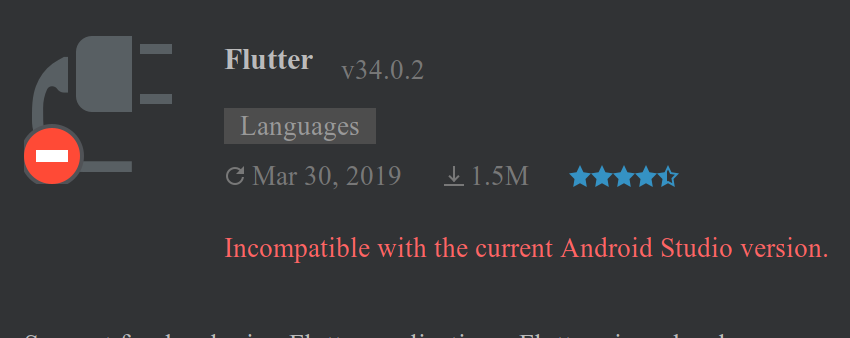
- There's no support for Flutter in the IDE. If you go to "Plugins" settings you'll see it says "Incompatible with the current Android Studio version"
Issue seems to only happen on Linux. My MacBook has no issues with Android Studio 3.4 and Flutter Plugin v34.0.2 But on My linux Machine I see the following error, this is also reported by another Linux user here

Version info
Android Studio 3.4
Build #AI-183.5429.30.34.5452501, built on April 10, 2019
JRE: 1.8.0_152-release-1343-b16-5323222 amd64
JVM: OpenJDK 64-Bit Server VM by JetBrains s.r.o
Linux 5.0.8-arch1-1-ARCH
[✓] Flutter (Channel stable, v1.2.1, on Linux, locale en_US.UTF-8)
• Flutter version 1.2.1 at /opt/flutter
• Framework revision 8661d8aecd (9 weeks ago), 2019-02-14 19:19:53 -0800
• Engine revision 3757390fa4
• Dart version 2.1.2 (build 2.1.2-dev.0.0 0a7dcf17eb)
[✓] Android toolchain - develop for Android devices (Android SDK version 28.0.3)
• Android SDK at /home/edgar/Android/Sdk
• Android NDK location not configured (optional; useful for native profiling support)
• Platform android-28, build-tools 28.0.3
• ANDROID_HOME = /home/edgar/Android/Sdk
• Java binary at: /opt/android-studio/jre/bin/java
• Java version OpenJDK Runtime Environment (build 1.8.0_152-release-1343-b16-5323222)
• All Android licenses accepted.
[!] Android Studio (version 3.4)
• Android Studio at /opt/android-studio
✗ Flutter plugin not installed; this adds Flutter specific functionality.
✗ Dart plugin not installed; this adds Dart specific functionality.
• Java version OpenJDK Runtime Environment (build 1.8.0_152-release-1343-b16-5323222)
[!] Connected device
! No devices available
! Doctor found issues in 2 categories.
 edTheGuy00
All 12 comments
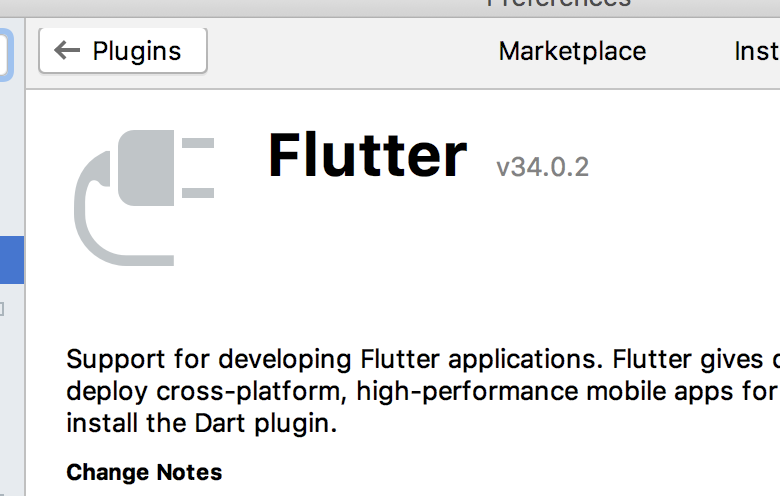
@edTheGuy00 - have you checked for updates? I'm unable to repro this locally. I'm running Android Studio and do have the Flutter plugin installed (v34.0.2):
 devoncarew
on 20 Apr 2019
devoncarew
on 20 Apr 2019
If other people are seeing this issue, please thumbs up the first comment on the issue, or add additional details to the issue (OS, IDE and plugin versions, ...).
devoncarew
on 20 Apr 2019
@devoncarew I'm running Arch Linux, I've seen another Linux user with the same issue. MacOS users report everything working fine.
edTheGuy00
on 20 Apr 2019
Interesting. I don't think we select on the platform at all when deciding what we're compatible with, but perhaps the underlying platform version is slightly different for Linux vs macos.
devoncarew
on 20 Apr 2019
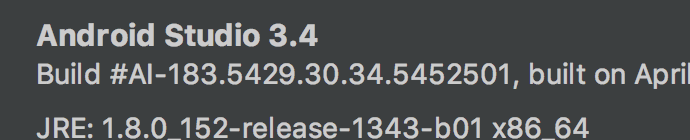
In the About box for Android Studio (on macos), I see:
Android Studio 3.4
Build #AI-183.5429.30.34.5452501, built on April 9, 2019
JRE: 1.8.0_152-release-1343-b01 x86_64
JVM: OpenJDK 64-Bit Server VM by JetBrains s.r.o
macOS 10.13.6
(the Build #AI ... number is the important one here)
devoncarew
on 20 Apr 2019
Here's mine
Android Studio 3.4
Build #AI-183.5429.30.34.5452501, built on April 10, 2019
JRE: 1.8.0_152-release-1343-b16-5323222 amd64
JVM: OpenJDK 64-Bit Server VM by JetBrains s.r.o
Linux 5.0.7-arch1-1-ARCH
edTheGuy00
on 20 Apr 2019
I have the SAME issue on my Arch Linux and Manjaro computers. I guess we just have to wait for them to update the plugin to work with Android Studio (3.4)
 X1Zeth2X
on 20 Apr 2019
X1Zeth2X
on 20 Apr 2019
@devoncarew @X1Zeth2X I got another Android Studio Update today (3.4.0.18-2). Issue is fixed now, I'm closing this issue as it was probably related to Android Studio.
edTheGuy00
on 21 Apr 2019
Have you tried Reinstalling the plugin? I have the same issue and to fix it just as easy as reinstalling the plugin
 AkhdanRasiq
on 16 May 2019
AkhdanRasiq
on 16 May 2019
Updating the dart and flutter plugin fixed the issue for me.
 lintov7
on 30 May 2019
lintov7
on 30 May 2019
Actually uninstalling, invalidating caches and installing the Flutter and Dart plugins again fixed the problem. This issue didn't happen for Intellij Idea so I'm guessing the problem is with Android Studio.
 vladostaci
on 21 Aug 2019
vladostaci
on 21 Aug 2019
Updating flutter plugin and restart VS after that work for me.
 HidTosh
on 19 Jun 2020
HidTosh
on 19 Jun 2020
Related issues
 branflake2267
·
68Comments
branflake2267
·
68Comments
 pcdinh
·
54Comments
devoncarew
·
39Comments
pcdinh
·
54Comments
devoncarew
·
39Comments
 feinstein
·
49Comments
feinstein
·
49Comments
 sempre76
·
46Comments
sempre76
·
46Comments
Most helpful comment
Actually uninstalling, invalidating caches and installing the Flutter and Dart plugins again fixed the problem. This issue didn't happen for Intellij Idea so I'm guessing the problem is with Android Studio.