Flutter-geolocator: Web: when compiled with sound-null-safety: Geolocator.getCurrentPosition() throws NoSuchMethodError
🔙 Regression
Using Flutter for Web:
Compiling without sound-null-safety: Geolocator.getCurrentPosition() works
Compiling with sound-null-safety: Geolocator.getCurrentPosition() throws NoSuchMethodError: method not found: 'get$coords' (t2.get$coords is not a function) / TypeError: t2.get$coords is not a function
Error points at the last line of the this code from geolocator:
  A.HtmlGeolocationManager.prototype = {
    getCurrentPosition$2$enableHighAccuracy$timeout: function(_, enableHighAccuracy, timeout) {
      return this.getCurrentPosition$body$HtmlGeolocationManager(_, enableHighAccuracy, timeout);
    },
    getCurrentPosition$0: function($receiver) {
      return this.getCurrentPosition$2$enableHighAccuracy$timeout($receiver, null, null);
    },
    getCurrentPosition$body$HtmlGeolocationManager: function(_, enableHighAccuracy, timeout) {
      var $async$goto = 0,
        $async$completer = P._makeAsyncAwaitCompleter(type$.Position),
        $async$returnValue, $async$handler = 2, $async$currentError, $async$next = [], $async$self = this, geoPosition, e, t1, t2, coords, t3, t4, t5, t6, t7, exception, $async$exception;
      var $async$getCurrentPosition$2$enableHighAccuracy$timeout = P._wrapJsFunctionForAsync(function($async$errorCode, $async$result) {
        if ($async$errorCode === 1) {
          $async$currentError = $async$result;
          $async$goto = $async$handler;
        }
        while (true)
          switch ($async$goto) {
            case 0:
              // Function start
              $async$handler = 4;
              $async$goto = 7;
              return P._asyncAwait(C.Geolocation_methods.getCurrentPosition$2$enableHighAccuracy$timeout($async$self._html_geolocation_manager$_geolocation, enableHighAccuracy, timeout), $async$getCurrentPosition$2$enableHighAccuracy$timeout);
            case 7:
              // returning from await.
              geoPosition = $async$result;
              t1 = geoPosition;
              t2 = J.getInterceptor$x(t1);
              coords = t2.get$coords(t1);
Old (and correct) behavior
Compiling without sound-null-safety: getCurrentPosition() works
Current behavior
Compiling with sound-null-safety: getCurrentPosition() throws NoSuchMethodError: method not found: 'get$coords' (t2.get$coords is not a function) / TypeError: t2.get$coords is not a function
Reproduction steps
Compile with sound-null-safety for web and use getCurrentPosition()
Configuration
Flutter beta channel latest
Version: 7.0.1
Platform:
- [ ] :iphone: iOS
- [ ] :robot: Android
- [x] Web
flutter doctor -v
[√] Flutter (Channel beta, 2.1.0-12.2.pre, on Microsoft Windows [Version 10.0.19042.867], locale en-DE)
• Flutter version 2.1.0-12.2.pre at C:\Dev\Flutter.SDK
• Framework revision 5bedb7b1d5 (10 days ago), 2021-03-17 17:06:30 -0700
• Engine revision 711ab3fda0
• Dart version 2.13.0 (build 2.13.0-116.0.dev)
[√] Android toolchain - develop for Android devices (Android SDK version 30.0.3)
• Android SDK at C:\Dev\Android.SDKs
• Platform android-S, build-tools 30.0.3
• ANDROID_HOME = C:\Dev\Android.SDKs
• Java binary at: C:\Program Files\Android\Android Studio\jre\bin\java
• Java version OpenJDK Runtime Environment (build 1.8.0_212-release-1586-b04)
• All Android licenses accepted.
[√] Chrome - develop for the web
• Chrome at C:\Program Files (x86)\Google\Chrome\Application\chrome.exe
[√] Android Studio (version 3.6)
• Android Studio at C:\Program Files\Android\Android Studio
• Flutter plugin version 49.0.1
• Dart plugin version 192.8052
• Java version OpenJDK Runtime Environment (build 1.8.0_212-release-1586-b04)
[√] IntelliJ IDEA Ultimate Edition (version 2019.3)
• IntelliJ at C:\Program Files\JetBrains\IntelliJ IDEA 2019.1.1
• Flutter plugin version 44.0.3
• Dart plugin version 193.6911.31
[√] IntelliJ IDEA Ultimate Edition (version 2020.3)
• IntelliJ at C:\Program Files\JetBrains\IntelliJ IDEA 2020.2.2
• Flutter plugin version 54.1.4
• Dart plugin version 203.7759
[√] VS Code (version 1.54.3)
• VS Code at ....\AppData\Local\Programs\Microsoft VS Code
• Flutter extension version 3.18.1
[√] Connected device (2 available)
• Chrome (web) • chrome • web-javascript • Google Chrome 89.0.4389.90
• Edge (web) • edge • web-javascript • Microsoft Edge 89.0.774.57
• No issues found!
 eggnstone
All 9 comments
Hi @eggnstone,
Thank you for reporting this issue. The thing is that I am unable to reproduce it. I have taken the following steps to try and reproduce the problem:
- Create a new Flutter App:
flutter create issue_693; - Change into the folder of the new App:
cd issue_693; - Migrate to sound null-safety:
dart migrate --apply-changes; - Open the new App in your favourite IDE (in my case I used Visual Studio Code):
code .; - Add the Geolocator dependency to the
pubspec.yaml:geolocator: ^7.0.1; - Update dependencies (in my case Visual Studio Code does this on save but just to be sure):
flutter pub get; - Replace the code in
main.dartwith the code listed below; - Run the App in the browser (in my case Chrome);
- Hit the floating action button to fetch the location, allow fetching location and wait a bit for the location to be retrieved;
- The location is retrieved and the App should display the coordinates (see screenshot):
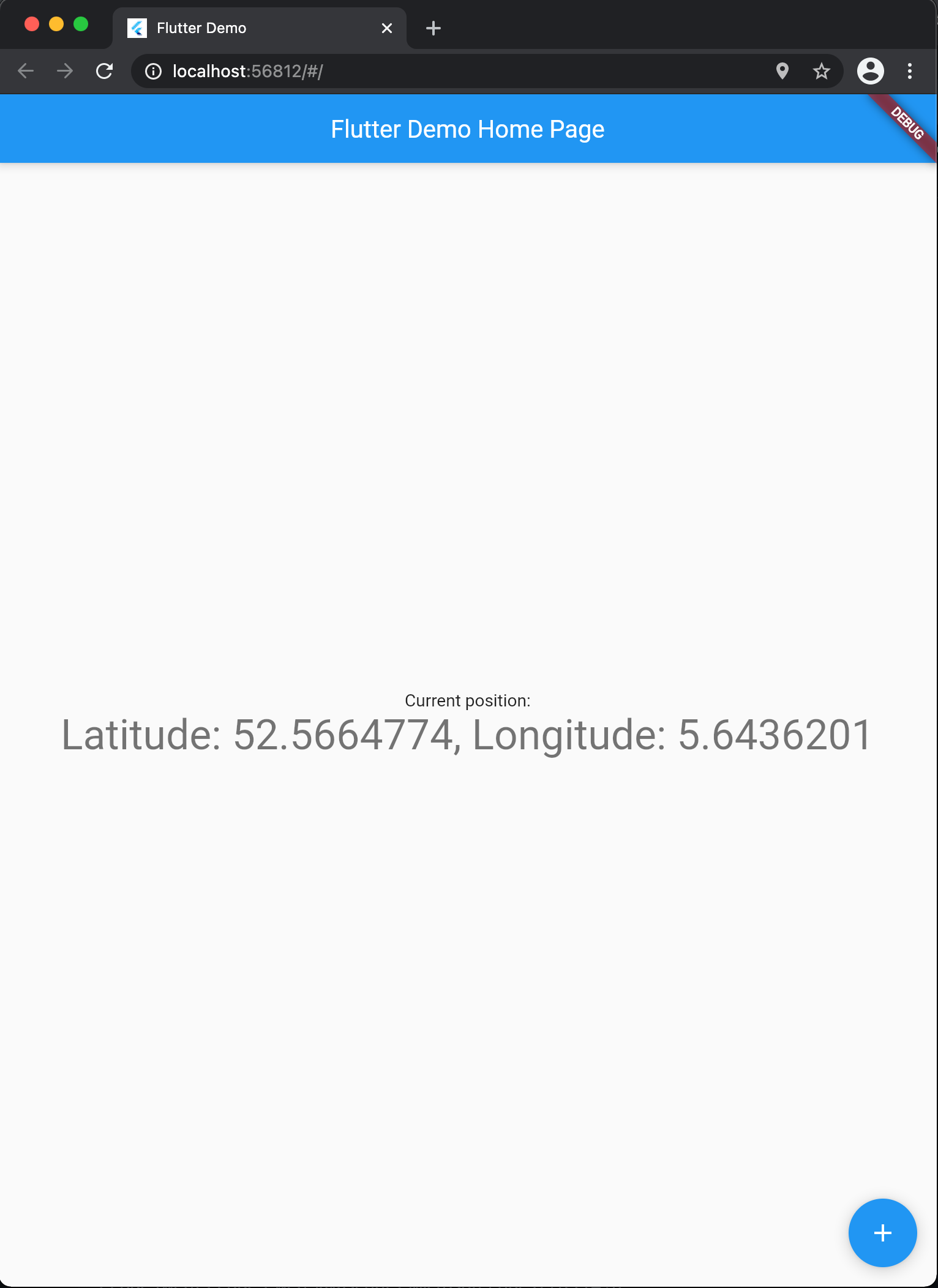
main.dart
import 'package:flutter/material.dart';
import 'package:geolocator/geolocator.dart';

void main() {
  runApp(MyApp());
}

class MyApp extends StatelessWidget {
  // This widget is the root of your application.
  @override
  Widget build(BuildContext context) {
    return MaterialApp(
      title: 'Flutter Demo',
      theme: ThemeData(
        primarySwatch: Colors.blue,
      ),
      home: MyHomePage(title: 'Flutter Demo Home Page'),
    );
  }
}

class MyHomePage extends StatefulWidget {
  MyHomePage({Key? key, this.title}) : super(key: key);
  final String? title;

  @override
  _MyHomePageState createState() => _MyHomePageState();
}

class _MyHomePageState extends State<MyHomePage> {
  String _position = 'unknown';

  Future<void> _incrementCounter() async {
    final position = await Geolocator.getCurrentPosition();

    setState(() {
      _position = position.toString();
    });
  }

  @override
  Widget build(BuildContext context) {
    return Scaffold(
      appBar: AppBar(
        title: Text(widget.title!),
      ),
      body: Center(
        child: Column(
          mainAxisAlignment: MainAxisAlignment.center,
          children: <Widget>[
            Text(
              'Current position:',
            ),
            Text(
              '$_position',
              style: Theme.of(context).textTheme.headline4,
            ),
          ],
        ),
      ),
      floatingActionButton: FloatingActionButton(
        onPressed: _incrementCounter,
        tooltip: 'Increment',
        child: Icon(Icons.add),
      ),
    );
  }
}
Output of
flutter doctor -v
[✓] Flutter (Channel stable, 2.0.3, on macOS 11.2.3 20D91 darwin-x64, locale en-GB)
    • Flutter version 2.0.3 at /Users/maurits/fvm/versions/stable
    • Framework revision 4d7946a68d (10 days ago), 2021-03-18 17:24:33 -0700
    • Engine revision 3459eb2436
    • Dart version 2.12.2

[✓] Android toolchain - develop for Android devices (Android SDK version 30.0.3)
    • Android SDK at /Users/maurits/Library/Android/sdk
    • Platform android-30, build-tools 30.0.3
    • ANDROID_HOME = /Users/maurits/Library/Android/sdk
    • Java binary at: /Applications/Android Studio.app/Contents/jre/jdk/Contents/Home/bin/java
    • Java version OpenJDK Runtime Environment (build 1.8.0_242-release-1644-b3-6915495)
    • All Android licenses accepted.

[✓] Xcode - develop for iOS and macOS
    • Xcode at /Applications/Xcode.app/Contents/Developer
    • Xcode 12.4, Build version 12D4e
    • CocoaPods version 1.10.1

[✓] Chrome - develop for the web
    • Chrome at /Applications/Google Chrome.app/Contents/MacOS/Google Chrome

[✓] Android Studio (version 4.1)
    • Android Studio at /Applications/Android Studio.app/Contents
    • Flutter plugin can be installed from:
      🔨 https://plugins.jetbrains.com/plugin/9212-flutter
    • Dart plugin can be installed from:
      🔨 https://plugins.jetbrains.com/plugin/6351-dart
    • Java version OpenJDK Runtime Environment (build 1.8.0_242-release-1644-b3-6915495)

[✓] IntelliJ IDEA Ultimate Edition (version 2020.3.2)
    • IntelliJ at /Applications/IntelliJ IDEA.app
    • Flutter plugin version 54.0.3
    • Dart plugin version 203.7759

[✓] VS Code (version 1.54.3)
    • VS Code at /Applications/Visual Studio Code.app/Contents
    • Flutter extension version 3.20.0

[✓] Connected device (2 available)
    • Nexus 5X (mobile) • 01043361c1b19568 • android-arm64  • Android 8.1.0 (API 27)
    • Chrome (web)      • chrome           • web-javascript • Google Chrome 89.0.4389.90

• No issues found!
 mvanbeusekom
on 29 Mar 2021
mvanbeusekom
on 29 Mar 2021
Just to be sure, I also update to the latest Flutter beta version and tried again with the same result. On my side the location is fetched correctly.
flutter doctor -v
[✓] Flutter (Channel beta, 2.1.0-12.2.pre, on macOS 11.2.3 20D91 darwin-x64, locale en-GB)
    • Flutter version 2.1.0-12.2.pre at /Users/maurits/fvm/versions/beta
    • Framework revision 5bedb7b1d5 (11 days ago), 2021-03-17 17:06:30 -0700
    • Engine revision 711ab3fda0
    • Dart version 2.13.0 (build 2.13.0-116.0.dev)

[✓] Android toolchain - develop for Android devices (Android SDK version 30.0.3)
    • Android SDK at /Users/maurits/Library/Android/sdk
    • Platform android-30, build-tools 30.0.3
    • ANDROID_HOME = /Users/maurits/Library/Android/sdk
    • Java binary at: /Applications/Android Studio.app/Contents/jre/jdk/Contents/Home/bin/java
    • Java version OpenJDK Runtime Environment (build 1.8.0_242-release-1644-b3-6915495)
    • All Android licenses accepted.

[✓] Xcode - develop for iOS and macOS
    • Xcode at /Applications/Xcode.app/Contents/Developer
    • Xcode 12.4, Build version 12D4e
    • CocoaPods version 1.10.1

[✓] Chrome - develop for the web
    • Chrome at /Applications/Google Chrome.app/Contents/MacOS/Google Chrome

[✓] Android Studio (version 4.1)
    • Android Studio at /Applications/Android Studio.app/Contents
    • Flutter plugin can be installed from:
      🔨 https://plugins.jetbrains.com/plugin/9212-flutter
    • Dart plugin can be installed from:
      🔨 https://plugins.jetbrains.com/plugin/6351-dart
    • Java version OpenJDK Runtime Environment (build 1.8.0_242-release-1644-b3-6915495)

[✓] IntelliJ IDEA Ultimate Edition (version 2020.3.2)
    • IntelliJ at /Applications/IntelliJ IDEA.app
    • Flutter plugin version 54.0.3
    • Dart plugin version 203.7759

[✓] VS Code (version 1.54.3)
    • VS Code at /Applications/Visual Studio Code.app/Contents
    • Flutter extension version 3.20.0

[✓] Connected device (3 available)
    • Nexus 5X (mobile)                      • 01043361c1b19568          • android-arm64  • Android 8.1.0 (API 27)
    • Chrome (web)                           • chrome                    • web-javascript • Google Chrome 89.0.4389.90

• No issues found!
How did you compile and run the app?
It looks like it works when run in debug mode.
It does not work when compiled for deployment with
flutter build web (does not work)
flutter build web --no-sound-null-safety (works)
and deployed to a site, e.g., Firebase Hosting.
Running from the command line or IDE with additional arguments, e.g. flutter run -d chrome --release shows the error, too.
eggnstone
on 29 Mar 2021
@eggnstone thank you for clarifying. I can indeed reproduce the same behaviour when in release mode. I will have to look into this, seems something it not included correctly when compiling.
mvanbeusekom
on 29 Mar 2021
Just to add to this, I'm getting a similar error in release mode. The error I got in the chrome console was Uncaught TypeError: m.gJy is not a function, and the error is all in main.dart.js, but if I turn on source maps and symlink the flutter package directory into the build directory and then run an http server out of the directory, I can see the full dart call stack which looks more like this:
Uncaught TypeError: m.gJy is not a function
    at Object.aoY (utils.dart:7)
    at Xo.$1 (html_geolocation_manager.dart:41)
    at nY.rD (stream_pipe.dart:213)
    at lv.Y6 (stream_pipe.dart:153)
    at Object.eval (eval at ajD (js_helper.dart:2183), <anonymous>:3:37)
    at MJ.lj (zone.dart:1546)
    at lv.i8 (stream_impl.dart:341)
    at lv.eN (stream_impl.dart:271)
    at lv.eN (stream_pipe.dart:123)
    at nW.rD (stream_pipe.dart:256)
And specifically the place in utils.dart where the error is coming from for me is toPosition method at line 7, so for me the error is being thrown by watching the position (the function that contains like 41 in html_geolocation_manager).
I'm also running with sound null safety on, disabling it does seem to make the error go away, I wonder if there's a chance of a null position somehow slipping in there somewhere and it's causing dart to fail because it's not doing null checks since they shouldn't happen?
 artificerchris
on 2 Apr 2021
artificerchris
on 2 Apr 2021
@artificerchris
but if I turn on source maps and symlink the flutter package directory into the build directory and then run an http server out of the directory, I can see the full dart call stack which looks more like this:
Can you please tell me how to do these steps (source maps and so on)?
I've been looking for this for ages.
The only way I found to get a proper stacktrace is this:
flutter build web --profile --dart-define=Dart2jsOptimization=O0
eggnstone
on 2 Apr 2021
This indeed looks like a bug in the dart:html package. The issue is easily reproduced without using the geolocator plugin. I have created a stack overflow question (see here) and reported an issue on the Dart repo.
mvanbeusekom
on 2 Apr 2021
Can you please tell me how to do these steps (source maps and so on)?
Sure, keep in mind this will only work on macos or linux, so if you run flutter build web --release --source-maps that will output your project at build/web. What I did was cd into that directory and call up a web server, if you have python3 installed, use this: python3 -m http.server 8080. Once that webserver is up, visit it and your flutter app should load, open the console and once the app throws our error, it'll say something about a 404 trying to find something in the pub cache. For me it was at ~/Developer/flutter because that's where I have my flutter sdk, so I just symlinked the folder it needed into build/web so it would be served by the python web server. Then reload the page and this time it shouldn't 404 and your output will be source mapped like mine.
edit: This will make your dart analyzer go nuts because there will be tons of packages in the build folder, probably best to close your editor while debugging this way.
@eggnstone
artificerchris
on 2 Apr 2021
@artificerchris
Sure, keep in mind this will only work on macos or linux
Thank you! I'm under Windows but I think there are now also soft and hard links. Should work, too. Will see.
eggnstone
on 2 Apr 2021
Related issues
 fawadkhanucp
·
3Comments
fawadkhanucp
·
3Comments
 seakmengc
·
3Comments
seakmengc
·
3Comments
 samo92
·
6Comments
samo92
·
6Comments
 Sammius
·
4Comments
Sammius
·
4Comments
 joesnarky
·
3Comments
joesnarky
·
3Comments
Most helpful comment
Sure, keep in mind this will only work on macos or linux, so if you run
flutter build web --release --source-mapsthat will output your project at build/web. What I did was cd into that directory and call up a web server, if you have python3 installed, use this:python3 -m http.server 8080. Once that webserver is up, visit it and your flutter app should load, open the console and once the app throws our error, it'll say something about a 404 trying to find something in the pub cache. For me it was at~/Developer/flutterbecause that's where I have my flutter sdk, so I just symlinked the folder it needed into build/web so it would be served by the python web server. Then reload the page and this time it shouldn't 404 and your output will be source mapped like mine.edit: This will make your dart analyzer go nuts because there will be tons of packages in the build folder, probably best to close your editor while debugging this way.
@eggnstone