Flutter-geolocator: getCurrentPosition close app [iOS]
🐛 Bug Report
When i use getCurrentPosition the app closes,
Version: 5.3.2+2
Platform:
- [X] :iphone: iOS
- [ ] :robot: Android
 samo92
All 6 comments
Have you added the required configuration to your ios/Runner/Info.plist file (see the Permission section in the README.md)?
 mvanbeusekom
on 19 Aug 2020
mvanbeusekom
on 19 Aug 2020
Hello there, my info.plist has:
in my app a FAB call a method like this:
getPos(){
try{
final resp = await mGeolocator.getCurrentPosition();
} catch (e) {
print(e.toString);
}
}
in android works perfectly, but in iOS never appears requestPermission and the app closes, debug console not print any exception.
samo92
on 19 Aug 2020
I am facing the same issue as well on my iOS Simulator. The app closes.
Working fine on an Android simulator and able to get the position.
My info.plist has:
My Code:
void getLocation() async {
Position position = await Geolocator()
    .getCurrentPosition(desiredAccuracy: LocationAccuracy.low);

print(position);
}
 vijayanbits
on 20 Aug 2020
vijayanbits
on 20 Aug 2020
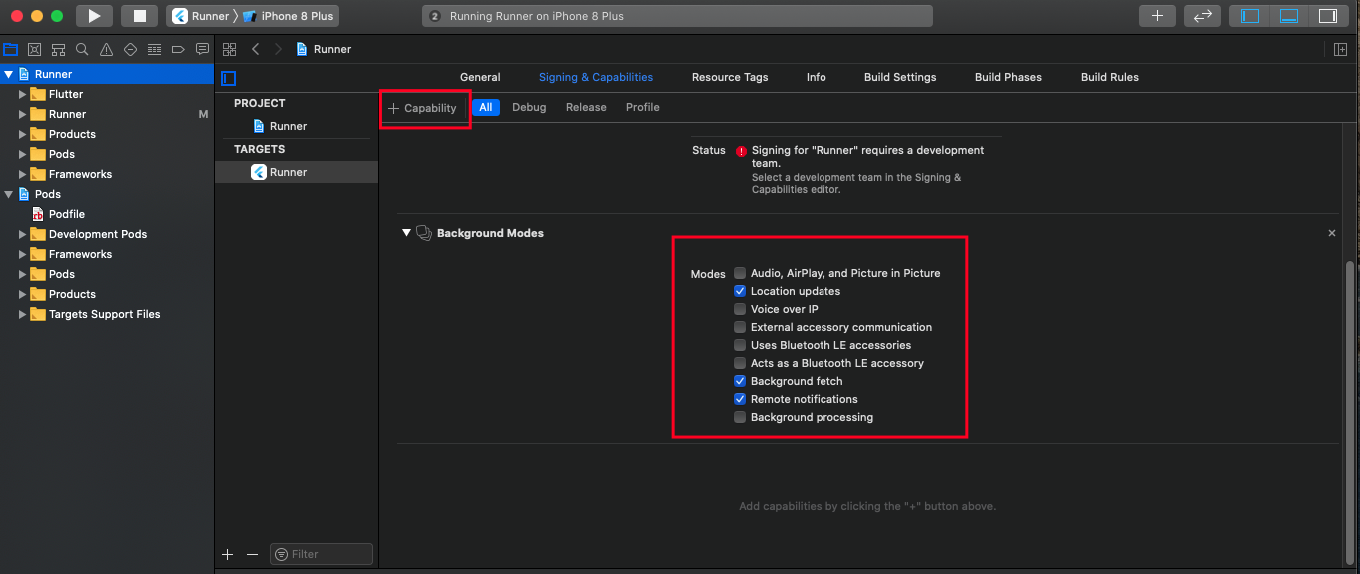
In your Targets -> Tab Signing&Capabilites -> Add Capability -> Select Background Modes
And choose options below.
 ChucNgo
on 20 Aug 2020
ChucNgo
on 20 Aug 2020
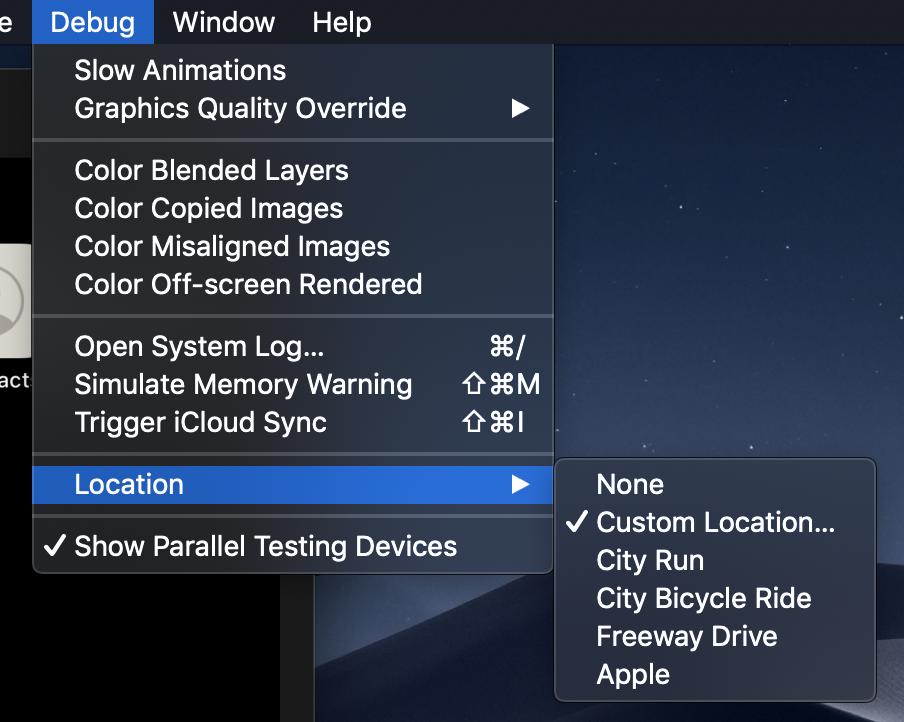
make sure your simulator has location enabled.
in your simulator -> Debug -> Location -> Custom Location...
 KennyChan94
on 25 Aug 2020
KennyChan94
on 25 Aug 2020
@samo92, @vijayanbits during the weekend I published a release candidate for version 6.0.0 on pub.dev which solves a lot of problems specifically with permissions and reporting if the location services are not enabled.
I would very much appreciate it if you can give it a try and see if it solves this problem. Hope to hear from you.
mvanbeusekom
on 25 Aug 2020
Related issues
 lqmminh
·
6Comments
lqmminh
·
6Comments
 fawadkhanucp
·
3Comments
fawadkhanucp
·
3Comments
 seakmengc
·
3Comments
seakmengc
·
3Comments
 BigWillieStyle
·
6Comments
BigWillieStyle
·
6Comments
 Andrew-Tolentino
·
3Comments
Andrew-Tolentino
·
3Comments
Most helpful comment
@samo92, @vijayanbits during the weekend I published a release candidate for version 6.0.0 on pub.dev which solves a lot of problems specifically with permissions and reporting if the location services are not enabled.
I would very much appreciate it if you can give it a try and see if it solves this problem. Hope to hear from you.