Fluent-bit: in_tail with DB file still reads from beginning of the file
FYI I'm the one whom called in via hangouts at KubeCon :)
Bug Report
Hi all (FYI I was the guy from hangouts debugging session during kubecon) :)
Describe the bug
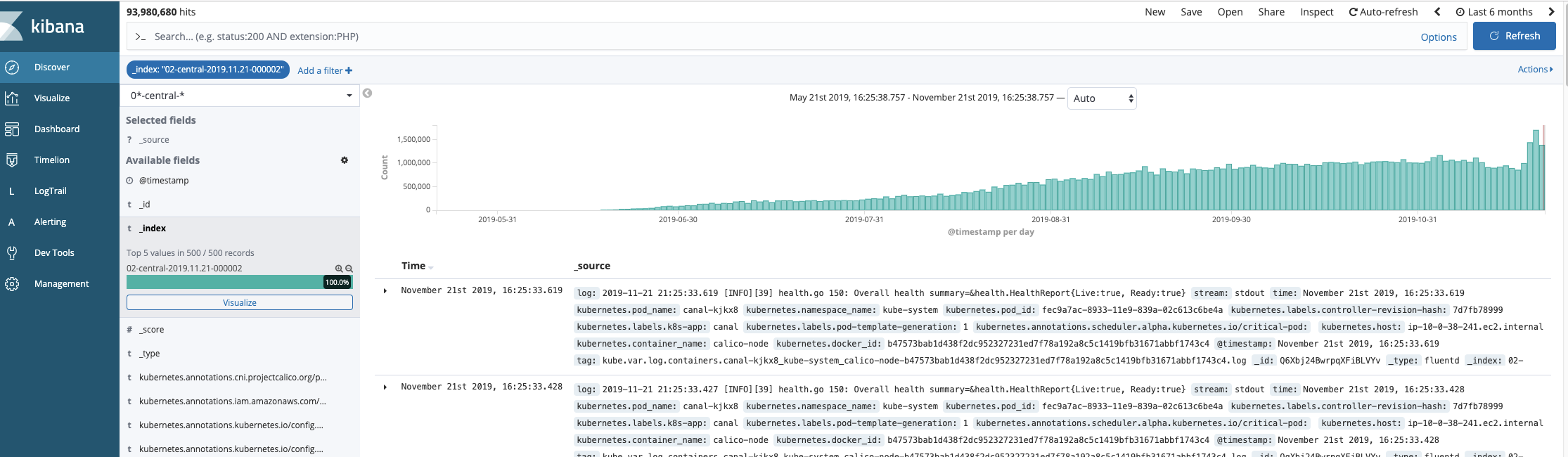
Setting DB flag should of started tailing the logs from the end of the file but seems to go back all the way back to the beginning.
To Reproduce
- Steps to reproduce the problem:
Deploy this to an environment with fluentd already running and replace fluentd with fluent-bit.
Expected behavior
Logs are being sent over to ES
Screenshots
Your Environment
K8s 1.13.10
* Version used:
Tried 1.2.2 and 1.3.2
* Configuration:
{{ $global := .Values.global }}
apiVersion: v1
kind: ConfigMap
metadata:
  name: fluentbit-fwd
  namespace: {{ $global.namespace }}
  labels:
    k8s-app: fluent-bit
data:
  # Configuration files: server, input, filters and output
  # ======================================================
  fluent-bit-service.conf: |
    [SERVICE]
        Flush         1
        Log_Level     info
        Daemon        off
        Parsers_File  parsers.conf
        HTTP_Server   On
        HTTP_Listen   0.0.0.0
        HTTP_Port     2020

  fluent-bit-input.conf: |
    [INPUT]
        Name              tail
        Tag               kube.*
        Path              /var/log/containers/*.log
        DB                /var/log/flb_kube_1.db
        Parser            docker
        Mem_Buf_Limit     20MB
        Skip_Long_Lines   On
        Refresh_Interval  10
   {{- if $global.system.splunk_enabled }}
    [INPUT]
        Name              tail
        Tag               sys.auth
        Path              /var/log/syslog,/var/log/auth.log
        Parser            sys_auth
        Mem_Buf_Limit     20MB
        Skip_Long_Lines   On
        Refresh_Interval  10
    [INPUT]
        Name              tail
        Tag               sys.clamav
        Path              /var/log/clamav/*.log
        Mem_Buf_Limit     20MB
        Skip_Long_Lines   On
        Refresh_Interval  10

    [INPUT]
        Name              tail
        Tag               sys.audit
        Path              /var/log/audit.log
        Mem_Buf_Limit     20MB
        Skip_Long_Lines   On
        Refresh_Interval  10
    [INPUT]
        Name              tail
        Tag               audit
        Path              /var/log/kube-apiserver-audit.log
        Parser            docker
        Mem_Buf_Limit     20MB
        Skip_Long_Lines   On
        Refresh_Interval  10
   {{- end }}
  fluent-bit-filter.conf: |
    [FILTER]
        Name                kubernetes
        Match               kube.*
        Kube_URL            https://kubernetes.default.svc.cluster.local:443
        Kube_CA_File        /var/run/secrets/kubernetes.io/serviceaccount/ca.crt
        Kube_Token_File     /var/run/secrets/kubernetes.io/serviceaccount/token
        Kube_Tag_Prefix     kube.var.log.containers.
        Merge_Log           On
        Merge_Log_Key       log_processed
        K8S-Logging.Parser  On
        K8S-Logging.Exclude Off

  fluent-bit-output.conf: |
    [OUTPUT]
        Name            forward
        Match           *
        Host            fluent-fw
        Port            24224
        Retry_Limit     False

  fluent-bit.conf: |
    @INCLUDE fluent-bit-service.conf
    @INCLUDE fluent-bit-input.conf
    @INCLUDE fluent-bit-filter.conf
    @INCLUDE fluent-bit-output.conf


  parsers.conf: |
    [PARSER]
        Name   apache
        Format regex
        Regex  ^(?<host>[^ ]*) [^ ]* (?<user>[^ ]*) \[(?<time>[^\]]*)\] "(?<method>\S+)(?: +(?<path>[^\"]*?)(?: +\S*)?)?" (?<code>[^ ]*) (?<size>[^ ]*)(?: "(?<referer>[^\"]*)" "(?<agent>[^\"]*)")?$
        Time_Key time
        Time_Format %d/%b/%Y:%H:%M:%S %z

    [PARSER]
        Name   apache2
        Format regex
        Regex  ^(?<host>[^ ]*) [^ ]* (?<user>[^ ]*) \[(?<time>[^\]]*)\] "(?<method>\S+)(?: +(?<path>[^ ]*) +\S*)?" (?<code>[^ ]*) (?<size>[^ ]*)(?: "(?<referer>[^\"]*)" "(?<agent>[^\"]*)")?$
        Time_Key time
        Time_Format %d/%b/%Y:%H:%M:%S %z

    [PARSER]
        Name   apache_error
        Regex  ^\[[^ ]* (?<time>[^\]]*)\] \[(?<level>[^\]]*)\](?: \[pid (?<pid>[^\]]*)\])?( \[client (?<client>[^\]]*)\])? (?<message>.*)$

    [PARSER]
        Name   sys_auth
        Format regex
        Regex  ^(?<time>[^4]{0,16}) (?<host>[^ ]*) (?<ident>[a-zA-Z0-9_\/\.\-]*)(?:\[(?<pid>[0-9]+)\])?(?:[^\:]*\:)? *(?<message>.*)$

    [PARSER]
        Name   nginx
        Format regex
        Regex ^(?<remote>[^ ]*) (?<host>[^ ]*) (?<user>[^ ]*) \[(?<time>[^\]]*)\] "(?<method>\S+)(?: +(?<path>[^\"]*?)(?: +\S*)?)?" (?<code>[^ ]*) (?<size>[^ ]*)(?: "(?<referer>[^\"]*)" "(?<agent>[^\"]*)")?$
        Time_Key time
        Time_Format %d/%b/%Y:%H:%M:%S %z

    [PARSER]
        Name   json
        Format json
        Time_Key time
        Time_Format %d/%b/%Y:%H:%M:%S %z

    [PARSER]
        Name        docker
        Format      json
        Time_Key    time
        Time_Format %Y-%m-%dT%H:%M:%S.%L
        Time_Keep   On

    [PARSER]
        Name        syslog
        Format      regex
        Regex       ^\<(?<pri>[0-9]+)\>(?<time>[^ ]* {1,2}[^ ]* [^ ]*) (?<host>[^ ]*) (?<ident>[a-zA-Z0-9_\/\.\-]*)(?:\[(?<pid>[0-9]+)\])?(?:[^\:]*\:)? *(?<message>.*)$
        Time_Key    time
        Time_Format %b %d %H:%M:%S
Our current setup is fluent-bit(running as daemonset) and fluentd(running as statefulset)
prior to this set up we only had fluentd running as a daemon.
Additional context
This screen shot shows the data getting pulled in going back more almost 6 months
 coderFPV
All 5 comments
Setting DB flag should of started tailing the logs from the end of the file but seems to go back all the way back to the beginning.
It's not much clear about what exactly you are expecting from the expalnation,
but here is how in_tail basically works on Fluent Bit:
- By default, it tries to read a file from the beginning.
- If there is an "already read" entry in DB, it tries to read from that position instead.
So, as far as the current implementation is concerned, in_tail never
tries to read a file from the end of it. (This behaviour is different
from the same-named plugin in Fluentd).
If you want to ignore older files, a common strategy is to use the
Ignore_Older option, which make in_tail to skip files that have
not been modified for a while.
https://docs.fluentbit.io/manual/input/tail#config
Here is a simple example that ignores files older than a week:
[INPUT]
    Name              tail
    Tag               kube.*
    Path              /var/log/containers/*.log
    DB                /var/log/flb_kube_1.db
    Parser            docker
    Mem_Buf_Limit     20MB
    Skip_Long_Lines   On
    Refresh_Interval  10
    Ignore_Older      7d
 fujimotos
on 2 Dec 2019
fujimotos
on 2 Dec 2019
That is not how Ignore_Older works. in_tail will happily open all files there are, but it will skip any records that have a timestamp older than Ignore_Older.
 jstaffans
on 18 Feb 2020
jstaffans
on 18 Feb 2020
That is not how Ignore_Older works. in_tail will happily open all files there are, but it will skip any records that have a timestamp older than Ignore_Older.
@jstaffans You're right. I was wrong on that option.
After re-reading the original post, it seems to me that there are two
possible fixes here.
- Implement an option to read from the end of files (something like
read_from_tail) - Implement an option to filter files based on
mtime(there is an option
with a similar concept in Fluentd:limit_recently_modified)
Both should be technically implementable (1 is a bit tricky on handling rotates, though).
If there is anyone interested in these features, please feel free to comment your opinion
on which solution is desirable.
fujimotos
on 19 Feb 2020
fixed in https://github.com/fluent/fluent-bit/commit/70e33fa2618227882d48faf690848bb4117cdb3e
This will be part of release v1.6 next week.
 edsiper
on 1 Oct 2020
edsiper
on 1 Oct 2020
fixed in 70e33fa
This will be part of release v1.6 next week.
Is it out?
 Adhira-Deogade
on 9 Oct 2020
Adhira-Deogade
on 9 Oct 2020
Related issues
 epcim
·
31Comments
epcim
·
31Comments
 rjshrjndrn
·
43Comments
rjshrjndrn
·
43Comments
 duythinht
·
26Comments
duythinht
·
26Comments
 grep4error
·
33Comments
grep4error
·
33Comments
 hdiass
·
26Comments
hdiass
·
26Comments