Fluent-bit: Logs with custom quote characters in stringed json values will be "broken"
Bug Report
Describe the bug
- If we produce logs without additional quotes in message field...:
{"@timestamp":"2019-03-04T14:12:08.913+00:00","@version":"1","message":"Without additional quotes: Blub","logger_name":"de.beanfactory.droplogs.StashLogger","thread_name":"scheduling-1","level":"INFO","level_value":20000,"SELECTED":"Six"}
...they will be sent to Elasticsearch correctly:
{"@timestamp-es":"2019-03-04T14:12:08.913Z", "log":"{\"@timestamp\":\"2019-03-04T14:12:08.913+00:00\",\"@version\":\"1\",\"message\":\"Without additional quotes: Blub\",\"logger_name\":\"de.beanfactory.droplogs.StashLogger\",\"thread_name\":\"scheduling-1\",\"level\":\"INFO\",\"level_value\":20000,\"SELECTED\":\"Six\"}\n", "stream":"stdout", "@timestamp":"2019-03-04T14:12:08.913+00:00", "@version":"1", "message":"Without additional quotes: Blub", "logger_name":"de.beanfactory.droplogs.StashLogger", "thread_name":"scheduling-1", "level":"INFO", "level_value":20000, "SELECTED":"Six", "kubernetes":{"pod_name":"drop-logs-c54bb8df8-rkl6z", "namespace_name":"logging", "pod_id":"585d1b96-3e83-11e9-acbc-06b579b66a62", "labels":{"app_kubernetes_io/instance":"drop-logs", "app_kubernetes_io/name":"drop-logs", "pod-template-hash":"710664894"}, "annotations":{"cni_projectcalico_org/podIP":"10.42.9.24/32"}, "host":"ip-10-12-190-146.eu-central-1.compute.internal", "container_name":"drop-logs", "docker_id":"bb674b2d9e5c037a1b23ca198b67296f43211aedbfb52013096283ee8edf3964"}}
In Kibana:
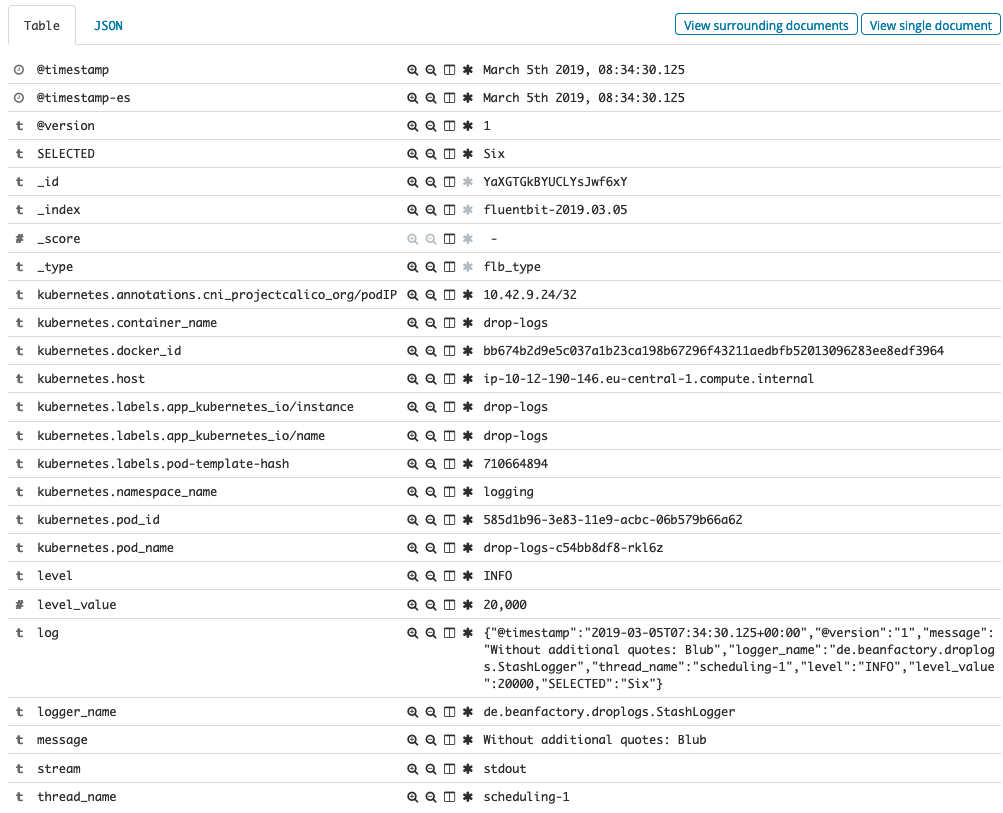
As you see fields like thread_name or logger_name are represented as separate fields. Perfect!
- BUT if we produce logs with additional quotes in message field...:
{"@timestamp":"2019-03-04T14:12:08.913+00:00","@version":"1","message":"With additional quotes: \"Bla\"","logger_name":"de.beanfactory.droplogs.StashLogger","thread_name":"scheduling-1","level":"INFO","level_value":20000,"SELECTED":"Two"}
...they will be sent to Elasticsearch incorrectly:
{"@timestamp-es":"2019-03-04T14:12:08.913Z", "log":"{\"@timestamp\":\"2019-03-04T14:12:08.913+00:00\",\"@version\":\"1\",\"message\":\"With additonal quotes: \"Bla\"\",\"logger_name\":\"de.beanfactory.droplogs.StashLogger\",\"thread_name\":\"scheduling-1\",\"level\":\"INFO\",\"level_value\":20000,\"SELECTED\":\"Two\"}\n", "stream":"stdout", "kubernetes":{"pod_name":"drop-logs-c54bb8df8-rkl6z", "namespace_name":"logging", "pod_id":"585d1b96-3e83-11e9-acbc-06b579b66a62", "labels":{"app_kubernetes_io/instance":"drop-logs", "app_kubernetes_io/name":"drop-logs", "pod-template-hash":"710664894"}, "annotations":{"cni_projectcalico_org/podIP":"10.42.9.24/32"}, "host":"ip-10-12-190-146.eu-central-1.compute.internal", "container_name":"drop-logs", "docker_id":"bb674b2d9e5c037a1b23ca198b67296f43211aedbfb52013096283ee8edf3964"}}
In Kibana:
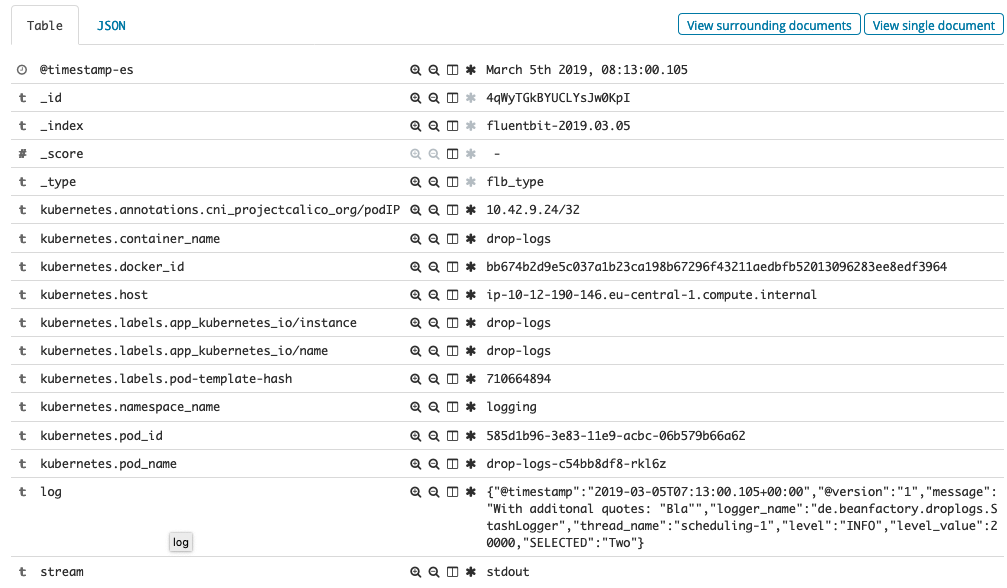
As you see fields like thread_name or logger_name are not represented anymore as separate fields. :-(
Your Environment
- Version used: 1.0.4 (same behavior with 0.14.8)
- Configuration:
fluent-bit.conf:
[SERVICE]
    Flush        1
    Daemon       Off
    Log_Level    info
    Parsers_File parsers_custom.conf

[INPUT]
    Name             tail
    Path             /var/log/containers/*.log
    Parser           docker
    Tag              kube.*
    Refresh_Interval 5
    Skip_Long_Lines  false
    Mem_Buf_Limit    5MB
    DB               /tail-db/tail-containers-state.db
    DB.Sync          Normal

[FILTER]
    Name                kubernetes
    Match               kube.*
    Kube_URL            https://kubernetes.default.svc.cluster.local:443
    Kube_CA_File        /var/run/secrets/kubernetes.io/serviceaccount/ca.crt
    Kube_Token_File     /var/run/secrets/kubernetes.io/serviceaccount/token
    Merge_Log           On
    K8S-Logging.Parser  On

[OUTPUT]
    Name  es
    Match *
    Host  elasticsearch-client
    Port  9200
    Logstash_Format On
    Replace_Dots On
    Retry_Limit False
    Type  flb_type
    Time_Key @timestamp-es
    Logstash_Prefix fluentbit
parsers_custom.conf:
[PARSER]
    Name        docker
    Format      json
    Time_Keep    Off
    Time_Key    time
    Time_Format %Y-%m-%dT%H:%M:%S.%L
    Decode_Field_As escaped log
- Environment name and version (e.g. Kubernetes? What version?): AWS + Kubernetes v1.11.6 (RancherOS)
- Operating System and version: official docker image (fluent/fluent-bit)
- Filters and plugins: kubernetes filter
Not sure if our problem is related to:
https://github.com/fluent/fluent-bit/issues/615 (if yes, this should be fixed)
https://github.com/fluent/fluent-bit/issues/1130 (still open)
If you want to produce logs with quotes, you can use: https://github.com/asciimo71/drop-logs
 dbluxo
All 4 comments
I found using escaped_utf8 worked for me when i had issues with double quotes in my log value field. (https://github.com/fluent/fluent-bit/issues/615)
not sure if that's the case for you here.
 kiich
on 9 Apr 2019
kiich
on 9 Apr 2019
@kiich Thank you! With escaped_utf8 our problem is solved.
dbluxo
on 16 Apr 2019
Please check the following comment on #1278 :
https://github.com/fluent/fluent-bit/issues/1278#issuecomment-499583503
 edsiper
on 6 Jun 2019
edsiper
on 6 Jun 2019
Issue already fixed, ref: #1278 (comment)
edsiper
on 14 Jun 2019
Related issues
 Bulat-Gumerov
·
4Comments
edsiper
·
4Comments
Bulat-Gumerov
·
4Comments
edsiper
·
4Comments
 mbelchin
·
3Comments
mbelchin
·
3Comments
 jcdauchy-moodys
·
3Comments
jcdauchy-moodys
·
3Comments
 c0ze
·
3Comments
c0ze
·
3Comments
Most helpful comment
I found using
escaped_utf8worked for me when i had issues with double quotes in my log value field. (https://github.com/fluent/fluent-bit/issues/615)not sure if that's the case for you here.