Fluent-bit: Hanging with busy CPU on Windows Server
Bug Report
Describe the bug
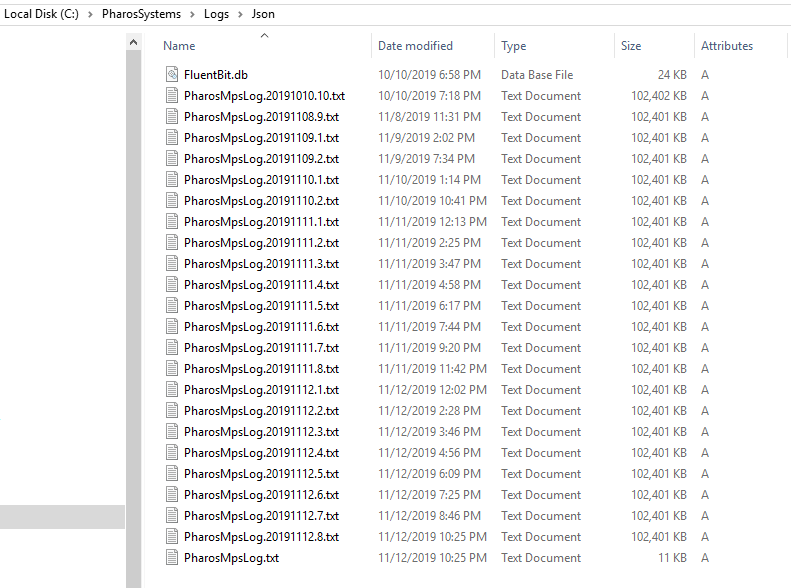
I'm investigating why Fluent Bit on Windows stopped sending logs to Elasticsearch; it seems be tailing the wrong file and busy spinning the CPU.
Screenshots
Your Environment
- Version used: 1.2.0
- Configuration: See below
- Environment name and version: AWS EC2 instance
- Server type and version: Windows
- Operating System and version: Server 2016
- Filters and plugins: in_tail, filter_lua, output_es
fluent-bit.conf:
[SERVICE]
    daemon                  false
    flush                   1
    log_level               info
    parsers_file            parsers.conf
    plugins_file            plugins.conf
    http_server             true
    http_listen             0.0.0.0
    http_port               2020

[INPUT]
    name                    tail
    tag                     pharos.*
    path                    C:\PharosSystems\Logs\Json\PharosMpsLog.txt
    db                      C:\PharosSystems\Logs\Json\FluentBit.db
    parser                  json
    buffer_chunk_size       64k
    buffer_max_size         64k
    mem_buf_limit           8m
    skip_long_lines         true
    refresh_interval        10

[FILTER]
    name                    lua
    match                   *
    script                  filters.lua
    call                    transform

[OUTPUT]
    name                    es
    match                   *
    host                    logs
    port                    80
    logstash_format         true
    type                    _doc
    replace_dots            true
    retry_limit             5
    trace_error             true
filters.lua:
function transform(tag, timestamp, record)
    if record["Payload"] then
        record["Service"] = record["Payload"]["processName"]
    end

    if not record["Message"] and record["Payload"]["message"] then
        record["Message"], record["Payload"]["message"] = record["Payload"]["message"], nil
    end
    return 1, timestamp, record
end
Files on disk:
File handles:

Threads in WinDbg:
0:000> ~*kb

.  0  Id: 1294.1554 Suspend: 0 Teb: 00000056`a7f6c000 Unfrozen
 # RetAddr           : Args to Child                                                           : Call Site
00 00007ff8`cd74ea69 : 000001f7`00000000 00000000`00000000 000001f7`9133b680 000001f7`90290000 : ntdll!NtDeviceIoControlFile+0x14
01 00007ff8`cf8bb3b3 : 00000000`00002736 000001f7`903953f0 00000000`fffffffa 00007ff8`d1a34dc8 : mswsock!WSPSelect+0x4c9
02 00007ff6`880bd7b5 : 000001f7`90373850 00000056`a80ff978 000001f7`9038e310 00007ff6`88295640 : ws2_32!select+0x1d3
03 000001f7`90373850 : 00000056`a80ff978 000001f7`9038e310 00007ff6`88295640 00000056`a80ff978 : fluent_bit+0xfd7b5
04 00000056`a80ff978 : 000001f7`9038e310 00007ff6`88295640 00000056`a80ff978 000001f7`903670e0 : 0x000001f7`90373850
05 000001f7`9038e310 : 00007ff6`88295640 00000056`a80ff978 000001f7`903670e0 000001f7`903e43a0 : 0x00000056`a80ff978
06 00007ff6`88295640 : 00000056`a80ff978 000001f7`903670e0 000001f7`903e43a0 00007ff6`880bad5c : 0x000001f7`9038e310
07 00000056`a80ff978 : 000001f7`903670e0 000001f7`903e43a0 00007ff6`880bad5c 000001f7`9038e310 : fluent_bit+0x2d5640
08 000001f7`903670e0 : 000001f7`903e43a0 00007ff6`880bad5c 000001f7`9038e310 00000056`a80ff930 : 0x00000056`a80ff978
09 000001f7`903e43a0 : 00007ff6`880bad5c 000001f7`9038e310 00000056`a80ff930 00000056`a80ff978 : 0x000001f7`903670e0
0a 00007ff6`880bad5c : 000001f7`9038e310 00000056`a80ff930 00000056`a80ff978 000001f7`903670e0 : 0x000001f7`903e43a0
0b 000001f7`9038e310 : 00000056`a80ff930 00000056`a80ff978 000001f7`903670e0 000001f7`903773f0 : fluent_bit+0xfad5c
0c 00000056`a80ff930 : 00000056`a80ff978 000001f7`903670e0 000001f7`903773f0 000001f7`9036ed60 : 0x000001f7`9038e310
0d 00000056`a80ff978 : 000001f7`903670e0 000001f7`903773f0 000001f7`9036ed60 00007ff6`88295640 : 0x00000056`a80ff930
0e 000001f7`903670e0 : 000001f7`903773f0 000001f7`9036ed60 00007ff6`88295640 0006ab08`00b9bc4a : 0x00000056`a80ff978
0f 000001f7`903773f0 : 000001f7`9036ed60 00007ff6`88295640 0006ab08`00b9bc4a 00000000`00000000 : 0x000001f7`903670e0
10 000001f7`9036ed60 : 00007ff6`88295640 0006ab08`00b9bc4a 00000000`00000000 000001f7`903670e0 : 0x000001f7`903773f0
11 00007ff6`88295640 : 0006ab08`00b9bc4a 00000000`00000000 000001f7`903670e0 000001f7`9035c340 : 0x000001f7`9036ed60
12 0006ab08`00b9bc4a : 00000000`00000000 000001f7`903670e0 000001f7`9035c340 00000000`00000060 : fluent_bit+0x2d5640
13 00000000`00000000 : 000001f7`903670e0 000001f7`9035c340 00000000`00000060 000001f7`903773f0 : 0x0006ab08`00b9bc4a

   1  Id: 1294.cdc Suspend: 0 Teb: 00000056`a7f74000 Unfrozen
 # RetAddr           : Args to Child                                                           : Call Site
00 00007ff8`cd748033 : 00000000`000001a8 000001f7`9036e0c0 000001f7`9034e1c0 00001000`00010000 : ntdll!NtWaitForSingleObject+0x14
01 00007ff8`cd74ed84 : 00000000`00000000 00000000`00000000 00000056`a84ff4f0 00000000`00000000 : mswsock!SockWaitForSingleObject+0x133
02 00007ff8`cf8bb3b3 : 00000000`0000001f 00000000`000003ee ffffffff`ffffffff ffffffff`ffffffff : mswsock!WSPSelect+0x7e4
03 00007ff6`880bd7b5 : 000001f7`9035a9f0 00000000`00000000 000001f7`9036d9d0 00007ff6`88295640 : ws2_32!select+0x1d3
04 000001f7`9035a9f0 : 00000000`00000000 000001f7`9036d9d0 00007ff6`88295640 00000000`00000000 : fluent_bit+0xfd7b5
05 00000000`00000000 : 000001f7`9036d9d0 00007ff6`88295640 00000000`00000000 00000000`00000000 : 0x000001f7`9035a9f0

   2  Id: 1294.1bc0 Suspend: 0 Teb: 00000056`a7f76000 Unfrozen
 # RetAddr           : Args to Child                                                           : Call Site
00 00007ff8`d1a39e4e : 00000056`00000000 00000056`a7f6b000 00000000`00000000 00000000`00000000 : ntdll!NtWaitForWorkViaWorkerFactory+0x14
01 00007ff8`d00184d4 : 00000000`00000000 00000000`00000000 00000000`00000000 00000000`00000000 : ntdll!TppWorkerThread+0x76e
02 00007ff8`d1a7e851 : 00000000`00000000 00000000`00000000 00000000`00000000 00000000`00000000 : kernel32!BaseThreadInitThunk+0x14
03 00000000`00000000 : 00000000`00000000 00000000`00000000 00000000`00000000 00000000`00000000 : ntdll!RtlUserThreadStart+0x21
Note: missing symbols for fluent-bit.exe, so it would be useful to include PDB symbols with the Windows build artifact, especially if I'm to try again with latest, as last time I tried I couldn't build it.
Any idea what could be going on here?
 gitfool
All 10 comments
Can you post your data example and fluent-bit's running log?
I'll try to reproduce the issue on my dev machine.
Note: missing symbols for fluent-bit.exe, so it would be useful to include PDB symbols with the Windows build artifact, especially if I'm to try again with latest, as last time I tried I couldn't build it.
This is because Fluent Bit does not support ninja as a build system (on any platforms).
You need to use msbuild or nmake to build it on Windows properly like:
PS> cmake .. -G "NMake Makefiles"
PS> cmake --build .
 fujimotos
on 13 Nov 2019
fujimotos
on 13 Nov 2019
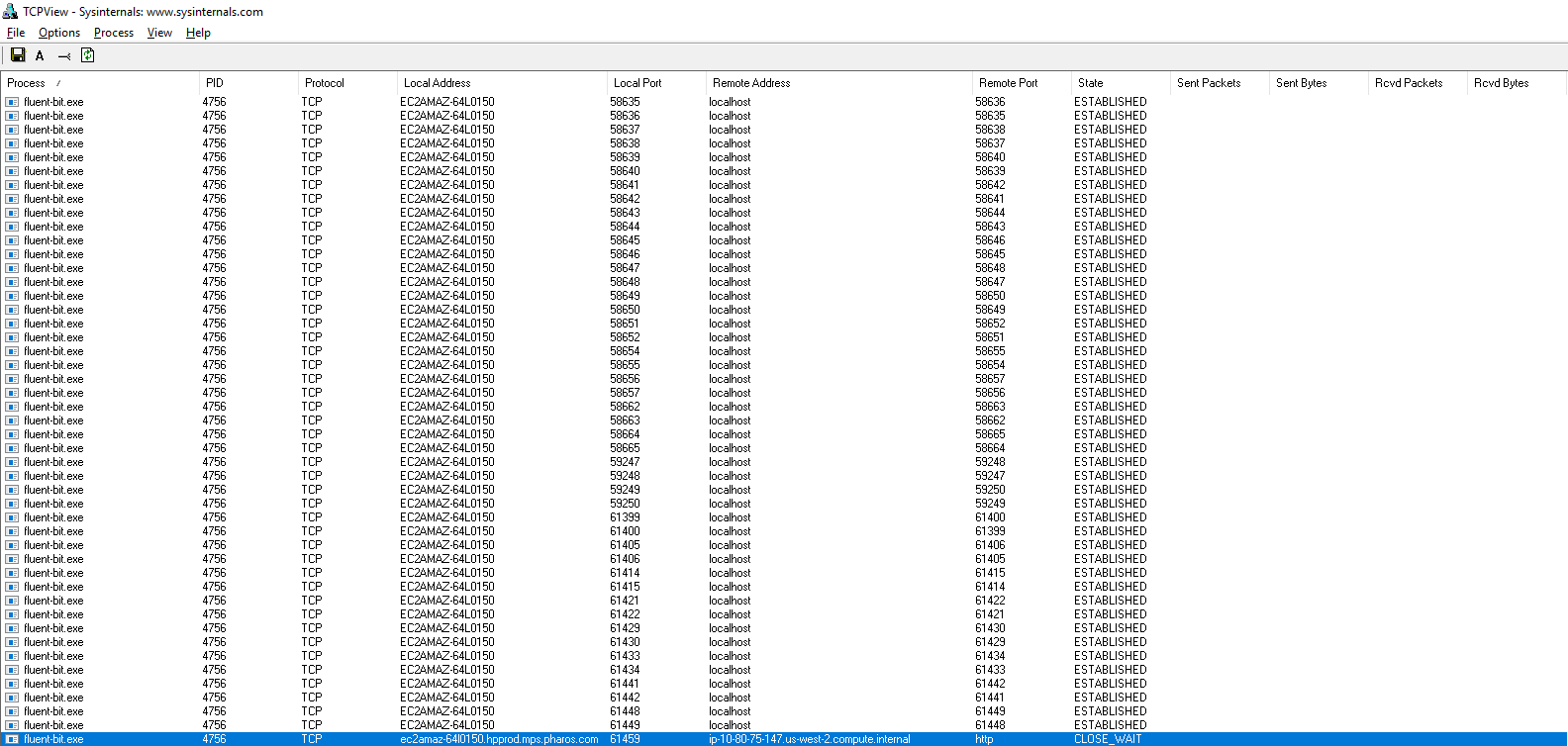
FWIW, I did subsequently find a connection to the Elasticsearch server seemed to be stuck in CLOSE_WAIT state, so I forcibly closed it from Sysinternals TCPView, but to no avail.
gitfool
on 13 Nov 2019
Can you post your data example and fluent-bit's running log?
@fujimotos It's running as a Windows service using winsw and I can't find any logs. 😞
gitfool
on 13 Nov 2019
It's running as a Windows service using winsw and I can't find any logs. disappointed
As far as I know, winsw redirects stdout/stderr to fluent-bit.out.log/fluent-bit.err.log.
You should find these files somewhere on your machine.
fujimotos
on 13 Nov 2019
Good catch! Got some log files afterall, but nothing of interest in them.
WinSW.NET4.xml:
<configuration>
  <id>FluentBit</id>
  <name>FluentBit</name>
  <description>Fluent Bit</description>
  <executable>C:\PharosSystems\Tools\FluentBit\1.2.0\td-agent-bit-1.2.0-win64\bin\fluent-bit.exe</executable>
  <arguments>-c C:\PharosSystems\Tools\FluentBit\1.2.0\td-agent-bit-1.2.0-win64\conf\fluent-bit.conf</arguments>
</configuration>
WinSW.NET4.wrapper.log:
2019-09-03 21:39:51,777 DEBUG - Starting ServiceWrapper in the CLI mode
2019-09-03 21:39:52,046 INFO  - Installing the service with id 'FluentBit'
2019-09-03 21:39:52,049 DEBUG - Completed. Exit code is 0
2019-09-03 21:39:52,797 INFO  - Starting ServiceWrapper in the service mode
2019-09-03 21:39:52,828 INFO  - Starting C:\PharosSystems\Tools\FluentBit\1.2.0\td-agent-bit-1.2.0-win64\bin\fluent-bit.exe -c C:\PharosSystems\Tools\FluentBit\1.2.0\td-agent-bit-1.2.0-win64\conf\fluent-bit.conf
2019-09-03 21:39:52,828 INFO  - Starting C:\PharosSystems\Tools\FluentBit\1.2.0\td-agent-bit-1.2.0-win64\bin\fluent-bit.exe -c C:\PharosSystems\Tools\FluentBit\1.2.0\td-agent-bit-1.2.0-win64\conf\fluent-bit.conf
2019-09-03 21:39:52,876 INFO  - Started process 3696
2019-09-03 21:39:52,876 DEBUG - Forwarding logs of the process System.Diagnostics.Process (fluent-bit) to winsw.DefaultLogAppender
2019-10-03 19:40:47,578 INFO  - Stopping FluentBit
2019-10-03 19:40:47,578 DEBUG - ProcessKill 3696
2019-10-03 19:40:51,249 INFO  - Found child process: 4676 Name: conhost.exe
2019-10-03 19:40:51,594 INFO  - Stopping process 4676
2019-10-03 19:40:51,594 INFO  - Send SIGINT 4676
2019-10-03 19:40:51,609 WARN  - SIGINT to 4676 failed - Killing as fallback
2019-10-03 19:40:51,609 INFO  - Stopping process 3696
2019-10-03 19:40:51,625 INFO  - Send SIGINT 3696
2019-10-03 19:40:51,734 WARN  - SIGINT to 3696 failed - Killing as fallback
2019-10-03 19:40:51,734 INFO  - Finished FluentBit
2019-10-03 19:40:51,734 DEBUG - Completed. Exit code is 0
2019-10-03 19:40:52,109 INFO  - Starting ServiceWrapper in the service mode
2019-10-03 19:40:52,141 INFO  - Starting C:\PharosSystems\Tools\FluentBit\1.2.0\td-agent-bit-1.2.0-win64\bin\fluent-bit.exe -c C:\PharosSystems\Tools\FluentBit\1.2.0\td-agent-bit-1.2.0-win64\conf\fluent-bit.conf
2019-10-03 19:40:52,172 INFO  - Starting C:\PharosSystems\Tools\FluentBit\1.2.0\td-agent-bit-1.2.0-win64\bin\fluent-bit.exe -c C:\PharosSystems\Tools\FluentBit\1.2.0\td-agent-bit-1.2.0-win64\conf\fluent-bit.conf
2019-10-03 19:40:52,234 INFO  - Started process 4756
2019-10-03 19:40:52,250 DEBUG - Forwarding logs of the process System.Diagnostics.Process (fluent-bit) to winsw.DefaultLogAppender
WinSW.NET4.out.log is empty.
WinSW.NET4.err.log:
Fluent Bit v1.2.0
Copyright (C) Treasure Data

[2019/09/03 21:39:52] [ info] [storage] initializing...
[2019/09/03 21:39:52] [ info] [storage] in-memory
[2019/09/03 21:39:52] [ info] [storage] normal synchronization mode, checksum disabled, max_chunks_up=128
[2019/09/03 21:39:52] [ info] [engine] started (pid=3696)
[2019/09/03 21:39:52] [ info] [sp] stream processor started
Fluent Bit v1.2.0
Copyright (C) Treasure Data

[2019/10/03 19:40:52] [ info] [storage] initializing...
[2019/10/03 19:40:52] [ info] [storage] in-memory
[2019/10/03 19:40:52] [ info] [storage] normal synchronization mode, checksum disabled, max_chunks_up=128
[2019/10/03 19:40:52] [ info] [engine] started (pid=4756)
[2019/10/03 19:40:52] [ info] [sp] stream processor started
write: No such file or directory
I can at least re-configure it to use a rotating log for next time.
gitfool
on 13 Nov 2019
Good catch! Got some log files afterall, but nothing of interest in them.
This is due to your log level being info. Increasing the loglevel in [SERVICE] to
debug should produce more useful logs.
write: No such file or directory
My current suspicion is that there is some failure in internal event system. These
stagging TCP connections seem to be actually pipes (not connections to ES) that
are used to communicate the engine state internally.
fujimotos
on 13 Nov 2019
I'll change to debug log level too. Where can I get the win64 download for current latest stable; i.e. currently v1.3.2 (not the AppVeyor prerelease of v1.4.0)?
Edit: Never mind; found it here.
gitfool
on 13 Nov 2019
FTR, I worked out how to configure Visual Studio Code to build Fluent Bit using the CMake Tools extension and Visual Studio 2019 toolchain:
- Select build kit ("Visual Studio Enterprise 2019 - amd64")
- Select variant ("Debug" or "Release")
- Configure cmake.cmakePath since
cmake.exeis internal to Visual Studio 2019 - Configure cmake.generator since
ninjais preferred but unsupported by Fluent Bit
("NMake Makefiles" or preferably the magic incantation "Visual Studio 16 2019")
settings.json:
{
    "cmake.cmakePath": "C:\\Program Files (x86)\\Microsoft Visual Studio\\2019\\Enterprise\\Common7\\IDE\\CommonExtensions\\Microsoft\\CMake\\CMake\\bin\\cmake.exe",
    "cmake.generator": "Visual Studio 16 2019"
}
Thanks for these tips, to add for anyone else, I had to also install msys2, and then use it to install Flex and Bison (pacman -Su flex bison). They end up in C:\msys64\usr\bin which you can then add to your $PATH.
 benmoss
on 18 Nov 2019
benmoss
on 18 Nov 2019
I believe this is fixed in #2195. This fix is already included in the
latest stable release.
Thank you for reporting and debugging everyone.
fujimotos
on 8 Jul 2020
Related issues
 mitchellmaler
·
24Comments
mitchellmaler
·
24Comments
 felipejfc
·
28Comments
felipejfc
·
28Comments
 yann-soubeyrand
·
26Comments
yann-soubeyrand
·
26Comments
 duythinht
·
26Comments
duythinht
·
26Comments
 trstringer
·
27Comments
trstringer
·
27Comments