Fluent-bit: Add Windows Support to Fluent Bit
Overview
Right now, Fluent Bit is designed to run on Unix platforms (Linux, BSD and OSX).
This ticket aims to expand the supported platforms a bit more; Namely we want
to be able to run Fluent Bit on Windows, and make it possible to ship logs
efficiently from there.
Goals
- Make the core engine of Fluent Bit runnable on Windows.
- Our primary build target is MSVC 2017.
- (Cygwin and MinGW are out of our scope for now)
- Create an installation package so that users can install easily
- Maybe
setup.exeorfluent-bit.msi; We need to figure out how to do it.
- Maybe
- Migrate plugins as many as possible (see below)
Roadmap
ETA of this feature (Windows support) is 2019 1Q.
We don't expect all plugins being migrated to Windows by the end of March 2019,
though. The high priority list of plugins is attached to this ticket.
Also we are planning to create a new input plugin for Windows event logs
(maybe in_windows_eventlog). This plugin should be included in the initial
release of Windows support.
List of plugins to be ported
- Input Plugins
- in_tail
- in_lib
- in_syslog
- Filter Plugins
- filter_grep
- filter_lua
- filter_modify
- filter_record_modifier
- filter_stdout
- Output Plugins
- out_es
- out_kafka
- out_flowcounter
- out_counter
- out_http
- out_splunk
 fujimotos
All 132 comments
seems like travis has windows https://blog.travis-ci.com/2018-10-11-windows-early-release now so we can get the build + ci going there too.
 donbowman
on 11 Jan 2019
donbowman
on 11 Jan 2019
Thank you for the information!
I'll definitely add that config to travis.yml, once fluent-bit gets
compilable on Windows (it's actually not so far).
fujimotos
on 11 Jan 2019
Hey @fujimotos, any idea on how close this work is?
 benmoss
on 11 Feb 2019
benmoss
on 11 Feb 2019
@benmoss no ETA yet, work in process.
 edsiper
on 11 Feb 2019
edsiper
on 11 Feb 2019
Are we still tracking the 2019 Q1 for Windows support?
 joby-thomas
on 14 Mar 2019
joby-thomas
on 14 Mar 2019
@joby-thomas as Alpha support yes (very restricted/limited features), for production there is no ETA.
edsiper
on 14 Mar 2019
@fujimotos & @edsiper we are seeing an emerging need for windows functionality with Fluentbit as well. Our first choice would be to use the work in progress here and we'd be happy to contribute if that would be helpful.
That said we are considering addressing this by adding go-lang input plugin support in order to recreate the tail plugin in go-lang and be able to satisfy our specific input and output needs. Any update on progress or expected completion would be helpful to planning out how we handle our specific use case.
 hev
on 20 Mar 2019
hev
on 20 Mar 2019
Given that go plugins don't work on windows in general
https://github.com/golang/go/issues/19282 is it the case that they would
work w/ fluent-bit on windows?
On Wed, 20 Mar 2019 at 15:55, Adam Hevenor notifications@github.com wrote:
@fujimotos https://github.com/fujimotos & @edsiper
https://github.com/edsiper we are seeing an emerging need for windows
functionality with Fluentbit as well. Our first choice would be to use the
work in progress here and we'd be happy to contribute if that would be
helpful.That said we are considering addressing this by adding go-lang input
plugin support in order to recreate the tail plugin in go-lang and be able
to satisfy our specific input and output needs. Any update on progress or
expected completion would be helpful to planning out how we handle our
specific use case.—
You are receiving this because you commented.
Reply to this email directly, view it on GitHub
https://github.com/fluent/fluent-bit/issues/960#issuecomment-475003187,
or mute the thread
https://github.com/notifications/unsubscribe-auth/AE5Okzz4hp0ri893eywcyL8h--P4K3kRks5vYpIcgaJpZM4ZS6RM
.
donbowman
on 21 Mar 2019
fluent-bit output golang proxy can migrate to work on Windows:
https://github.com/fluent/fluent-bit/pull/1196
If we create golang input plugin interface, we also should migrate to work on Windows with WIN32 API.(LoadLibrary/GetProcAddress/FreeLibrary)
 cosmo0920
on 21 Mar 2019
cosmo0920
on 21 Mar 2019
@donbowman thanks for pointing that out. Perhaps that route is harder than I thought.
hev
on 21 Mar 2019
Is there any release I can play with it on windows? If not, when would be available?
 ganga1980
on 22 Mar 2019
ganga1980
on 22 Mar 2019
@ganga1980 Currently, Windows support is still alpha (very limited feature) and there is no ETA yet.
cosmo0920
on 22 Mar 2019
@hev Sorry for a late reply, but thanks for letting us know.
Right now, I'm actively working on adding Windows support to Fluent Bit.
I think I can help you in the technical aspect of the Windows port, so please
feel free to tell me if you see any issues in the port.
For golang input (and feature planning in general), I think you probably want
to submit a separate issue ticket with your details (background, usecase etc),
and have some discussion with @edsiper.
fujimotos
on 27 Mar 2019
I saw in the 1.1 patch notes that FluentBit is now in beta for Windows. Is there an installation package for it? Not seeing one anywhere.
 AddChickpeas
on 20 May 2019
AddChickpeas
on 20 May 2019
Try this installer on fluent/fluent-bit:
32 bit: https://ci.appveyor.com/project/fluent/fluent-bit-2e87g/builds/24476493/job/p3m772tlptd586i9/artifacts
64 bit: https://ci.appveyor.com/project/fluent/fluent-bit-2e87g/builds/24476493/job/jb0nds9gkplqmd59/artifacts
fujimotos
on 21 May 2019
Hi @fujimotos that's great you are porting this wonderful tool to windows.. this is all what we need in our environment to have a standard log shipper across multiple platforms.. When do you reckon the stable installer will be ready for windows? would you port it for 32 and 64 bits? cheers
 macgahe
on 10 Jul 2019
macgahe
on 10 Jul 2019
@macgahe I'm right now actively working to distribute Windows installer from
fluentbit.io. I think I can publish the first version (v1.2.0) next week.
If you want to try it earlier, there are already 1.2.0 installers built on the CI server.
They should have essentially the same content with the actual distributed version.
Also, the installation manual is already up here.
https://docs.fluentbit.io/manual/installation/windows
I'll follow up on this ticket when I've done preparing, so wait a bit for me.
fujimotos
on 10 Jul 2019
@fujimotos thanks for the quick update.. Those are really good news!!!
I will give it a go to the installers you have shared.. and feed you back... and will be following this "issue" , hopefully next week fluent-bit will have their presence in the windows space ;)
Keep up with such a good work
thanks
macgahe
on 10 Jul 2019
Hi - I have been playing with the windows release and found 3 issues I wanted to flag -
@INCLUDE input_*.confdoes not work with windows paths -
PS C:\Program Files\td-agent-bit> .\bin\fluent-bit.exe -c .\conf\fluent-bit.conf
Fluent Bit v1.2.0
Copyright (C) Treasure Data

[2019/08/26 11:39:26] [  Error] [config] wildcard is not supported on Windows
[2019/08/26 11:39:26] [  Error] [config] path: C:/tmp/input_*.conf
Error: Configuration file contain errors. Aborting
- Quotes break windows path - This is a bit odd, as most C fopen advice will point towards a quoted path -
"c:\\program files\\foo\\bar.conf"is typical for example.
[INPUT]
    Name  tail
    Parser vmware-vmx
    Path  "c:/tmp/vmware.log"
Yields -
[2019/08/26 11:48:36] [error] [in_tail] Cannot read info from: "c:/tmp/vmware.log"
Remove the quotes and it works fine -
[INPUT]
    Name  tail
    Parser vmware-vmx
    Path  c:/tmp/vmware.log

---

PS C:\Program Files\td-agent-bit> .\bin\fluent-bit.exe -c .\conf\fluent-bit.conf
Fluent Bit v1.2.0
Copyright (C) Treasure Data

[2019/08/26 11:52:01] [ info] [storage] initializing...
[2019/08/26 11:52:01] [ info] [storage] in-memory
[2019/08/26 11:52:01] [ info] [storage] normal synchronization mode, checksum disabled, max_chunks_up=128
[2019/08/26 11:52:01] [ info] [engine] started (pid=12156)
[2019/08/26 11:52:01] [ info] [sp] stream processor started
[0] tail.0: [<SNIP - working tail follows>
- Storage buffering on windows causes a crash on startup -
[SERVICE]
    Flush        1
    Daemon       Off
    Log_Level    info
    Parsers_File parsers.conf
    Plugins_File plugins.conf
    storage.path c:/tmp/fluentd-buffer.td
    HTTP_Server  Off
Yields -
PS C:\Program Files\td-agent-bit> .\bin\fluent-bit.exe -c .\conf\fluent-bit.conf
Fluent Bit v1.2.0
Copyright (C) Treasure Data

[cio] file system backend not supported
[2019/08/26 11:50:31] [error] [storage] error initializing storage engine
[2019/08/26 11:50:31] [ info] [input] pausing tail.0
[engine] caught signal (SIGSEGV)
I really don't know any C/C++ to be able to provide much in the way of a PR, but wanted to at least log for visibility.
 onetinov
on 26 Aug 2019
onetinov
on 26 Aug 2019
@onetinov Thank you for feedback.
@INCLUDE input_*.confdoes not work with windows paths -
Yes this is a missing feature from https://github.com/monkey/monkey/commit/d0bdc4d925070a2af3e0c427c8d11bd5084096ab.
I'm aware that we need to implement this feature, and right now
planning to implement it using FindFirstFile() in kernel32.
- Quotes break windows path - This is a bit odd, as most C fopen advice will point towards a quoted path - "c:\program files\foo\bar.conf" is typical for example.
This is interesting. I'll investigate this issue a bit more later.
- Storage buffering on windows causes a crash on startup -
Sorry, we do not have a file system storage support on Windows yet.
We need to first work on Win32 port of chunkio in order to make file
strorage usable on Windows. This should take a couple of weeks work,
so it won't materialize any time soon...
fujimotos
on 28 Aug 2019
I'm trying to build current master using VS Code (and Visual Studio 2019) but lib/libonigmo.lib is missing:
[build] Starting build
[driver] Start build all
[driver] Runnnig pre-configure checks and steps
[proc] Executing command: "C:\Program Files (x86)\Microsoft Visual Studio\2019\Enterprise\Common7\IDE\CommonExtensions\Microsoft\CMake\CMake\bin\cmake.exe" --build d:/Devel/Repos/fluent-bit/build --config Release --target all -- -j 14
[build] ninja: warning: multiple rules generate library/fluent-bit.lib. builds involving this target will not be correct; continuing anyway [-w dupbuild=warn]
[build] ninja: error: 'lib/libonigmo.lib', needed by 'bin/fluent-bit.dll', missing and no known rule to make it
[driver] Run _refreshExpansions
[cms-driver] Run doRefreshExpansions
[driver] Run _refreshExpansions cb
[build] Build finished with exit code 1
[extension] [1120] cmake.build finished (returned 1)
[cache] Reading CMake cache file d:/Devel/Repos/fluent-bit/build/CMakeCache.txt
[cache] Parsing CMake cache string
[kit] OK running C:\Program Files (x86)\Microsoft Visual Studio\2019\Enterprise\VC\Auxiliary\Build\vcvarsall.bat amd64, env vars:[["CL",""],["_CL_",""],["INCLUDE","C:\\Program Files (x86)\\Microsoft Visual Studio\\2019\\Enterprise\\VC\\Tools\\MSVC\\14.22.27905\\include;C:\\Program Files (x86)\\Windows Kits\\NETFXSDK\\4.7.2\\include\\um;C:\\Program Files (x86)\\Windows Kits\\10\\include\\10.0.18362.0\\ucrt;C:\\Program Files (x86)\\Windows Kits\\10\\include\\10.0.18362.0\\shared;C:\\Program Files (x86)\\Windows Kits\\10\\include\\10.0.18362.0\\um;C:\\Program Files (x86)\\Windows Kits\\10\\include\\10.0.18362.0\\winrt;C:\\Program Files (x86)\\Windows Kits\\10\\include\\10.0.18362.0\\cppwinrt"],["LIBPATH","C:\\Program Files (x86)\\Microsoft Visual Studio\\2019\\Enterprise\\VC\\Tools\\MSVC\\14.22.27905\\lib\\x64;C:\\Program Files (x86)\\Microsoft Visual Studio\\2019\\Enterprise\\VC\\Tools\\MSVC\\14.22.27905\\lib\\x86\\store\\references;C:\\Program Files (x86)\\Windows Kits\\10\\UnionMetadata\\10.0.18362.0;C:\\Program Files (x86)\\Windows Kits\\10\\References\\10.0.18362.0;C:\\Windows\\Microsoft.NET\\Framework64\\v4.0.30319;"],["LINK",""],["_LINK_",""],["LIB","C:\\Program Files (x86)\\Microsoft Visual Studio\\2019\\Enterprise\\VC\\Tools\\MSVC\\14.22.27905\\lib\\x64;C:\\Program Files (x86)\\Windows Kits\\NETFXSDK\\4.7.2\\lib\\um\\x64;C:\\Program Files (x86)\\Windows Kits\\10\\lib\\10.0.18362.0\\ucrt\\x64;C:\\Program Files (x86)\\Windows Kits\\10\\lib\\10.0.18362.0\\um\\x64;"],["PATH","C:\\Program Files (x86)\\Microsoft Visual Studio\\2019\\Enterprise\\VC\\Tools\\MSVC\\14.22.27905\\bin\\HostX64\\x64;C:\\Program Files (x86)\\Microsoft Visual Studio\\2019\\Enterprise\\Common7\\IDE\\VC\\VCPackages;C:\\Program Files (x86)\\Microsoft Visual Studio\\2019\\Enterprise\\Common7\\IDE\\CommonExtensions\\Microsoft\\TestWindow;C:\\Program Files (x86)\\Microsoft Visual Studio\\2019\\Enterprise\\Common7\\IDE\\CommonExtensions\\Microsoft\\TeamFoundation\\Team Explorer;C:\\Program Files (x86)\\Microsoft Visual Studio\\2019\\Enterprise\\MSBuild\\Current\\bin\\Roslyn;C:\\Program Files (x86)\\Microsoft Visual Studio\\2019\\Enterprise\\Team Tools\\Performance Tools\\x64;C:\\Program Files (x86)\\Microsoft Visual Studio\\2019\\Enterprise\\Team Tools\\Performance Tools;C:\\Program Files (x86)\\Microsoft Visual Studio\\Shared\\Common\\VSPerfCollectionTools\\vs2019\\\\x64;C:\\Program Files (x86)\\Microsoft Visual Studio\\Shared\\Common\\VSPerfCollectionTools\\vs2019\\;C:\\Program Files (x86)\\Microsoft SDKs\\Windows\\v10.0A\\bin\\NETFX 4.7.2 Tools\\x64\\;C:\\Program Files (x86)\\Microsoft Visual Studio\\2019\\Enterprise\\Common7\\IDE\\CommonExtensions\\Microsoft\\FSharp\\;C:\\Program Files (x86)\\Windows Kits\\10\\bin\\10.0.18362.0\\x64;C:\\Program Files (x86)\\Windows Kits\\10\\bin\\x64;C:\\Program Files (x86)\\Microsoft Visual Studio\\2019\\Enterprise\\\\MSBuild\\Current\\Bin;C:\\Windows\\Microsoft.NET\\Framework64\\v4.0.30319;C:\\Program Files (x86)\\Microsoft Visual Studio\\2019\\Enterprise\\Common7\\IDE\\;C:\\Program Files (x86)\\Microsoft Visual Studio\\2019\\Enterprise\\Common7\\Tools\\;C:\\ProgramData\\DockerDesktop\\version-bin;C:\\Program Files\\Docker\\Docker\\Resources\\bin;C:\\Program Files (x86)\\Common Files\\Oracle\\Java\\javapath;C:\\WINDOWS\\system32;C:\\WINDOWS;C:\\WINDOWS\\System32\\Wbem;C:\\WINDOWS\\System32\\WindowsPowerShell\\v1.0\\;C:\\WINDOWS\\System32\\OpenSSH\\;C:\\Program Files\\Microsoft VS Code\\bin;C:\\Program Files\\Microsoft SQL Server\\110\\Tools\\Binn\\;C:\\Program Files\\dotnet\\;C:\\Program Files\\Microsoft SQL Server\\130\\Tools\\Binn\\;C:\\Program Files\\Microsoft SQL Server\\Client SDK\\ODBC\\170\\Tools\\Binn\\;C:\\Program Files\\TortoiseGit\\bin;C:\\Program Files\\Git\\cmd;C:\\Tools\\docker-credential-helpers;C:\\Tools\\liquibase-3.5.5;C:\\Tools\\NuGet;C:\\Program Files\\Microsoft VS Code\\bin;C:\\Users\\sfausett\\AppData\\Local\\Microsoft\\WindowsApps;C:\\Users\\sfausett\\.dotnet\\tools;C:\\Program Files (x86)\\Microsoft Visual Studio\\2019\\Enterprise\\Common7\\IDE\\CommonExtensions\\Microsoft\\CMake\\CMake\\bin;C:\\Program Files (x86)\\Microsoft Visual Studio\\2019\\Enterprise\\Common7\\IDE\\CommonExtensions\\Microsoft\\CMake\\Ninja"],["TMP","C:\\Users\\sfausett\\AppData\\Local\\Temp"],["FRAMEWORKDIR","C:\\Windows\\Microsoft.NET\\Framework64\\"],["FRAMEWORKDIR64","C:\\Windows\\Microsoft.NET\\Framework64\\"],["FRAMEWORKVERSION","v4.0.30319"],["FRAMEWORKVERSION64","v4.0.30319"],["UCRTCONTEXTROOT",""],["UCRTVERSION","10.0.18362.0"],["UNIVERSALCRTSDKDIR","C:\\Program Files (x86)\\Windows Kits\\10\\"],["VCINSTALLDIR","C:\\Program Files (x86)\\Microsoft Visual Studio\\2019\\Enterprise\\VC\\"],["VCTARGETSPATH",""],["WINDOWSLIBPATH","C:\\Program Files (x86)\\Windows Kits\\10\\UnionMetadata\\10.0.18362.0;C:\\Program Files (x86)\\Windows Kits\\10\\References\\10.0.18362.0"],["WINDOWSSDKDIR","C:\\Program Files (x86)\\Windows Kits\\10\\"],["WINDOWSSDKLIBVERSION","10.0.18362.0\\"],["WINDOWSSDKVERSION","10.0.18362.0\\"],["VISUALSTUDIOVERSION","16.0"]]
 gitfool
on 29 Aug 2019
gitfool
on 29 Aug 2019
@fujimotos Just forgot to mentioned, when I installed and tried to run the binary in windows asked me for 2 dll's
libeay32.dll and ssleay32.dll
I downloaded them from the link below and added to the c:\windows\system32\ and the error disappeared . Not sure if it is only me that happened that error, but would be good if not, that the dll's can be added as part of the installation :)
thanks for the good work
macgahe
on 30 Aug 2019
@gitfool I'm suspecting that the failure is due to the use of Ninja as the build tool,
instead of MSBuild. I'll check out VS2019 later and see how it can be fixed
fujimotos
on 4 Sep 2019
@macgahe Thank you for the info. The requirement is because we bundles
out_kafka in Windows Build, which depends on OpenSSL for secure connections.
I'll update the insallation manual for future users...
fujimotos
on 4 Sep 2019
I noticed that Stackdriver's output plugin isn't initially included. What would need to be done to have it included as well?
 heartrobotninja
on 19 Sep 2019
heartrobotninja
on 19 Sep 2019
So some updates on our quest to get fluent-bit to work in windows. We were investigating telegraf as well, and it seems like it has to do with service creation. When we run telegraf, for example, on windows it works, but when run in a container without the --console flag, it fails with "cannot create service". We see the same kind of behavior right now with fluent-bit. We can run on the host vm, but once we run in a container, it instantly fails with no output.
 Benjamintf1
on 20 Sep 2019
Benjamintf1
on 20 Sep 2019
~Is there a flag for silent (and thus automated) installation of fluentbit?~
Found it, /S
Now, I wonder why the uninstall key is being written to WOW6432Node for a 64-bit install.
 plinkable
on 28 Oct 2019
plinkable
on 28 Oct 2019
Is there an option to run as a service?
plinkable
on 28 Oct 2019
@INCLUDE input_*.confdoes not work with windows paths -Yes this is a missing feature from monkey/monkey@d0bdc4d.
I'm aware that we need to implement this feature, and right now
planning to implement it usingFindFirstFile()in kernel32.
Any news on this? It's blocking my deployment.
plinkable
on 28 Oct 2019
@heartrobotninja I ported out_stackdriver to Windows in #1688
The testing installer is downloadable from appveyor#28446697.
I appreciate if you could try it and see if it works as supposed.
fujimotos
on 29 Oct 2019
@fujimotos Hello ! First Thanks for your work !
I'm testing fluent-bit on windows in a container run by kubernetes (AKS).
It's working well ! I'm thinking about creating a PR with the Windows Dockerfile in the repository.
There is still 2 issues:
- The
tailinput plugin I can not user/var/log/containers/*/*. It just doesn't match any file (I guess this is linked to #1692) - The
tailinput plugin doesn't seem able to read symlink files. I just got something like
[2019/11/04 16:44:41] [debug] [in_tail] skip (invalid) entry=C:\var\log\container\wintest-5747bcc47d-mtrxn_default_wintest-cb5c12ed6dd8e20c2e96ae1172cc560604e6cfb1865f22cdffb5ecbf7a84b591.log
Thanks for your help !
 titilambert
on 4 Nov 2019
titilambert
on 4 Nov 2019
@titilambert care to share your dockerfile I'm working on the exact same thing right now settings up EKS windows kubernetes for newrelic log ingestion!
 rparsonsbb
on 6 Nov 2019
rparsonsbb
on 6 Nov 2019
The tail input plugin I can not user /var/log/containers//. It just doesn't match any file (I guess this is linked to #1692)
Yes, we do not have a full support for * on Windows yet.
This really needs implementing.
The tail input plugin doesn't seem able to read symlink files. I just got something like
I am curious as to why this fails. As far as I can tell, in_tail _does_ support symlinks on
WIndows, so it should work on your settings.
In fact, I can confirm that in_tail can handle symlinks on my Windows machine.
Preparing a symbolic link on the file system:
C:\fluent-bit> dir
...
11/08/2019  05:58 PM    <SYMLINK>      symlink.txt [test.txt]
and evidently in_tail can read from it:
C:\fluent-bit> .\fluent-bit.exe -i tail -p path=symlink.txt -o stdout
Fluent Bit v1.4.0
Copyright (C) Treasure Data

[2019/11/08 18:13:56] [ info] [storage] initializing...
[2019/11/08 18:13:56] [ info] [storage] in-memory
[2019/11/08 18:13:56] [ info] [storage] normal synchronization mode, checksum disabled, max_chunks_up=128
[2019/11/08 18:13:56] [ info] [engine] started (pid=13080)
[0] tail.0: [1573204436.689636300, {"log"=>"{"foo": "baa"}"}]
Does the failure always happen on your environment? > @titilambert
fujimotos
on 8 Nov 2019
I used this Dockerfile to run fluent-bit on Windows after building it:
FROM mcr.microsoft.com/dotnet/framework/sdk:4.8

SHELL ["powershell", "-NoLogo", "-Command", "$ErrorActionPreference = 'Stop'; $ProgressPreference = 'SilentlyContinue';"]

ADD build/bin/Release/fluent-bit.* /Windows/

RUN Invoke-WebRequest -OutFile vc_redist.x64.exe https://aka.ms/vs/15/release/vc_redist.x64.exe; Start-Process vc_redist.x64.exe -ArgumentList '/install /passive /norestart' -Wait; Remove-Item -Force vc_redist.x64.exe

CMD ["fluent-bit","-i","dummy","-o","stdout"]
I'd like to try to figure out how to build it in Docker too and then I'll submit a PR to add this Dockerfile to the project.
benmoss
on 18 Nov 2019
Hello,
Here my dockerfile.
# Use this base image for AKS
FROM mcr.microsoft.com/windows/servercore:ltsc2019
# Use this base image on your laptop
#FROM mcr.microsoft.com/windows/nanoserver:1803-amd64

ARG BINARY_URL

RUN powershell.exe -Command \
    $ErrorActionPreference = 'Stop'; \
    md -p c:\fluentbit ; \
    md -p c:\download ; \
    # Install fluentbit
    # https://github.com/fluent/fluent-bit/issues/960
    Invoke-WebRequest -Uri "$env:BINARY_URL" -OutFile c:\download\td-agent-bit-1.4.0-win64.zip ; \
    md -p c:\download\td-agent-bit ; \
    Expand-Archive c:\download\td-agent-bit-1.4.0-win64.zip -DestinationPath c:\download\td-agent-bit ; \
    # cd c:\download\td-agent-bit ; \
    cp c:\download\td-agent-bit\*\bin\fluent-bit.exe c:\fluentbit ; \
    cp c:\download\td-agent-bit\*\bin\fluent-bit.dll c:\fluentbit ; \
    # Install openssl
    # https://indy.fulgan.com/SSL/
    Invoke-WebRequest -Uri https://indy.fulgan.com/SSL/openssl-1.0.2t-x64_86-win64.zip -OutFile c:\download\openssl-1.0.2t-x64_86-win64.zip ; \
    md -p c:\download\openssl ; \
    Expand-Archive c:\download\openssl-1.0.2t-x64_86-win64.zip -DestinationPath c:\download\openssl ; \
    cp c:\download\openssl\libeay32.dll c:\fluentbit ; \
    cp c:\download\openssl\ssleay32.dll c:\fluentbit ; \
    # Install needed dlls
    Invoke-WebRequest -Uri https://aka.ms/vs/16/release/vc_redist.x64.exe -OutFile c:\download\VC_redist.x64.exe ; \
    cmd /c "C:\download\VC_redist.x64.exe /quiet /install" ; \
    Remove-Item -path c:\download -recurse ; \
    echo "Echo fluent-bit version" ; \
    c:\fluentbit\fluent-bit.exe -V

WORKDIR c:\\fluentbit

CMD "c:\fluentbit\fluent-bit.exe"
Where BINARY_URL=https://ci.appveyor.com/api/buildjobs/9wmy57txbiub8upp/artifacts/build%2Ftd-agent-bit-1.4.0-win64.zip
I don't know if it's better or worst than @benmoss
@fujimotos Is it possible that the kubernetes filter is not included in the windows version ?
I got that in the log
Fluent Bit v1.4.0
Copyright (C) Treasure Data

Invalid configuration value at FILTER.Name
[2019/11/25 16:00:27] [ info] [storage] initializing...
[2019/11/25 16:00:27] [ info] [storage] in-memory
[2019/11/25 16:00:27] [ info] [storage] normal synchronization mode, checksum disabled, max_chunks_up=128
[2019/11/25 16:00:27] [ info] [engine] started (pid=3736)
[2019/11/25 16:00:28] [ info] [sp] stream processor started
with the filter config
[FILTER]
    Name             kubernetes
    Match            *
    Kube_URL         https://kubernetes.default.svc:443
    Kube_CA_File     /var/run/secrets/kubernetes.io/serviceaccount/ca.crt
    Kube_Token_File  /var/run/secrets/kubernetes.io/serviceaccount/token
    Kube_Tag_Prefix  kube.var.log.containers.
    Merge_Log        On
    Merge_Log_Key    log_processed
Thanks !
titilambert
on 25 Nov 2019
The answer is no: Kubernetes filter is not included: https://github.com/fluent/fluent-bit/blob/e6fa010a023e810be7095a647b8488568a9c3a3c/cmake/windows-setup.cmake#L75
titilambert
on 25 Nov 2019
Is it possible that the kubernetes filter is not included in the windows version ? I got that in the log
...
The answer is no: Kubernetes filter is not included:
@titilambert After tracing the code in filter_kubernates a bit today,
I found that we can make the plugin compilable on Windows with
just a few tweaks.
I have posted the patch to #1774. I appreciate if you can check
that build and see if it works fine.
fujimotos
on 26 Nov 2019
@fujimotos Thanks ! I'm testing it (build), then I will build the windows docker image and test it tomorrow (tuesday)
titilambert
on 26 Nov 2019
@fujimotos I'm able to run it and to get kubernetes labels !
The only issue is that I have to disable tls.verify with the kubernete filter.
I get I need to install certificates in the windows container. I just don't know how to do it...
But anyway @fujimotos thanks a lot !!!
EDIT:
The tls issue's root cause is that fluentbit in the windows container can not resolves kubernetes.default.svc neither kubernetes.default.svc.cluster.local ...
titilambert
on 26 Nov 2019
I'm able to run it and to get kubernetes labels !
The only issue is that I have to disable tls.verify with the kubernete filter.
@titilambert Thank you for reporting back. For reference, can you also add
comment to #1774 (that you could confirm the plugin worked on Windows etc.)?
That would help code review a lot.
fujimotos
on 26 Nov 2019
@fujimotos So fluentbit seems to be not able to resolve dns entries (powershell does). Do know how fluentbit is doing DNS queries ?
Thanks !
EDIT:
Workaround found: Fluentbit is starting too quickly for window and the network is not completely ready. So I just added a small sleep 30 (30 seconds to be sure) at the start up and now it's working !
titilambert
on 26 Nov 2019
@fujimotos are there plans to support the in_forward plugin for fluent-bit on windows?
I see in the cmake config it is currently turned off.
 jfeeny
on 11 Dec 2019
jfeeny
on 11 Dec 2019
I see in the cmake config it is currently turned off.
@jfeeny I took some time looking at the plugin yesterday, and it seemed
to me that it's a few commits away from being Windows-ready.
I think I can find some more time poking around in the plugin this month,
so wait a bit.
Aside from this, I appreciate if you can create a ticket for that issue, to
prevent your request from slipping through the cracks.
fujimotos
on 13 Dec 2019
CC: @edsiper
To encourage people to test new Windows features, I started to publish
a branch that contains major changes for the next version.
https://github.com/fujimotos/fluent-bit-win32/commits/win32-next
This is a cutting-edge snapshot of the Windows port. For example, it contains
the following features (on top of the current stable v1.3 series).
- New plugins available
in_tcpfilter_throttlefilter_nestfilter_kubernetes
- Improvement
- Installers do not require
ssleay.dllandlibeay.dllanymore.
- Installers do not require
To make testing easier, I set up AppVeyor to build Windows installers on
every push to the branch.
https://ci.appveyor.com/project/fujimotos/fluent-bit-win32
(Go to the "Artifacts" tab on each platform to download installers)
If you are interested, please try it out. I am hoping that this branch
helps me to do faster community testing/feedback cycle.
fujimotos
on 17 Dec 2019
Note: win32-next contains things not yet merged into the mainline.
So not everything in the branch will show up on v1.4.0, but you will
get a pretty good view of what the new Windows version will look like.
fujimotos
on 17 Dec 2019
@fujimotos what would you think about cherry-picking my commit from #1820 into that branch?
 krancour
on 17 Dec 2019
krancour
on 17 Dec 2019
@krancour Indeed, I am thinking to incorporate the change set into
win32-next once I've done my share of reviewing it.
fujimotos
on 17 Dec 2019
@fujimotos can you publish the windows -next versions in fluent/fluent-bit repo ?
edsiper
on 17 Dec 2019
you can create a win-next branch for that purpose and write directly to it
edsiper
on 17 Dec 2019
@edsiper I actually have no commit right on fluent/fluent-bit.
This was the reason why I created a separate integration-only tree.
Anyway, I happily host win32-next here if it makes more sense.
fujimotos
on 17 Dec 2019
let me check the write access...
edsiper
on 17 Dec 2019
@fujimotos you should be OK now.
I prefer we have all ongoing work centralized in the main repo,
edsiper
on 17 Dec 2019
@fujimotos I tried the build from your branch. I shimmed it into a Docker image using a Dockerfile similar to that from @titilambert above and ran it in k8s.
There seems to be an issue with the kubernetes plugin still:
Fluent Bit v1.3.0
Copyright (C) Treasure Data

[2019/12/17 20:56:19] [ info] [storage] initializing...
[2019/12/17 20:56:19] [ info] [storage] in-memory
[2019/12/17 20:56:19] [ info] [storage] normal synchronization mode, checksum disabled, max_chunks_up=128
[2019/12/17 20:56:19] [ info] [engine] started (pid=4812)
[2019/12/17 20:56:19] [ info] [filter_kube] https=1 host=kubernetes.default.svc port=443
[2019/12/17 20:56:19] [error] [io_tls] flb_io_tls.c:165 X509 - Read/write of file failed
[2019/12/17 20:56:19] [error] [TLS] error reading certificates from /var/run/secrets/kubernetes.io/serviceaccount/ca.crt
[2019/12/17 20:56:19] [ info] [filter_kube] local POD info OK
[2019/12/17 20:56:19] [ info] [filter_kube] testing connectivity with API server...
[2019/12/17 20:56:19] [ warn] [filter_kube] could not get meta for POD fluent-bit-windows-2t9kv
[2019/12/17 20:56:19] [ info] [sp] stream processor started
Note that var/run/secrets/kubernetes.io/serviceaccount/ca.crt _does_ exist. It's a symlink.
Also note that the situation isn't improved by using the more Windows-looking path C:\var\run\secrets\kubernetes.io\serviceaccount\ca.crt, nor does it seem to be helped by pointing to a CA that isn't a symlink.
krancour
on 17 Dec 2019
@krancour I suppose you have used tls.ca_path, not tls.ca_file.
tls.ca_pathis supposed to be a directory. Fluent Bit looks into the path and
load all certs in that directory (the primary usage is to set/etc/ssl/certs)tls.ca_fileis supposed to be a file. This is the right config for a single certificate.
Try tls.ca_file and see if the problem still persists.
(For more details, see https://docs.fluentbit.io/manual/configuration/tls_ssl)
fujimotos
on 19 Dec 2019
@edsiper Thanks! I can confirm that I am able to push windows branch now.
fujimotos
on 19 Dec 2019
Any news on wildcard support?
plinkable
on 19 Dec 2019
It's being tracked here https://github.com/fluent/fluent-bit/issues/1692, there's a PR open in the monkey library
benmoss
on 19 Dec 2019
@fujimotos, unless I am missing something, tls.ca_path and tls.ca_file don't look applicable to the Kubernetes filter plugin. It seems the equivalents there are Kube_CA_Path and Kube_CA_File.
Kube_CA_File is the one I used.
Here's the complete configuration for that filter:
[FILTER]
        Name                kubernetes
        Match               kube.*
        Kube_URL            https://kubernetes.default.svc:443
        Kube_CA_File        /var/run/secrets/kubernetes.io/serviceaccount/ca.crt
        Kube_Token_File     /var/run/secrets/kubernetes.io/serviceaccount/token
        Kube_Tag_Prefix     kube.var.log.containers.
        Merge_Log           On
        Merge_Log_Key       log_processed
        K8S-Logging.Parser  On
        K8S-Logging.Exclude Off
Note this exact configuration works fine on Linux, but not on Windows, it seems.
krancour
on 19 Dec 2019
So I published the new version of the integration testing branch.
It is now hosted on the main repository (thanks to Eduardo), so you
can fetch changes just by:
git fetch https://github.com/fluent/fluent-bit win32-next
Here are topics that are included in the integration branch.
- New plugins
in_forward(#1830)in_tcp(#1831)filter_throttle(#1833)filter_nest(#1745)filter_kubernetes(#1774)
- Improvements
- Installers do not require
ssleay.dllandlibeay.dllanymore. (#1832) - Wildcard support for
@INCLUDE(monkey/monkey/pull/305) - Fix the symlink handling in
in_tail(#1820 by @krancour)
- Installers do not require
If you want to try it out, installers are available:
https://ci.appveyor.com/project/fluent/fluent-bit-2e87g/builds/29673141
As I said, my main motivation behind this build is to increase the test
coverage of new features, so that we can safely include them in the next
stable release.
So I'd like to encourage users to leave comment below. I'm waiting for
feedback from you.
fujimotos
on 20 Dec 2019
@krancour I'm aware your reply. Will look at it more closely,
so can you post that as a separate issue?
fujimotos
on 20 Dec 2019
@fujimotos sorry for the delay. Adding an issue for that now.
krancour
on 23 Dec 2019
To Windows users: this is the latest version of breeding-edge Windows build.
- Development tip: 5b85b16f
- 32-bit installer for Windows
- 64-bit installer for Windows
What's cooking in the win32-next branch:
- New plugins
in_forward(#1830)in_tcp(#1831)filter_throttle(#1833)filter_nest(#1745)filter_kubernetes(#1774)
- Improvements
- Installers do not require
ssleay.dllandlibeay.dllanymore. (#1832) - Wildcard support for
@INCLUDE(monkey/monkey/pull/305) - Fix the symlink handling in
in_tail(#1820)
- Installers do not require
- Bug fixes
- Skip signv4 testing on Windows (#1856)
- Fix "400 Bad Request" in
filter_kubernetes(#1858) - Fix "ELF section name out of range" error on Travis (#1738)
The major update is that we got filter_kubernetes working well on
Windows pods (much kudos to Kent Rancourt). Read the discussion in
1838 if you want some details.
If interested, please go test this build and try stuffs out. And, if you
see any issues, I'd very appreciage if you report back here.
fujimotos
on 8 Jan 2020
For anyone interested, here is the fourth Windows RC release. I'm expecting
that this is the final testing release for Fluent Bit v1.4.0.
- Development tip: f7a093b4
- 32-bit installer for Windows
- 64-bit installer for Windows
What's cooking in the win32-next branch:
- New plugins
in_forward(#1830)in_tcp(#1831)in_statsd(#1883)filter_throttle(#1833)filter_nest(#1745)filter_kubernetes(#1774)
- Improvements
- Installers do not require
ssleay.dllandlibeay.dllanymore. (#1832) - Wildcard support for
@INCLUDE(monkey/monkey/pull/305) - Wildcard support for
in_tail(#1906) - Fix the symlink handling in
in_tail(#1820)
- Installers do not require
- Bug fixes
- Skip signv4 testing on Windows (#1856)
- Fix "400 Bad Request" in
filter_kubernetes(#1858) - Fix "ELF section name out of range" error on Travis (#1738)
An improvement from the last release is that in_tail has a full wildcard
support on Windows (See #1906 for an example usage). In addition to that,
we have _StatsD_ input plugin working on Windows too.
If you notice any issue on that build, please comment back here.
fujimotos
on 27 Jan 2020
@fujimotos Those are great improvements... Thanks @fujimotos for the hard work
In regards fluent-bit as a windows service, I know this question has been asked before, are there any plans to add this as a feature to the windows fluent-bit agent? I know there are some wrappers that can be used, but what happened in our situation, we have a very strict and tight security policies and adding that wrapper binary is giving us a hard time with the security team... It would be easier if fluent-bit can be added as a windows service, not to mention what this means in regards managing the agent as a completely integrated windows solution..
Thanks for all the support!!!
macgahe
on 27 Jan 2020
@macgahe Thank you for the feedback.
In regards fluent-bit as a windows service, I know this question has been asked before, are there any plans to add this as a feature to the windows fluent-bit agent?
I'm aware that a couple of users have requested that feature independently
last months. Considering that, I definitely for adding Windows Service
support to Fluent Bit.
My current inclination is to work on that support after v1.4.0 is out. If
everything is going good, I think we can have a working prototype in a few
months...
I'll post updates to #1693 as things proceed, so please stay tuned.
fujimotos
on 27 Jan 2020
@fujimotos Really much appreciated..Will keep track of the issue record above.. looking forward to it ;).
macgahe
on 27 Jan 2020
I noticed that the binary and config files are named fluent-bit instead of td-agent-bit. Any plan to normalize that?
heartrobotninja
on 18 Feb 2020
Also having issues running the 64bit binary on 64bit Windows, but the 32bit binary works fine. Its possible it is trying to use a 32bit DLL instead of a 64bit DLL (from what I have read). The error code it was throwing was 0xc000007b
heartrobotninja
on 19 Feb 2020
@fujimotos I am also being told that stackdriver is an invalid output target. Did something change from the version where you added it and the latest binaries you posted?
heartrobotninja
on 20 Feb 2020
I noticed that the binary and config files are named fluent-bit instead of td-agent-bit. Any plan to normalize that?
@heartrobotninja No, there is no plan AFAIK.
This is basically how packaging works in the Fluent Bit project as of v1.x.
(The executable name is not normalized in the Linux package too)
If you'd like it to be normalized, please submit a feature request for that.
Also having issues running the 64bit binary on 64bit Windows, but the 32bit binary works fine. Its possible it is trying to use a 32bit DLL instead of a 64bit DLL (from what I have read). The error code it was throwing was 0xc000007b
That's strange. I actually can run 64-bit Fluent Bit on x64 Windows.
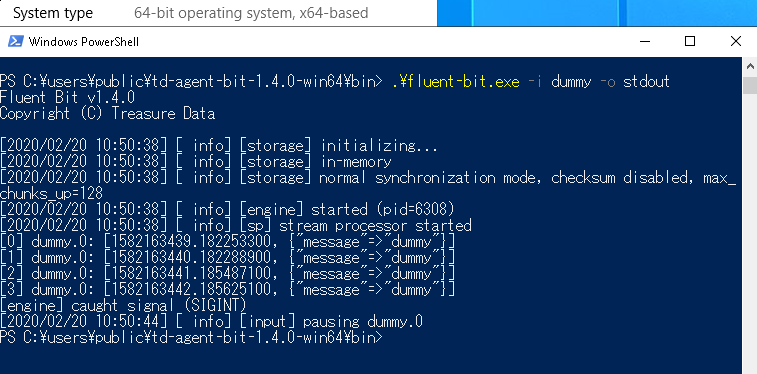
if the error persists, can you create a new issue with a full log and
your setup?
I am also being told that stackdriver is an invalid output target. Did something change from the version where you added it and the latest binaries you posted?
The Windows patch for stackdriver plugin has been posted to #1688, but it
does not make it to be merged into master, nor into win32-next branch yet.
So the plugin is not usable in the above integration testing build.
fujimotos
on 20 Feb 2020
To Windows users: All the PRs in the RC release have been merged successfully
into mainline by this date.
This means: every feature listed in the following list shall be usable in the upcoming
v1.4.0 release.
https://github.com/fluent/fluent-bit/issues/960#issuecomment-578571975
Thank you for testing and feedback. I'd like to express my thanks for your contributions.
fujimotos
on 27 Feb 2020
@fujimotos ... just wondering if by fixing the issue #1832 means in the new release we can use the out_Kafka plugin? if so, I will give it a try ;)
I am anxiously waiting for your next release where you will include #1693 fluent-bit as windows service :)
macgahe
on 27 Feb 2020
just wondering if by fixing the issue #1832 means in the new release we can use the out_Kafka plugin? if so, I will give it a try ;)
@macgahe Sadily it's not available yet.
The source code of out_kafka per se is already Windows compatible;
It can be compiled and linked on Microsoft Visual C++ just fine.
However, it turned out that:
- librdkafka (used by out_kafka) requires OpenSSL to be functional.
- Since Windows servers do not normally have OpenSSL's DLLs, bundling the
plugin resulted in deployment troubles on a lot of Windows servers. - I received many bug report from users about this issue, so I stopped to
bundleout_kafkasince v1.3.8. (#1832 was a patch for this purpose).
You can still use the plugin by toggling the flag FLB_OUT_KAFKE in
windows-setup.cmake and compile it manually.
I have a plan to work on this issue and make out_kafka actually usable
(probably somewhere in 1.4.x series?) but not getting there yet.
fujimotos
on 28 Feb 2020
@fujimotos I understand, hopefully soon you will get it working on 1.4.x :)... I reckon we will need to consider installing windwos server 2019 as it comes with openssl installed..
It seems there are 2 approaches for the time being for this issue.. either we compile it with the flag FLB_OUT_KAFKE or we put openssl DLLs in the server potentially this can be done using SCCM....
well I will keep looking waiting for this plugin to come up... as we put Kafka in in front of the fluent-bit agents for buffering purposes and resiliency.. this way we can have a 1-3 days logs buffer in kafka before we send it to Logstash and later on to Elasticsearch...
macgahe
on 29 Feb 2020
is out_es output plugin works on Windows? in what version of fluent-bit ?
 sachinmsft
on 27 Mar 2020
sachinmsft
on 27 Mar 2020
can we expect HTTP_Server option to work on windows?
 mahsoud
on 31 Mar 2020
mahsoud
on 31 Mar 2020
@fujimotos, I'm curious if there's any update on when all of this is targeted for.
krancour
on 10 Apr 2020
Fluent Bit is already supported on Windows, but there are certain plugins and features not available. Maybe would be good to describe in our documentation what is available and not available on Windows.
cc: @fujimotos
edsiper
on 10 Apr 2020
I don't think that the Kubernetes filter works with Windows containers. What I see is that the names of Windows Docker container logs do not contain the pod name, namespace, etc; they look like this:
C:\ProgramData\Docker\containers\52cee3c0f6ddbd8a0b65f60786684156f315d5841f545cb43018d4f5d904c672\52cee3c0f6ddbd8a0b65f60786684156f315d5841f545cb43018d4f5d904c672-json.log
get_api_server_info is not able to get any information from the API server, so it returns -1 here:
ret = flb_http_do(c, &b_sent);
flb_plg_debug(ctx->ins, "API Server (ns=%s, pod=%s) http_do=%i, "
              "HTTP Status: %i",
              namespace, podname, ret, c->resp.status);
if (ret != 0 || c->resp.status != 200) {
    if (c->resp.payload_size > 0) {
        flb_plg_debug(ctx->ins, "API Server response\n%s",
                      c->resp.payload);
    }
    flb_http_client_destroy(c);
    flb_upstream_conn_release(u_conn);
    return -1;
}
The caller, get_and_merge_meta, does not check for an error return:
    get_api_server_info(ctx,
                        meta->namespace, meta->podname,
                        &api_buf, &api_size);
    ret = merge_meta(meta, ctx,
                     api_buf, api_size,
                     out_buf, out_size);
Leading to the following outcome:
[2020/04/11 20:28:15] [debug] [filter:kubernetes:kubernetes.0] API Server (ns=(null), pod=(null)) http_do=0, HTTP Status: 404
[2020/04/11 20:28:15] [debug] [filter:kubernetes:kubernetes.0] API Server response
{"kind":"Status","apiVersion":"v1","metadata":{},"status":"Failure","message":"pods \"(null)\" not found","reason":"NotFound","details":{"name":"(null)","kind":"pods"},"code":404}

[engine] caught signal (SIGSEGV)
 tboemker
on 11 Apr 2020
tboemker
on 11 Apr 2020
Since the v1.4.0 is released last month, let's start the cycle again.
@krancour I'm currently thinking to work on 4 things targeting v1.5.0.
- Port out_stackdriver to Windows (#1603)
- Windows Service support (#1693)
- Better Event Log support (#1949)
- Better k8s support (#2027, #2087)
Out of four, out_stackdriver is already done (by #2049). So I'm planning to work on
Windows Service support next.
If anyone has suggestion or comments, please post comment here.
fujimotos
on 13 Apr 2020
can we expect HTTP_Server option to work on windows?
@mahsoud This requires us to port monkey to Windows, which needs
a good chunk of work. Although it is a legitimate feature request, i don't
think it happens soon.
fujimotos
on 13 Apr 2020
https://github.com/fluent/fluent-bit/issues/2101 Windows version depends on Microsoft Visual C++ 2015 Redistributable
 farcop
on 13 Apr 2020
farcop
on 13 Apr 2020
https://github.com/fluent/fluent-bit/issues/2133 [Windows] fluent-bit keep deleted files
farcop
on 27 Apr 2020
To Windows users
So I started to maintain the "win32-next" branch for the upcoming v1.5 release.
Again, this is besically about the master HEAD + cutting edge Windows stuffs.
https://github.com/fluent/fluent-bit/commits/win32-next
Currently it only contains a handful of improvements. I'm planning to add
more in the following weeks.
- Improvements
- Mitigate Kubernetes's unstable networking (#2145)
- Fix "undeletable file" issue in in_tail (#2141)
If you want to try it out, installers are available on AppVeyor.
Please feel free to comment here if you have any feedback.
fujimotos
on 1 May 2020
is in_stdin plugin available on Windows? Is there a list of plugins supported on Windows with Fluentbit version 1.4.2?
 wolverinets
on 1 May 2020
wolverinets
on 1 May 2020
@fujimotos I tried to build my docker image based on https://ci.appveyor.com/project/fluent/fluent-bit-2e87g/build/job/nj9t9hia8sd043i7/artifacts and it seems some dependencies changes. Could you confirm that ? what are the new needed ddls ? thanks !
titilambert
on 6 May 2020
And I got the same behavior with this https://ci.appveyor.com/project/fluent/fluent-bit-2e87g/builds/32575527/job/mbaof7brwff9k0yw/artifacts (zip file)
titilambert
on 6 May 2020
is in_stdin plugin available on Windows? Is there a list of plugins supported on Windows with Fluentbit version 1.4.2?
@wolverinets in_stdin has not ported to Fluent Bit yet.
You can view cmake/windows-setup-cmake for the list of supported plugin.
Those marked "Yes" are the supported ones.
https://github.com/fluent/fluent-bit/blob/master/cmake/windows-setup.cmake
fujimotos
on 7 May 2020
it seems some dependencies changes. Could you confirm that ? what are the new needed ddls ? thanks !
@titilambert All you needs to run fluen-bit is MSVC runtime.
You can download one from the following link.
https://aka.ms/vs/15/release/vc_redist.x64.exe
I can confirm the following setup works on Windows Server 2016.
PS> wget -O vc_redist.x64.exe https://aka.ms/vs/15/release/vc_redist.x64.exe
PS> .\vc_redist.x64.exe /install /quiet /norestart
PS> fluent-bit.exe -i dummy -o stdout
Note that this requirement per se has not not changed since v1.3.x.
So I'm not entirely sure why your setup got broken on update...
fujimotos
on 7 May 2020
@fujimotos Thanks for your answer ! I might find the issue. Could you confirm that the binary is 32bits compiled ? and not 64bits ?
titilambert
on 7 May 2020
I guess I have this issue: https://support.microsoft.com/en-us/help/4542617/you-might-encounter-issues-when-using-windows-server-containers-with-t
titilambert
on 7 May 2020
Thanks for your answer ! I might find the issue. Could you confirm that the binary is 32bits compiled ? and not 64bits ?
@titilambert You probably need to install "vc_redist.x86.exe" instead to use
win32 build. You can get one from:
https://aka.ms/vs/15/release/vc_redist.x86.exe
I did some testing this morning to see if it works. I can confirm that the following
steps work fine on Windows Server 2016.
PS> .\vc_redist.x64.exe /install /quiet
PS> cd td-agent-bit-1.5.0-win32\bin
PS> .\fluent-bit.exe -i dummy -o stdout
The Windows version I used was 10.0.17763.1158 (for both host and container);
I think it should work for you too.
fujimotos
on 8 May 2020
So I have pushed a new revision to the "win32-next" branch.
This contains a fix for the long standing "Windows depends on Visual C
runtime" issue. Since this version, you should be able to run Fluent Bit
without installing vc_redist.exe.
The list of patches it contains:
- Improvements
- Mitigate Kubernetes's unstable networking (#2145)
- Fix "undeletable file" issue in in_tail (#2141)
- Fix "vcruntime140.dll is missing" error (#2101)
A test build is available if you want to try it.
I'm looking forward to feedback from you guys.
fujimotos
on 11 May 2020
I tried the build, though I am still getting the below error
Starting fluent-bit
[2020/05/10 19:07:41] [ info] [storage] version=1.0.3, initializing...
[2020/05/10 19:07:41] [ info] [storage] in-memory
[2020/05/10 19:07:41] [ info] [storage] normal synchronization mode, checksum disabled, max_chunks_up=128
[2020/05/10 19:07:41] [ info] [engine] started (pid=9020)
[2020/05/10 19:07:42] [ info] [filter:kubernetes:kubernetes.0] https=1 host=kubernetes.default.svc.cluster.local port=443
[2020/05/10 19:07:42] [ info] [filter:kubernetes:kubernetes.0] local POD info OK
[2020/05/10 19:07:42] [ info] [filter:kubernetes:kubernetes.0] testing connectivity with API server...
[2020/05/10 19:07:52] [error] [io] TCP connect timeout after 10 seconds to: kubernetes.default.svc.cluster.local:443
[2020/05/10 19:07:52] [error] [filter:kubernetes:kubernetes.0] upstream connection error
[2020/05/10 19:08:12] [error] [io] TCP connect timeout after 10 seconds to: kubernetes.default.svc.cluster.local:443
[2020/05/10 19:08:12] [error] [filter:kubernetes:kubernetes.0] upstream connection error
[2020/05/10 19:08:32] [error] [io] TCP connect timeout after 10 seconds to: kubernetes.default.svc.cluster.local:443
[2020/05/10 19:08:32] [error] [filter:kubernetes:kubernetes.0] upstream connection error
[2020/05/10 19:08:52] [error] [io] TCP connect timeout after 10 seconds to: kubernetes.default.svc.cluster.local:443
[2020/05/10 19:08:52] [error] [filter:kubernetes:kubernetes.0] upstream connection error
[2020/05/10 19:09:12] [error] [io] TCP connect timeout after 10 seconds to: kubernetes.default.svc.cluster.local:443
[2020/05/10 19:09:12] [error] [filter:kubernetes:kubernetes.0] upstream connection error
[2020/05/10 19:09:32] [error] [io] TCP connect timeout after 10 seconds to: kubernetes.default.svc.cluster.local:443
[2020/05/10 19:09:32] [error] [filter:kubernetes:kubernetes.0] upstream connection error
[2020/05/10 19:09:52] [error] [io] TCP connect timeout after 10 seconds to: kubernetes.default.svc.cluster.local:443
[2020/05/10 19:09:52] [error] [filter:kubernetes:kubernetes.0] upstream connection error
[2020/05/10 19:10:12] [error] [io] TCP connect timeout after 10 seconds to: kubernetes.default.svc.cluster.local:443
[2020/05/10 19:10:12] [error] [filter:kubernetes:kubernetes.0] upstream connection error
kubeURL: https://kubernetes.default.svc.cluster.local:443
kubeCAFile: C:\var\run\secrets\kubernetes.io\serviceaccount\ca.crt
kubeTokenFile: C:\var\run\secrets\kubernetes.io\serviceaccount\token
From: Fujimoto Seiji notifications@github.com
Sent: Sunday, May 10, 2020 6:17 PM
To: fluent/fluent-bit fluent-bit@noreply.github.com
Cc: Sachin Kumar sackumar@microsoft.com; Comment comment@noreply.github.com
Subject: Re: [fluent/fluent-bit] Add Windows Support to Fluent Bit (#960)
So I have pushed a new revision to the "win32-next" branch.
This contains a fix for the long standing "Windows depends on Visual C
runtime" issue. Since this version, you should be able to run Fluent Bit
without installing vc_redist.exe.
The list of patches it contains:
- Improvements
- Mitigate Kubernetes's unstable networking (#2145https://nam06.safelinks.protection.outlook.com/?url=https%3A%2F%2Fgithub.com%2Ffluent%2Ffluent-bit%2Fpull%2F2145&data=02%7C01%7Csackumar%40microsoft.com%7Ccbc9254bd48846c1e1bc08d7f54901b9%7C72f988bf86f141af91ab2d7cd011db47%7C1%7C0%7C637247566294736943&sdata=ws9MMM28qAGjbB7sxvCKN1Zj9%2FR3AedJbjmsgatwFrU%3D&reserved=0)
- Fix "undeletable file" issue in in_tail (#2141https://nam06.safelinks.protection.outlook.com/?url=https%3A%2F%2Fgithub.com%2Ffluent%2Ffluent-bit%2Fpull%2F2141&data=02%7C01%7Csackumar%40microsoft.com%7Ccbc9254bd48846c1e1bc08d7f54901b9%7C72f988bf86f141af91ab2d7cd011db47%7C1%7C0%7C637247566294736943&sdata=JZeRdc5upd1djLQ5Xxdp7awNTrALBOLRNHCknSYt7zc%3D&reserved=0)
- Fix "vcruntime140.dll is missing" error (#2101https://nam06.safelinks.protection.outlook.com/?url=https%3A%2F%2Fgithub.com%2Ffluent%2Ffluent-bit%2Fissues%2F2101&data=02%7C01%7Csackumar%40microsoft.com%7Ccbc9254bd48846c1e1bc08d7f54901b9%7C72f988bf86f141af91ab2d7cd011db47%7C1%7C0%7C637247566294746940&sdata=EMAF1D%2BJyJM%2BepEvIyJ1LD1uqUdFkTv7yqtaP%2BwLdpA%3D&reserved=0)
A test build is available if you want to try it.
https://ci.appveyor.com/project/fluent/fluent-bit-2e87g/builds/32780493/job/doylfioyod36rtmr/artifactshttps://nam06.safelinks.protection.outlook.com/?url=https%3A%2F%2Fci.appveyor.com%2Fproject%2Ffluent%2Ffluent-bit-2e87g%2Fbuilds%2F32780493%2Fjob%2Fdoylfioyod36rtmr%2Fartifacts&data=02%7C01%7Csackumar%40microsoft.com%7Ccbc9254bd48846c1e1bc08d7f54901b9%7C72f988bf86f141af91ab2d7cd011db47%7C1%7C0%7C637247566294756934&sdata=XqReJqzs6y3oFw0dbxnEy5J%2FfWB5s1yx93kiqgSo%2Fa4%3D&reserved=0
I'm looking forward to feedback from you guys.
—
You are receiving this because you commented.
Reply to this email directly, view it on GitHubhttps://nam06.safelinks.protection.outlook.com/?url=https%3A%2F%2Fgithub.com%2Ffluent%2Ffluent-bit%2Fissues%2F960%23issuecomment-626422545&data=02%7C01%7Csackumar%40microsoft.com%7Ccbc9254bd48846c1e1bc08d7f54901b9%7C72f988bf86f141af91ab2d7cd011db47%7C1%7C0%7C637247566294756934&sdata=dMBt7WUBVddf1lDp83h6CPl2gvnPJG7Os%2Fm4yCOfLOE%3D&reserved=0, or unsubscribehttps://nam06.safelinks.protection.outlook.com/?url=https%3A%2F%2Fgithub.com%2Fnotifications%2Funsubscribe-auth%2FALC2IE6UHJYECOQBTVFOATTRQ5GYZANCNFSM4GKLURGA&data=02%7C01%7Csackumar%40microsoft.com%7Ccbc9254bd48846c1e1bc08d7f54901b9%7C72f988bf86f141af91ab2d7cd011db47%7C1%7C0%7C637247566294766927&sdata=6PEMyCD4UXg3xqMe%2FqmEga3JeQjTNbBTxHtziRF6B5o%3D&reserved=0.
sachinmsft
on 11 May 2020
@sachinmsft Login into the VM and check if that domain resolves.
If not, you need to fix your k8s setup.
PS> ping kubernetes.default.svc.cluster.local
PS> Invoke-WebRequest https://kubernetes.default.svc.cluster.local:443
Edit: I think the possibility is that 1) your DNS settings for the pod is wrong (so
kubernetes.default.svc.cluster.local does not resolve), or 2) it is a temporary
issue due to the networking bug in k8s.
To debug your issue further, I need you to check which is the case.
fujimotos
on 11 May 2020
https://github.com/fluent/fluent-bit/issues/2101 fixed.
@fujimotos Thank you!
farcop
on 11 May 2020
is in_stdin plugin available on Windows? Is there a list of plugins supported on Windows with Fluentbit version 1.4.2?
@wolverinets
in_stdinhas not ported to Fluent Bit yet.You can view
cmake/windows-setup-cmakefor the list of supported plugin.
Those marked "Yes" are the supported ones.https://github.com/fluent/fluent-bit/blob/master/cmake/windows-setup.cmake
Thank you @fujimotos
wolverinets
on 11 May 2020
Thanks @fujimotos I'm now able to run the latest build to did in a docker image.
But I got a error using the forwarding module (that I didn't have with the version 1.4)
± kubectl logs -n sumologic  -f k8s-collection-fluent-bit-windows-mjd7h
[2020/05/12 14:47:05] [ info] [storage] version=1.0.3, initializing...
[2020/05/12 14:47:05] [ info] [storage] in-memory
[2020/05/12 14:47:05] [ info] [storage] normal synchronization mode, checksum disabled, max_chunks_up=128
[2020/05/12 14:47:05] [ info] [engine] started (pid=7584)
[2020/05/12 14:47:05] [ info] [filter:kubernetes:kubernetes.1] https=1 host=kubernetes.default.svc.cluster.local port=443
[2020/05/12 14:47:05] [ info] [filter:kubernetes:kubernetes.1] local POD info OK
[2020/05/12 14:47:05] [ info] [filter:kubernetes:kubernetes.1] testing connectivity with API server...
[2020/05/12 14:47:05] [ info] [filter:kubernetes:kubernetes.1] API server connectivity OK
[2020/05/12 14:47:05] [ info] [sp] stream processor started
[2020/05/12 14:48:40] [error] [output:forward:forward.0] could not write chunk header
Then the container just crashed (and restart)
titilambert
on 12 May 2020
@sachinmsft Login into the VM and check if that domain resolves.
If not, you need to fix your k8s setup.PS> ping kubernetes.default.svc.cluster.local PS> Invoke-WebRequest https://kubernetes.default.svc.cluster.local:443Edit: I think the possibility is that 1) your DNS settings for the pod is wrong (so
kubernetes.default.svc.cluster.local does not resolve), or 2) it is a temporary
issue due to the networking bug in k8s.To debug your issue further, I need you to check which is the case.
PS C:> Invoke-WebRequest https://kubernetes.default.svc.cluster.local:443
Invoke-WebRequest : Unable to connect to the remote server
At line:1 char:1
- Invoke-WebRequest https://kubernetes.default.svc.cluster.local:443
~~~~~~~~~~~~~~
- CategoryInfo : InvalidOperation: (System.Net.HttpWebRequest:HttpWebRequest) [Invoke-WebRequest], WebException
- FullyQualifiedErrorId : WebCmdletWebResponseException,Microsoft.PowerShell.Commands.InvokeWebRequestCommand
PS C:>
PS C:>
PS C:>
PS C:> ping kubernetes.default.svc.cluster.local
Pinging kubernetes.default.svc.cluster.local [10.96.0.1] with 32 bytes of data:
Request timed out.
sachinmsft
on 12 May 2020
Hi @titilambert
can you please share the Kubernetes filter config of your fluent-bit. which version of fluent-bit are you using ?
sachinmsft
on 12 May 2020
@sachinmsft I'm using this version: https://ci.appveyor.com/project/fluent/fluent-bit-2e87g/builds/32780493/job/doylfioyod36rtmr/artifacts
and here my filter:
[FILTER]
    Name             kubernetes
    Match            containers.*
    Kube_URL         https://kubernetes.default.svc:443
    tls.verify       Off
    Kube_Tag_Prefix  kube.var.log.containers.
    Merge_Log        On
    Merge_Log_Key    log_processed
@sachinmsft what is the link between the forward issue then this filter config ?
titilambert
on 12 May 2020
But I got a error using the forwarding module (that I didn't have with the version 1.
@titilambert Thank you for reporting. Can you create a new ticket and
post your environment info there?
- Running
systeminfoon cmd.exe should provide a sufficient info
for debugging. - Also I want to know if you've used win32 or win64 build.
I'm going to try to reproduce the issue on my machine.
fujimotos
on 13 May 2020
@sachinmsft I'm working on a patch for the networking issue.
I will post update to #2144. Let's discuss your problem on that ticket.
fujimotos
on 13 May 2020
@fujimotos Thanks. I have 2 minutes sleep at starting and seems DNS is working as ping is able to resolve the kubernetes.default.svc.cluster.local to [10.96.0.1]. The issue that I am seeing is that seems that networking is not working properly from windows pod to API server .
sachinmsft
on 14 May 2020
@sachinmsft this is a common windows issue, look at the AKS issue list, there is a issue tracking this I think. we also added a sleep in our manifest command args...
 djsly
on 26 May 2020
djsly
on 26 May 2020
we also added a sleep in our manifest command args...
@djsly @sachinmsft FWIW, Fluent Bit >= 1.4.5 will wait for DNS to start
up by default, so that you don't need to have a sleep in your manifest.
You can also tweak the wait behaviour. For example:
[FILTER]
   Name Kubernetes
   ...
   DNS_Wait_Time 60
   DNS_Retries   10
This will make Fluent Bit poll the DNS service for each 30 sec, and
retry 10 times before giving up.
Thanks to @edsiper, v1.4.5 has been released 30 minutes ago, so you
can count on that feature starting today.
fujimotos
on 27 May 2020
Awesome. Thanks Fujimoto.
Note that we tested 1.4.4 today and the lock on the pod deletion is indeed fixed! :)
We will stick to the 1.4.X release branch for now as the 1.5 had constant restart issue
Thanks a lot for the great work.
On May 26, 2020, at 8:12 PM, Fujimoto Seiji notifications@github.com wrote:
we also added a sleep in our manifest command args...@djsly @sachinmsft FWIW, Fluent Bit >= 1.4.5 will wait for DNS to start
up by default, so that you don't need to have a sleep in your manifest.You can also tweak the wait behaviour. For example:
[FILTER]
Name Kubernetes
...
DNS_Wait_Time 60
DNS_Retries 10
This will make Fluent Bit poll the DNS service for each 30 sec, and
retry 10 times before giving up.Thanks to @eduardo, v1.4.5 has been released 30 minutes ago, so you
can count on that feature starting today.—
You are receiving this because you were mentioned.
Reply to this email directly, view it on GitHub, or unsubscribe.
djsly
on 27 May 2020
I don't think that the Kubernetes filter works with Windows containers. What I see is that the names of Windows Docker container logs do not contain the pod name, namespace, etc; they look like this:
@tboemker AFAIK, Kubernetes creates symlinks to these docker logs.
In a normal setup, a Windows node has the following directory strucuture.
C:\
├── ProgramData\Docker\containers\<docker>\<docker>.log
└── var\log\containers\<pod>_<namespace>_<container>-<docker>.log
Both log files contain the same logging content. So you can watch
the latter (not the former as you suggested) to get the meta info.
So, typically you will have the following volume definition in your
Fluent Bit deployment file.
volumes:
- name: k            # /k/ for kubelet.err.log
  hostPath:
    path: /k/
- name: varlog       # /var/log/ for conteiner logs
  hostPath:
    path: /var/log/
- name: progdata     # You need this to resolve symlinks in /var/log
  hostPath:
    path: /ProgramData/
https://github.com/fluent/fluent-bit/issues/2208 [Windows] fluent-bit can not find log files grater then 2Gbytes
farcop
on 28 May 2020
https://github.com/fluent/fluent-bit/commits/win32-next
Here is the current tip of the Windows development (2020-06-02).
- Improvement
- Enable
out_influxdbfor Windows build #2207 - Remove the dependency on vcruntime140.dll #2170
- Enable
- Kubernetes Support
- Fix the "unremovable pods" issue #2141
- Add
dns_retriesoption to mitigate unstable network #2186 - More natural tag expansion on Windows file system #2188
- Bug fixes
- Fix infinite loop bug in
in_tail#2195 - Fix segf on net.keepalive=yes #2192
- Fix segf on closing network fonnection #2206
- Fix "Type" option usable again #2200
- Fix infinite loop bug in
Here is the latest experimental builds:
- (64bit) https://ci.appveyor.com/project/fluent/fluent-bit-2e87g/builds/33256750/job/ua2j8hvvfi42uesx/artifacts
- (32bit) https://ci.appveyor.com/project/fluent/fluent-bit-2e87g/builds/33256750/job/iys8rifs61vwwdy4/artifacts
A major improvement is a significantly better kubernetes support.
Most bugs reported have been resolved, so Fluent Bit should work
fine on Windows pods. Just report back to me if you see anything
working not well.
fujimotos
on 2 Jun 2020
Hello,
Has anyone checked fluent-bit is working well with Windows Container? I'm trying but it doesn't work.
My fluent-bit.conf has @include section.
fluent-bit.conf
[SERVICE]
...
  @INCLUDE input-kubernetes.conf
  @INCLUDE ...
input-kubernetes.conf
[INPUT]
  NAME tail
  ...
Almost the same configuration Is working fine on fluent-bit on Linux container.
The fluent-bit outputs the following error message. The same error happens both with the latest stable 1.4.4 and 1.5.0.
[2020/05/31 17:25:24] [Warning] [config] I cannot open input-kubernetes.conf file
Fluent Bit v1.4.4
* Copyright (C) 2019-2020 The Fluent Bit Authors
* Copyright (C) 2015-2018 Treasure Data
* Fluent Bit is a CNCF sub-project under the umbrella of Fluentd
* https://fluentbit.io
Error: Configuration file contains errors. Aborting
It looks like #1436,
At least I confirmed the files are actually located in the correct folder.
I'm afraid this is not a good issue comment because of lack of information, but I would appreciate if anyone has an idea.
 tanaka-takayoshi
on 4 Jun 2020
tanaka-takayoshi
on 4 Jun 2020
@tanaka-takayoshi yes, I think @include does not work in windows.
just use the config in below format and it should work
fluent-bit.conf: |
[SERVICE]
[INPUT]


[FILTER]


[OUTPUT]

[OUTPUT]

[OUTPUT]

[OUTPUT]

[OUTPUT]
parsers.conf: |
[PARSER]
sachinmsft
on 5 Jun 2020
@tanaka-takayoshi @sachinmsft Hmm. I suppose @INCLUDE should
work on Windows.
I cannot open input-kubernetes.conf file Fluent Bit v1.4.4
The exact failure path is:
https://github.com/monkey/monkey/blob/master/mk_core/mk_rconf.c#L221
So it's a plain fopen(). According to your error message, it failed
with -1, unable to open "input-kubernetes.conf".
My current guess is that Fluent Bit was somehow looking at a different
directory than you expected.
To investigate further, can you share 1) the directory layout of your
configuration files and 2) how you invoked fluent-bit.exe?
I'm going to find some time next week and try to reproduce your issue.
fujimotos
on 5 Jun 2020
Hi @fujimotos ,
I am seeing a new bug in the fluent-bit. I see that if fluent-bit is not able to reach to elastic-search cluster then I see that timer tail_fs_check is not triggering. I have added some logs inside the fluent-bit and as you can see in one instance it it triggering tail_fs_check time if it does not have connectivity issue
[2020/06/05 17:25:07] [ info] [storage] version=1.0.3, initializing...
[2020/06/05 17:25:07] [ info] [storage] in-memory
[2020/06/05 17:25:07] [ info] [storage] normal synchronization mode, checksum disabled, max_chunks_up=128
[2020/06/05 17:25:07] [ info] [engine] started (pid=10408)
[2020/06/05 17:25:07] [ info] [input:tail:tail.0] inside flb_tail_fs_init
[2020/06/05 17:25:07] [ info] [filter:kubernetes:kubernetes.0] https=1 host=kubernetes.default.svc.cluster.local port=443
[2020/06/05 17:25:07] [ info] [filter:kubernetes:kubernetes.0] local POD info OK
[2020/06/05 17:25:07] [ info] [filter:kubernetes:kubernetes.0] testing connectivity with API server...
[2020/06/05 17:25:28] [error] [filter:kubernetes:kubernetes.0] upstream connection error
[2020/06/05 17:25:28] [ warn] [filter:kubernetes:kubernetes.0] could not get meta for POD loggingstack-fluent-bit-windows-7gp47
[2020/06/05 17:25:28] [ info] [sp] stream processor started
[2020/06/05 17:25:49] [error] [filter:kubernetes:kubernetes.0] upstream connection error
[2020/06/05 17:26:10] [error] [filter:kubernetes:kubernetes.0] upstream connection error
[2020/06/05 17:26:31] [error] [filter:kubernetes:kubernetes.0] upstream connection error
[2020/06/05 17:26:52] [error] [filter:kubernetes:kubernetes.0] upstream connection error
[2020/06/05 17:27:14] [error] [filter:kubernetes:kubernetes.0] upstream connection error
[2020/06/05 17:27:35] [error] [filter:kubernetes:kubernetes.0] upstream connection error
[2020/06/05 17:27:35] [ info] [input:tail:tail.0] inside tail_fs_check
[2020/06/05 17:27:37] [ info] [input:tail:tail.0] inside tail_fs_check
[2020/06/05 17:27:40] [ info] [input:tail:tail.0] inside tail_fs_check
[2020/06/05 17:27:42] [ info] [input:tail:tail.0] inside tail_fs_check
[2020/06/05 17:27:45] [ info] [input:tail:tail.0] inside tail_fs_check
[2020/06/05 17:27:47] [ info] [input:tail:tail.0] inside tail_fs_check
[2020/06/05 17:27:50] [ info] [input:tail:tail.0] inside tail_fs_check
but not triggering if it has connectivity issue
[2020/06/05 17:25:07] [ info] [engine] started (pid=6320)
[2020/06/05 17:25:07] [ info] [input:tail:tail.0] inside flb_tail_fs_init
[2020/06/05 17:25:07] [ info] [filter:kubernetes:kubernetes.0] https=1 host=kubernetes.default.svc.cluster.local port=443
[2020/06/05 17:25:07] [ info] [filter:kubernetes:kubernetes.0] local POD info OK
[2020/06/05 17:25:07] [ info] [filter:kubernetes:kubernetes.0] testing connectivity with API server...
[2020/06/05 17:25:07] [ info] [filter:kubernetes:kubernetes.0] API server connectivity OK
[2020/06/05 17:25:07] [ info] [sp] stream processor started
[2020/06/05 17:25:07] [ warn] [input] tail.0 paused (mem buf overlimit)
[2020/06/05 17:25:29] [error] [io] TCP connection failed: loggingstack-opendistro-es-client-service:8443 (Unknown error)
[2020/06/05 17:25:29] [ warn] [engine] failed to flush chunk '6320-1591377907.783287200.flb', retry in 11 seconds: task_id=1, input=tail.0 > output=es.0
[2020/06/05 17:25:29] [error] [io] TCP connection failed: loggingstack-opendistro-es-client-service:8443 (Unknown error)
[2020/06/05 17:25:29] [ warn] [engine] failed to flush chunk '6320-1591377907.800896400.flb', retry in 11 seconds: task_id=2, input=tail.0 > output=es.0
[2020/06/05 17:25:29] [error] [io] TCP connection failed: loggingstack-opendistro-es-client-service:8443 (Unknown error)
[2020/06/05 17:25:29] [ warn] [engine] failed to flush chunk '6320-1591377907.842661800.flb', retry in 11 seconds: task_id=4, input=tail.0 > output=es.0
[2020/06/05 17:25:29] [error] [io] TCP connection failed: loggingstack-opendistro-es-client-service:8443 (Unknown error)
[2020/06/05 17:25:29] [error] [io] TCP connection failed: loggingstack-opendistro-es-client-service:8443 (Unknown error)
[2020/06/05 17:25:29] [ warn] [engine] failed to flush chunk '6320-1591377907.765930100.flb', retry in 11 seconds: task_id=0, input=tail.0 > output=es.0
[2020/06/05 17:25:29] [ warn] [engine] failed to flush chunk '6320-1591377907.823109300.flb', retry in 11 seconds: task_id=3, input=tail.0 > output=es.0
[2020/06/05 17:25:29] [error] [io] TCP connection failed: loggingstack-opendistro-es-client-service:8443 (Unknown error)
[2020/06/05 17:25:29] [ warn] [engine] failed to flush chunk '6320-1591377907.861788600.flb', retry in 11 seconds: task_id=5, input=tail.0 > output=es.0
[2020/06/05 17:25:29] [error] [io] TCP connection failed: loggingstack-opendistro-es-client-service:8443 (Unknown error)
[2020/06/05 17:25:29] [ warn] [engine] failed to flush chunk '6320-1591377907.969191900.flb', retry in 11 seconds: task_id=6, input=tail.0 > output=es.0
[2020/06/05 17:25:29] [error] [io] TCP connection failed: loggingstack-opendistro-es-client-service:8443 (Unknown error)
[2020/06/05 17:25:29] [ warn] [engine] failed to flush chunk '6320-1591377907.970391200.flb', retry in 11 seconds: task_id=7, input=tail.0 > output=es.0
[2020/06/05 17:26:01] [error] [io] TCP connection failed: loggingstack-opendistro-es-client-service:8443 (Unknown error)
[2020/06/05 17:26:01] [ warn] [engine] failed to flush chunk '6320-1591377907.783287200.flb', retry in 88 seconds: task_id=1, input=tail.0 > output=es.0
[2020/06/05 17:26:01] [error] [io] TCP connection failed: loggingstack-opendistro-es-client-service:8443 (Unknown error)
[2020/06/05 17:26:01] [error] [io] TCP connection failed: loggingstack-opendistro-es-client-service:8443 (Unknown error)
[2020/06/05 17:26:01] [error] [io] TCP connection failed: loggingstack-opendistro-es-client-service:8443 (Unknown error)
[2020/06/05 17:26:01] [error] [io] TCP connection failed: loggingstack-opendistro-es-client-service:8443 (Unknown error)
[2020/06/05 17:26:01] [error] [io] TCP connection failed: loggingstack-opendistro-es-client-service:8443 (Unknown error)
[2020/06/05 17:26:01] [error] [io] TCP connection failed: loggingstack-opendistro-es-client-service:8443 (Unknown error)
problem that is happening because of that is that if in between docker try to delete the pod it is not able to do so since fluent-bit has opened file handle to the log file and docker keep waiting for that handle to be closed.
sachinmsft
on 5 Jun 2020
@sachinmsft You need to look at this log line:
[2020/06/05 17:25:07] [ warn] [input] tail.0 paused (mem buf overlimit)
The reason tail_fs_check() didn't fire is that the send queue (memory
buffer) was already full.
Since Fluent Bit could not find any more place to store temporal data,
it stopped reading from files. This is an expected behaviour and not
exactly a bug.
- https://docs.fluentbit.io/manual/administration/memory-management
- https://docs.fluentbit.io/manual/pipeline/inputs/tail
problem that is happening because of that is that if in between docker try to delete the pod it is not able to do so since fluent-bit has opened file handle to the log file and docker keep waiting for that handle to be closed.
I guess this is another issue already fixed by #2141. Please use v1.4.4
and see if it resolves this issue.
fujimotos
on 8 Jun 2020
@fujimotos I have already taken the fix #2141 and it solves the success scenario.
**The reason tail_fs_check() didn't fire is that the send queue (memory
buffer) was already full.
Since Fluent Bit could not find any more place to store temporal data,
it stopped reading from files. This is an expected behaviour and not
exactly a bug.**
think below scenario:
fluent-bit starts and it will opens the file handle to logs file to read the logs.
though it check the connectivity with elastic search and see that it can not reach to ES so it stopped reading the file though it still has the log file handle opened.
now docker comes and wants to delete the pod and associated log file. but since fluent-bit has opened the log file handle so docker can not delete the log file and keep checking if log file handle is closed or not. but since tail_fs_check() is not running so fluent-bit also does not check the file status and does not close the file handle.
and as a result of it pod stuck in terminating state for ever.
I am not saying that that not running tail_fs_check() is bug. but for windows there is should be mechanism to check the file status even if send queue is full.
i have repro of this scenario on my setup.
sachinmsft
on 8 Jun 2020
the solution is to enable filesystem buffering, so if you hit a memory limit and cannot flush data, at least your collected data is stored in the file system and will be flushed once connectivity is up again.
But, we don't support file system buffering on Windows yet.
edsiper
on 11 Jun 2020
Actually I am talking about difference issue.
When tail input paused for any reason we destroy the timer that fires tail_fs_check() and as a reason we don't check if any file is deleted or not.
and when docker tries to delete the pod it try to delete the log file associated with pod but since fluent-bit has one handle opened for that log file and we are not firing (since tail is paused and we have destroyed the tail_fs_check() timer) tail_fs_check() to close the log file FD if docker is trying to delete the pod log file and pod stuck in terminating state.
I have observed all above scenario on Windows. I have not tested on Linux.
sachinmsft
on 11 Jun 2020
So a new testing build for v1.5.0 is out.
https://github.com/fluent/fluent-bit/releases/tag/v1.5.0-win32-rc4
We start to support "Windows Service" since this version. This means
that you can run Fluent Bit as a long-running background process
on Windows systems.
# Register "fluent-bit"
% sc.exe create fluent-bit binpath= "\flb\fluent-bit.exe -c \flb\fluent-bit.conf"

# Stop and stop fluent-bit
% sc.exe start fluent-bit
% sc.exe stop fluent-bit
This feature is pretty new, so I'm awaiting your testing report and
further suggestions.
Also we started to include a PDB file "fluent-bit.pdb" to each build
(thanks to @gitfool). You can use this file to get a detailed stack-
trace etc. I hope it helps general debugging.
New features from v1.4
- Improvements
- Enable
out_influxdbfor Windows build #2207 - Remove the dependency on vcruntime140.dll #2170
- Add a PDB file to each release #2294
- Add Windows Service support #2296
- Enable
- Kubernetes Support
- Fix the "unremovable pods" issue #2141
- Add
dns_retriesoption to mitigate unstable network #2186 - More natural tag expansion on Windows file system #2188
- Bug fixes
- Fix infinite loop bug in
in_tail#2195 - Fix segf on net.keepalive=yes #2192
- Fix segf on closing network connection #2206
- Fix "Type" option usable again #2200
- Fix segf in logging worker #2295
- Fix infinite loop bug in
Test Builds
fujimotos
on 29 Jun 2020
@fujimotos I dropped the test build into a couple of production machines and they both quickly hung while spinning high cpu and are not generating output:


Hang dump with Sysinternals ProcDump and busy thread in WinDbg:
fluent-bit.exe_200630_005249.dmp.zip
.  0  Id: 1c8.f7c Suspend: 0 Teb: 00000075`7dd0d000 Unfrozen
 # RetAddr           : Args to Child                                                           : Call Site
00 00007ffd`cedcea69 : 000001cb`00000000 00000000`00000000 000001cb`ae4dc570 00000000`00000000 : ntdll!NtDeviceIoControlFile+0x14
01 00007ffd`d0cbb3b3 : 00000000`00002736 00000000`00000000 00000000`00000000 00000000`00000000 : mswsock!WSPSelect+0x4c9
02 00007ff6`6885e4b5 : 000001cb`ae486270 00000075`7dbbf618 000001cb`ae493320 00007ff6`68a08a00 : ws2_32!select+0x1d3
03 00007ff6`6885879c : 000001cb`ae493320 00000075`7dbbf5d0 00000075`7dbbf618 000001cb`00000000 : fluent_bit!win32_dispatch+0x145 [c:\projects\fluent-bit-2e87g\lib\monkey\mk_core\deps\libevent\win32select.c @ 326]
04 00007ff6`6884fd26 : 00000000`00000001 00000000`00000001 00000000`00000000 00000000`00000000 : fluent_bit!event_base_loop+0x24c [c:\projects\fluent-bit-2e87g\lib\monkey\mk_core\deps\libevent\event.c @ 1949]
05 (Inline Function) : --------`-------- --------`-------- --------`-------- --------`-------- : fluent_bit!_mk_event_wait+0x1c [c:\projects\fluent-bit-2e87g\lib\monkey\mk_core\mk_event_libevent.c @ 349]
06 00007ff6`6866590b : 00000000`00000000 00000000`00000000 00000000`000001fc 000001cb`ae474a40 : fluent_bit!mk_event_wait+0x26 [c:\projects\fluent-bit-2e87g\lib\monkey\mk_core\mk_event.c @ 163]
07 00007ff6`68658746 : 00000000`00000001 00000000`00000003 00000000`00000003 000001cb`ae3f5960 : fluent_bit!flb_engine_start+0x37b [c:\projects\fluent-bit-2e87g\src\flb_engine.c @ 549]
08 00007ff6`68864e08 : 00000000`00000000 00000000`00000000 000001cb`ae45f980 00007ff6`68a0e250 : fluent_bit!flb_main+0x6f6 [c:\projects\fluent-bit-2e87g\src\fluent-bit.c @ 1034]
09 (Inline Function) : --------`-------- --------`-------- --------`-------- --------`-------- : fluent_bit!invoke_main+0x22 [d:\agent\_work\2\s\src\vctools\crt\vcstartup\src\startup\exe_common.inl @ 78]
0a 00007ffd`d07a84d4 : 00000000`00000000 00000000`00000000 00000000`00000000 00000000`00000000 : fluent_bit!__scrt_common_main_seh+0x10c [d:\agent\_work\2\s\src\vctools\crt\vcstartup\src\startup\exe_common.inl @ 288]
0b 00007ffd`d310e8b1 : 00000000`00000000 00000000`00000000 00000000`00000000 00000000`00000000 : kernel32!BaseThreadInitThunk+0x14
0c 00000000`00000000 : 00000000`00000000 00000000`00000000 00000000`00000000 00000000`00000000 : ntdll!RtlUserThreadStart+0x21
Fluent Bit debug logs; still coming from WinSW since I haven't yet tried the new Windows Service feature:
Each time I restart the Fluent Bit service it seems to have a burst of activity, uploading logs to date to AWS Elasticsearch, but then it hangs again. New to these logs compared to v1.4.6 is keepalive connection info, which seems to show it disconnecting immediately:
[2020/06/30 00:44:10] [debug] [upstream] KA connection #608 to logs:80 is now available
[2020/06/30 00:44:10] [debug] [upstream] KA connection #608 to logs:80 has been disconnected by the remote service
Each time I restart the Fluent Bit service it seems to have a burst of activity, uploading logs to date to AWS Elasticsearch, but then it hangs again. New to these logs compared to v1.4.6 is keepalive connection info, which seems to show it disconnecting immediately:
@gitfool Hmm. I could confirm this happens with keepalive enabled.
I incorporated a fix #2309 into win32-next and released v1.5.0-win32-rc5.
New test builds are:
Now HTTP requests seems to be working reliably on my environment. I'd
appreciate if you can confirm it.
fujimotos
on 30 Jun 2020
@fujimotos keepalive connections are now being recycled and cpu is back to normal (low) levels. Great turnaround!
gitfool
on 30 Jun 2020
@fujimotos checking the logs from overnight, I'm seeing quite a few es output related warnings and errors:
[2020/06/30 18:52:28] [ warn] [engine] failed to flush chunk '8160-1593543147.508013200.flb', retry in 9 seconds: task_id=0, input=tail.0 > output=es.0
...
[2020/06/30 18:52:37] [ info] [engine] flush chunk '8160-1593543147.508013200.flb' succeeded at retry 1: task_id=1, input=tail.0 > output=es.0
...
[2020/06/30 18:52:30] [error] [output:es:es.0] HTTP status=0 URI=/_bulk, response:
{"took":7,"errors":false,"items":[{"index":{"_index":"logstash-2020.06.30","_type":"_doc","_id":"2QKSBnMBpWtYKTqnw2ci","_version":1,"result":"created","_shards":{"total":2,"successful":2,"failed":0},"_seq_no":234509,"_primary_term":1,"status":201}},{"index":{"_index":"logstash-2020.06.30","_type":"_doc","_id":"2gKSBnMBpWtYKTqnw2ci","_version":1,"result":"created","_shards":{"total":2,"successful":2,"failed":0},"_seq_no":234138,"_primary_term":1,"status":201}},{"index":{"_index":"logstash-2020.06.30","_type":"_doc","_id":"2wKSBnMBpWtYKTqnw2ci","_version":1,"result":"created","_shards":{"total":2,"successful":2,"failed":0},"_seq_no":234510,"_primary_term":1,"status":201}},{"index":{"_index":"logstash-2020.06.30","_type":"_doc","_id":"3AKSBnMBpWtYKTqnw2ci","_version":1,"result":"created","_shards":{"total":2,"successful":2,"failed":0},"_seq_no":234511,"_primary_term":1,"status":201}},{"index":{"_index":"logstash-2020.06.30","_type":"_doc","_id":"3QKSBnMBpWtYKTqnw2ci","_version":1,"result":"created","_shards":{"total":2,"successful":2,"failed":0},"_seq_no":234512,"_primary_term":1,"status":201}},{"index":{"_index":"logstash-2020.06.30","_type":"_doc","_id":"3gKSBnMBpWtYKTqnw2ci","_version":1,"result":"created","_shards":{"total":2,"successful":2,"failed":0},"_seq_no":234139,"_primary_term":1,"status":201}}]}
The errors include the response from Elasticsearch, which doesn't look like an error to me. Maybe something else is afoot?
(The logs I kept from previously running Fluent Bit 1.4.6 didn't have any of these warnings or errors.)
gitfool
on 30 Jun 2020
@gitfool Evidently this is a bug in keepalive mode. I see c->resp.status is broken here:
[2020/06/30 18:52:30] [error] [output:es:es.0] HTTP status=0 URI=/_bulk, response:
Now, I suspect this is occurring due to FLB_ES_DEFAULT_HTTP_MAX.
When there is more data than the payload limit, it could leave some
data into the socket.
So when Fluent Bit attempts to re-use that socket, it first read the
payload from the previous request, resulting in misdetection of the
status code.
If my guess is correct, these errors should be gone if you increase
buffer_size as follows (default is 4kb):
[OUTPUT]
    Name es
    ...
    Buffer_Size 32kb
    ...
Can you confirm it? If it indeed solves the issue, I'll work on a
fix on this issue later.
fujimotos
on 1 Jul 2020
@fujimotos I can confirm it affects the outcome. I only had 1 error in the last 3 hours, and I noticed that was after restarting the service for the config change, so I then did a test where I stopped the service and waited a couple of minutes before starting the service again. As expected, the logs had backed up enough that the first bulk send was large enough to cause the response from Elasticsearch to be larger than 32KB and I saw a couple of errors in quick succession and then none after that.
So it looks like the buffer is the issue, but rather than relying on a bigger buffer which could still be insufficient, the solution needs to bleed any excess data before the socket can be safely re-used.
gitfool
on 1 Jul 2020
@gitfool Thank you for the confirmation.
So it looks like the buffer is the issue, but rather than relying on a bigger buffer which could still be insufficient, the solution needs to bleed any excess data before the socket can be safely re-used.
I posted a fix to #2323. I ended up fixing it by marking the socket as "not
recyclable", to advise the connection manager to open a new connection.
The reason for the choice is the uncertainty of how long it takes to read
the remaining payload; If the server sends a very large data (say, 1GB),
I fear it can easily get fluent-bit to perform a expensive busy loop.
So the patch above choose to close the socket, instead of the (small?)
benefit of connection reuse on that failure path.
fujimotos
on 3 Jul 2020
Here is the current tip of the Windows development (2020-07-03).
https://github.com/fluent/fluent-bit/releases/tag/v1.5.0-win32-rc6
This release includes the improved support for Windows Event Log.
It is now possible to safely use in_winlog for multi-byte data. So the
"invalid UTF-8 bytes" error #1949 should not happen anymore.
Also two new output plugins are added to our Windows build:
out_azureout_cloudwatch_logs(by @PettitWesley)
One more thing: A fix for the connection-reuse bug is included in
this release. I hope this resolves the issue reported by @gitfool.
I'd very appreciate if anyone interested tries out the build and
report back (note: this will be the last rc build before v1.5).
New features from v1.4
- Improvements
- Remove the dependency on vcruntime140.dll #2170
- Add a PDB file to each release #2294
- Add Windows Service support #2296
- Improve Windows Event Log support #2322
- New plugins
out_influxdb#2207out_stackdriver#2041out_azure#2318out_cloudwatch_logs#2319
- Kubernetes Support
- Fix the "unremovable pods" issue #2141
- Add
dns_retriesoption to mitigate unstable network #2186 - More natural tag expansion on Windows file system #2188
- Bug fixes
- Fix infinite loop bug in
in_tail#2195 - Fix segf on net.keepalive=yes #2192
- Fix segf on closing network connection #2206
- Fix "Type" option usable again #2200
- Fix segf in logging worker #2295
- Fix connection reuse bug in HTTP client #2323
- Fix infinite loop bug in
Test Builds
fujimotos
on 3 Jul 2020
@fujimotos FYI, just put up a few PRs to fix issues found by Coverity Scan, including the new AWS/CloudWatch code you mentioned.
 PettitWesley
on 4 Jul 2020
PettitWesley
on 4 Jul 2020
@PettitWesley Thank you. I'll integrate your fixes into my build
when I release a new RC.
fujimotos
on 5 Jul 2020
@fujimotos
Sorry… a few more fixes. I finally went through and tested every AWS use case today; I found a few things that I needed to fix:
- https://github.com/fluent/fluent-bit/pull/2335
- https://github.com/fluent/fluent-bit/pull/2334
- https://github.com/fluent/fluent-bit/pull/2333
There are also still a few Coverity issue fixes which Eduardo has not merged yet:
- https://github.com/fluent/fluent-bit/pull/2331
- https://github.com/fluent/fluent-bit/pull/2330
- https://github.com/fluent/fluent-bit/pull/2327
That should be it from me for 1.5. I have run through every AWS scenario now. Apologies for the late notice.
PettitWesley
on 6 Jul 2020
This is the current tip of the Windows development (2020-07-08)
https://github.com/fluent/fluent-bit/releases/tag/v1.5.0-win32-rc7
This is the final Windows candidate release for v1.5.0. No major change
has been made since rc6, but it incorporates some fixes in the mainline.
The official release of v1.5.0 is planned to be the next Monday (July 13).
I'm right now doing "last-minute" testing against the following build:
I'd like to express my thanks to everyone who has sent me suggestions
and bug reports. It was so much helpful for the project!
fujimotos
on 8 Jul 2020
Fluent Bit v1.5.0 is out.
https://fluentbit.io/announcements/v1.5.0/
Thanks for everyone who helped the development on this cycle (especially,
@theggelund, @sachinmsft, @djsly, @titilambert, @heyaWorld, @gitfool
and @farcop)
For v1.6 discussion, I decided to move to a new thread #2351, since this issue
became too long that GH won't show every comment anymore. So if you have
ideas or suggestions, please comment to the new thread.
fujimotos
on 14 Jul 2020
Related issues
 huanggze
·
3Comments
edsiper
·
4Comments
huanggze
·
3Comments
edsiper
·
4Comments
 Markbnj
·
4Comments
Markbnj
·
4Comments
 iamshreeram
·
3Comments
iamshreeram
·
3Comments
 c0ze
·
3Comments
c0ze
·
3Comments
Most helpful comment
https://github.com/fluent/fluent-bit/commits/win32-next
Here is the current tip of the Windows development (2020-06-02).
out_influxdbfor Windows build #2207dns_retriesoption to mitigate unstable network #2186in_tail#2195Here is the latest experimental builds:
A major improvement is a significantly better kubernetes support.
Most bugs reported have been resolved, so Fluent Bit should work
fine on Windows pods. Just report back to me if you see anything
working not well.