Flex-layout: Import error when running example from custom breakpoints documentation
The Custom Breakpoints documentation describes using the following code to create custom @media query ranges:
import { NgModule } from '@angular/core';
import { DEFAULT_BREAKPOINTS, BreakPoint } from '@angular/flex-layout'
import { validateSuffixes } from '@angular/flex-layout/utils';

/**
 * For mobile and tablet, reset ranges
 */
function updateBreakpoints(bp:BreakPoint) {
  switch(bp.alias) {
    case 'xs' : bp.mediaQuery =  '(max-width: 470px)';   break;
    case 'sm' : bp.mediaQuery =  '(min-width: 471px) and (max-width: 820px)'; break;
  }
  return bp;
}

@NgModule({
  providers: [
    // register a Custom BREAKPOINT Provider
    {
      provide : BREAKPOINTS,
      useFactory : function customizeBreakPoints() {
        return validateSuffixes(DEFAULT_BREAKPOINTS.map( updateBreakpoints ));
      }
    }
  ]
})
export class MyBreakPointsModule { }
However, trying to compile this, will result in the following errors:
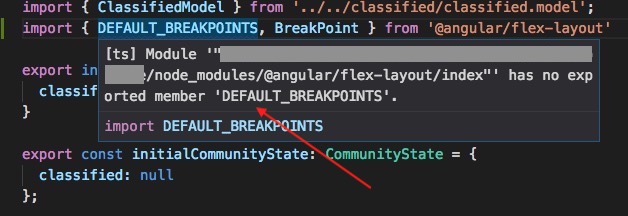
ERROR in path/to/some.module.ts (2,10): Module '"path/to/some.module.ts/node_modules/@angular/flex-layout/index"' has no exported member 'DEFAULT_BREAKPOINTS'.

ERROR in path/to/some.module.ts (3,10): Module '"path/to/project/node_modules/@angular/flex-layout/utils/index"' has no exported member 'validateSuffixes'.

ERROR in path/to/some.module.ts (20,17): Cannot find name 'BREAKPOINTS'.
All Angular packages are at the latest version at the time of writing:
"@angular/animations": "^4.4.5",
"@angular/cdk": "^2.0.0-beta.12",
"@angular/common": "^4.4.5",
"@angular/compiler": "^4.4.5",
"@angular/core": "^4.4.5",
"@angular/flex-layout": "^2.0.0-rc.1",
"@angular/forms": "^4.4.5",
"@angular/http": "^4.4.5",
"@angular/material": "^2.0.0-beta.12",
"@angular/platform-browser": "^4.4.5",
"@angular/platform-browser-dynamic": "^4.4.5",
"@angular/router": "^4.4.5",
 BovineEnthusiast
All 8 comments
Same error here on the latest "^2.0.0-rc.1":
 demisx
on 18 Oct 2017
demisx
on 18 Oct 2017
2.0.0-rc.1 is not the latest. It was a beta.6 that use RAW_DEFAULTS. To use DEFAULT_BREAKPOINTS as in the document, upgrade to 2.0.0-beta.8 or above
 alexfung888
on 19 Oct 2017
alexfung888
on 19 Oct 2017
@alexfung888 Thank you so much for chiming in. This indeed fixed the error. Didn't occur to me that beta was newer than a release candidate. Usually, it's the other way around. npm out should've given the clue, of course, but I've somehow overlooked it.
demisx
on 19 Oct 2017
@demisx I heard the rc was a mistake. You can't see it listed on the change log.
It also led to problems in upgrades, because npm keeps thinking that you should go to rc.1
To quiet npm I hard coded the full version into package.json
"@angular/flex-layout": "2.0.0-beta.9",
and modify it manually when a new beta appear.
alexfung888
on 19 Oct 2017
@alexeagle Gotcha. Makes sense. Wondering if there is a good reason for the team not to unpublish the bad rc.1 from npm.
demisx
on 19 Oct 2017
Hmm, whilst upgrading to 2.0.0-beta.9 has fixed the reference to DEFAULT_BREAKPOINTS, I still get errors for the following:
ERROR in path/to/some.module.ts (3,10): Module '"path/to/project/node_modules/@angular/flex-layout/utils/index"' has no exported member 'validateSuffixes'.

ERROR in path/to/some.module.ts (20,17): Cannot find name 'BREAKPOINTS'.
Anything else you'd advise to try? Thanks.
BovineEnthusiast
on 21 Oct 2017
Never mind, I just had to import both of them from the base flex-layout path.
BovineEnthusiast
on 21 Oct 2017
This issue has been automatically locked due to inactivity.
Please file a new issue if you are encountering a similar or related problem.
Read more about our automatic conversation locking policy.
_This action has been performed automatically by a bot._
![angular-automatic-lock-bot[bot] picture](https://avatars.githubusercontent.com/in/40213?v=4&s=40) angular-automatic-lock-bot[bot]
on 4 Sep 2019
angular-automatic-lock-bot[bot]
on 4 Sep 2019
Related issues
 mackelito
·
3Comments
mackelito
·
3Comments
 Splaktar
·
4Comments
Splaktar
·
4Comments
 MarcusMorba
·
3Comments
MarcusMorba
·
3Comments
 JadedEric
·
4Comments
JadedEric
·
4Comments
 ciukstar
·
4Comments
ciukstar
·
4Comments
Most helpful comment
2.0.0-rc.1 is not the latest. It was a beta.6 that use RAW_DEFAULTS. To use DEFAULT_BREAKPOINTS as in the document, upgrade to 2.0.0-beta.8 or above