Flatpickr: Flatpickr layout wrong after update to 4.4.1
After updating Flatpickr to version 4.4.1 from version 4.3.2 the layout of the picker is wrong
My config:
{
  enableTime: true,
  weekNumbers: true,
  allowInput: true,
  enableSeconds: true,
  locale: {
    firstDayOfWeek: 1
  }
}
Reproduction Link
https://jsfiddle.net/tL7znbot/
Screenshot

Your Environment
- flatpickr version used: 4.4.1
- Browser name and version: Google Chrome 66
- OS and version: MacOS High Sierra
 ThomHurks
All 15 comments
@chmln Thanks for your fast response! You partially fixed the issue, but the picker is still wider than it used to be and the weekdays go out of the window:
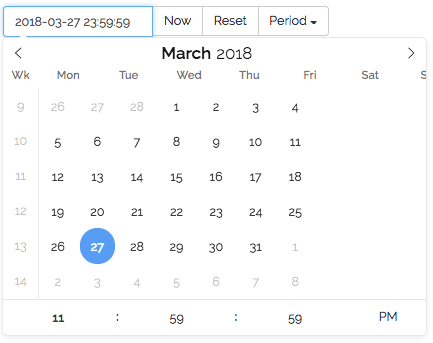
You can also see it in the repro JSFiddle: https://jsfiddle.net/tL7znbot/
ThomHurks
on 27 Mar 2018
same issue here, but also with inline templates
 Chris1904
on 27 Mar 2018
Chris1904
on 27 Mar 2018
My inline picker looks like this now (4.4.2):
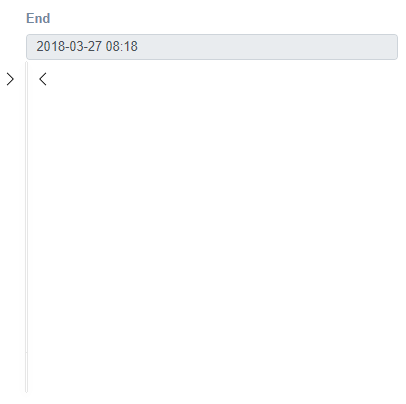
 RedShift1
on 27 Mar 2018
RedShift1
on 27 Mar 2018
Thanks for reporting this @ThomHurks @RedShift1 @Chris1904
v4.4.3 is out with the fix
 chmln
on 27 Mar 2018
chmln
on 27 Mar 2018
@chmln Can confirm it fixed. Thanks!
ThomHurks
on 27 Mar 2018
I just updated to confirm as well, but still running into the same/similar issue:
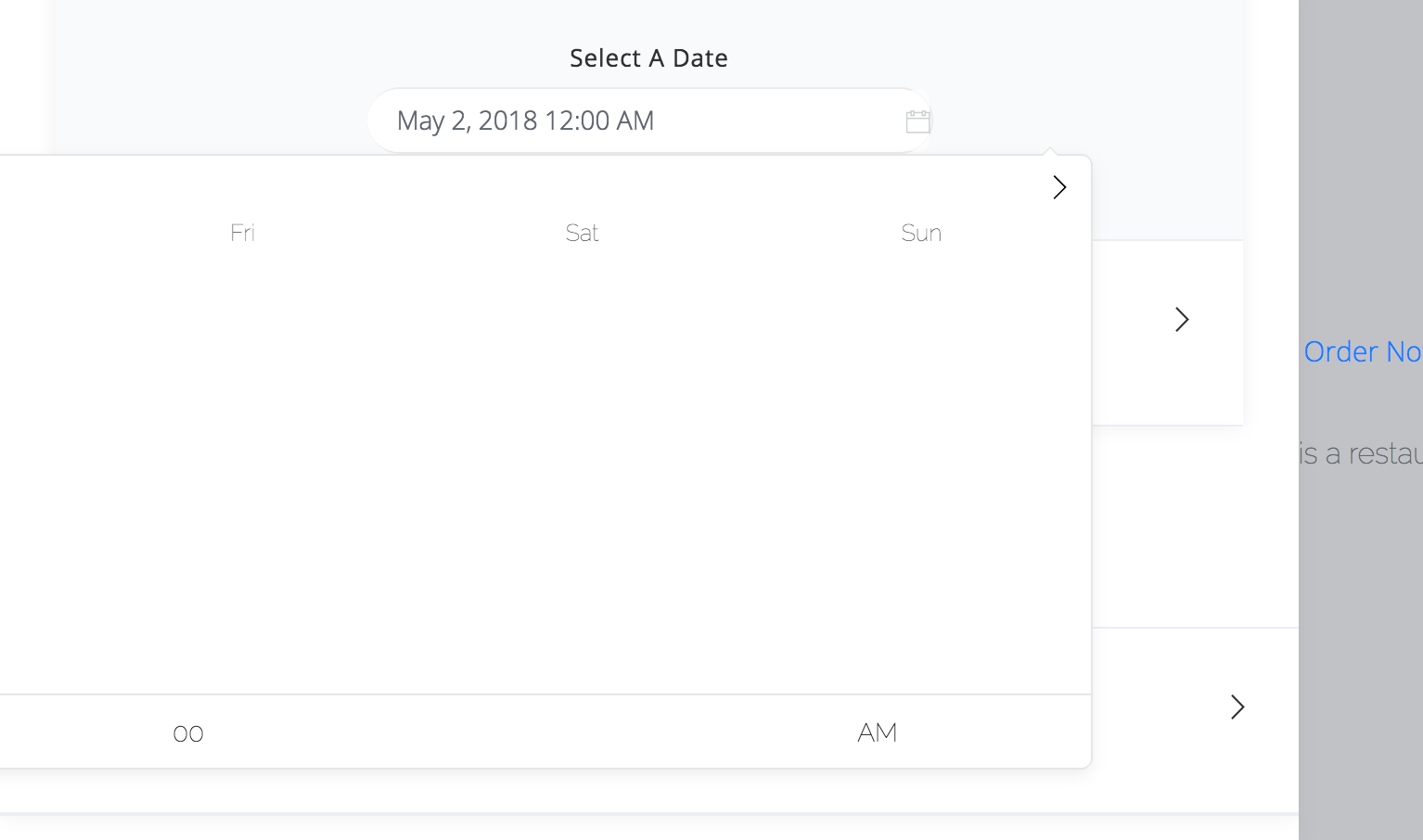
4.3.2 is the latest version that works for me using vue-flatpickr.
Chris1904
on 27 Mar 2018
@Chris1904 post your config or get me a repro link
chmln
on 27 Mar 2018
Sorry, I will be on a mobile device all day from now, but my config is:
config: {
    wrap: true,
    altInput: true,
    enableTime: true,
    locale: {
        "firstDayOfWeek": 1
    },
    minDate: "today",
    onChange: function (selectedDate, dateStr) {
        this.removeWarningColors();
    }.bind(this),

    disable: [
        function(date) {
            return this.disabledDates(date);
        }.bind(this)
    ],
},
I tried re-creating your issue using that config, but it works fine for me. I think you need to do some more digging.
ThomHurks
on 27 Mar 2018
I will reach back on here later tonight if I find what the issue could be.
Chris1904
on 27 Mar 2018
The issue I have is more of an edge case, I assume.
First off, I apologize, but I won't be able to provide a fiddle because of time reasons. If I have some more time within the next couple of days/weeks, I will definitely recreate the issue.
Anyways, let me demo the issue in the meantime:
http://i.imgur.com/GxnvdSN.gifv
The width size seems to be calculated ^4.3.2 on .flatpickr-calendar, whereas on 4.3.2 it did not, causing it to be too wide.
@chmln any idea by the gif (without the fiddle yet) of what could be the issue?
Chris1904
on 9 Apr 2018
@Chris1904 first thing that stood out for me was the calendar scrolling with the scrollbar - that shouldn't happen. Before we go any further, try using static: true and see if that fixes it.
Otherwise, did you make any style changes to the calendar? And is the issue present without wrap: true also?
chmln
on 10 Apr 2018
I have had a similar issue with Google's autocomplete .pac-container. The "issue" there was the position: absolute was based on the body and not the container it was in.
static: true without wrap-mode the issue is present still, but it seems to fix the positioning. The flatpickr opens and scrolls with the container, but the styling is incorrect. .flatpickr-container has a width of 1px for example.
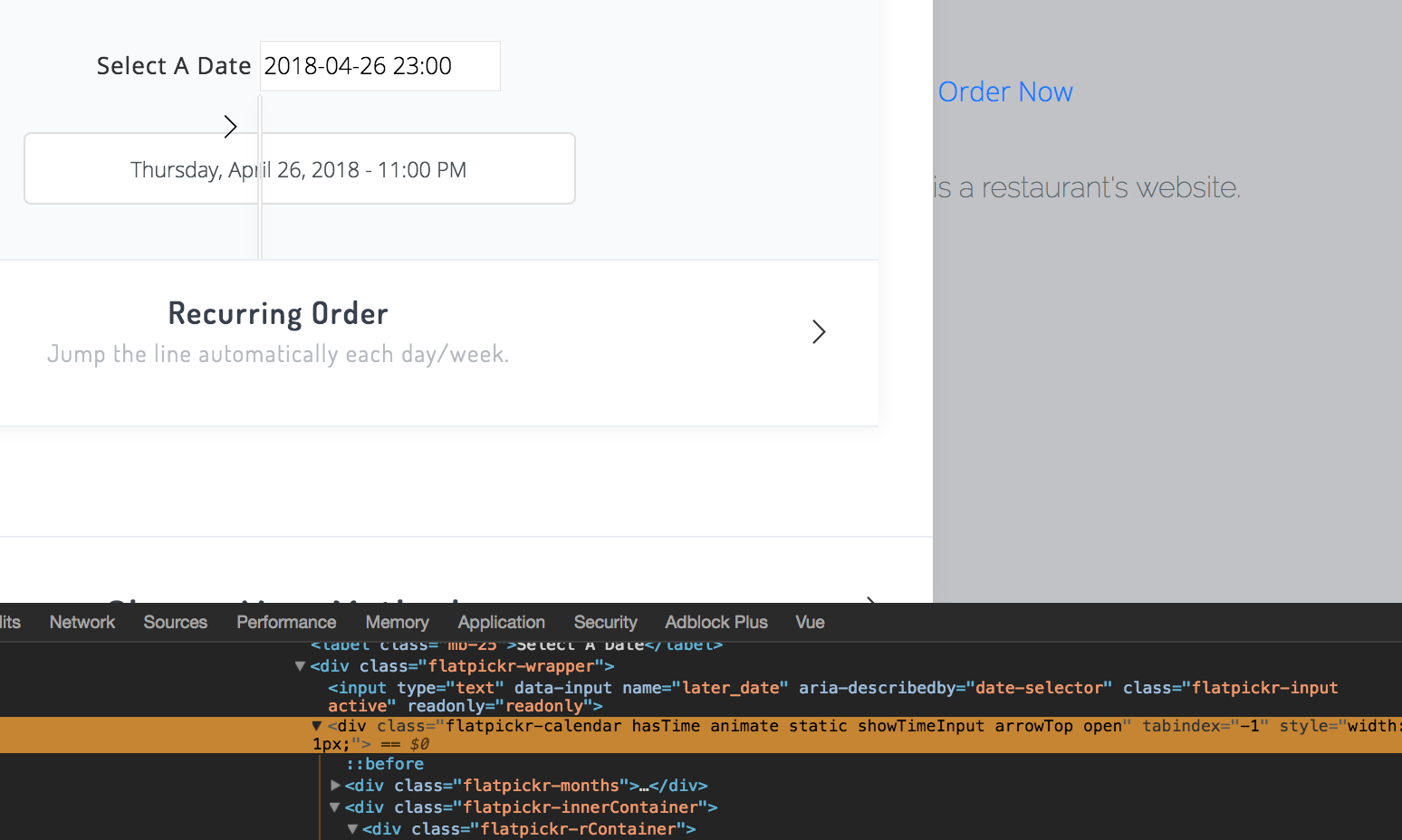
If inline: true the styling looks similar to the static: true flatpickr.
I also did not make any style changes to the calendar itself, besides some colors and font-family.
With flatpickr 4.3.2, the styling appeared to be calculated correctly on my end.
If I find some time soon, I will try to add a jsfiddle.
Chris1904
on 10 Apr 2018
Happening here too after upgrading to 4.4.4. It looks like @RedShift1's image. The config is
{
    inline: true,
    static: true,
    enableTime: true,
    altInput: true
}
The main thing for me is that the date picker is not visible when the page loads, one of its parent element's display is toggled later on. .flatpickr-calendar and .flatpickr-days have a style="width: 1px" on them for some reason.
Adding this fixes the issue for me:
.flatpickr-calendar, .flatpickr-days {
    width: auto !important;
}
 abrenneke
on 30 Apr 2018
abrenneke
on 30 Apr 2018
Hi Folks,
I've recently experienced this issue in an app where I have been using flatpickr and aurelia. Everything worked fine before as I had v4.3.2 but now I had to upgrade and bum...:) I've looked for several options, nothing helped. To demo this, I've created a git Repo, where the project is having only the scaffold, using this two frameworks. Can anyone take a look? Thank you
Repo: https://github.com/PoDaC/AureliaFlatpickrDemo.git
I found that if I add a reference to the flatpickr style inside my view-model will make it functional.
import 'flatpickr/dist/flatpickr.min.css';
 PoDaC
on 10 Jul 2018
PoDaC
on 10 Jul 2018
Related issues
 anhskohbo
·
3Comments
anhskohbo
·
3Comments
 mgohin
·
4Comments
mgohin
·
4Comments
 Spoki4
·
3Comments
Spoki4
·
3Comments
 deangibson89
·
3Comments
deangibson89
·
3Comments
 mchaves-ciandt
·
3Comments
mchaves-ciandt
·
3Comments