Flameshot: Separate text thickness with painting tools thickness
Is your feature request related to a problem?
Yes. The problem is: Once adjust the Text tool's active thickness, pait tools thickness changes as well.
Details below:
My OS is Ubuntu 20.04 LTS with Flameshot 0.6.0+git20191001-2(Debian)
Current situation:
I can adjust the text font size using the slider in side panel by changing "active thickness", but this thickness value is universal to all paiting tools like line, pen, square, circle etc. Once the font size is thicker, the painting tools brush become thicker.
Unpleasant Experience:
When I set a decent larger size font to type(as the default font is too small), I will get an unpleasant line or pen brush(too thicker) when switch to draw; so I have to adjust the thickness again. And in some cases I have to switch draw and text editing several times for specific editing job. So that's a little anoying.
(btw: There is also bug here that the real thickness is not actually changed sometimes even when the slider is adjusted to a different place.)
Feature Request:
So I suggest that the thickness value of painting tools and text should be separated and stored independently after user changes them.
 denven
All 14 comments
The scroll wheel on your mouse will adjust the size really easily.
 borgmanJeremy
on 7 Jul 2020
borgmanJeremy
on 7 Jul 2020
@denven after the comment @borgmanJeremy wrote, do you still think you want to have this feature request active? If not, i can close this.
 mmahmoudian
on 5 Sep 2020
mmahmoudian
on 5 Sep 2020
I believe there's a trend of expectation that the size of different tools should not be a global variable; they should be recorded separately. It is kind of a feature request and the rationale behind is valid, but such needs contradicts with the low-level design of flameshot. If we are to fix it, it will largely change user interaction experience as well as introducing nontrivial code refactoring.
I would recommend recording it as a separate feature request but there might be no guarantee of implementing it.
 hosiet
on 8 Sep 2020
hosiet
on 8 Sep 2020
@hosiet I also personally prefer to have them separately as I have to remember what size I chose for each tool and then resize every tool manually.
@borgmanJeremy what do you think? Shall I create a feature request based on this issue?
mmahmoudian
on 8 Sep 2020
Sure, I reopened the issue as I did not realize how popular it was to want different settings. We could potentially still use the scroll wheel for all tools, but store the thickness as a unique value for each tool rather than a shared value.
borgmanJeremy
on 8 Sep 2020
use the scroll wheel for changing size/thickness of all tools, but store the thickness as a unique value for each tool rather than a shared value. 🤘🏼
mmahmoudian
on 8 Sep 2020
The scroll wheel is fine but it would be great to have UI alternatives. For example, the scroll wheel may not be (easily) accessible on certain notebooks (it isn't on mine), and I often use graphics tablets or pens instead of a mouse for teaching. And it took me a while to understand that "active thickness" meant font size. Why not call it like this? There are also other UI elements that appear/disappear depending on the selected tool.
 pn2
on 8 Sep 2020
pn2
on 8 Sep 2020
It has been reported multiple times already that users with touch screens interfaces (generally no keyboard and mouse) cannot use Flameshot due to high dependency to keyboard shortcuts or mouse. I found these just by searching in issues:
782, #792, #611
I think we should make Flameshot a bit more inclusive. For example by adding buttons + & - to the gui and/or Ctrl+ and Ctrl-.
mmahmoudian
on 9 Sep 2020
@denven after the comment @borgmanJeremy wrote, do you still think you want to have this feature request active? If not, i can close this.
Yes, I appreciate if you can implement this. I think this feature will provide more convenience.
denven
on 10 Sep 2020
Will implement + - button and Ctrl+ / Ctrl- this or tomorrow evening.
 Martin-Eckleben
on 10 Sep 2020
Martin-Eckleben
on 10 Sep 2020
Started and had a successful compile but needs a little more work tomorrow evening :)
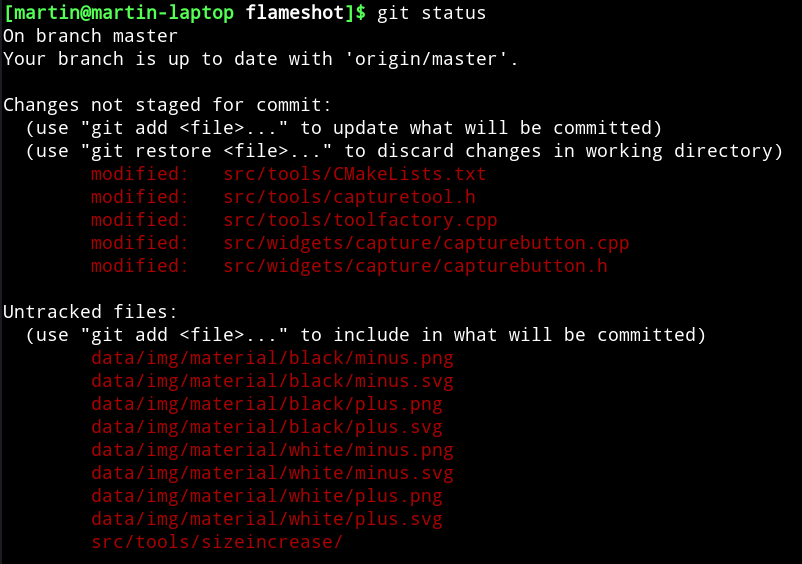
Martin-Eckleben
on 10 Sep 2020
+1 for saving size and color separated for each tool.
See the usage of latest (great!) feature of circle counter tool: I want to draw red rectangles and arrows, but prefer to have orange circle counters, and more bigger that the arrows tickness. I would like to keep these settings, because I will use them in the same way for many screenshots.
If saving size and color for each tool seems to much, you can consider grouping settings storage for type of tools, for example:
- a setting for rectangle / line / arrow / circle
- a setting for text
- a setting for circle counter
- ...
Thank you
 thepisu
on 22 Sep 2020
thepisu
on 22 Sep 2020
I forked from this issue as its main issue is separating tool sizes.
The CTRL+ & CTRL- and Buttons for tablets etc. seems a different issue to me.
I can get to separate tool sizes after I finally completed #1003 (sorry for the delay - had not much time lately).
Martin-Eckleben
on 28 Sep 2020
I forked from this issue as its main issue is separating tool sizes.
The CTRL+ & CTRL- and Buttons for tablets etc. seems a different issue to me.I can get to separate tool sizes after I finally completed #1003 (sorry for the delay - had not much time lately).
Hi, Martin,
Thanks for implementing this feature. Flameshot is good enough I think and you guys are trying to make it better.
I saw there is a new release these days so I updated flameshot and experienced the thickness adjusting feature again. As you are implementing the new enhanced feature, I suggest the following user cases for thickness adjusting(only):
As there is keybinding(scroll wheel) for adjusting the global thickness of all painting tools, adding new key bindings to separate thickness may not be necessary:
- just disable the global thickness adjusting by wheels;
- and let this thickness adjusting happen to the specific tool only when user is using it(like when I click T for text editing, then wheel adjusting will change text size and save the text thickness; when I click line tools, then wheel adjusting will change line thickness and keep the value);
- if CTRL+/- keybinding is added for adjusting thickness on Tablets, you can ignore this.
Separating line tools and text thickness may be enough, it may not need to separate all tools' thickness, as I think when people draw lines/rectangles/circle they may use the same thickness.
FYI
thanks.
denven
on 30 Sep 2020
Related issues
 soundsbeard
·
4Comments
soundsbeard
·
4Comments
 dajare
·
4Comments
dajare
·
4Comments
 gdude2002
·
4Comments
gdude2002
·
4Comments
 szszoke
·
4Comments
szszoke
·
4Comments
 ElijahLynn
·
3Comments
ElijahLynn
·
3Comments
Most helpful comment
Sure, I reopened the issue as I did not realize how popular it was to want different settings. We could potentially still use the scroll wheel for all tools, but store the thickness as a unique value for each tool rather than a shared value.