Flameshot: [Feature Request] Auto-Incrementing Numbered Bullets
Hey there,
great tool!
I miss a tool for auto-incrementing number bullets. This would allow easy highlighting of screenshot details from e.g. a documentation text.

Is this a feature you may consider to implement?
 H8to
H8to
All 24 comments
@H8to I like this idea.
 ZetaoYang
on 12 Apr 2018
ZetaoYang
on 12 Apr 2018
sounds good to me.
 lupoDharkael
on 12 Apr 2018
lupoDharkael
on 12 Apr 2018
It's in shutter and it's a great thing --- it's a pity that shutter sometimes crashes my X-server. So yes, it would be nice to have.
 Rmano
on 3 May 2018
Rmano
on 3 May 2018
@Rmano and it's even a pity that shutter is now discontinued.
But flameshot can become as good as shutter if they add those features:
- ~writing text into the Image~
- auto-incrementing bullets
- Enhance Export Menu to choose between some pages (imgur, imageshak, own ftp, g-drive, dropbox)
 xstable
on 25 Aug 2018
xstable
on 25 Aug 2018
@xstable the first one (writing text) has been already added. It's not movable (once written, I mean) but it works quite ok.
Also relevant is https://github.com/lupoDharkael/flameshot/issues/272
Rmano
on 27 Aug 2018
I don't know how to write text. I've tested with version 0.6.0
 DavidPerezIngeniero
on 4 Sep 2018
DavidPerezIngeniero
on 4 Sep 2018
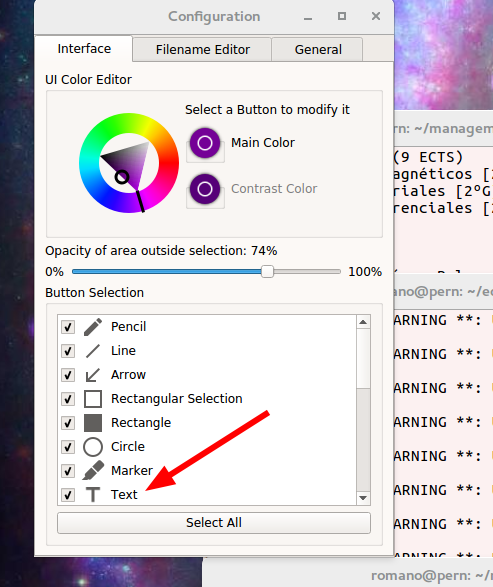
call
flameshot config, enable the text tool:
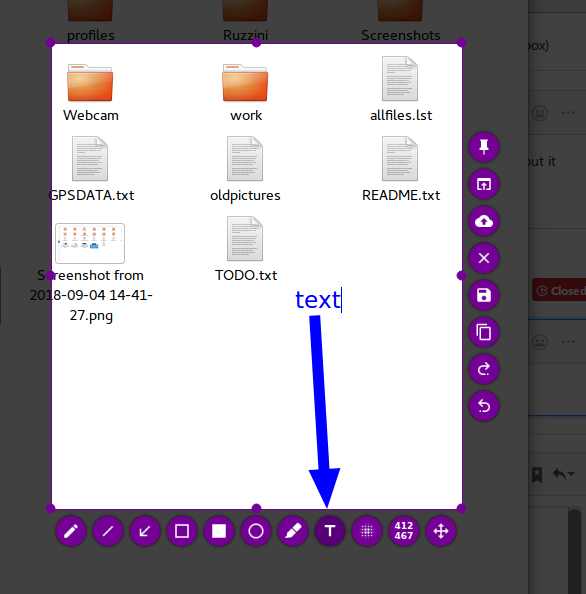
Use the text tool; mouse wheel to select size, right click for color.
Rmano
on 4 Sep 2018
Thanks!
DavidPerezIngeniero
on 6 Sep 2018
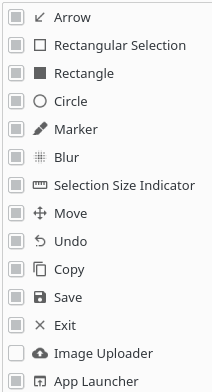
Version 0.6.0 doesn't have it yet.
DavidPerezIngeniero
on 6 Sep 2018
DavidPerezIngeniero
on 6 Sep 2018
Have you stopped the old flameshot after installing the new one?
killall flameshot
...and then restart it. Flameshot keeps running in background...
Rmano
on 6 Sep 2018
That's it!
Here is the solution:
pkill flameshot
flameshot&
flameshot config
That's it!
Here is the solution:pkill flameshot flameshot& flameshot config
Thank you so much for this! I've been looking for something like greenshot on windows, for linux, just discovered flameshot, and couldn't figure out the text feature! Then couldn't figure out how to enable it, thanks a lot, this helped me!! Now onto exploring this repo to see if there's a way to adjust the font! :)
Update: I found out from another thread that scrolling in and out with the mouse scroll will allow me to change the size of the text. Woah. This tool is better than greenshot! Much more intuitive, I'm gonna have a lot of fun w/ this! After I play w/ it for a few days, will make a donation to devs, thanks a lot, this is great!
 wokezombie
on 23 Dec 2018
wokezombie
on 23 Dec 2018
I've started working on this feature.
lupoDharkael
on 28 Dec 2018
I've started working on this feature.
Love it! This has been one of the most useful features when explaining multiple things in a single shot
 whnr
on 22 Jul 2019
whnr
on 22 Jul 2019
I've started working on this feature.
@lupoDharkael Hey, have you made any progress? I can help.
 sparcbr
on 24 Aug 2019
sparcbr
on 24 Aug 2019
Any Update on this?
its the only thing i miss from Windows / Greenshot
 Frankstar
on 27 Feb 2020
Frankstar
on 27 Feb 2020
This is the only feature I've been missing on Flameshot. It's a really good alternative for Shutter!
 mattiz
on 8 May 2020
mattiz
on 8 May 2020
I concur, auto increment bullet is a great feature I miss on Flameshot
 sebastienPoussard
on 13 May 2020
sebastienPoussard
on 13 May 2020
I'm not sure if this Project is still alive. A pitty, that since a long time there is no progress on it.
Would be great if the maintainer would add some developers (someone who still send pull-requests) to the project.
I still use flameshot and like it, but I've also started to test & use [ksnip](https://github.com/ksnip/ksnip) as alternate Snapshot-Tool.
I would prefer to use flameshot, but if this project isn't under maintenance anymore, I think ksnip will overtake flameshot soon.
xstable
on 14 May 2020
Check out #769 and provide feedback. I added this feature to my local fork a while back.
 borgmanJeremy
on 11 Jun 2020
borgmanJeremy
on 11 Jun 2020
Can you send an PR to this repo. I would love to see it in the main release
How can I install your fork? Any suggestions? I use Manjaro Linux
xstable
on 12 Jun 2020
Yeah there is a PR #770 .
You can just clone the repo and build in qt creator.
borgmanJeremy
on 12 Jun 2020
Merged into master and will be in next release.
borgmanJeremy
on 4 Sep 2020
Related issues
 makz27
·
4Comments
makz27
·
4Comments
 szszoke
·
4Comments
szszoke
·
4Comments
 soundsbeard
·
4Comments
soundsbeard
·
4Comments
 dajare
·
4Comments
dajare
·
4Comments
 hosiet
·
4Comments
hosiet
·
4Comments
Most helpful comment
I've started working on this feature.