Flameshot: Blurring doesn't hide text
I love Flameshot and use it on a daily basis. But one thing is a real problem for me. Blurred sensitive text can still be read. Since I work in the medical industry, blurring patient information is extremely important. Have a look at the screenshot below though. If you look closely, you can still read the first part of the text.
When I used to work on a mac I used Monosnap, which does an awesome job at blurring. Is it somehow possible to make the blurring resemble that of Monosnap?
Is this blurring a setting somewhere or can this be marked as a bug?

 kramer65
All 14 comments
go over it twice or as many times until you cant read it.
 vendforce
on 20 Feb 2018
vendforce
on 20 Feb 2018
I've made it more blurry with the last commit. The actual implementation is not ideal as it requires 3 iterations of the Qt's built in blur. The perfect solution would be to implement a specific blur and be able to control the level of blur with the mouse wheel. I think Deepin's screenshot tool has an implementation, I should check it.
I hope the blur is enough with the last change while I investigate the implementation of a specific blur algorithm.
 lupoDharkael
on 20 Feb 2018
lupoDharkael
on 20 Feb 2018
Hi @lupoDharkael - Thanks for the extra blur. Unfortunately I don't think it's enough for me. As you already suggest I think you need a different kind of blurring algorithm. I would really suggest to have a look at the blurring of Monosnap. Maybe someone on the interwebs knows what kind of algorithm that is.
kramer65
on 9 Apr 2018
Could you make the blurring according to the selected pencil width? Because blurring out big headings often needs multiple passes. It would be awesome if we could just crank up the mouse wheel and only blur it once.
 mbirth
on 23 Jun 2018
mbirth
on 23 Jun 2018
Seconded. With 0.5.1 (trunk in Ubuntu 18.04 repos):
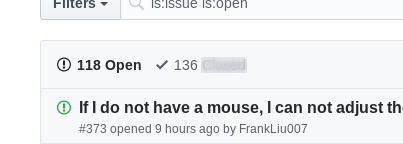
Workaround
Get more area under the blur and/or repeat in different orientations.
Single pass, higher box:
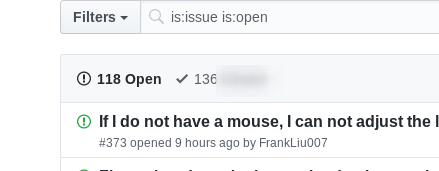
Four passes, once along each diagonal:
 reitzig
on 9 Oct 2018
reitzig
on 9 Oct 2018
I seem to remember Shutter's blurring tool to be quite effective. I think they averaged color in small segments, and then shuffled those, or something like that.
reitzig
on 9 Oct 2018
I seem to remember Shutter's blurring tool to be quite effective. I think they averaged color in small segments, and then shuffled those, or something like that.
Yes, Shutter uses a "pixelate" or "mosaic" filter instead of a Gaussian blur. This is particularly useful when blurring high-contrast things like text.
 spirituallyinsane
on 12 Nov 2018
spirituallyinsane
on 12 Nov 2018
A simple blur like this does have its place. Perhaps an additional tool to pixelate rather than blur would be better. I can imagine using a blur in a high-contrast photo would look much nicer than a pixelation.
Being able to control the blur amount would be quite useful too!
 RealOrangeOne
on 2 Jan 2019
RealOrangeOne
on 2 Jan 2019
A place for artistic effect, maybe. But if it's about obfuscation, it better _obfuscate_.
reitzig
on 2 Jan 2019
The reason why blurring/pixelation looks better than blackening is that part of the information is kept. This part can always be recovered and the missing information can be extrapolated. This works especially well with text. Blurring should never be used to obfuscate anything sensitive!
 tastytea
on 26 Jan 2019
tastytea
on 26 Jan 2019
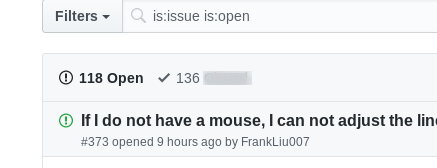
User version 0.5.1-1 on Mint Linux i'm massively underwhelmed at having to re-blur text/icons multiple times to make them unreadable. As @reitzig points out, the blur that's implemented is fine for artistic effect, but this is not an artistic tool - it's one for posting screenshots, and making areas of screenshots unreadable is an extremely common operation... which we have to repeat multiple times just to get a blurry-enough effect (making it exceptionally tedious).
This screenshot was just made from this github page, using a single pass of the blur tool:

It clearly (no pun intended) demonstrates that the text below the blur is not obfuscated all that well.
 sgbeal
on 18 Apr 2019
sgbeal
on 18 Apr 2019
Could it be that the blurring also "feathers" the edges of the blur area adding transparency?
Let's say I have a image that I want to blur
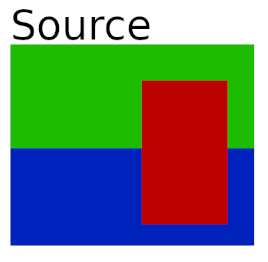
What I believe is happening is that the selected area get blurred (while surrounded by transparency), cropped, then pasted back
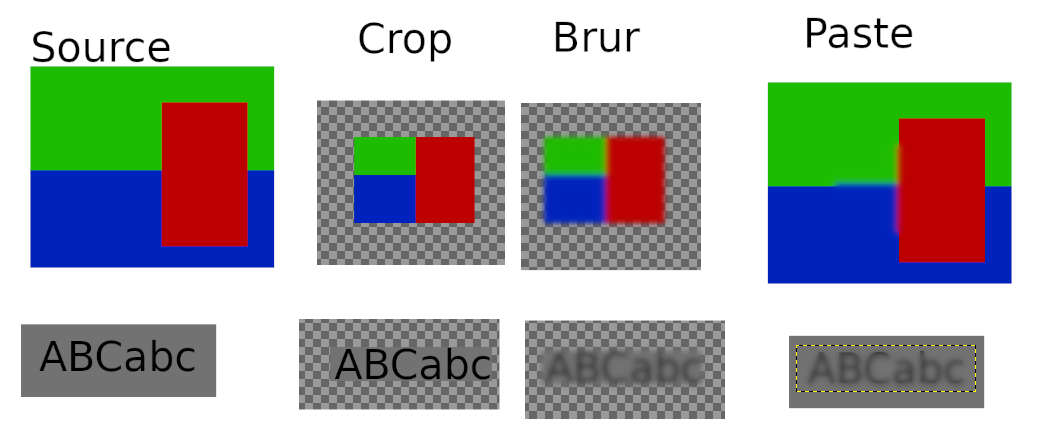
Notice the same thing with the edges of the letters "sticking out" as with a actual use of the tool
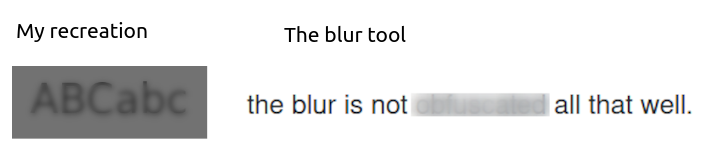
Proposed solution:
I think that the easiest way to fix this is to have a larger initial area selected to get blurred, but then the blurred result to get cropped before pasting it back, or some way of removing any alpha transparency before the blurred result gets applied
 Tc-001
on 10 Jul 2020
Tc-001
on 10 Jul 2020
Check out this for a solution using pixelation https://github.com/lupoDharkael/flameshot/issues/774
 borgmanJeremy
on 10 Jul 2020
borgmanJeremy
on 10 Jul 2020
This is merged and will be present in the next release.
borgmanJeremy
on 4 Sep 2020
Related issues
 bingoIsCoder
·
4Comments
bingoIsCoder
·
4Comments
 orschiro
·
3Comments
orschiro
·
3Comments
 ElijahLynn
·
3Comments
ElijahLynn
·
3Comments
 szszoke
·
4Comments
szszoke
·
4Comments
 kylewill
·
4Comments
kylewill
·
4Comments
Most helpful comment
A place for artistic effect, maybe. But if it's about obfuscation, it better _obfuscate_.