Great app.
Is there a way to add "text" to my shots?
 rendomnet
All 113 comments
Not yet. But I want to work on this after the next release. I wont close this issue as a reminder!
 lupoDharkael
on 14 Aug 2017
lupoDharkael
on 14 Aug 2017
+1 this would be absolutely amazing, rather than just (well) amazing, also see:
http://www.omgubuntu.co.uk/2018/01/flameshot-linux-screenshot-tool-annotation
Perhaps you could help Joey getting it running on Ubuntu?
 xircon
on 5 Jan 2018
xircon
on 5 Jan 2018
I tried to implement a text tool for the last release but I realized I need to redesign the parts related with the tools in order to have a maintainable code.
lupoDharkael
on 5 Jan 2018
Just found the project....compiling was pretty easy. So thanks to the explanation.
Being able to add text would be really nice. Don't feel pushed. Only want to add a "me too" for that feature request. ;)
And not to forget...great work :+1: the automatic "upload to imgur"-option is reaaaally nice!!
 DaVukovic
on 5 Jan 2018
DaVukovic
on 5 Jan 2018
+1 for this please let us know if we could be of any help... i know bit of programming
 sajidzaman
on 11 Jan 2018
sajidzaman
on 11 Jan 2018
Very nice tool. The text feature would be a welcomed enhancement. Keep up the great work.
 graysky2
on 12 Jan 2018
graysky2
on 12 Jan 2018
I don't have much time to implement new functionality right now.
I'm working on adapting Flameshot for Windows but the next feature I'll be working on will be the text tool.
A lot of people want it and some times I'd like to have it too.
lupoDharkael
on 13 Jan 2018
@lupoDharkael - Sounds good, although I would prioritize features on the UNIX side ahead of porting/enablement on the Winblows side myself ;p
graysky2
on 13 Jan 2018
@lupoDharkael Windows already has rock solid choices for screenshot apps. I would argue that you will have much more impact by focusing on linux. Linux is suffering in the screenshot department - Shutter is the only usable screenshot app I could ever find for this type of application, but since it's no longer under development and doesn't support wayland, its death will be inevitable. Flameshot has been a 90% satisfactory replacement for me - the 10% being the ability to add text.
Just my two cents - thanks for your work!
 curtisbelt
on 15 Jan 2018
curtisbelt
on 15 Jan 2018
I don't use Windows myself but someone could want to use Flameshot when is forced to use Windows for work. Having another open alternative is always good. The port implies an initial big time investment (which is almost completed) just to make the base work. New features wont require too much effort as most of the new code wont need to be adapted thanks to Qt.
lupoDharkael
on 15 Jan 2018
Text tool is a must for screenshot tool.
+1 here
PS: everything else works just great.
 AlexVadkovskiy
on 23 Jan 2018
AlexVadkovskiy
on 23 Jan 2018
Looking forward to.
 amitbha
on 26 Jan 2018
amitbha
on 26 Jan 2018
Amazing program. This is exactly what Linux has been missing.
Shutter is basically unmaintained; but even though the latest bug fix release (http://shutter-project.org/2017/09/after-a-long-time-a-new-bug-fix-release-0-94/) crashes often on my machine, I still use it since it has the text tool.
Keep up the great work!
 andrei-a-papou
on 18 Feb 2018
andrei-a-papou
on 18 Feb 2018
Please add text
 puzanov
on 22 Feb 2018
puzanov
on 22 Feb 2018
Can you please just add text. its the number 1 request people have been asking since the previous 2 releases
 vendforce
on 26 Feb 2018
vendforce
on 26 Feb 2018
@lupoDharkael Keep up the good work...
Text support will be ready when ready.
 Creteil
on 28 Feb 2018
Creteil
on 28 Feb 2018
@puzanov @vendforce Guys, the author is well aware of the fact that users need this feature. He's also working on it. He's also added a high priority label to the issue. Scroll up, it's right there.
A bunch of "I-want-this-feature-too" comments is not helpful, especially when people don't even thank the author for the great work done already.
andrei-a-papou
on 28 Feb 2018
@andrei-a-papou +1000
Creteil
on 28 Feb 2018
+1
Without the abilty to add text comments it's only half as good. The rest is impressive in comparison to shutter e.g.
 schoebbe
on 8 Mar 2018
schoebbe
on 8 Mar 2018
And of course: Thanks for the great work! ;)
schoebbe
on 8 Mar 2018
I've started coding the new tool system. After that I'll be able to effectively implement the text tool.
lupoDharkael
on 11 Mar 2018
:champagne: If anyone else wants to donate after hearing this news: https://github.com/lupoDharkael/flameshot#donations
curtisbelt
on 11 Mar 2018
Awesome! Thanks so much for this great tool. As others have said, Linux has been lacking in the screenshot department, and this is filling a void left by some Windows counterparts. Having text annotations will be icing on the cake!
 JLemur
on 14 Mar 2018
JLemur
on 14 Mar 2018
Just letting you know I'm working on it, the refactor is bigger than is expected but I'm deleting a lot of legacy code. (I started Flameshot with little knowledge of QT)

lupoDharkael
on 23 Mar 2018
I put a few bucks in your paypal. Go grab a beer on me dude. Keep up the good work. Code clean up is always the way to go.
 philthynz
on 23 Mar 2018
philthynz
on 23 Mar 2018
The refactor is almost done, there is more code now but it's more clear and decoupled. I just need to change a few things and everything will be working again. It's not only more maintainable, drawing with a tool will consume less CPU.
Once this is finished I'll start the text tool.

lupoDharkael
on 1 Apr 2018
I discover this program today, and it is almost perfect, I was using deepin screenshot, another good one, but it doesn't work well with a dual monitor setup, this work very good in the same conditions. I'm waiting for a text tool, "it will be ready when ready", no hurry
 DanielRios549
on 19 Apr 2018
DanielRios549
on 19 Apr 2018
I want this too feature too!
When will you start on this @lupoDharkael ? Since you wrote "Once this [refactor] is finished I'll start the text tool." and I saw you commited that.
By the way, thank you for a great tool!
 flashjames
on 29 Apr 2018
flashjames
on 29 Apr 2018
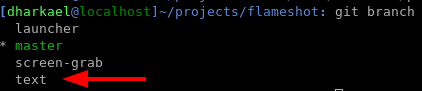
The tool is almost finished. It still requires some testing. I expect it to be marged soon! maybe tomorrow or in 2 days.
lupoDharkael
on 29 Apr 2018
Is there a way we can grab the text branch of flameshot and experiment with it?
I didn't see the text branch in your flameshot code on github...
 ryanerwin
on 30 Apr 2018
ryanerwin
on 30 Apr 2018
@lupoDharkael Great!
flashjames
on 30 Apr 2018
I think he doesn't push the branch to Github, but it's all right, tanks so much to hear us, a text tool is the only thing I think it's missing in this software
DanielRios549
on 1 May 2018
I've found a nasty bug related to the management of the tool by the capture editor. I'll need some more days to study the problem but I expect to have it merged before the end of this week. I'm sorry for the long wait for this specific tool.
lupoDharkael
on 2 May 2018
Nothing to excuse and absolutely no rush.
Take your time. It's done, when it's done. Seems most ppl don't understand what FOSS means by pushing some volunteer that hard to get some additional functionality done.
I'm glad if it will work some days. I don't care if it's this week or next week. Even if I have to admit that adding text would be a killer feature ;), the tool is still great without it. Still using it much for different Wikis I contribute to.
Keep on the good work
DaVukovic
on 3 May 2018
Fully agree here. It's already great and soon the proper Shutter
replacement we all have been longing for. :)
On Thu, May 3, 2018, 00:55 DaVukovic notifications@github.com wrote:
Nothing to excuse and absolutely no rush.
Take your time. It's done, when it's done. Seems most ppl don't understand
what FOSS means by pushing some volunteer that hard to get some additional
functionality done.I'm glad if it will work some days. I don't care if it's this week or next
week. Even if I have to admit that adding text wild be a killer feature ;),
the tool is still great without it. Still using it much for different Wikis
I contribute to.Keep on the good work
—
You are receiving this because you are subscribed to this thread.
Reply to this email directly, view it on GitHub
https://github.com/lupoDharkael/flameshot/issues/11#issuecomment-386146255,
or mute the thread
https://github.com/notifications/unsubscribe-auth/AAKbw4ya80P9mtuL1XaEjiTxdtXI2bRMks5tujlNgaJpZM4O1qqJ
.>
 orschiro
on 3 May 2018
orschiro
on 3 May 2018
@lupoDharkael no problem, keep up the great work! It'll be done when it's done. I've just sent you some cash as my thanks
andrei-a-papou
on 3 May 2018
The Text tool is here!
It took some time to polish but now it's usable. In the future I'll implement a way to change the font family, make it bold, italics, etc using the side panel that you can open pressing Space.
lupoDharkael
on 6 May 2018
"The Text tool is here!"
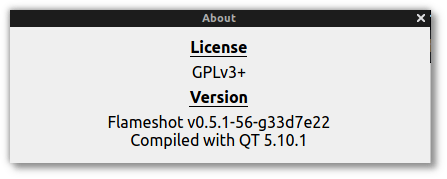
@lupoDharkael cool 🙂! Is there anything to do to activate it? I built latest 33d7e220fc979803c003a5893518630b549f49b3 , but no text icon is present among the tools.

 ronjouch
on 6 May 2018
ronjouch
on 6 May 2018
Open the configuration widget and check the Text tool.
lupoDharkael
on 6 May 2018
I activated it and the did a flameshot gui, but no text tool showed up. I afterwards reopened the config and the text tool was again deselected. Just closing the config and reopening will still show it as selected.
 jankatins
on 6 May 2018
jankatins
on 6 May 2018
@jankatins That could be caused by using different binaries, launch Flameshot with the new compiled binary and execute the command with that same binary.
lupoDharkael
on 6 May 2018
I must be making the same mistake as @jankatins and @ronjouch

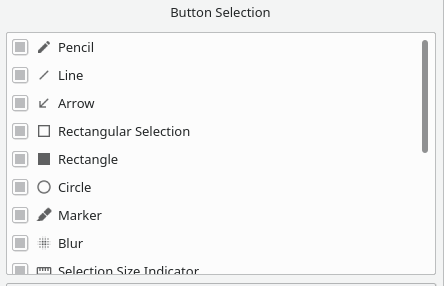
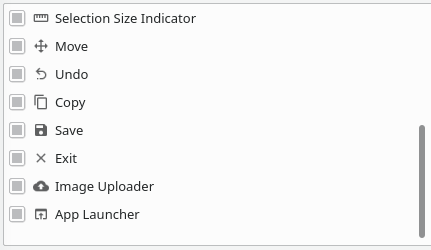
When I run ./flameshot config to make sure the text tool is selected, I don't see it as an option:

ryanerwin
on 7 May 2018
@ryanerwin weird, here I have the new Text tool listed between Marker and Blur:
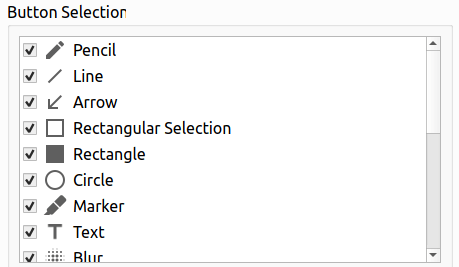
ronjouch
on 7 May 2018
@lupoDharkael , Did you release new version with Text tool ? I can't find the new release in there: https://github.com/lupoDharkael/flameshot/releases
 minhtranite
on 7 May 2018
minhtranite
on 7 May 2018

Creteil
on 7 May 2018
So, now I have it: I had to kill all flameshot process (pkill flameshot), started flameshot in a terminal and opened the config form the (gnome) topicons bar (running just flameshot config wasn't opening the config window -> does that need a already running instance?), set the check on "Text", killed flameshot (ctrl+c), started it again via the gnome launcher and then could do screenshots with text.
Debian package (compiled with dpkg-buildpackage -b -rfakeroot -us -uc) on ubuntu 17.10
jankatins
on 7 May 2018
@Creteil, Yes. The issue was closed but I can't find new binary file to download.
minhtranite
on 7 May 2018
@lupoDharkael
Great work. Thanks for adding that feature. Much appreciated. Recompiling was easy and after selecting the text tool at the configuration everything works like a charm on Ubuntu 16.04
Good to see that it's packaged for Ubuntu 18.04+ so users don't need to fiddle around with compiling if they aren't familiar with.
Not yet keen enough to switch over and waiting for the first Ubuntu dot-release, but better than nothing ;)
Again...thanks a bunch :+1:
DaVukovic
on 7 May 2018
@minhtranite you can't find the release because Flameshot is not ready for a new release right now.
If you want a package for the last commit you can find it in the CI.
HOW TO DOWLOAD A PACKAGE FROM THE CI:
- Enter here: https://travis-ci.org/lupoDharkael/flameshot

Scroll until you reach the end of the log and try to find an URL like this one
https://transfer.sh/L3hfA/flameshot_0.5.1-jessie-x86_64.deb

Open the URL in your browser and download the package!
lupoDharkael
on 7 May 2018
@lupoDharkael Thank you so much !
minhtranite
on 7 May 2018
@lupoDharkael Thank you so much, I was waiting for new packages here in github, I didn't know this travis-ci...
DanielRios549
on 8 May 2018
@jankatins That was it for me too... Had to run a pkill flameshot otherwise the existing flameshot process was relaunching... I don't quite understand how that actually works... Does it mean flameshot first checks to see if another process named flameshot is already running, and if it is, then sends a signal to the other process to effectively forward the command line params? Something like that would obviously be desirable on this sort of application that you don't want running multiple instances of.
Anyway, @lupoDharkael.... AWESOME!

ryanerwin
on 8 May 2018
Hey guys,
This is great! Went to travis-ci and was looking for the rpms but they seem
to fail building.
Any insights?
On Tue, May 8, 2018 at 4:45 AM ryanerwin notifications@github.com wrote:
@jankatins https://github.com/jankatins That was it for me too... Had
to run a pkill flameshot otherwise the existing flameshot process was
relaunching... I don't quite understand how that actually works... Does it
mean flameshot first checks to see if another process named flameshot is
already running, and if it is, then sends a signal to the other process to
effectively forward the command line params? Something like that would
obviously be desirable on this sort of application that you don't want
running multiple instances of.Anyway, @lupoDharkael https://github.com/lupoDharkael.... AWESOME!
[image: image]
https://user-images.githubusercontent.com/2156415/39735155-dae00966-52ac-11e8-8ac4-abf1e84c1b4c.png—
You are receiving this because you are subscribed to this thread.
Reply to this email directly, view it on GitHub
https://github.com/lupoDharkael/flameshot/issues/11#issuecomment-387267362,
or mute the thread
https://github.com/notifications/unsubscribe-auth/AAKbw9Dsq_kCIHXvjmfDBdZ4fUh0XIhCks5twQbLgaJpZM4O1qqJ
.>
orschiro
on 8 May 2018
Thanks for notification, the rpm needs to be fixed.
lupoDharkael
on 8 May 2018
@lupoDharkael it's actually working but still building version 0.5.1 for some reasons:
https://travis-ci.org/lupoDharkael/flameshot/jobs/376516002#L1444
Hmmm....
orschiro
on 10 May 2018
It builds the last commit, the version number is updated before the release.
lupoDharkael
on 10 May 2018
Not sure I understand then. I removed the "old" version, downloaded https://transfer.sh/YyUo3/flameshot_0.5.1-fedora27-x86_64.rpm and installed this rpm locally. But I don't have the text tool.
Am I missing something obvious?
orschiro
on 10 May 2018
close the old version of Flameshot and enable the new tool in the configuration menu.
lupoDharkael
on 10 May 2018
and enable the new tool in the configuration menu.
That was the missing stone. Thanks! :)

orschiro
on 10 May 2018
How can you change the text color?
BTW: this tools is awesome..great job!!!
 dhd0004
on 11 May 2018
dhd0004
on 11 May 2018
@dhd0004 Change the color is the same for all features, using a right click. There is limited colors but it's better than just one.
DanielRios549
on 11 May 2018
Hi and thanks for great tool,
I've tried F27 rpm https://transfer.sh/UYS5T/flameshot_0.5.1-fedora27-x86_64.rpm
build log there https://api.travis-ci.org/v3/job/379927112/log.txt
Definitely removed old app previously installed from fedora repo (although it has same version number 0.5.1)
Still cannot see Text in the tool list :(
http://chunk.io/tagwint/32d2b60b80a34239b5b6dece79d7fa9a
 tagwint
on 17 May 2018
tagwint
on 17 May 2018
Please ignore my previous message, I figured out the reason
dnf did not use local file until I used localinstall instead of just install command
Thanks!
tagwint
on 17 May 2018
I just found this tool today! i installed via apt initially with ubuntu 18.04. I then read that text support is available in git, so I proceeded to install via git
after cloning and building, the application loads but does not seem to have the text writing button, what am I doing wrong here:
sudo apt install git g++ build-essential qt5-qmake qt5-default qttools5-dev-tools
git clone https://github.com/lupoDharkael/flameshot
cd flameshot
sudo qmake
sudo make

/home/xekon/flameshot/flameshot gui -p ~/
I did not notice any errors while building, and I can see textconfig.o, texttool.o, textwidget.o files are in the folder....
 xekon
on 12 Jun 2018
xekon
on 12 Jun 2018
@xekon Please read previous discussions carefully and your problem has been explained one month ago. Text tool is not enabled by default and you must enable it manually in the app config menu.
 hosiet
on 12 Jun 2018
hosiet
on 12 Jun 2018
EDIT: got it, had to do this pkill flameshot, to kill the one that I installed from apt
Thanks :)
xekon
on 13 Jun 2018
@lupoDharkael Thank you for the app. Works great!
Is there a way to increase text size? Can't figure out how to make it bigger...
 mxdrive
on 13 Jun 2018
mxdrive
on 13 Jun 2018
Hello Guys.
Just correct me if I'm wrong. I have a question.
How to install updates or to update my flameshot installed from my ubuntu
16.04?
Also is there a way you guys can add a feature like you can input a text.
same function as from Lightshot?
Thanks!
On Wed, Jun 13, 2018 at 10:05 PM, mxdrive notifications@github.com wrote:
@lupoDharkael https://github.com/lupoDharkael Thank you for the app.
Works great!
Is there a way to increase text size? Can't figure out how to make it
bigger...—
You are receiving this because you are subscribed to this thread.
Reply to this email directly, view it on GitHub
https://github.com/lupoDharkael/flameshot/issues/11#issuecomment-396949558,
or mute the thread
https://github.com/notifications/unsubscribe-auth/ANcSiMX-m-ceLNtqnW3-tVr2115cKnreks5t8RwpgaJpZM4O1qqJ
.
 mazestricks
on 13 Jun 2018
mazestricks
on 13 Jun 2018
Why this great enhancement not released yet?
No new version in github release.
amitbha
on 13 Jun 2018
@mxdrive when you first launch the gui tool, theres a little box in the middle of screen, you should really read that, it explains many of the features, it would have told you to use the mousewheel to adjust size.
Also you can find the same information on the main page: https://github.com/lupoDharkael/flameshot/#keyboard-shortcuts
@mazestricks
Here is how I installed the latest from github:
cd ~
sudo apt-get remove flameshot
sudo pkill flameshot

sudo apt-get install git g++ build-essential qt5-qmake qt5-default qttools5-dev-tools
git clone https://github.com/lupoDharkael/flameshot
cd flameshot
sudo qmake
sudo make

./flameshot
the first ./flameshot is to start the background service
open a second terminal and run:
./flameshot config (this is to enable the text feature)
when installing from git clone you do not get an application menu item, on kubuntu I right click the application launcher and select edit applications. then under utilities I right click and enter new item, name it flameshot and for the command put this:
/home/xekon/flameshot/flameshot
That is the launcher for the service
you can create another launcher for the gui tool:
/home/xekon/flameshot/flameshot gui -p ~/
obviously replace xekon with your linux user name to reflect where the files are located.
On every boot the service needs to be started otherwise you have to manually start the service, I added the service to my Autostart in system settings.
I went one step further and bound the gui tool to a hotkey, goto system settings, shortcuts, custom shortcuts
I set the trigger to my hotkey I wanted to use and the action/command to:
/home/xekon/flameshot/flameshot gui -p ~/
xekon
on 13 Jun 2018
Thanks xekon!!! nice one!
On Thu, Jun 14, 2018 at 1:50 AM, xekon notifications@github.com wrote:
Here is how I installed the latest from github:
sudo apt-get remove flameshot
sudo pkill flameshotsudo apt install git g++ build-essential qt5-qmake qt5-default qttools5-dev-tools
git clone https://github.com/lupoDharkael/flameshot
cd flameshot
sudo qmake
sudo make./flameshot
the first ./flameshot is to start the background service
open a second terminal and run: ./flameshot config (this is to enable the
text feature)when installing from git clone you do not get an application menu item, on
kubuntu I right click the application launcher and select edit
applications. then under utilities I right click and enter new item, name
it flameshot and for the command put this:
/home/xekon/flameshot/flameshot
That is the launcher for the serviceyou can create another launcher for the gui tool:
/home/xekon/flameshot/flameshot gui -p ~/obviously replace xekon with your linux user name to reflect where the
files are located.On ever boot the service needs to be started otherwise you have to
manually start the service, I added the service to my Autostart in system
settings.I went one step further and bound this to a hotkey, goto system settings,
shortcuts, custom shortcutsI set the trigger to my hotkey I wanted to use and the action/command to:
/home/jieiku/flameshot/flameshot gui -p ~/—
You are receiving this because you commented.
Reply to this email directly, view it on GitHub
https://github.com/lupoDharkael/flameshot/issues/11#issuecomment-397026899,
or mute the thread
https://github.com/notifications/unsubscribe-auth/ANcSiE7h6PthQEU1zRh6TtkLJNlXbyveks5t8VDPgaJpZM4O1qqJ
.
mazestricks
on 15 Jun 2018
Hello Guys. I installed the latest version of Flameshot. but I can't see how to use the text feature. Just correct me if I'm wrong. Thanks
mazestricks
on 15 Jun 2018
did you issue this command:
./flameshot config
and enable the text feature? (by default its disabled, the text feature looks like a button with a capital "T" )
 xekon
on 15 Jun 2018
xekon
on 15 Jun 2018
Hello @xekon
Thanks I followed again your instructions and it's now working. But the problem is the text is too small. Is there any way to adjust the font size of the text? Just let me know on your thoughts.
Thanks!
mazestricks
on 16 Jun 2018
@mazestricks Use the mouse scroll, it adjusts the size of all tools, and a right click gives you the option to change the color.
DanielRios549
on 16 Jun 2018
Thanks!!!
On Sat, Jun 16, 2018 at 11:50 AM, Daniel Rios notifications@github.com
wrote:
@mazestricks https://github.com/mazestricks Use the mouse scroll, it
adjusts the size of all tools, and a right click gives you the option to
change the color.—
You are receiving this because you were mentioned.
Reply to this email directly, view it on GitHub
https://github.com/lupoDharkael/flameshot/issues/11#issuecomment-397784010,
or mute the thread
https://github.com/notifications/unsubscribe-auth/ANcSiPYfuKtBtF59fCDzipIxJmn-9OPFks5t9IB7gaJpZM4O1qqJ
.
mazestricks
on 16 Jun 2018
After upgrading to fedora28 the Text option has gone ( 0.5.1-1.fc28 seem not to have it )
Can Fedora28 target be added to https://travis-ci.org/lupoDharkael/flameshot
Please?
tagwint
on 19 Jun 2018
hey guys, any progress on adding the latest version with text option to apt repository?
btw this is the tool I've been looking for for few years. terrific work @lupoDharkael !
 michondr
on 5 Jul 2018
michondr
on 5 Jul 2018
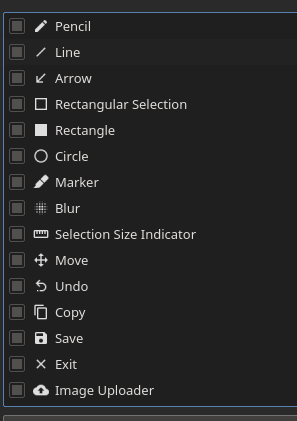
Maybe im stupid, but i have no Text in config window (built from git)
 averrin
on 6 Jul 2018
averrin
on 6 Jul 2018
@averrin, are you sure you are running the last version? Sometime you have a background flameshot lingering around. Use killall flameshot and the restart it.
 Rmano
on 6 Jul 2018
Rmano
on 6 Jul 2018
Oh… I remove folder, reclone, rebuild but forgot to kill=(
Thanks.
averrin
on 6 Jul 2018
@lupoDharkael When will be this enhancement released? We have been waiting for a long time :(
 quanengineering
on 18 Jul 2018
quanengineering
on 18 Jul 2018
@tagwint I will upgrade docker build environment to fedora28 and remove fedora26 build environment.
Also, I will add Ubuntu 18.04 and flatpak support. Wait me good news!
 ZetaoYang
on 26 Jul 2018
ZetaoYang
on 26 Jul 2018
I installed flameshot for the first time today on opensuse 15 but I cannot see the text feature out there in the configurations. I was expecting that it hasn't actually implemented yet, but I came across this issue and it seems that's implemented already. Did I miss something?
Here's my configurations:

OS: openSUSE Leap 15.0
Flameshot: v0.5.1
BTW, Thumbs up for this great tool, linux was missing this for long time :+1:
 MagedMYoussef
on 3 Aug 2018
MagedMYoussef
on 3 Aug 2018
If the text option is to be added, any idea when?
 andrewspag
on 6 Sep 2018
andrewspag
on 6 Sep 2018
@andreawspag It's already in. See https://github.com/lupoDharkael/flameshot/issues/187#issuecomment-418352456
Rmano
on 6 Sep 2018
Thank you so much for the quick response.
Regards,
Andrew Spagnoletti
http://nitric.co.za/ http://nitric.co.za
[email protected]
www.lawpracticeza.com
082-557-7771
On Thu, 6 Sep 2018 at 11:10, Romano Giannetti notifications@github.com
wrote:
@andreawspag It's already in.
—
You are receiving this because you commented.
Reply to this email directly, view it on GitHub
https://github.com/lupoDharkael/flameshot/issues/11#issuecomment-419022524,
or mute the thread
https://github.com/notifications/unsubscribe-auth/AD_wCzliqGDj1_zodeqkTX8vLm0qpEK_ks5uYOaQgaJpZM4O1qqJ
.
andrewspag
on 6 Sep 2018
This ticket is closed - but where is the information about the application version when it was fixed?
 nnar1o
on 15 Feb 2019
ZetaoYang
on 15 Feb 2019
nnar1o
on 15 Feb 2019
ZetaoYang
on 15 Feb 2019
So, on the text tool, I hope you can make it as easy as the other tools, where you'd be able to increase/decrease font-size by simply scrolling your mouse.
What would be the easiest work-around for adding text to images? Maybe an in-between step, for adding this feature, would be to add a button that exports the current screenshot into another application that has this missing feature; it could even be a web application like this one:
https://www.befunky.com/features/text-editor/
That was just the first one I found doing this search:
https://www.google.com/search?as_q=write+text+on+images+online
Perhaps you could add a button like this and default it to a particular tool, but also add a preference allowing the user to set that button to export the image to a tool of his choice. When the button is clicked, you simply write the image to some temp location and run a command that opens that temp-file with the application.
Anyway, thanks for the tool; I use it a great deal and really appreciate it now that Shutter isn't supported much anymore.
 Lonniebiz
on 19 Mar 2019
Lonniebiz
on 19 Mar 2019
Thank you.
I use it in Linux Mint 19.1 Cinnamon.
Came from Windows recently.
Used SnagIt which costs a lot.
Figured I would thank you and ask that you add text via a donation.
Thanx!

 zeddock
on 14 May 2019
zeddock
on 14 May 2019
need text adding badly
 hq9000
on 3 Jul 2019
hq9000
on 3 Jul 2019
This feature is in version 0.6. I managed to do that by adding new PPA
sudo add-apt-repository ppa:sicklylife/flameshot
sudo apt-get update
and upgrade it to v 0.6 . I did it on my Ubuntu 18.04
 sybozz
on 1 Oct 2019
sybozz
on 1 Oct 2019
Before you recommend to add another (untrusted) PPA to someones system, you should at least warn that adding PPAs could be problematic depending on what those PPAs do contain or not.
It's way more secure to compile flameshot from source (and it's not rocket science to do so) rather than adding some PPA you do not know
Just my 2 cents
DaVukovic
on 1 Oct 2019
What DaVukovic says is probably best, but I just wanted to mention that there is also a snap package that's easy to install:
https://snapcraft.io/flameshot-app
Lonniebiz
on 1 Oct 2019
@mxdrive when you first launch the gui tool, theres a little box in the middle of screen, you should really read that, it explains many of the features, it would have told you to use the mousewheel to adjust size.
Also you can find the same information on the main page: https://github.com/lupoDharkael/flameshot/#keyboard-shortcuts
@mazestricks
Here is how I installed the latest from github:cd ~ sudo apt-get remove flameshot sudo pkill flameshot sudo apt-get install git g++ build-essential qt5-qmake qt5-default qttools5-dev-tools git clone https://github.com/lupoDharkael/flameshot cd flameshot sudo qmake sudo make ./flameshotthe first
./flameshotis to start the background service
open a second terminal and run:
./flameshot config(this is to enable the text feature)when installing from git clone you do not get an application menu item, on kubuntu I right click the application launcher and select edit applications. then under utilities I right click and enter new item, name it flameshot and for the command put this:
/home/xekon/flameshot/flameshot
That is the launcher for the serviceyou can create another launcher for the gui tool:
/home/xekon/flameshot/flameshot gui -p ~/obviously replace xekon with your linux user name to reflect where the files are located.
On every boot the service needs to be started otherwise you have to manually start the service, I added the service to my Autostart in system settings.
I went one step further and bound the gui tool to a hotkey, goto system settings, shortcuts, custom shortcuts
I set the trigger to my hotkey I wanted to use and the action/command to:
/home/xekon/flameshot/flameshot gui -p ~/
I have errors with this instruction in Ubuntu 18.04
sudo qmake
Updating '/home/moledet/tmp/flameshot/translations/Internationalization_es.qm'...
Removing translations equal to source text in '/home/moledet/tmp/flameshot/translations/Internationalization_es.qm'...
    Создан 151 перевод (151 завершённых и 0 незавершённых)
Updating '/home/moledet/tmp/flameshot/translations/Internationalization_ca.qm'...
Removing translations equal to source text in '/home/moledet/tmp/flameshot/translations/Internationalization_ca.qm'...
    Создано 126 переводов (124 завершённых и 2 незавершённых)
    Пропущено 24 непереведённых исходных текста
Updating '/home/moledet/tmp/flameshot/translations/Internationalization_ru.qm'...
Removing translations equal to source text in '/home/moledet/tmp/flameshot/translations/Internationalization_ru.qm'...
    Создано 156 переводов (156 завершённых и 0 незавершённых)
Updating '/home/moledet/tmp/flameshot/translations/Internationalization_zh_CN.qm'...
Removing translations equal to source text in '/home/moledet/tmp/flameshot/translations/Internationalization_zh_CN.qm'...
    Создано 169 переводов (169 завершённых и 0 незавершённых)
Updating '/home/moledet/tmp/flameshot/translations/Internationalization_zh_TW.qm'...
Removing translations equal to source text in '/home/moledet/tmp/flameshot/translations/Internationalization_zh_TW.qm'...
    Создано 132 перевода (129 завершённых и 3 незавершённых)
    Пропущено 24 непереведённых исходных текста
Updating '/home/moledet/tmp/flameshot/translations/Internationalization_tr.qm'...
Removing translations equal to source text in '/home/moledet/tmp/flameshot/translations/Internationalization_tr.qm'...
    Создано 149 переводов (148 завершённых и 1 незавершённых)
    Пропущено 7 непереведённых исходных текстов
Updating '/home/moledet/tmp/flameshot/translations/Internationalization_ka.qm'...
Removing translations equal to source text in '/home/moledet/tmp/flameshot/translations/Internationalization_ka.qm'...
    Создано 132 перевода (129 завершённых и 3 незавершённых)
    Пропущено 24 непереведённых исходных текста
Warning: dropping duplicate messages in '/home/moledet/tmp/flameshot/translations/Internationalization_fr.qm':

* Context: SidePanelWidget
* Source: Active color:

* Context: SidePanelWidget
* Source: Press ESC to cancel

* Context: SidePanelWidget
* Source: Grab Color

Updating '/home/moledet/tmp/flameshot/translations/Internationalization_fr.qm'...
Removing translations equal to source text in '/home/moledet/tmp/flameshot/translations/Internationalization_fr.qm'...
    Создано 149 переводов (149 завершённых и 0 незавершённых)
    Пропущено 3 непереведённых исходных текста
Updating '/home/moledet/tmp/flameshot/translations/Internationalization_pl.qm'...
Removing translations equal to source text in '/home/moledet/tmp/flameshot/translations/Internationalization_pl.qm'...
    Создано 146 переводов (146 завершённых и 0 незавершённых)
    Пропущено 4 непереведённых исходных текста
Updating '/home/moledet/tmp/flameshot/translations/Internationalization_ja.qm'...
Removing translations equal to source text in '/home/moledet/tmp/flameshot/translations/Internationalization_ja.qm'...
    Создано 154 перевода (154 завершённых и 0 незавершённых)
    Пропущено 2 непереведённых исходных текста
Updating '/home/moledet/tmp/flameshot/translations/Internationalization_pt_br.qm'...
Removing translations equal to source text in '/home/moledet/tmp/flameshot/translations/Internationalization_pt_br.qm'...
    Создано 150 переводов (150 завершённых и 0 незавершённых)
    Пропущено 2 непереведённых исходных текста
Updating '/home/moledet/tmp/flameshot/translations/Internationalization_sr.qm'...
Removing translations equal to source text in '/home/moledet/tmp/flameshot/translations/Internationalization_sr.qm'...
    Создано 154 перевода (154 завершённых и 0 незавершённых)
    Пропущено 2 непереведённых исходных текста
Updating '/home/moledet/tmp/flameshot/translations/Internationalization_uk.qm'...
Removing translations equal to source text in '/home/moledet/tmp/flameshot/translations/Internationalization_uk.qm'...
    Создано 156 переводов (156 завершённых и 0 незавершённых)
Updating '/home/moledet/tmp/flameshot/translations/Internationalization_de_DE.qm'...
Removing translations equal to source text in '/home/moledet/tmp/flameshot/translations/Internationalization_de_DE.qm'...
    Создано 153 перевода (153 завершённых и 0 незавершённых)
Updating '/home/moledet/tmp/flameshot/translations/Internationalization_sk.qm'...
Removing translations equal to source text in '/home/moledet/tmp/flameshot/translations/Internationalization_sk.qm'...
    Создано 168 переводов (168 завершённых и 0 незавершённых)
Project ERROR: Unknown module(s) in QT: svg
 moledet
on 20 Feb 2020
moledet
on 20 Feb 2020
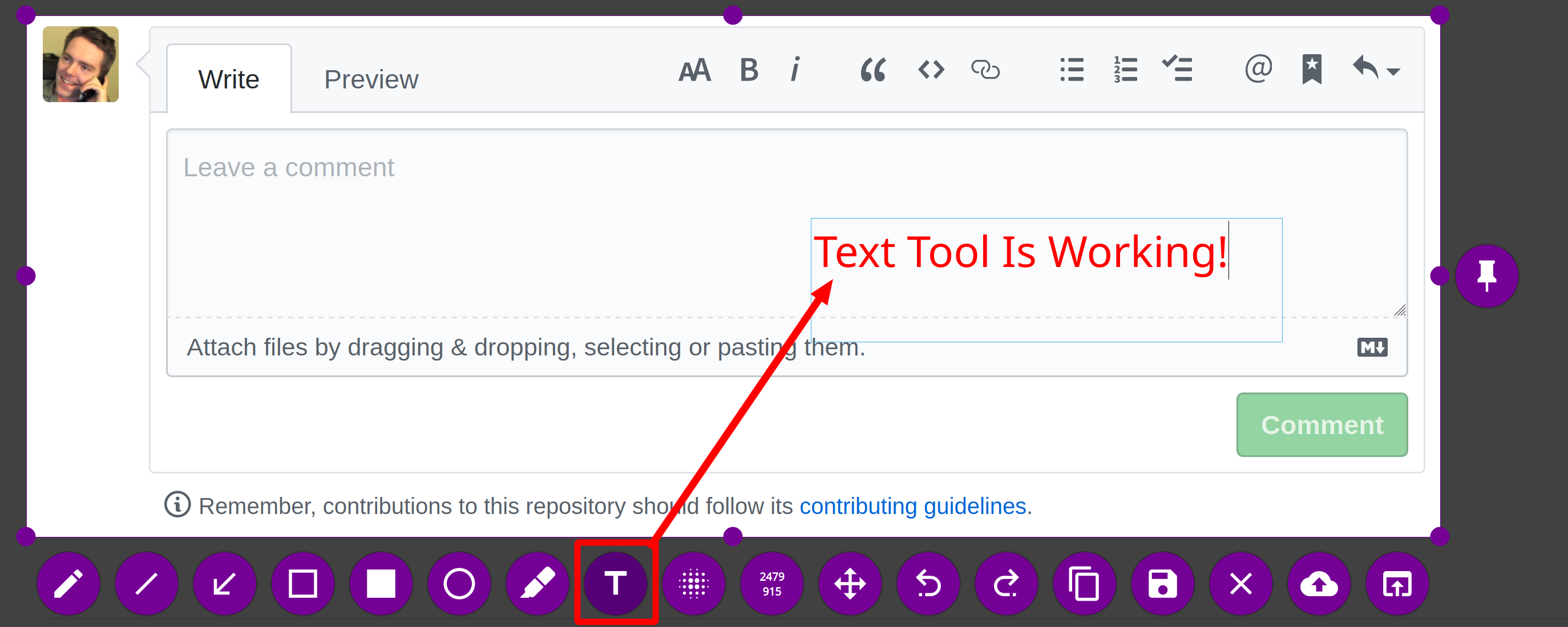
Awesome! In my version of Flameshot (installed via sudo snap install flameshot-app), the text tool is working:
Lonniebiz
on 27 Feb 2020
@Lonniebiz hi, I must tell you flameshot-app is not the latest package. Please install the new build snap from https://github.com/flameshotapp/packages/releases manually.
ZetaoYang
on 28 Feb 2020
@ZetaoYang If you update the snap that is at sudo snap install flameshot-app, then it will automatically update my snap soon enough.
Lonniebiz
on 29 Feb 2020
Extraordinary app!
I just installed v0.6.0 (downloaded from the web) on my Linux Mint 19.3, but I don't see the Text button. That's the main feature I am missing. Am I doing something wrong?
Also Why the Linux Mint repository has an outdated v0.5.1-2? And how can we request that they include the latest version?

Thanks for the fantastic work!
 sheykandi
on 1 Apr 2020
sheykandi
on 1 Apr 2020
@sheykandi run flameshot config and enable the text tool.
 bogdbo
on 1 Apr 2020
bogdbo
on 1 Apr 2020
Tick the box that says text
xircon
on 2 Apr 2020
@xircon Oh my!
Am I really that blind? Thanks and sorry about that.
 mnedelchevbg
on 2 Apr 2020
mnedelchevbg
on 2 Apr 2020
@sheykandi run
flameshot configand enable the text tool.
Thanks so much @bogdbo. Easier as that! Now I can see the text button.
sheykandi
on 2 Apr 2020
Seems not active.
I recommend ksnip. Nearly perfect.
amitbha
on 7 Apr 2020
W00t, been wanting this feature since I installed Flameshot a year or so ago. Had no idea I had to run flameshot config, but now I got it and it is great!
How can we enable this for existing users who won't realize to come searching for this issue or do a new install?
 ElijahLynn
on 8 May 2020
ElijahLynn
on 8 May 2020
Weird. I just downloaded the deb from the releases section, I run flameshot config and see no text tool to enable (I scrolled up and down).
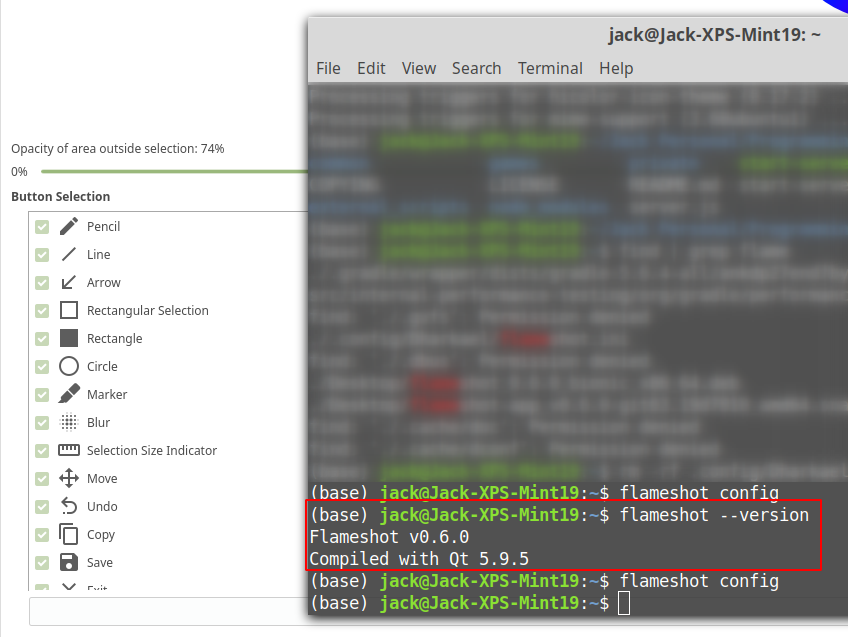
Let me know if I'm missing something. I also uninstalled a previous version and deleted the .config folder. I'm on Linux Mint 19.2. Totally weird.
 jaxankey
on 11 May 2020
jaxankey
on 11 May 2020
That is odd, it should be in between the "Marker" and "Blur" options.

ElijahLynn
on 13 May 2020
Maybe there are some config files left over from a previous install? I really tried to remove everything.
From: Elijah Lynn notifications@github.com
Sent: Wednesday, May 13, 2020 12:50 PM
To: lupoDharkael/flameshot flameshot@noreply.github.com
Cc: Jack Sankey jack.sankey@gmail.com; Comment comment@noreply.github.com
Subject: Re: [lupoDharkael/flameshot] Adding text? (#11)
That is odd, it should be in between the "Marker" and "Blur" options.
[image]https://user-images.githubusercontent.com/1504756/81841327-1cdc6a80-94ff-11ea-94de-96140973e601.png
—
You are receiving this because you commented.
Reply to this email directly, view it on GitHubhttps://github.com/lupoDharkael/flameshot/issues/11#issuecomment-628114524, or unsubscribehttps://github.com/notifications/unsubscribe-auth/AB7ELJ7DATUJMGF5YCLBUKDRRLFU5ANCNFSM4DWWVKEQ.
jaxankey
on 13 May 2020
@jaxankey
I am using Linux Mint 19.2 too and found solution:
- Update flameshot to lastest release (git clone and build):
Flameshot v0.6.0-70-g91ba28c
Compiled with Qt 5.9.5 - And run
pkill flameshot; flameshot config
 capricornusx
on 14 May 2020
capricornusx
on 14 May 2020
Thanks! I just updated to 19.3 and reinstalled the bionic. It's there now (though not easy to use; font size?)
Cheers,
Jack
From: Dmitry Dubinin notifications@github.com
Sent: Thursday, May 14, 2020 4:27 AM
To: lupoDharkael/flameshot flameshot@noreply.github.com
Cc: Jack Sankey jack.sankey@gmail.com; Mention mention@noreply.github.com
Subject: Re: [lupoDharkael/flameshot] Adding text? (#11)
@jaxankeyhttps://github.com/jaxankey
I am using Linux Mint 19.2 too and found solution:
- Update flameshot to lastest release (git clone and build):
Flameshot v0.6.0-70-g91ba28c
Compiled with Qt 5.9.5 - And run pkill flameshot; flameshot config
—
You are receiving this because you were mentioned.
Reply to this email directly, view it on GitHubhttps://github.com/lupoDharkael/flameshot/issues/11#issuecomment-628478911, or unsubscribehttps://github.com/notifications/unsubscribe-auth/AB7ELJ4FZBKR5XTFS65HCBDRROTQFANCNFSM4DWWVKEQ.
jaxankey
on 14 May 2020
@jaxankey
You can use control+scroll with your mouse to change text size, but the next element will also get enlarged or shrank so then you need to scroll back. Not the best answer but it works.
Duplicate of #584
https://github.com/lupoDharkael/flameshot/issues/584#issuecomment-514774974
capricornusx
on 14 May 2020
Very nice. Can I have a hotkey to confirm and save the image with text?
 amosbird
on 31 Aug 2020
amosbird
on 31 Aug 2020
Related issues
 makz27
·
4Comments
makz27
·
4Comments
 szszoke
·
4Comments
szszoke
·
4Comments
 mrinvisible0
·
4Comments
mrinvisible0
·
4Comments
 kylewill
·
4Comments
kylewill
·
4Comments
 bingoIsCoder
·
4Comments
bingoIsCoder
·
4Comments
Most helpful comment
@lupoDharkael Windows already has rock solid choices for screenshot apps. I would argue that you will have much more impact by focusing on linux. Linux is suffering in the screenshot department - Shutter is the only usable screenshot app I could ever find for this type of application, but since it's no longer under development and doesn't support wayland, its death will be inevitable. Flameshot has been a 90% satisfactory replacement for me - the 10% being the ability to add text.
Just my two cents - thanks for your work!