First-contributions: Make the contributor list clear(Alphabetical and correct render of markdown)
🐞 Problem
The contributor list contain unorganized names and incorrect markdown syntax
🎯 Goal
To make the contributor list clean so anyone can find any name by alphabetical order by name or by username.
💡 Possible solutions
Apply a nodejs sort script
📋 Steps to solve the problem
- Readme should include a instruction that name should be added in correct markdown syntax
- If not then that PR should not merged
- Contributor should ask to correct the syntax to get their things merged.
- Celebrate your contribution to this project. 🎉
 darkRaspberry
All 17 comments
I am on this task
 Anita-ihuman
on 22 Jul 2020
Anita-ihuman
on 22 Jul 2020
YUP
darkRaspberry
on 22 Jul 2020
@darkRaspberry, I think we have different ideas about the content of Contributors.md. In my humble opinion, content in Contributors.md doesn't matter.
The purpose of this tutorial is to help people to learn how to do pull requests on GitHub. Contributors.md is merely there to simulate a change.
We won't keep the content in Contributors.md forever. When this file gets bigger and new users find it hard to open it in their text editor, we will remove most of it. Accessibility for new users is quite important.
To make the contributor list clean so anyone can find any name by alphabetical order by name or by username.
I don't understand this use case. Why is this important?
 Roshanjossey
on 23 Jul 2020
Roshanjossey
on 23 Jul 2020
@Roshanjossey
I think this as a event so that people can remember this awesome event.
Like this is our first PULL REQUEST aka PR.
so people can share snippet as "See my first PR.
Like achievements.
In this case, this sorting is great.
Although you can always close this issue. You are collaborator.
darkRaspberry
on 23 Jul 2020
Pull requests and patches are saved by GitHub. It'll be easier to use GitHub's search to find it
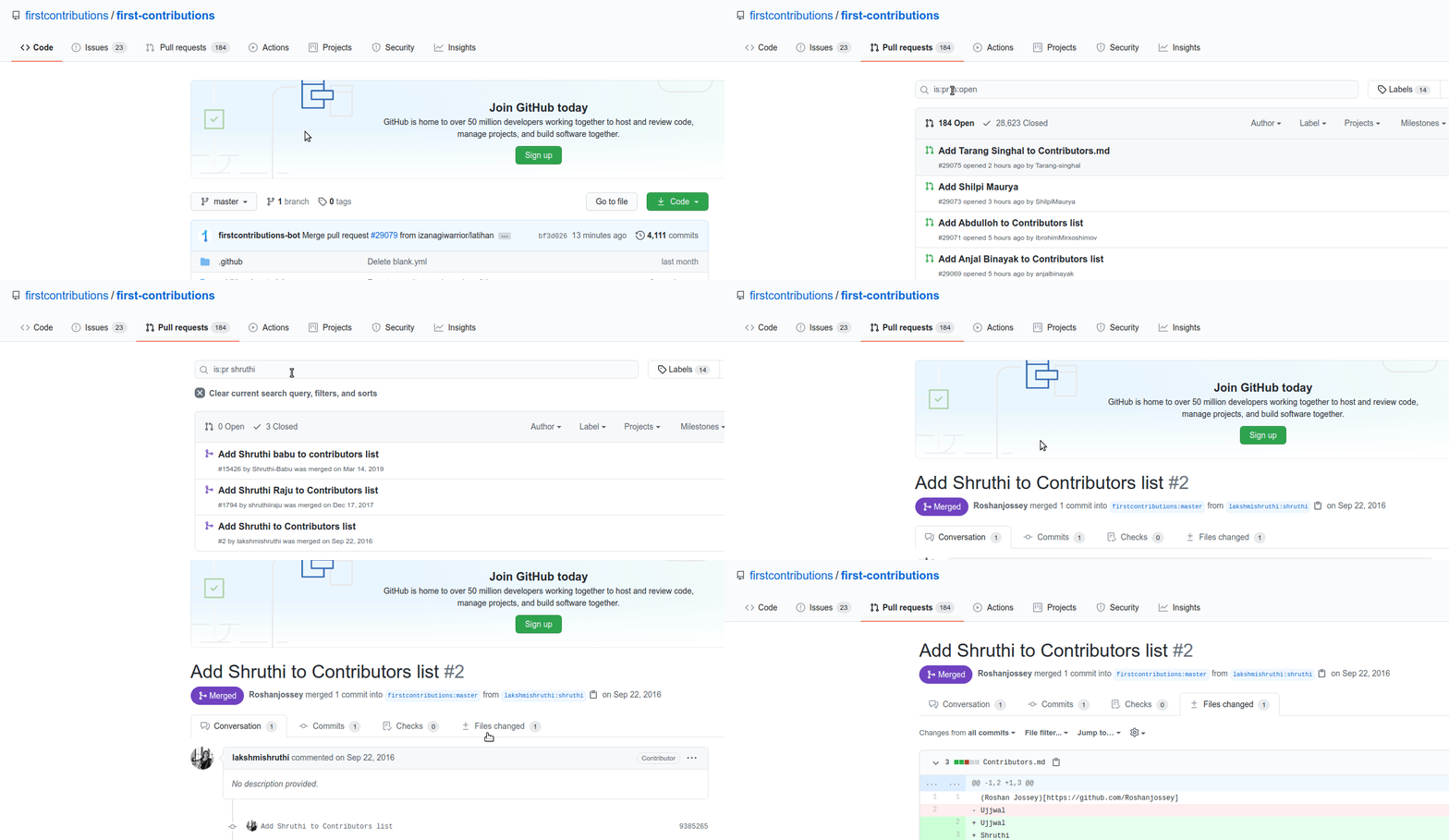
This is the second pull request in this repo. Their name is not in Contributors.md, but the pull request is still there.
Roshanjossey
on 23 Jul 2020
Although you can always close this issue. You are collaborator.
I'm not trying to close this issue. I'm trying to understand your point.
Roshanjossey
on 23 Jul 2020
Pull requests and patches are saved by GitHub. It'll be easier to use GitHub's search to find it
Thanks for the tutorial. I know search pull request.
As I stated. That's my only point. It just more appealing to see a sorted list and find your name in list.😊
I'm not trying to close this issue. I'm trying to understand your point.
OK I am just saying that
darkRaspberry
on 23 Jul 2020
Again, I think we have different understanding about the content of that file.
Think about it like this. Let's say you're starting to learn Javascript and start with
console.log('Hello world!")
Here, the string Hello world doesn't really matter. It could be I can code, hello or hi Javascript and it doesn't make a difference.
What you're learning is how to invoke a function or there is a console object and you're calling log method on it.
Contributors.md is like Hello world. It's a convention we use as a suggestion to users. It doesn't matter if your name gets added in that file, if somebody edits/removes it later or even if your pull request is getting merged.
If you submit a pull request, you have gone through the tutorial successfully.
Roshanjossey
on 23 Jul 2020
YUP.
darkRaspberry
on 23 Jul 2020
@darkRaspberry, If you don't mind, I'll keep this issue open. I had to reply to similar questions before and I think it make sense to get the opinion of other people on this issue. Maybe they have other perspectives.
Roshanjossey
on 23 Jul 2020
Yup. 😊
darkRaspberry
on 24 Jul 2020
I am facing some issues with this.
I ran a script that fetches the contributors list from github and then write it to a Contribution.md file. The issue is is that the response from github returns only 420 contributors for the project
Below is the code
const fs = require("fs");
const path = require("path");
const request = require("request-promise");

let apiUrl =
  "https://api.github.com/repos/firstcontributions/first-contributions/contributors?per_page=100";

// Change the page limit (currently 10) to 50
for (let page = 1; page <= 10; page++) {
  let options = {
    uri: `${apiUrl}&page=${page}`,
    headers: {
      "User-Agent": "Request-Promise",
    },
    json: true,
  };
  request(options)
    .then((data) => {
      if (data) {
        writeToFile(data.sort(function(a, b){
          if(a.login < b.login) { return -1; }
          if(a.login > b.login) { return 1; }
          return 0;
      }));
        console.log(`Results for page ${page} retrieved => ${data.length}`);
      } else {
        console.log(`Data retrieval failed for page ${page}`);
      }
    })
    .catch((e) => {
      console.log(`Data retrieval failed for page ${page} with error => ${e}`);
    });
}

function writeToFile(data) {
  for (let profile of data) {
    let markdown = `* [${profile.login}](${profile.html_url})\n`;
    fs.appendFile(path.join(__dirname, "Contributor.md"), markdown, () => {});
  }
}
@Anita-ihuman, please go through the rest of the comments in this thread. We've decided not to address this issue.
Now to debug the script, check individual pages https://api.github.com/repos/firstcontributions/first-contributions/contributors?per_page=100&page=5, https://api.github.com/repos/firstcontributions/first-contributions/contributors?per_page=100&page=6
Also, GitHub will also rate limit without an access token.
Roshanjossey
on 26 Jul 2020
I don't wanna add much to the discussion as I see it the way @Roshanjossey said.
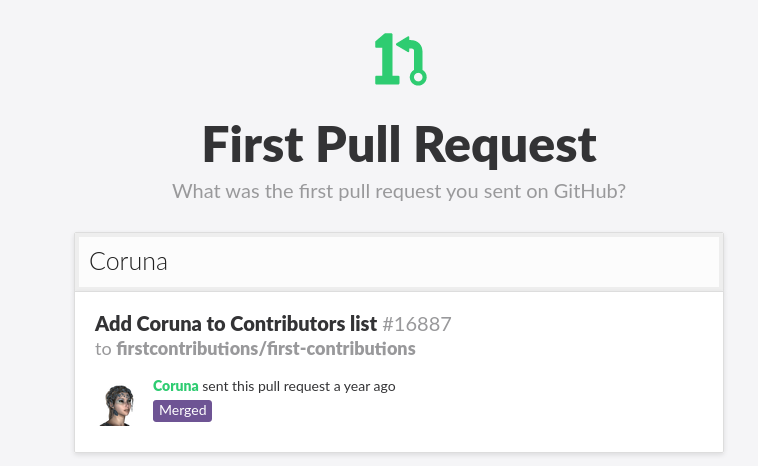
For those who want to show their first PR as a kind of trophy I recommend https://firstpr.me/ :smile:
 Coruna
on 15 Aug 2020
Coruna
on 15 Aug 2020
Great find @Coruna.
 swapniljha001
on 2 Sep 2020
swapniljha001
on 2 Sep 2020
I'm getting more pull requests about sorting contributors list alphabetically.
It could be that those contributors are only reading the title of this issue and not going through the comments to understand what we decided here. So, I'm closing this issue to avoid confusion for people who might do that.
Roshanjossey
on 7 Sep 2020
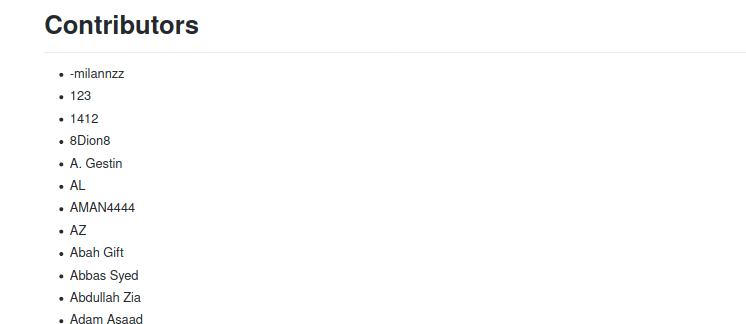
Learning to use Github Actions and thought this might be the right place to interact
Here is the preview Happy To Learn
 MallikarjunHt
on 23 Sep 2020
MallikarjunHt
on 23 Sep 2020
Related issues
 palash25
·
5Comments
palash25
·
5Comments
 kevinnls
·
6Comments
kevinnls
·
6Comments
 chnuessli
·
12Comments
chnuessli
·
12Comments
 TomerPacific
·
9Comments
TomerPacific
·
9Comments
 syakubov
·
5Comments
syakubov
·
5Comments
Most helpful comment
I'm getting more pull requests about sorting contributors list alphabetically.
It could be that those contributors are only reading the title of this issue and not going through the comments to understand what we decided here. So, I'm closing this issue to avoid confusion for people who might do that.