Firefox-ios: Add ability to set custom identity.sync.tokenserver.uri for self-hosted Sync
User Agent: Mozilla/5.0 (X11; CrOS x86_64 11316.165.0) AppleWebKit/537.36 (KHTML, like Gecko) Chrome/72.0.3626.122 Safari/537.36
Related issue: https://github.com/mozilla-mobile/firefox-ios/issues/3150
Steps to reproduce:
There is currently no way to specify a custom URL for a Firefox Sync Server (token url) while using the publicly available, Mozilla-hosted Firefox Accounts service.
Actual results:
There is no option to do this.
Expected results:
There should be an option like on Android to specify to custom token URL for self-hosted sync server. This option is available on desktop Firefox and on Firefox for Android.
 SimonBasca
All 81 comments
Jerry Heiselman:
I have attempted to create a fxa-client-configuration file located at https://thor.heiselman.com/.well-known/fxa-client-configuration that mirrors the one served by accounts.firefox.com with the one change being the URL for the sync tokenserver url to point to my own.
When configuring this URL in Firefox on iOS using the method of revealing the hidden Advance Account Settings menu by tapping repeatedly on the Version string in the Settings. I filled in the base URL for my server (https://thor.heiselman.com) and enable the "Use Custom Account Service" option. Once I enable the option, I can see the client request the fxa-client-configuration file from my server successfully, however, it then attempts to load the login page on my server despite the configuration pointing all other services back to the public Firefox service.
m.m.[email protected]:
Can we bump the priority of this bug from a P3? Many people seem to be holding off moving to the FF ecosystem simply because they can’t carry their privately stored data without the additional cost of setting up an account server.
This clearly breaks the user experience and I’d have imagined that after a couple years of back and forth on Github this would’ve received more attention.
SimonBasca
on 20 May 2019
Also mentioned in #3150 (which was closed in favor of the bug in the bugzilla system).
 mmnaseri
on 24 May 2019
mmnaseri
on 24 May 2019
I was the submitter of the Bugzilla report. I am still willing to work with someone here to help resolve this.
 jheiselman
on 24 May 2019
jheiselman
on 24 May 2019
This option (choose what Firefox Sync server to use) should definitely be available on iOS (as it appears to be available on Android). Looking forward to being able to set it up.
 jellium
on 30 May 2019
jellium
on 30 May 2019
I recently made the switch to Firefox as my default browser (I think a lot of developer types have it installed, but drift back to their old setups for various comfort/muscle memory reasons). I would absolutely love to have the iOS version support a custom sync server.
There are quite a few "homelab" types that run significant infrastructure at home (i.e. VM hosts), and running something like a custom sync server doesn't add any extra overhead to their tech setup. I would absolutely run it, but it doesn't make any sense unless all of my Firefox devices can also use it.
 mwegner
on 30 May 2019
mwegner
on 30 May 2019
When implemented, ensure URLs are https or localhost. This is a sec requirement from app services.
 garvankeeley
on 5 Jun 2019
garvankeeley
on 5 Jun 2019
@garvankeeley if you look at my comment (copied from the original bug), all URLs are HTTPS with valid LE certs.
jheiselman
on 6 Jun 2019
On desktop this is set in about:config using identity.fxaccounts.autoconfig.uri
Docs: https://moz-services-docs.readthedocs.io/en/latest/howtos/run-fxa.html
garvankeeley
on 13 Jun 2019
@garvankeeley this issue is specifically for Firefox on iOS which has no about:config
jheiselman
on 13 Jun 2019
Is there a schedule available for this feature?
Many people seem to be holding off moving to the FF ecosystem simply because they can’t carry their privately stored data without the additional cost of setting up an account server.
This is exactly the reason why I don't use FF sync on any of my devices. Just because a self-hosted sync server it's not implemented on iOS :(
 nook24
on 13 Jun 2019
nook24
on 13 Jun 2019
Same here @nook24. I already have the sync server setup for my Linux desktop. But I don’t use FF on my iPhone because of this. I would in a heartbeat though.
jheiselman
on 13 Jun 2019
I have confirmed this works as-intended (by the Sync team), but the intention is that the entire stack is being hosted on the custom URL where the config file is.
garvankeeley
on 13 Jun 2019
Closing this bug as works as-intended, the docs here still apply as to how to use your own fxa and sync stack: https://moz-services-docs.readthedocs.io/en/latest/howtos/run-fxa.html
garvankeeley
on 13 Jun 2019
I’m very disappointed that we (the users) simply aren’t being heard. We know it’s working as intended. We want how it works to change. I feel like plenty of people have laid out perfectly valid reasons for the behavior to change. And the lack of willingness to even acknowledge that this leaves iOS at a distinct disadvantage shows a poor attitude towards the Firefox community as a whole.
I stand by my offer to help test any changes if anyone is willing to actually listen and attempt to implement this feature request.
jheiselman
on 13 Jun 2019
You are being heard. In fact, we were willing to spend a few hours today investigating this before concluding that this is not solely an iOS issue, but an FxA issue for something that is currently not supported. With limited resources, we have to prioritize issues and feature requests and the overall number of users who want this feature is almost immeasurably small.
 justindarc
on 13 Jun 2019
justindarc
on 13 Jun 2019
You are also welcome to run your own full FxA/Sync stack and you can follow the steps outlined here to configure iOS to work with it: https://moz-services-docs.readthedocs.io/en/latest/howtos/run-fxa.html
justindarc
on 13 Jun 2019
I will be available to have a discussion around 2:00 pm US/Central and for most of the day after.
As for running a full stack server, it has been stated by several users that there are specific reasons for some of us to not want to do that.
jheiselman
on 13 Jun 2019
This is a discussion to have with the FxA/Sync team, they implemented this feature in the product with the intention that it be consistent with Android behaviour. If more users make this request across the various products then I could see that changing their opinion.
garvankeeley
on 13 Jun 2019
Thanks for your time and investigation effort. I really appreciate this.
From the docs :
Note By default, a server set up using this guide will defer authentication to the Mozilla-hosted accounts server at https://accounts.firefox.com.
You can safely use the Mozilla-hosted Firefox Accounts server in combination with a self-hosted sync storage server. The authentication and encryption protocols are designed so that the account server does not know the user’s plaintext password, and therefore cannot access their stored sync data.Alternatively, you can also Run your own Firefox Accounts Server to control all aspects of the system. The process for doing so is currently very experimental and not well documented.
I would say there should be a big fat warning, that the docs will not work for iOS devices.
I had given the /.well-known/fxa-client-configuration trick a shot but this didn't work. (As already expected).
This is a discussion to have with the FxA/Sync team, they implemented this feature in the product with the intention that it be consistent with Android behaviour.
I would really like to know why the option is not available on iOS. Is this an restriction from Apple or so?
I mean, it's available on Desktop and Android.
Again from the docs:
Since Firefox 33, Firefox for Android has supported custom sync servers. To configure Android Firefox 44 and later to talk to your new Sync server, just set the “identity.sync.tokenserver.uri” exactly as above before signing in to Firefox Accounts and Sync on your Android device.
Are there just not enough iOS based Firefox users?
Please don't get me wrong. I don't want to blame anyone why this isn't implemented already. I'm just wondering why there is a different behavior.
nook24
on 13 Jun 2019
I would say there should be a big fat warning, that the docs will not work for iOS devices.
I had given the/.well-known/fxa-client-configurationtrick a shot but this didn't work. (As already expected).
Can you indicate what part doesn't work specifically on iOS? If so, I can report this to the FxA/Sync team to investigate further.
The bug report here indicates that the content server is not on the same host as the /.well-known/fxa-client-configuration, which according to the server team, is not supported (which is correct behaviour for all platforms).
I would really like to know why the option is not available on iOS. Is this an restriction from Apple or so?
Firefox iOS should behave like Desktop and Android, if I can show that it isn't behaving consistently, I can get traction on getting something fixed.
garvankeeley
on 13 Jun 2019
Firefox on iOS doesn't have the ability to use about:config to configure the syncserver (token server) URL. Therefore, it already doesn't have feature parity with Android and desktop versions. This means that iOS users _cannot_ follow the same setup procedure as Android and desktop users.
iOS users only have the option to "Use Custom Account Service". This asks for a single URL at which it will retrieve the /.well-known/fxa-client-configuration. The structure of this file is a listing of the different components with URLs for each piece. The documentation indicates that one can set each value independently.
While Firefox on iOS does query and retrieve the fxa-client-configuration file, it doesn't obey it as far as the different URLs are listed. As stated earlier in this issue, I downloaded the file from the public Firefox Accounts service and changed only the URL for the token server and hosted that changed file on my own server (same one hosting the syncserver). The file contents are as follows:
{"auth_server_base_url":"https://api.accounts.firefox.com","oauth_server_base_url":"https://oauth.accounts.firefox.com","pairing_server_base_uri":"wss://channelserver.services.mozilla.com","profile_server_base_url":"https://profile.accounts.firefox.com","sync_tokenserver_base_url":"https://thor.heiselman.com/sync/token/1.0/sync/1.5"}
Firefox on iOS doesn't seem to use any of these other values and instead attend to authorize against the hosting server instead of any of the others listed here.
jheiselman
on 13 Jun 2019
- I installed my Sync Server like described in: https://moz-services-docs.readthedocs.io/en/latest/howtos/run-sync-1.5.html
- I created an Firefox Sync Account at https://accounts.firefox.com
- I created: https://sync.nook24.eu/.well-known/fxa-client-configuration
- On my Desktop Firefox (Mac and Windows) i set
identity.sync.tokenserver.uritohttps://sync.nook24.eu/token/1.0/sync/1.5usingabout:config - Desktop Sync works.
iOS Setup:
- Advance Acount Settings
- Set Custom Account Url to
https://sync.nook24.euand enable "Use custom Account Service" - Check access.log:
xxx.xxx.xxx.xxx - - [13/Jun/2019:21:26:39 +0200] "GET /.well-known/fxa-client-configuration HTTP/1.1" 304 5373 "-" "Client/15323 CFNetwork/976 Darwin/18.2.0" - Login to Sync ("Bei Sync anmelden") Firefox tries to load the login page from my server:
xxx.xxx.xxx.xxx - - [13/Jun/2019:21:27:37 +0200] "GET /signin?service=sync&context=fx_ios_v1 HTTP/1.1" 404 5542 "-" "Mozilla/5.0 (iPhone; CPU iPhone OS 12_1_4 like Mac OS X) AppleWebKit/605.1.15 (KHTML, like Gecko) FxiOS/17.3b15323 Mobile/16D57 Safari/605.1.15" - Firefox error: Could not load page ("Seite konnte nicht geladen werden.")
nook24
on 13 Jun 2019
@vbudhram do you mind looking at the last comment, the user was able to avoid hosting the content server when setting identity.sync.tokenserver.uri on Desktop, but this appears unavoidable on iOS. Should iOS not behave the same?
garvankeeley
on 13 Jun 2019
These are the exact instructions I followed as well.
jheiselman
on 13 Jun 2019
Ok, after talking with some more FxA folks, it seems that you are correct and this should be supportable as long as we add a new pref on iOS explicitly for identity.sync.tokenserver.uri. I'll update the title to add clarity here so that this work can get scheduled.
justindarc
on 13 Jun 2019
Sounds good! Looking forward to get this.
Many thanks to all of you.
nook24
on 13 Jun 2019
Thank you justindarc. This looks like it will work great for us!
jheiselman
on 13 Jun 2019
No problem. Sorry for the confusion.
justindarc
on 13 Jun 2019
WIP pull request: https://github.com/mozilla-mobile/firefox-ios/pull/5158
justindarc
on 17 Jun 2019
I got the update on iOS today, thanks to all involved for making this happen!
Is it working for everybody as expected?
All I'm seeing is a GET /mozilla/token/1.0/sync/1.5 HTTP/2.0" 200 893.
Nothing for /storage/, no actual syncing.
Edit: it's 100% working on lighttpd! Thanks again to everybody!
 fireglow
on 7 Jul 2019
fireglow
on 7 Jul 2019
Installed the iOS update an hour ago and everything is working as expected. Set the token server, restarted Firefox and logged in to my Firefox account. Syncing is also working in both directions.
@fireglow My sync server is running under http (at least for now), maybe this makes a difference.
Thanks to all involved for making this happen!
 s-fiebig
on 7 Jul 2019
s-fiebig
on 7 Jul 2019
Works like expected for me, many thanks to all.
This is my setup: https://daniel-ziegler.com/computer/netzwerk/linux/2019/07/07/Firefox-Sync-iOS/
nook24
on 7 Jul 2019
Doesn't work for me :(
I use the docker ffsync image and a reverse-proxy.
I add my server : https://mydomain/token/1.0/sync/1.5
 Balooforever
on 9 Jul 2019
Balooforever
on 9 Jul 2019
I finally got the chance to test this out and am running into a problem.
I'm running the syncserver from Docker Hub (same as I always have). Firefox on my iPhone is able to set the token server, I'm able to login, and I see the request make it to the sync server. The device is added to my (Mozilla hosted) Firefox Account and my desktop browser pops up a notification saying that the iPhone was added to my account. I am able to send pages back and forth between my two browsers. However, my bookmarks, history, open tabs, and logins/passwords are not syncing.
All of the requests to my sync server are resulting in HTTP 200 status codes and I was using this sync server with my Android phone, so I think everything is setup properly there, but I'd be happy to do some testing/logging if someone points me in a direction.
jheiselman
on 10 Jul 2019
Same for me @jheiselman , thank for your post, i'm not english : it's hard for me to explain !
I use Docker Hub too and it's doesn't work.
Balooforever
on 10 Jul 2019
Same issue here. Logs give 200:
10.8.0.1 - - [14/Jul/2019:20:59:32 +0000] "GET /token/1.0/sync/1.5 HTTP/2.0" 200 513 "-" "Firefox-iOS-FxA/18.0b15690 (iPhone; iPhone OS 12.3.1) (Firefox)" 22306 "Host-firesync-bb8-fun-0" "http://172.22.0.22:5000" 4ms
10.8.0.1 - - [14/Jul/2019:20:59:45 +0000] "GET /token/1.0/sync/1.5 HTTP/2.0" 200 513 "-" "Firefox-iOS-FxA/18.0b15690 (iPhone; iPhone OS 12.3.1) (Firefox)" 22325 "Host-firesync-bb8-fun-0" "http://172.22.0.22:5000" 2ms
10.8.0.1 - - [14/Jul/2019:21:00:00 +0000] "GET /token/1.0/sync/1.5 HTTP/2.0" 200 513 "-" "Firefox-iOS-FxA/18.0b15690 (iPhone; iPhone OS 12.3.1) (Firefox)" 22339 "Host-firesync-bb8-fun-0" "http://172.22.0.22:5000" 2ms
10.8.0.1 - - [14/Jul/2019:21:00:03 +0000] "GET /token/1.0/sync/1.5 HTTP/2.0" 200 513 "-" "Firefox-iOS-FxA/18.0b15690 (iPhone; iPhone OS 12.3.1) (Firefox)" 22340 "Host-firesync-bb8-fun-0" "http://172.22.0.22:5000" 2ms
10.8.0.1 - - [14/Jul/2019:21:00:37 +0000] "GET /token/1.0/sync/1.5 HTTP/2.0" 200 513 "-" "Firefox-iOS-FxA/18.0b15690 (iPhone; iPhone OS 12.3.1) (Firefox)" 22360 "Host-firesync-bb8-fun-0" "http://172.22.0.22:5000" 2ms
10.8.0.1 - - [14/Jul/2019:21:00:40 +0000] "GET /token/1.0/sync/1.5 HTTP/2.0" 200 513 "-" "Firefox-iOS-FxA/18.0b15690 (iPhone; iPhone OS 12.3.1) (Firefox)" 22364 "Host-firesync-bb8-fun-0" "http://172.22.0.22:5000" 2ms
"Send tab to device" feature works sometimes (with a lot of lag and Firefox restarts). Bookmarks and other content sync doesn't work at all.
Running the latest mozilla/syncserver image (3f9bc839727f)
 captn3m0
on 14 Jul 2019
captn3m0
on 14 Jul 2019
@jheiselmann:
Same problem for me.
All other devices (PC, Android) are able to sync. I also see my iOS device on my Firefox devices list.
But the iOS device cannot sync any bookmark or "synced tabs". I can't even send a tab from another device to the iPad, because the iPad doesn't appear on the shown list. (Again: my iPad appears on the devices list on my profile!)
 BirgerK
on 25 Aug 2019
BirgerK
on 25 Aug 2019
Question for those that cannot get sync going:
Are you using nginx?
I tried and failed with nginx, had to set up a lighttpd on a dedicated port and switch every device, iOS or not, over to that port. Only then sync worked in iOS.
fireglow
on 25 Aug 2019
Yes, nginx. But no chance to change the proxy! Is it missing some headers?
All other devices (PC, Android, Mac) are able to sync without any problems.
BirgerK
on 25 Aug 2019
@fireglow I am not using nginx. I am using Caddy HTTP server.
Further, for those of us who can’t get it to work, it seems to be the same in that each of us can use it from a PC and Android. It’s only iOS based devices that don’t work. So, I don’t think there is something wrong in the web server setup.
jheiselman
on 25 Aug 2019
It has to be something, it'll be interesting to know what server people are having success with, and which servers are failing.
I'm having success with lighttpd with
$SERVER["socket"] == "10.0.112.1:8888" {
  ssl.engine  = "enable"
  ssl.pemfile = "/usr/local/etc/ssl/acme/foo.bar/cert.pem"
  ssl.privkey = "/usr/local/etc/ssl/acme/foo.bar/key.pem"
  $HTTP["host"] == "sync.foo.bar" {
    ssl.pemfile = "/usr/local/etc/ssl/acme/sync.foo.bar/cert.pem"
    ssl.privkey = "/usr/local/etc/ssl/acme/sync.foo.bar/key.pem"
    proxy.server = ( "" =>
                   ( (
                       "host" => "jail_mozillasync",
                       "port" => 5000
                     ) )
                  )
    proxy.forwarded = ( "for"   => 1,
                        "proto" => 1,
                        "host"  => 1,
                      )
  }
}
Hmm. Well, I can try swapping out the web layer this evening to see if that makes a difference for me. If it works, then I can see about putting wireshark on it to check out the headers.
jheiselman
on 25 Aug 2019
I'm running Traefik in front of the syncserver to terminate TLS, it does forward all 3 X-Forwarded headers.
Config: https://github.com/captn3m0/nebula/blob/master/firefox-sync.tf#L18-L24
captn3m0
on 26 Aug 2019
@fireglow I finally got around to trying lighttpd and it still isn't working for me. However, I did see that you had your sync server setup as the root application at a dedicated domain. I had mine mounted under a /sync context root. So I changed it up and created a dedicated DNS name and mapped it the same way that you had (full proxy from / to the sync server) and it still hasn't worked.
Symptoms as described before:
- Can login just fine
- Send tab to device works fine both ways
- Bookmarks, tabs, logins do NOT sync at all
jheiselman
on 28 Aug 2019
@Mardiie I am not running the account server. My setup is using the Mozilla-hosted FxA while using a self-hosted sync server.
jheiselman
on 16 Sep 2019
For the record, I’m having the same issue. Login works but nothing syncs. I’m using Traefik in front of syncserver too with let’s encrypt.
 Strayer
on 29 Sep 2019
Strayer
on 29 Sep 2019
Same problem here. Is it about some configuration of the sync server (e.g. that we have to use FORCE_WSGI_ENVIRON and the seen url does not match the configured application url? Or is it some missing header on the reverse proxy? I use Caddy as a reverse proxy, use LE certificates and forward all the necessary X-Forwarded- headers.
However I have the same problems, send tab to device works but sync is not started, no request to the /storage endpoints are being made. From my Mac it works perfectly.
 dprandzioch
on 12 Oct 2019
dprandzioch
on 12 Oct 2019
Figured it out! HTTP/2.0 seems to be the problem. After forcing http 1.1 in caddy using:
tls {
    alpn http/1.1
}
everything works just fine!
I assume this is also the reason why it does not work with nginx as a reverse proxy while it does with lighttpd (where HTTP/2.0 is not turned on). Hope this helps.
dprandzioch
on 12 Oct 2019
@dprandzioch
That would make a lot of sense. Unfortunatly I can't test this as in nginx one can't disable http2 per vhost.
But that would mean that something in firefox-ios is broken to not accept http2, but also don't do a http1.1 request.
 Findus23
on 13 Oct 2019
Findus23
on 13 Oct 2019
Unfortunately it is working for me to sync with an ios device. My desktop FF on MacOS and Windows works fine. I can even sync with Waterfox. I'm using docker image from crazy-max https://github.com/crazy-max/docker-firefox-syncserver on a Synology NAS and Reverse proxy of Synology NAS setup properly with http proxy version set to 1.1 but it still wouldn't sync.
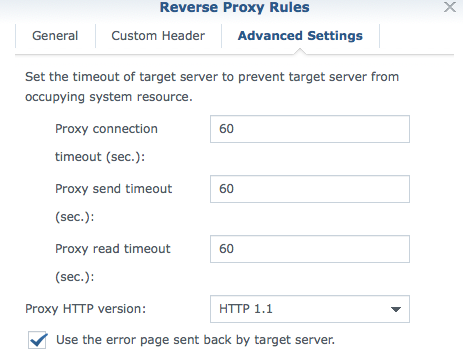
Any ideas? Has someone solved this problem yet with ios not syncing?
 BobWs
on 13 Oct 2019
BobWs
on 13 Oct 2019
yes, works also for me, when disabling HTTP2 !
BirgerK
on 14 Oct 2019
I wasn't able to get this working just yet. I have the server offering only http/1.1 when the SNI is set to my hostname, and when I use curl to check it, I can see that http/1.1 is being accepted, but the sync still doesn't work.
Using caddy 2.
jheiselman
on 15 Oct 2019
So, besides all the related server configurations, where in the iOS app do you actually set the location of the sync server? about:config on the latest iOS build still brings up an empty page for me and I don't see any settings on the sync setting page in the app.
mmnaseri
on 17 Oct 2019
@mmnaseri scroll down and tap the Version line a handful of times. After a few (five?) taps, more menu items will appear including Advanced up under Sign In. In there, you can set a custom sync server or a custom token server.
jheiselman
on 17 Oct 2019
@mmnaseri scroll down and tap the Version line a handful of times. After a few (five?) taps, more menu items will appear including Advanced up under Sign In. In there, you can set a custom sync server or a custom token server.
Have tried that but still doesn't sync. I'm using FF syncserver from https://github.com/crazy-max/docker-firefox-syncserver on a Synology NAS and Reverse proxy of Synology NAS setup properly with http proxy version set to 1.1
Do you think it is related to a specific version of firefox synserver?
BobWs
on 18 Oct 2019
same here, please fix
running crazy-max docker all is fine beside Firefox for iOS does not sync bookmarks etc.
Sending a tab works
using Firefox so is not an option for Apple Safari
 Section1977
on 10 Nov 2019
Section1977
on 10 Nov 2019
Same here. Firefox syncs with my private server across Mac, Windows and Android devices but iOS won't work. Using latest version 20.2 (16690)
 parsifallo
on 2 Dec 2019
parsifallo
on 2 Dec 2019
Can anyone confirm that HTTP/2 seems to be the fault? I can't disable HTTP/2 for a specific host (using traefik), but I see that the requests made are HTTP/2, so it's strange that it only expects HTTP/1.1 as the response.
 mavidser
on 5 Dec 2019
mavidser
on 5 Dec 2019
@mavidser yes, in my case it fixed the problem by disabling HTTP2.
BirgerK
on 7 Dec 2019
Yes, this solved my issue as well. Forcing the connection to HTTP 1.1 fixed it.
jheiselman
on 7 Dec 2019
I’m not sure I’d agree that you’re compromising security. HTTP/2 is more about efficiency. If you secure your server with a certificate, then it’s still encrypted communication. Besides, you can still accept HTTP/2 over the internet and terminate and use HTTP/1.1 just between the front end proxy and the syncserver.
That said, I agree that this is a workaround at best, not a solution.
jheiselman
on 8 Dec 2019
Just to chime in a little:
Python 2.7, the flavor of Python the sync software is written in, will go End-of-Life at the end of this month, year, and decade.
Mozilla already has indicated that there will be no rewrite for Python 3.
I gather there's a rewrite of these services in Rust in the works, at https://github.com/mozilla-services/syncstorage-rs
It's as of now unclear to me how all these parts will fit together in a way so us self-hosters will be able migrate over.
fireglow
on 8 Dec 2019
Fire glow, good point! I hadn’t considered if there was a rewrite in the works. Hopefully the rust version is released soonish.
jheiselman
on 8 Dec 2019
Besides, you can still accept HTTP/2 over the internet and terminate and use HTTP/1.1 just between the front end proxy and the syncserver.
@jheiselman I was under the impression that since it's only the iOS client which has this issue, HTTP 1.1 is needed on the internet, and doesn't matter on the syncserver. If that's the case, the client problems might still persist with the rust server too.
mavidser
on 10 Dec 2019
Seeing the same issue here; login works and I can see the server being hit but nothing comes across. The same sync server works without issues on Android, desktop Linux and macOS.
Firefox iOS v20.2, iOS v12.4.4, sync server v1.8.0, nginx v1.10.3.
Sync log from iPad upon attempt to sync:
iPad-sync-failure-sync.20191212T102735+0100.log
Maybe this warrants a separate issue?
 creywood
on 12 Dec 2019
creywood
on 12 Dec 2019
There is now a regression after FF 25 (as reported in #6535) that has broken this workflow, and as such, this feature is not usable on iOS anymore. Not being able to access history/bookmarks on my primary mobile device is a deal breaker for most users.
mmnaseri
on 29 Jun 2020
Any chances to get this fixed?
Setup
I have a similar setup as described before. I am self-hosting the sync server Mozilla docker image from here on a synology nas. The reverse proxy is configured without http2 support and uses https protocol with hsts.
Issue
Invalid OAuth parameter: redirect_url with Firfox IOS App 27.0 (18428) when trying to connect to the custom sync server
 Blitzbirnep
on 2 Jul 2020
Blitzbirnep
on 2 Jul 2020
Any chances to get this fixed?
Setup
I have a similar setup as described before. I am self-hosting the sync server Mozilla docker image from here on a synology nas. The reverse proxy is configured without http2 support and uses https protocol with hsts.Issue
Invalid OAuth parameter: redirect_url with Firfox IOS App 27.0 (18428) when trying to connect to the custom sync server
i can second that. same behaviour here.
 sprangen
on 8 Jul 2020
sprangen
on 8 Jul 2020
Same here. When trying to activate sync after i set a custom sync server, i get two choices:
- Scan QR-Code provided by stable.dev.lcip.org/pair
or - Use Email Address instead
1> when i go to stable.dev.lcip.org/pair, i always get a message like 'are you using your system camera? Then you have to connect out of a Firefox App', and no QR Code is showing up. Also the URL bar changes to 'https://stable.dev.lcip.org/pair/unsupported'.
2> Using the Email Button gives Invalid OAuth parameter: redirect_url
 delacroix0815
on 9 Jul 2020
delacroix0815
on 9 Jul 2020
same here
parsifallo
on 9 Jul 2020
Same problem as described by @delacroix0815 above with Firefox/iOS 27.0 (18428) running on iPadOS 13.6.
 HackintoshHD
on 25 Jul 2020
HackintoshHD
on 25 Jul 2020
Still the same problem on Synology Nas with this image https://github.com/crazy-max/docker-firefox-syncserver
BobWs
on 26 Jul 2020
Same here ...
 Thlb
on 13 Aug 2020
Thlb
on 13 Aug 2020
This issue should be reopened since the feature appears to have been removed on latest versions (not sure when it was actually removed).
jellium
on 5 Sep 2020
It’s not removed, it just doesn’t work. You can still enable the developer settings by tapping repeatedly on the version. There’s still a spot for a Custom Sync Token Server under Advanced Sync Settings. And it seems to actually connect. It just doesn’t sync bookmarks or tabs anymore. The “Send to device” works. That’s pretty much it.
I feel like this feature is just abandoned which is too bad. I may as well switch back to Safari.
jheiselman
on 5 Sep 2020
It’s not removed, it just doesn’t work. You can still enable the developer settings by tapping repeatedly on the version. There’s still a spot for a Custom Sync Token Server under Advanced Sync Settings. And it seems to actually connect. It just doesn’t sync bookmarks or tabs anymore. The “Send to device” works. That’s pretty much it.
I feel like this feature is just abandoned which is too bad. I may as well switch back to Safari.
I cannot seem to find the Advanced Sync Settings within the debug mode anymore. That is why I believed the feature was actually removed. Where is this settings button hidden?
jellium
on 5 Sep 2020
Settings -> Tap Version row under About heading near the bottom. After some number of taps (10?) the debug menus show up at the bottom. Back near the top will be the Advanced Sync Server settings. Note that it will only show up if you are not currently signed in to Sync.
jheiselman
on 5 Sep 2020
@jheiselman This feature is completly broken, given we cannot link a device to a custom sync server anymore (see #6535). What's the point of being able to configure a custom server if you cannot connect to it ?
Thlb
on 6 Sep 2020
@Thlb I agree completely. I was just stating that it wasn't removed; just broken. It's been broken for quite some time now and no one seems to be paying any attention to this issue since it was closed. I suppose one should re-open it, but I feel like this isn't something that the Mozilla iOS team cares much about given how it took quite a bit of back and forth to even get someone to add the feature and then it was immediately broken after the next update.
jheiselman
on 6 Sep 2020
Reopen, still broken ..
Time for change ..
Balooforever
on 6 Sep 2020
For all following this issue or find it through web search: @drixter figured out how to restore the custom sync server feature on current iOS versions of Firefox.
Original post: https://github.com/mozilla-mobile/firefox-ios/issues/6535#issuecomment-687747921
Summary: https://github.com/mozilla-mobile/firefox-ios/issues/6535#issuecomment-687751723
nook24
on 7 Sep 2020
Related issues
 tbenst
·
7Comments
tbenst
·
7Comments
 uncertainjatan
·
6Comments
uncertainjatan
·
6Comments
 shree007
·
5Comments
shree007
·
5Comments
 farhanpatel
·
8Comments
farhanpatel
·
8Comments
 Pernic
·
5Comments
Pernic
·
5Comments
Most helpful comment
WIP pull request: https://github.com/mozilla-mobile/firefox-ios/pull/5158