Firefox-ios: Support for self-hosted firefox sync/auth/content server
There are instructions on how to run your own Firefox sync/auth/content server [1,2] and according to [2] it's even possible to use the self-hosted solution for Firefox for Android. Unfortunately this isn't the case for Firefox for iOS (as there's no about:config to begin with). It'd be awesome to have a small link of some kind to enter the custom URL to one's self-hosted solution on the login screen, making this feature available on the iOS version as well and having all my bookmarks with me on my mobile.
[1] https://mozilla-services.readthedocs.io/en/latest/howtos/run-fxa.html
[2] https://mozilla-services.readthedocs.io/en/latest/howtos/run-sync-1.5.html
 stonie08
All 36 comments
 AaronMT
on 11 Sep 2017
AaronMT
on 11 Sep 2017
This is not the same as #3088, as #3088 needs someone to have a full fxa + sync server stack runnning.
But when about:config is available (like on firefox desktop), we can only override the identity.sync.tokenserver.uri setting.
This will us too still use firefox global fxa server, with custom sync server.
The #3088 doesn't permit this.
 iXo
on 15 Nov 2017
iXo
on 15 Nov 2017
By default, Firefox will use Mozilla’s hosted accounts server at https://accounts.firefox.com. This configuration will work well for most use-cases, including for those who want to self-host a storage server.
"The #3088 doesn't permit this." Unfortunately, this is true.
http://moz-services-docs.readthedocs.io/en/latest/fxa/index.html
 cwm77
on 19 Nov 2017
cwm77
on 19 Nov 2017
I was wondering the same thing as the initial reporter of this. It appears that currently Firefox iOS (10.3) does not come with a separate setting to set the token server. The url that you can specify (tapping 5 times on the version number to get into debug mode) appears to be intended to set a custom account server (replacing https://accounts.firefox.com), which is then to read the configuration from the account server's https://accounts.firefox.com/.well-known/fxa-client-configuration file.
Since I only have a sync server set up on my end, I tried to manually set up the config file like this:
https://zu.rf1155.de/moz-sync-conf/.well-known/fxa-client-configuration
and adding https://zu.rf1155.de/moz-sync-conf as the custom url in Firefox iOS didn't work out. When trying to log in, I just saw a "Could not load page." error. So it appears that just serving up the fxa-client-configuration isn't enough.
Any tips on how I can still make this work without having to set up my own account server?
Thanks!
 rainforest1155
on 5 Dec 2017
rainforest1155
on 5 Dec 2017
@rainforest1155 I tried the very same trick without luck. To bad it would have been quite a easy way to bypass this problem.
iXo
on 19 Dec 2017
@rainforest1155 great idea. Unfortunately it's not working, cause the code uses the url.absoulteString of the provided auth server dialog instead of the (faked) JSON post.
self.profile.prefs.setString(url.absoluteString, forKey: PrefsKeys.KeyCustomSyncWeb)
It might work, if they update the code to use and strip the PrefsKeys.KeyCustomSyncWeb url from the generated JSON (fake) post like:
self.profile.prefs.setString(json["auth_server_base_url"] as! String, forKey: PrefsKeys.KeyCustomSyncWeb)
"/auth" needs to be removed from "auth_server_base_url" to use it as PrefsKeys.KeyCustomSyncWeb url.
Would like to see an option to just use a sync server too.
 r-sherwood
on 20 Dec 2017
r-sherwood
on 20 Dec 2017
@r-sherwood and @iXo: I’ve briefly tried doing a redirect on the custom account service url to the default Firefox account url and while I couldn’t get that to work, might this be a workaround? Could any of you give that a try if you think this might be a possible workaround?
rainforest1155
on 23 Dec 2017
@rainforest1155 @r-sherwood Did you make any progress in setting this up? I'm also running a custom sync server but it seems like there's currently no chance to use this on iOS if you don't run a own fxa stack, which is sad because there's no usable documentation for mere mortals on how to set this up. :-/
 dprandzioch
on 22 Apr 2018
dprandzioch
on 22 Apr 2018
@dprandzioh I just tried setting up a redirect to the regular Firefox accounts url, but it still doesn't work. So I'm still stuck as well.
rainforest1155
on 22 Apr 2018
@r-sherwood / @rainforest1155 Is it only about this small code change? Then maybe someone who's deeper into that topic can open a pull request, if this does not destroy any existing functionality.
dprandzioch
on 23 Apr 2018
@dprandzioch That is correct, this is about having the custom FxA server setting on iOS not rely on having an FxA account server set up. Instead, the feature should be making use of the settings included in the /.well-known/fxa-client-configuration/ file. That would allow me to use the standard accounts.firefox.com server while making use of my own sync_tokenserver. The desktop Firefox supports this kind of set up for a long time, but I can't make use of it due to this shortcoming of the iOS version.
Thanks for your help trying to get this change going!
rainforest1155
on 24 Apr 2018
Any news on this? What could be done to help in this case?
 Ringelnatz
on 9 Jun 2018
Ringelnatz
on 9 Jun 2018
Do we have some update? it's quite strange issue that iOS version of Firefox not properly parse fxa-client-configuration file
 drixter
on 24 Jun 2018
drixter
on 24 Jun 2018
Anyone on development side, should I/we raise a bug for it?
As far of not correct implementation of assumptions.
As far JSON data from .well-known/fxa-client-configuration should be properly read, but it doesn't,
Forcing setup like:
{"auth_server_base_url":"https://api.accounts.firefox.com", "oauth_server_base_url":"https://oauth.accounts.firefox.com", "profile_server_base_url":"https://profile.accounts.firefox.com",
"sync_tokenserver_base_url":"https://fido.e-utp.net/ffsync"}
Forwarding browser to login using fido.e-utp.net/singin which is not correct. So browser should only use in this example a another token server, not the whole FxA stuff.
This what the most people need and this is expected as requested PR should work.
Thanks,
drixter
on 27 Jun 2018
This would be so brilliant if this was done. It seems that it's impossible to self host bookmarks etc easily across mobile and desktop browsers, and this addition to the iOS version of Firefox would change that situation and be a big deal for the more privacy-conscious! Fingers crossed.
 SillyPilleus
on 31 Jul 2018
SillyPilleus
on 31 Jul 2018
I would like to fully move my browsing environment to Firefox, only this missing feature is holding me back. Would be great seeing it implemented soon 🙌🏻😊
 flocbit
on 1 Aug 2018
flocbit
on 1 Aug 2018
It would be awesome to be able to sync iOS Firefox App with my selfhosted sync server. Hope the devs develop it sooner than later :)!!. Fingers crossed!!
 cristiangauma
on 6 Sep 2018
cristiangauma
on 6 Sep 2018
Is there any way we can push this forward? I'd really like to see this feature but it's now unresolved for more than a one year and without much traction. If I can help anyhow, please let me know. Sadly, I don't have enough of an overview over this codebase to open a PR on my own.
dprandzioch
on 5 Nov 2018
True words here! Push...
 Snake16547
on 21 Jan 2019
Snake16547
on 21 Jan 2019
And just another push. iOS is the only OS missing this feature within Firefox. Mac OS, Linux, Windows and Android has it since years.
cwm77
on 8 Feb 2019
Yet another push.
 mklettner
on 22 Feb 2019
mklettner
on 22 Feb 2019
I'd also love to sync with my own server on iOS. Please implement this feature.
 torso70
on 26 Mar 2019
torso70
on 26 Mar 2019
Yes please !
 Balooforever
on 26 Mar 2019
Balooforever
on 26 Mar 2019
Closing due to inactivity. Please reopen if you feel it is still is relevant
 farhanpatel
on 8 Apr 2019
farhanpatel
on 8 Apr 2019
of course it is still relevant!
Snake16547
on 8 Apr 2019
+1 ! I wait it !
Balooforever
on 8 Apr 2019
Lol you’re funny
On Apr 8, 2019 at 3:13 PM,
Closing due to inactivity. Please reopen if you feel it is still is relevant
—
You are receiving this because you are subscribed to this thread.
Reply to this email directly, view it on GitHub (https://github.com/mozilla-mobile/firefox-ios/issues/3150#issuecomment-480967832), or mute the thread (https://github.com/notifications/unsubscribe-auth/APvY3HW2HZEVJmWYdtUrvpQj_pbZWvc4ks5ve5TigaJpZM4PSI_5).
 working-name
on 8 Apr 2019
working-name
on 8 Apr 2019
The only inactivity is from the Mozilla team. There are many comments here asking for this functionality as early as 13 days before @farhanpatel closed this issue. Further, I created a matching bug in the Mozilla's bugzilla at https://bugzilla.mozilla.org/show_bug.cgi?id=1540006
This issue is very much alive.
 jheiselman
on 8 Apr 2019
jheiselman
on 8 Apr 2019
a self hosted sync server is very useful and I am realy happy to have this possiblity (because I don't trust a public service enough to sync my passwords) In other words: one of my main reasons to use firefox as my favorit browser is the self hosted sync server! But unfortunately the Mobile Firefox is not supporting these neat feature. So I use safari on my apple devices. Please, please, please add the possibility to setup a self hosted sync server for the mobile firefox so I can use it on my mobile devices :-)
 hgw77
on 10 Apr 2019
hgw77
on 10 Apr 2019
How we can reopen this issue ?
Balooforever
on 18 Apr 2019
@Balooforever the issue in Mozilla's actual bugtracker is still open. You can follow it at https://bugzilla.mozilla.org/show_bug.cgi?id=1540006
jheiselman
on 18 Apr 2019
FYI the bugzilla bug has been now closed in favor of #5006 here. The priority on that bug is still P3, so if you want to seem some action, you can follow it up there.
 mmnaseri
on 24 May 2019
mmnaseri
on 24 May 2019
Very disappointed about mozilla development team...
I have an old IPad 2.1 and an own FF Sync-server. The latest FF-Version I could get running on it is v8.2. Due to jailbreak I have full access to the file system. Is there any way to change the hardcoded tokenserver uri?
Anything that I could find was "https://sync.firefox.com.cn/token/1.0/sync/1.5" in line 5556 in \Client.app\Frameworks\Account.framework\Account
 Somebodyisnobody
on 17 Feb 2020
Somebodyisnobody
on 17 Feb 2020
It works when enabling developer tools.
Press the build number multiple times and you can select the token server.
Does not seem to work when behind a redirect though.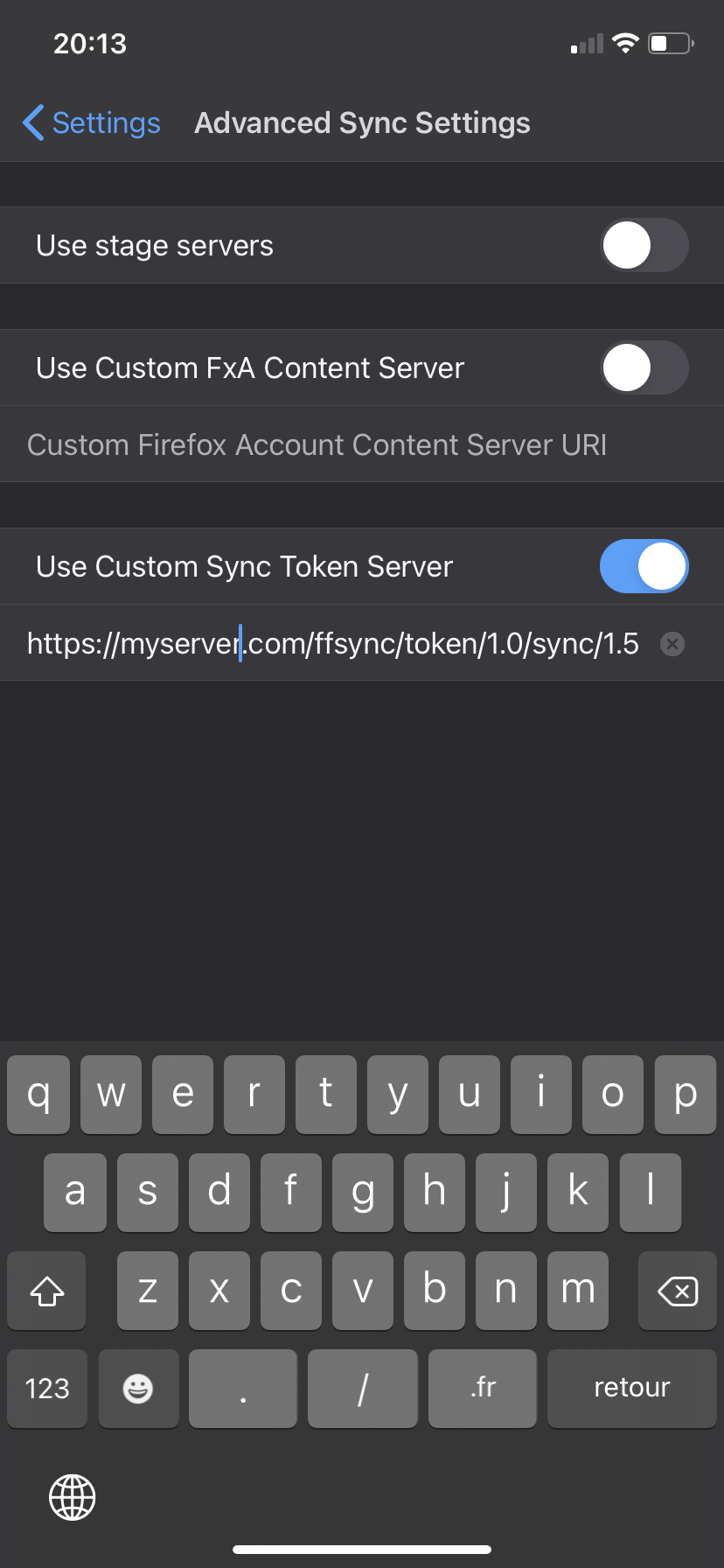
 eeeple
on 11 Sep 2020
eeeple
on 11 Sep 2020
Check here iOS case
drixter
on 11 Sep 2020
It works when enabling developer tools.
Press the build number multiple times and you can select the token server.
Does not seem to work when behind a redirect though.
I cannot reproduce this steps on FF 8.3 (latest for IOS 9.3.5)
Somebodyisnobody
on 14 Sep 2020
Related issues
 sleroux
·
4Comments
sleroux
·
4Comments
 GeckoEidechse
·
7Comments
farhanpatel
·
4Comments
GeckoEidechse
·
7Comments
farhanpatel
·
4Comments
 uncertainjatan
·
6Comments
uncertainjatan
·
6Comments
 brampitoyo
·
7Comments
brampitoyo
·
7Comments
Most helpful comment
of course it is still relevant!