Firefox-ios: FXIOS-513 ⁃ [Today Widget] Close private tabs
@AmyYLee originally pinged me about @noorhashem’s https://github.com/mozilla-mobile/firefox-ios/issues/6661#issuecomment-633185328, and also followed up last week. Thanks, Amy!
Why/User Benefit/User Problem
I want to close my private tabs without showing the private tabs I already have open.
Quoting @noorhashem:
Clear data which clears the browsing data and initiates an animation
Behaviour
When tapped, private tabs will be closed but the browser won’t reopen.
Strawman mocks for discussion
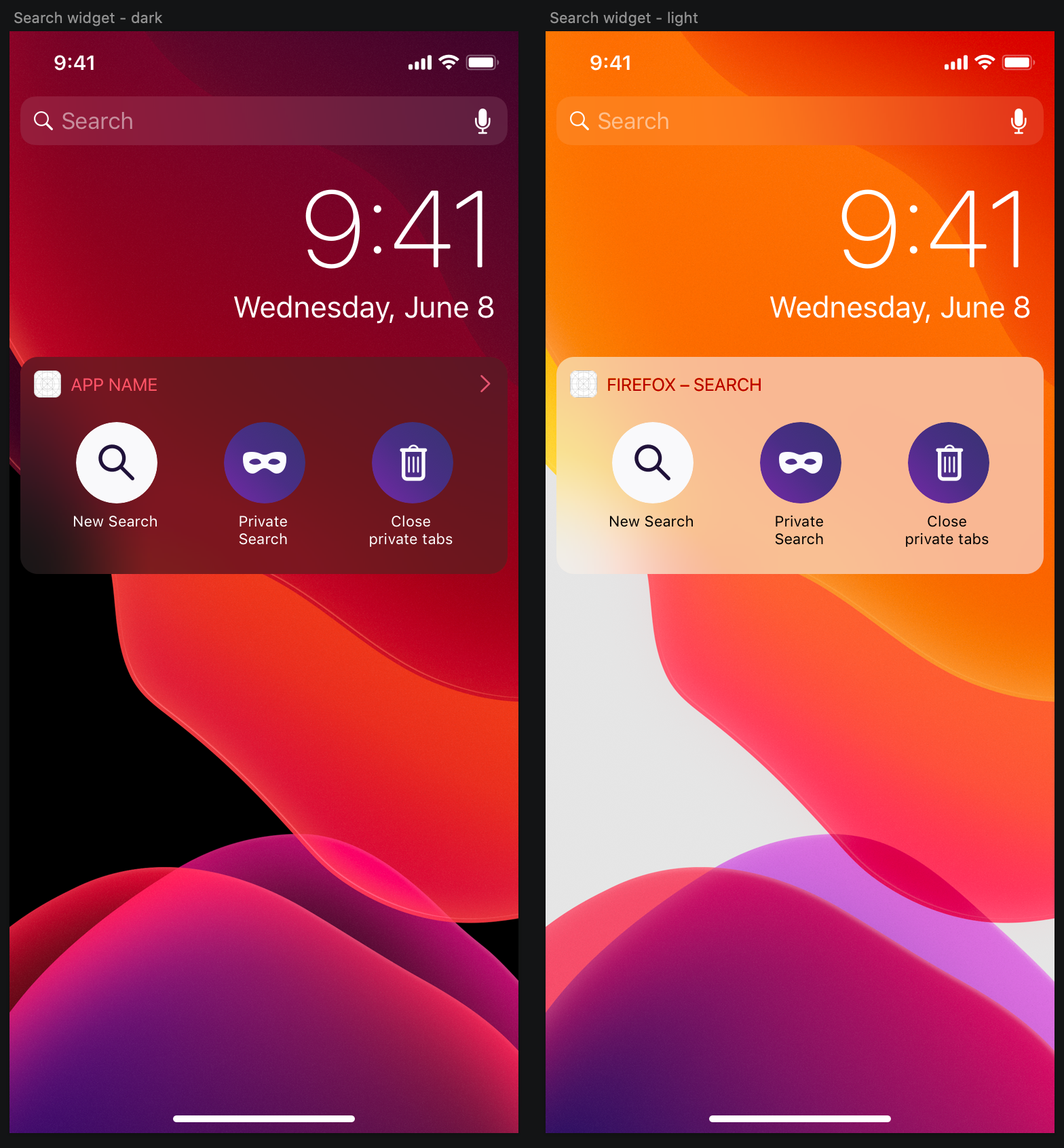
CC @dnarcese @athomasmoz
┆Issue is synchronized with this Jira Task
 brampitoyo
All 7 comments
@AmyYLee originally pinged me about @noorhashem’s #6661 (comment), and also followed up last week. Thanks, Amy!
Why/User Benefit/User Problem
I want to close my private tabs without showing the private tabs I already have open.
Quoting @noorhashem:
Clear data which clears the browsing data and initiates an animation
Ahead of implementation, there are at least two behaviours that we need to discuss:
1. Do we want to reopen the browser after you tap the “Clear” button?
@brampitoyo - No. The original intent was that we give the user the ability a quick way to clear private tabs without going into the browser like we do on Android (via notifications). We are also testing out deleting tabs via an iOS notification but the biggest concern is intrusiveness since iOS doesn't support background notifications like Android. Having a delete private tabs button in the widget is a less intrusive option. Thanks for opening this issue!
 AmyYLee
on 15 Jun 2020
AmyYLee
on 15 Jun 2020
Awesome. Thanks for your feedback, @AmyYLee.
I agree in making the Android and iOS behaviour consistent. When the action is tapped, we don’t need to go into the browser. While we’re at it, let’s rename the strings to “Close private tabs” for even more consistency.
Let’s make this into a formal decision, and I’ll update comment 0 with the correct behaviour.
@noorhashem this is a question to both you and @AmyYLee. After the “Close private tabs” action is tapped on Android, we simply remove the notification shade. On iOS, what can we do to indicate that this action is no longer necessary?
brampitoyo
on 16 Jun 2020
@AmyYLee @brampitoyo Is this feature ready to be implemented?
On iOS, what can we do to indicate that this action is no longer necessary?
My input would be we can either hide the button altogether, or we can make it a grey shade to appear like it is disabled and not allow the button to be clicked.
 dnarcese
on 22 Jun 2020
dnarcese
on 22 Jun 2020
@dnarcese I would say we have it as a disabled state to indicate that is an action that a user can take if they have private tabs opened. With that said, I'm not sure how common of a pattern it is to have a disabled icon in iOS. @brampitoyo What do you think?
AmyYLee
on 23 Jun 2020
I would agree with daniela and Amy here, or we could also show/hide it when necessary to use it (in case there are private tabs to be closed) and hide it when the tabs are closed.
 noorhashem
on 23 Jun 2020
noorhashem
on 23 Jun 2020
Thanks @AmyYLee for your question. @noorhashem @dnarcese I can confirm that widgets are meant to be highly contextual. The items in a widget can change, depending on whether it’s relevant to user’s need or not.
So, instead of disabling the icon, we should hide it when there’s nothing to erase.
brampitoyo
on 25 Jun 2020
Verified fixed on 0f06c3cbdcece8c20cbef992868fcb21c0469b19.
Bugs #7207 and #7208 should also be fixed for this feature to be complete.
 SimonBasca
on 25 Aug 2020
SimonBasca
on 25 Aug 2020
Related issues
SimonBasca
·
3Comments
 GeckoEidechse
·
7Comments
GeckoEidechse
·
7Comments
 farhanpatel
·
4Comments
farhanpatel
·
4Comments
 isabelrios
·
3Comments
isabelrios
·
3Comments
 tbenst
·
7Comments
tbenst
·
7Comments
Most helpful comment
Thanks @AmyYLee for your question. @noorhashem @dnarcese I can confirm that widgets are meant to be highly contextual. The items in a widget can change, depending on whether it’s relevant to user’s need or not.
So, instead of disabling the icon, we should hide it when there’s nothing to erase.