Firebaseui-android: the default_web_client_id string wasn't populated
Using these libraries:
implementation 'com.firebaseui:firebase-ui-auth:4.1.0'
implementation 'com.google.firebase:firebase-auth:16.0.1'
implementation 'com.google.android.gms:play-services-auth:15.0.1'
And this code:
`AuthUI.IdpConfig googleIdp = new AuthUI.IdpConfig.GoogleBuilder().build();
AuthUI.IdpConfig facebookIdp = new AuthUI.IdpConfig.FacebookBuilder().build();
AuthUI.IdpConfig emailIdp = new AuthUI.IdpConfig.EmailBuilder().build();
//not signed in
startActivityForResult(
                        AuthUI.getInstance()
                                .createSignInIntentBuilder()
                                .setAvailableProviders(Arrays.asList(facebookIdp, emailIdp))
                                .setIsSmartLockEnabled(false)
                                .setLogo(R.mipmap.app_icon)
                                .build(),
                        RC_SIGN_IN);`
 Sutheres
All 38 comments
@Sutheres that string comes from the google-services.json file and the google-services plugin. It's sort of tangential to FirebaseUI. If you're having trouble, re-download the json file theres a tiny chance you got a corrupted one.
 samtstern
on 29 Jun 2018
samtstern
on 29 Jun 2018
@samtstern re-downloaded, still no luck! any other ideas?
Sutheres
on 29 Jun 2018
@Sutheres can you show the error you're getting? And can you try the following:
From the command line, run ./gradlew :app:assembleDebug, then run cat app/build/generated/res/google-services/debug/values/values.xml
samtstern
on 29 Jun 2018
@samtstern Here is full error:
java.lang.RuntimeException: Unable to resume activity {com.solofunds.soloandroid/com.solofunds.soloandroid.LoginActivity}: java.lang.IllegalStateException: Check your google-services plugin configuration, the default_web_client_id string wasn't populated.
        at android.app.ActivityThread.performResumeActivity(ActivityThread.java:3581)
        at android.app.ActivityThread.handleResumeActivity(ActivityThread.java:3621)
        at android.app.ActivityThread.handleLaunchActivity(ActivityThread.java:2862)
        at android.app.ActivityThread.-wrap11(Unknown Source:0)
        at android.app.ActivityThread$H.handleMessage(ActivityThread.java:1589)
        at android.os.Handler.dispatchMessage(Handler.java:106)
        at android.os.Looper.loop(Looper.java:164)
        at android.app.ActivityThread.main(ActivityThread.java:6494)
        at java.lang.reflect.Method.invoke(Native Method)
        at com.android.internal.os.RuntimeInit$MethodAndArgsCaller.run(RuntimeInit.java:438)
        at com.android.internal.os.ZygoteInit.main(ZygoteInit.java:807)
     Caused by: java.lang.IllegalStateException: Check your google-services plugin configuration, the default_web_client_id string wasn't populated.
        at com.firebase.ui.auth.util.Preconditions.checkConfigured(Preconditions.java:90)
        at com.firebase.ui.auth.AuthUI$IdpConfig$GoogleBuilder.<init>(AuthUI.java:852)
        at com.solofunds.soloandroid.LoginActivity.onResume(LoginActivity.java:93)
        at android.app.Instrumentation.callActivityOnResume(Instrumentation.java:1355)
        at android.app.Activity.performResume(Activity.java:7117)
        at android.app.ActivityThread.performResumeActivity(ActivityThread.java:3556)
        at android.app.ActivityThread.handleResumeActivity(ActivityThread.java:3621)
        at android.app.ActivityThread.handleLaunchActivity(ActivityThread.java:2862)
        at android.app.ActivityThread.-wrap11(Unknown Source:0)
        at android.app.ActivityThread$H.handleMessage(ActivityThread.java:1589)
        at android.os.Handler.dispatchMessage(Handler.java:106)
        at android.os.Looper.loop(Looper.java:164)
        at android.app.ActivityThread.main(ActivityThread.java:6494)
        at java.lang.reflect.Method.invoke(Native Method)
        at com.android.internal.os.RuntimeInit$MethodAndArgsCaller.run(RuntimeInit.java:438)
        at com.android.internal.os.ZygoteInit.main(ZygoteInit.java:807)
I tried running ./gradlew :app:assembleDebug in the android studio terminal but I got this message back:
`ERROR: JAVA_HOME is not set and no 'java' command could be found in your PATH.
Please set the JAVA_HOME variable in your environment to match the
location of your Java installation.`
So, I ended up opening the Gradle side pane to app -> build -> assembleDebug. I have output from that I can post? Wasnt sure how to run the cat command since I couldnt run the gradle command in the AS terminal correctly
Sutheres
on 29 Jun 2018
Running assembleDebug in Android Studio and then running the cat command in your terminal after should work, thanks!
samtstern
on 29 Jun 2018
@samtstern Okay, it worked. I ran it and got some values back within a
Sutheres
on 29 Jun 2018
@Sutheres could you just show me the whole output you got?
samtstern
on 29 Jun 2018
@samtstern
1:43:29 PM: Executing task 'assembleDebug'...
Executing tasks: [assembleDebug]
Configuration on demand is an incubating feature.
registerResGeneratingTask is deprecated, use registerGeneratedResFolders(FileCollection)
Could not find google-services.json while looking in [src/nullnull/debug, src/debug/nullnull, src/nullnull, src/debug, src/nullnullDebug]
registerResGeneratingTask is deprecated, use registerGeneratedResFolders(FileCollection)
registerResGeneratingTask is deprecated, use registerGeneratedResFolders(FileCollection)
Could not find google-services.json while looking in [src/nullnull/release, src/release/nullnull, src/nullnull, src/release, src/nullnullRelease]
registerResGeneratingTask is deprecated, use registerGeneratedResFolders(FileCollection)
app: 'annotationProcessor' dependencies won't be recognized as kapt annotation processors. Please change the configuration name to 'kapt' for these artifacts: 'com.github.bumptech.glide:compiler:4.7.1' and apply the kapt plugin: "apply plugin: 'kotlin-kapt'".
:app:preBuild UP-TO-DATE
:app:preDebugBuild UP-TO-DATE
:app:compileDebugAidl UP-TO-DATE
:app:compileDebugRenderscript UP-TO-DATE
:app:checkDebugManifest UP-TO-DATE
:app:generateDebugBuildConfig UP-TO-DATE
:app:mainApkListPersistenceDebug UP-TO-DATE
:app:mergeDebugShaders UP-TO-DATE
:app:compileDebugShaders UP-TO-DATE
:app:generateDebugAssets UP-TO-DATE
:app:mergeDebugAssets
:app:processDebugGoogleServices
Parsing json file: /home/ed/StudioProjects/solo-android/app/google-services.json
:app:createDebugCompatibleScreenManifests UP-TO-DATE
:app:processDebugManifest UP-TO-DATE
:app:fabricGenerateResourcesDebug
:app:generateDebugResValues UP-TO-DATE
:app:generateDebugResources UP-TO-DATE
:app:mergeDebugResources
:app:splitsDiscoveryTaskDebug UP-TO-DATE
:app:processDebugResources
:app:compileDebugKotlin UP-TO-DATE
:app:prepareLintJar UP-TO-DATE
:app:generateDebugSources
:app:javaPreCompileDebug UP-TO-DATE
:app:compileDebugJavaWithJavac UP-TO-DATE
:app:compileDebugNdk NO-SOURCE
:app:compileDebugSources UP-TO-DATE
:app:transformClassesWithDexBuilderForDebug UP-TO-DATE
:app:transformDexArchiveWithExternalLibsDexMergerForDebug UP-TO-DATE
:app:transformDexArchiveWithDexMergerForDebug UP-TO-DATE
:app:mergeDebugJniLibFolders UP-TO-DATE
:app:transformNativeLibsWithMergeJniLibsForDebug UP-TO-DATE
:app:processDebugJavaRes NO-SOURCE
:app:transformResourcesWithMergeJavaResForDebug UP-TO-DATE
:app:validateSigningDebug UP-TO-DATE
:app:packageDebug
:app:assembleDebug
BUILD SUCCESSFUL in 26s
29 actionable tasks: 6 executed, 23 up-to-date
1:43:58 PM: Task execution finished 'assembleDebug'.
$cat app/build/generated/res/google-services/debug/values/values.xml
Sutheres
on 29 Jun 2018
Hmmm yeah something is going wrong in your project, here's what mine looks like:
$ cat app/build/generated/res/google-services/debug/values/values.xml
<?xml version="1.0" encoding="utf-8"?>
<resources>
    <string name="default_web_client_id" translatable="false">241316263954-vlja3di1tbnkv93jhhq5cfdsv3tr28sq.apps.googleusercontent.com</string>
    <string name="firebase_database_url" translatable="false">https://firuidemo.firebaseio.com</string>
    <string name="gcm_defaultSenderId" translatable="false">241316263954</string>
    <string name="google_api_key" translatable="false">AIzaSyD9XazjNUzmnJXEPpgokdLGuv6XlOdtTAU</string>
    <string name="google_app_id" translatable="false">1:241316263954:android:91eecf4730fc920b</string>
    <string name="google_crash_reporting_api_key" translatable="false">AIzaSyD9XazjNUzmnJXEPpgokdLGuv6XlOdtTAU</string>
    <string name="google_storage_bucket" translatable="false">firuidemo.appspot.com</string>
    <string name="project_id" translatable="false">firuidemo</string>
</resources>
As you can see that file should be a bunch of string resources. What version of the com.google.gms:google-services plugin are you using?
samtstern
on 29 Jun 2018
@samtstern apologies! i must have pasted the results improperly. Here is what I have:
$ cat app/build/generated/res/google-services/debug/values/values.xml
<?xml version="1.0" encoding="utf-8"?>
    <resources>
    <string name="firebase_database_url" translatable="false">https://solo-funds-production.firebaseio.com</string>
    <string name="gcm_defaultSenderId" translatable="false">716756156896</string>
    <string name="google_api_key" translatable="false">AIzaSyCr_lxlbImIvrhIG1bscqymz4PtoOwsWFI</string>
    <string name="google_app_id" translatable="false">1:716756156896:android:e65b7a8838b7df40</string>
    <string name="google_crash_reporting_api_key" translatable="false">AIzaSyCr_lxlbImIvrhIG1bscqymz4PtoOwsWFI</string>
    <string name="google_storage_bucket" translatable="false">solo-funds-production.appspot.com</string>
    <string name="project_id" translatable="false">solo-funds-production</string>
    </resources>
also, I am using classpath 'com.google.gms:google-services:4.0.1'
Sutheres
on 29 Jun 2018
@samtstern seems like ur getttin default_web_client_id in your output and im not, which is causing my issue!
Sutheres
on 29 Jun 2018
@Sutheres huh that's really strange! Looks like your project was not created properly (maybe a bug).
Ok you need to open the Google Cloud console (not the Firebase console) and go to your project. Then go to APIs and Services and open the Credentials section. Here's what I see:
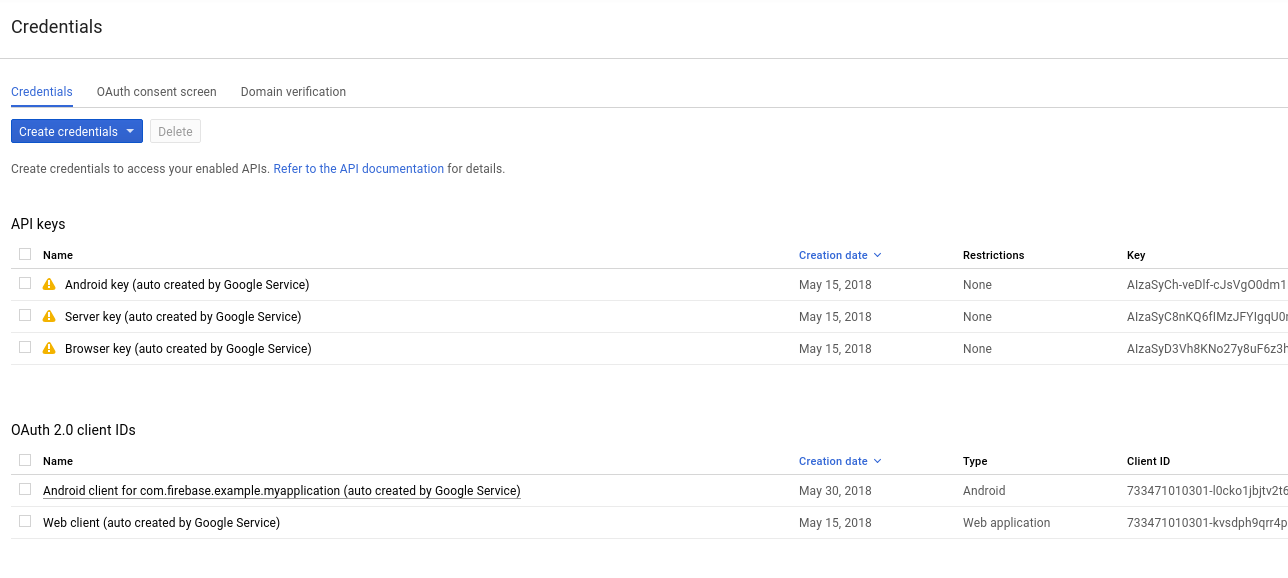
I assume that yours does not have any Web Client IDs, so let's make a new one. Here's the configuration mine has:

Replace fir-dumpster in my image with your project ID in all cases.
Finally, re-download your google-services.json and it should have the fields you need.
samtstern
on 29 Jun 2018
@samtstern I also have a default web client in my google cloud console

Should I still recreate one? I also saw this in configs.xml of the FirebaseUI auth code:
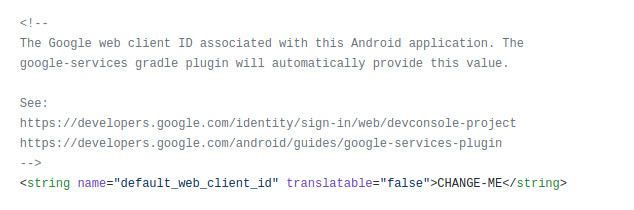
Could this mean its a gradle issue at all?
Sutheres
on 2 Jul 2018
@Sutheres sorry about the huge delay here, I was out on vacation for a week.
I would recommend a few things:
- Create a string in your app with the name
default_web_client_idand the value being the "Web client (auto created by Google Service)" id from the console. This will unblock you for now. - File an issue with Firebase support. Explain to them that even though your project has a web client ID, your
google-servicesconfiguration is not creating the proper string resources. You can link to this issue and say that we both suspect there is a bug here (I don't think this is user error)
samtstern
on 9 Jul 2018
@samtstern
I have submitted a ticket to firebase in the meantime and they've already reached out and confirmed this is a bug on their end, so I'll be checking the release notes from here on out. And creating the string in the app is indeed working as a temporary fix so thanks for everything!!
Sutheres
on 9 Jul 2018
@Sutheres glad to hear it! Closing the issue here, thanks so much for your patience.
samtstern
on 9 Jul 2018
I had this problem too. To solve, I just updated the classpath 'com.google.gms:google-services:4.2.0' inside the build.gradle file of the project.
 polotto
on 22 Jan 2019
polotto
on 22 Jan 2019
Thank you Ed Sutherlin.
I had this problem. To solve, I just updated the dependencies
implementation 'com.firebaseui:firebase-ui-auth:4.1.0'
 Ohiudzzaman
on 30 Mar 2019
Ohiudzzaman
on 30 Mar 2019
Hi @Sutheres @samtstern do you have any update on this issue?
I am getting following exception
2019-04-03 18:07:18.608 19787-19787/com.example.textonphotos E/AndroidRuntime: FATAL EXCEPTION: main
    Process: com.example.textonphotos, PID: 19787
    java.lang.RuntimeException: Unable to start activity ComponentInfo{com.example.textonphotos/com.example.textonphotos.screens.home.HomeActivity}: java.lang.IllegalStateException: Check your google-services plugin configuration, the default_web_client_id string wasn't populated.
        at android.app.ActivityThread.performLaunchActivity(ActivityThread.java:2778)
        at android.app.ActivityThread.handleLaunchActivity(ActivityThread.java:2856)
        at android.app.ActivityThread.-wrap11(Unknown Source:0)
        at android.app.ActivityThread$H.handleMessage(ActivityThread.java:1589)
        at android.os.Handler.dispatchMessage(Handler.java:106)
        at android.os.Looper.loop(Looper.java:164)
        at android.app.ActivityThread.main(ActivityThread.java:6494)
        at java.lang.reflect.Method.invoke(Native Method)
        at com.android.internal.os.RuntimeInit$MethodAndArgsCaller.run(RuntimeInit.java:438)
        at com.android.internal.os.ZygoteInit.main(ZygoteInit.java:807)
     Caused by: java.lang.IllegalStateException: Check your google-services plugin configuration, the default_web_client_id string wasn't populated.
        at com.firebase.ui.auth.util.Preconditions.checkConfigured(Preconditions.java:90)
        at com.firebase.ui.auth.AuthUI$IdpConfig$GoogleBuilder.<init>(AuthUI.java:852)
        at com.example.textonphotos.screens.login.LoginFragment.onActivityCreated(LoginFragment.kt:78)
        at androidx.fragment.app.Fragment.performActivityCreated(Fragment.java:2461)
        at androidx.fragment.app.FragmentManagerImpl.moveToState(FragmentManagerImpl.java:908)
        at androidx.fragment.app.FragmentManagerImpl.addAddedFragments(FragmentManagerImpl.java:2078)
        at androidx.fragment.app.FragmentManagerImpl.executeOpsTogether(FragmentManagerImpl.java:1852)
        at androidx.fragment.app.FragmentManagerImpl.removeRedundantOperationsAndExecute(FragmentManagerImpl.java:1808)
        at androidx.fragment.app.FragmentManagerImpl.execPendingActions(FragmentManagerImpl.java:1709)
        at androidx.fragment.app.FragmentManagerImpl.dispatchStateChange(FragmentManagerImpl.java:2609)
        at androidx.fragment.app.FragmentManagerImpl.dispatchActivityCreated(FragmentManagerImpl.java:2565)
        at androidx.fragment.app.Fragment.performActivityCreated(Fragment.java:2467)
        at androidx.fragment.app.FragmentManagerImpl.moveToState(FragmentManagerImpl.java:908)
        at androidx.fragment.app.FragmentManagerImpl.moveFragmentToExpectedState(FragmentManagerImpl.java:1229)
        at androidx.fragment.app.FragmentManagerImpl.moveToState(FragmentManagerImpl.java:1295)
        at androidx.fragment.app.FragmentManagerImpl.dispatchStateChange(FragmentManagerImpl.java:2605)
        at androidx.fragment.app.FragmentManagerImpl.dispatchActivityCreated(FragmentManagerImpl.java:2565)
        at androidx.fragment.app.FragmentController.dispatchActivityCreated(FragmentController.java:245)
        at androidx.fragment.app.FragmentActivity.onStart(FragmentActivity.java:525)
        at androidx.appcompat.app.AppCompatActivity.onStart(AppCompatActivity.java:179)
        at android.app.Instrumentation.callActivityOnStart(Instrumentation.java:1334)
        at android.app.Activity.performStart(Activity.java:7029)
        at android.app.ActivityThread.performLaunchActivity(ActivityThread.java:2741)
        at android.app.ActivityThread.handleLaunchActivity(ActivityThread.java:2856)
        at android.app.ActivityThread.-wrap11(Unknown Source:0)
        at android.app.ActivityThread$H.handleMessage(ActivityThread.java:1589)
        at android.os.Handler.dispatchMessage(Handler.java:106)
        at android.os.Looper.loop(Looper.java:164)
        at android.app.ActivityThread.main(ActivityThread.java:6494)
        at java.lang.reflect.Method.invoke(Native Method)
        at com.android.internal.os.RuntimeInit$MethodAndArgsCaller.run(RuntimeInit.java:438)
        at com.android.internal.os.ZygoteInit.main(ZygoteInit.java:807)
Here is startActivity code
startActivityForResult(AuthUI.getInstance().createSignInIntentBuilder().setAvailableProviders(arrayListOf(
                AuthUI.IdpConfig.EmailBuilder().build(),
                AuthUI.IdpConfig.GoogleBuilder().build()))
                .build(), RC_SIGN_IN)
I am using following gradle dependencies
project level
ext.firebase_core_version = "16.0.8"
ext.firebase_auth_version = "16.2.0"
ext.firebase_database_version = "16.1.0"
ext.firebase_storage_version = "16.1.0"
classpath 'com.google.gms:google-services:4.2.0' // Google Services plugin
app level
implementation 'com.firebaseui:firebase-ui-auth:4.3.2'
// firebase
implementation "com.google.firebase:firebase-core:$firebase_core_version"
implementation "com.google.firebase:firebase-auth:$firebase_auth_version"
implementation 'com.google.android.gms:play-services-auth:16.0.1'
implementation "com.google.firebase:firebase-database:$firebase_database_version"
implementation "com.google.firebase:firebase-storage:$firebase_storage_version"
}apply plugin: 'com.google.gms.google-services'  // Google Play services Gradle plugin
 rajasone
on 3 Apr 2019
rajasone
on 3 Apr 2019
@rajasone updating to all the latest libraries solved my issue. I haven't seen this happen for a while now
Sutheres
on 3 Apr 2019
I'm experiencing the same error with the latest libraries (just set it up today).
Here is the bottom of my app/build.grade. Does anything look wrong?
dependencies {
    implementation fileTree(dir: 'libs', include: ['*.jar'])
    implementation 'com.android.support:appcompat-v7:28.0.0'
    implementation 'com.android.support.constraint:constraint-layout:1.1.3'
    implementation 'com.android.support:design:28.0.0'
    implementation 'org.json:json:20180813'
    implementation 'com.android.support:support-v4:28.0.0'
    implementation 'com.android.support:recyclerview-v7:28.0.0'
    implementation 'com.google.firebase:firebase-core:16.0.8'
    implementation 'com.firebaseui:firebase-ui-auth:4.3.1'
    implementation 'com.facebook.android:facebook-android-sdk:4.41.0'

    testImplementation 'junit:junit:4.12'
    androidTestImplementation 'com.android.support.test:runner:1.0.2'
    androidTestImplementation 'com.android.support.test.espresso:espresso-core:3.0.2'
}

apply plugin: 'com.google.gms.google-services'
Manually adding the key to strings.xml works, but I'd obviously like to avoid that.
 kylecombes
on 3 Apr 2019
kylecombes
on 3 Apr 2019
@Sutheres I have all the latest libraries but still no luck.
rajasone
on 3 Apr 2019
Same here. I am getting the same error, having just things up today with the latest libraries etc. I've added the manual key in 'strings.xml' but yes, it would be nice to really solve this.
 hpols
on 4 Apr 2019
hpols
on 4 Apr 2019
I am getting the same error. My app dependencies:
implementation 'com.google.firebase:firebase-core:16.0.8'
implementation 'com.firebaseui:firebase-ui-auth:4.3.2'
 noblesilence
on 4 Apr 2019
noblesilence
on 4 Apr 2019
Well The solution is simple and easy. Most of the developers finds the error when they closed the project and reopen it then the default_web_client error results.
Solution:
You need to add the client id in the
res-->values-->string
<string name="default_web_client_id" translatable="false">xxxxxxxx</string>
for the client id(xxxxxxxxx) you can go to Firebase console and paste here.
https://youtu.be/Uwuy17eouCg
_### This video will guide you properly_.
 am9072
on 5 Apr 2019
am9072
on 5 Apr 2019
@am9072 the link you gave for the video doesn't open Youtube. Followed what you wrote now though. Is this a temporary fix or an actual one?
Thanks,
Sohaib
 msfm7
on 5 Apr 2019
msfm7
on 5 Apr 2019
It seems that the problem is with google-services.json file generated on Firebase website, not with the Firebase Auth UI. Even after I removed the Firebase Auth UI and used the regular Firebase Authentication method, the error still occurs.
I found more info on this stack overflow thread: https://stackoverflow.com/questions/37810552/cannot-resolve-symbol-default-web-client-id-in-firebases-android-codelab I tried all methods suggested in that thread but still no luck. I hard-coded the idToken string in the Java code for now.
noblesilence
on 6 Apr 2019
@noblesilence _default_web_client_id_ is automatically generated, its under generated files of google-services values.xml, unfortunately, we can't edit that file so there are two possible fix, try refreshing and rebuilding your gradle and if that doesn't fix it you can manually go to you google API panel > goto credentials > there would be web client in OAuth section from there just copy that in your strings.xml and use that, p.s don't forget to select the right app in google API panel
If your using firebase Auth for google sign in you can go to your firebase panel directly and select Authorization, select sign in method tab, click on google signin, the popup for google sign in enable/ disable option there is also a section called web client id. copy paste that to your string.xml and use that.
check my article regarding this
https://medium.com/@chetan.garg36/resolve-default-web-client-id-please-a37508e3f88b
 ch8n
on 6 Apr 2019
ch8n
on 6 Apr 2019
I got this error yesteday and it was because firebase console didnt add web client id object into generated google-services.json file: more details
 Ejstn
on 8 Apr 2019
Ejstn
on 8 Apr 2019
Hi everyone - this sounds like there's some issue with how the Firebase console is generating the google-services.json file. I will flag this to that team, thank you for all of your reports!
samtstern
on 8 Apr 2019
An update: we think we introduced a bug in the backend that makes the JSON files so we are undoing some recent changes. We hope this will fix the issue and we will investigate what happened.
samtstern
on 8 Apr 2019
@ch8n Thanks.
I got default_web_client_id from Web SDK configuration in my Firebase console(
select Authorization, select sign in method tab, click on google signin, the popup for google sign in enable/ disable option there is also a section called web client id.
) and manually paste
{
          "client_id": "my_web_client_id_.apps.googleusercontent.com",
          "client_type": 3
        }
into
"oauth_client": [] array in my google-service.json and it works
 YuriPopiv
on 9 Apr 2019
YuriPopiv
on 9 Apr 2019
I set up firebase using the default UI a couple of weeks ago without any issues, now I'm also seeing
java.lang.IllegalStateException: Check your google-services plugin configuration, the default_web_client_id string wasn't populated.
I tried redownloading the JSON, recreating my project, and updating all of my dependencies
Error occurs when hitting this part:
        // Choose authentication providers
        List<AuthUI.IdpConfig> providers = Arrays.asList(
                new AuthUI.IdpConfig.EmailBuilder().build(),
                new AuthUI.IdpConfig.GoogleBuilder().build());
dependencies:
   implementation 'com.google.android.gms:play-services-auth:16.0.1'
    implementation 'com.google.android.gms:play-services-identity:16.0.0'
    implementation 'com.firebaseui:firebase-ui-auth:4.3.1'
    implementation 'com.google.firebase:firebase-auth:16.2.1'
    implementation "com.google.firebase:firebase-firestore:18.2.0"
 Yori1
on 9 Apr 2019
Yori1
on 9 Apr 2019
In the next backend rollout, the google-services.json will again contain the correct web client ID values.
samtstern
on 9 Apr 2019
@samtstern cool thanks :+1:
rajasone
on 9 Apr 2019
@samtstern When do you expect next backend rollout?
 wildfisher
on 9 Apr 2019
wildfisher
on 9 Apr 2019
The backend should be live now, download a new google-services.json to resolve this issue.
samtstern
on 10 Apr 2019
I am still having the same problem :(
I tried steps from above, nothing helps, except for hardcoding the web id :(
I am setting up user sign in via google account as per Firebase manual:
https://firebase.google.com/docs/auth/android/google-signin
"default_web_client_id" value should be populated from google-services.json to the automatically built values.xml file.
I have downloaded google-services.json from the Firebase website and it looks good, json file shows proper value of the web client id (this value works if hardcoded). However during build, this value is not populated to values.xml.
In the build.gradle file I have:
implementation platform('com.google.firebase:firebase-bom:26.5.0')
implementation 'com.google.firebase:firebase-auth'
implementation 'com.firebaseui:firebase-ui-auth:4.3.2'
implementation 'com.google.android.gms:play-services-auth:19.0.0'
For now problem is resolved by nothing but hardcoding..
 Liker777
on 1 Mar 2021
Liker777
on 1 Mar 2021
Related issues
samtstern
·
3Comments
 GaborPeto
·
4Comments
GaborPeto
·
4Comments
 dmikesell
·
3Comments
dmikesell
·
3Comments
 imax531
·
3Comments
imax531
·
3Comments
 long1eu
·
4Comments
long1eu
·
4Comments
Most helpful comment
@noblesilence _default_web_client_id_ is automatically generated, its under generated files of google-services values.xml, unfortunately, we can't edit that file so there are two possible fix, try refreshing and rebuilding your gradle and if that doesn't fix it you can manually go to you google API panel > goto credentials > there would be web client in OAuth section from there just copy that in your strings.xml and use that, p.s don't forget to select the right app in google API panel
If your using firebase Auth for google sign in you can go to your firebase panel directly and select Authorization, select sign in method tab, click on google signin, the popup for google sign in enable/ disable option there is also a section called web client id. copy paste that to your string.xml and use that.
check my article regarding this
https://medium.com/@chetan.garg36/resolve-default-web-client-id-please-a37508e3f88b