Firebase-js-sdk: `auth/network-request-failed` being thrown on Cordova app when sign in
Describe your environment
- Operating System version: Android 7.1.1, iOS 10.3.2
- Firebase SDK version: 3.9.0
- Firebase Product: auth
Describe the problem
Cannot reliably sign in using Firebase email and password on cordova app (Android and iOS). When signing in auth/network-request-failed is thrown.
Steps to reproduce:
I can reproduce this 100% of the time on my Nexus 5x phone (also tested on Firefox and Chrome desktop, but never encounter this problem). cordova-plugin-whitelist is configured and has been worked in the past. I experimented a lot, the steps to reproduce is like this:
From Android phone:
- Use login form with email, password, and login button
- Enter email and password
- While device keyboard is still opened, press enter (big right arrow on some keyboards) or the login button and
auth/network-request-failedwill be thrown - Tap somewhere else to close the keyboard, press the login button and
auth/network-request-failedwill be thrown again - Tap into email or password input, press enter (big right arrow on some keyboards) or the login button and now it will log in successfully
It should has nothing to do with the keyboard or input focus / refocus but I don't have any clue either.
Related issue: https://github.com/angular/angularfire2/issues/581
Downgrading to Firebase SDK 3.3 does solve this issue as mentioned in the above thread.
Relevant Code:
firebase.auth().createUserWithEmailAndPassword(email, password).catch(function(error) {
  console.log(error.code);   // `auth/network-request-failed`
});
 deoxen0n2
All 35 comments
Hey there! I couldn't figure out what this issue is about, so I've labeled it for a human to triage. Hang tight.
 google-oss-bot
on 22 May 2017
google-oss-bot
on 22 May 2017
Hmmm this issue does not seem to follow the issue template. Make sure you provide all the required information.
google-oss-bot
on 22 May 2017
Can you please provide the actual code to recreate this? It will make it easier to debug. The code you added does not show the listeners you have set up to process/submit the create user form.
 bojeil-google
on 22 May 2017
bojeil-google
on 22 May 2017
@bojeil-google Sorry I will try to setup the minimal repo to reproduce this since my actual code is rather complicated. It might take some time because I'm kind of busy right now.
deoxen0n2
on 22 May 2017
I am also having this issue. It only appears on Android (tested on multiple devices with multiple OS). I am also using Cordova with Firebase 3.9.0. In my case it's calling firebase.auth().signInWithCustomToken(digitsToken) that returns auth/network-request-failed. It only happens about 10% of the time.
If this help, here is a related issue thread where they also recommend downgrading to 3.3.0: https://github.com/angular/angularfire2/issues/581
 grrrian
on 13 Jun 2017
grrrian
on 13 Jun 2017
@grrrian / @deoxen0n2 if we can get code that demonstrates the issue, we'd be happy to dig into this a little further!
 jshcrowthe
on 28 Jun 2017
jshcrowthe
on 28 Jun 2017
I tried but it's kinda sporadic ... any flag we can set to provide a clearer log ?
 pvdyck
on 28 Jun 2017
pvdyck
on 28 Jun 2017
It is likely to be network related especially if you are using cellphone networks. Most of these reports tend to be for mobile apps (Ionic/Cordova, etc). The timeout on mobile devices is 1 minute. We also check nagivator.onLine before trying.
If you can get network logs, it would be very helpful. I just can't recreate these unless I am connecting to a bad network which is expected.
bojeil-google
on 28 Jun 2017
It is indeed happening on mobile apps and, to my knowledge, never happened on a "standard" browser. Still, shouldn't we simply retry (silently?) when we receive "auth/network-request-failed" back ?
pvdyck
on 29 Jun 2017
We don't want to enforce that for everyone. It should be easy for you to do it on your end:
firebase.auth().signInWithCustomToken(digitsToken).catch(function(error) {
  if (error.code === 'auth/network-request-failed') {
    // Try again.
    return firebase.auth().signInWithCustomToken(digitsToken);
  }
  // Rethrow all other errors.
  throw error;
}).then(function(user) {
  /// Success either on first or second try, do your thing.
}).catch(function(error) {
  // Either a non network error or a failure after a retrial.
});
Including the cordova-plugin-network-information corrected this issue for me. I confirmed that the 'navigator.onLine' was occasionally 'false', which I believe was causing Firebase to think there was an issue. Once I added the cordova-plugin-network-information to my project, the problem went away. I didn't dig deep into why, but I suspect this plugin has a better wrapper around the navigator which may be giving Firebase better information. I did confirm this problem came back after removing the plugin, but re-applying it fixes it. I will update this if I dig deeper. I hope this helps.
 washowasho
on 5 Jul 2017
washowasho
on 5 Jul 2017
Looks like this may have been solved in the latest release of Firebase 4.2.0. I'll be verifying when I get a chance.
"Refactored to not use navigator.onLine for offline detection in Cordova environments."
washowasho
on 4 Aug 2017
I'm having this issue with Firebase 4.4.0, filed it as issue #168 which is probable a duplicate then.
On my device (HTC One), the problem appears most of the times, but sometimes the connection gets established. In its current state, it's a show-stopper for me. :-/
 derwaldgeist
on 24 Sep 2017
derwaldgeist
on 24 Sep 2017
Can confirm that adding cordova-plugin-network-information solved the problem for 4.4.0, too, but adding a plugin just for this is not a nice solution.
For instance, any new plugin disables hot-code-push on MeteorJS and requires me to distribute my app through the stores (which includes iOS, even if the problem only exists on Android). So I would be happy to see a "proper" solution to this.
derwaldgeist
on 24 Sep 2017
Please do not open several duplicate issues for the same issue.
This issue is not related to our SDK and is related to navigator.onLine in Cordova.
bojeil-google
on 25 Sep 2017
It wasn't clear that this was the same problem. But I confirm that the problem is caused by navigator.onLine. Nevertheless, I would recommend that Firebase should use a more reliable mechanism than checking navigator.onLine. Effectively, it's not a problem with Cordova, but with Chrome on Android. It can be fixed by adding a Cordova plugin (which effectively implements an old W3C spec on top of navigator.onLine), but that's not a good solution, if you ask me.
derwaldgeist
on 25 Sep 2017
I attempted to fix the issue by tring the cordova-plugin-network-information fix with no success. Using [email protected]. It seems to always happen on every opening/start of the app.
 adamduren
on 11 Feb 2018
adamduren
on 11 Feb 2018
@adamduren The original issue here was never reproduced such that we could actually triage the bug. If you can provide us a reproduction of the issue, we'd be happy to take a look.
jshcrowthe
on 20 Feb 2018
I am having this issue as well on android. Except it is throwing this error when it tries to refresh the auth token I believe, because the user is already signed in. It seems like it has to do with something with the app being in the background for a while, and then resuming the app. I have tried installing the cordova-plugin-network-information plugin, but it didn't fix it. I can't provide an example to reproduce the issue 100% of the time, as it seems random when it happens to me, and the only error I see is the auth/network-request-failed. And I get this error until I restart my app completely. Is there any way I can get more info from the error? I can provide code snippets to illustrate what my code is doing. Anything I can do to help resolve this issue, It's driving my users insane. I'm willing to hop on discord or skype and teamviewer to help. But.. I am also using angularfire2 on top of this, so maybe the issue is in angularfire.
 Treyphor
on 27 Feb 2018
Treyphor
on 27 Feb 2018
I've been trying to reproduce this in an isolated repository and so far have been unable to. I've used UIWebView, WkWebView, as well as Ionic's WkWebView. So far no luck but I have a few other things to try.
adamduren
on 27 Feb 2018
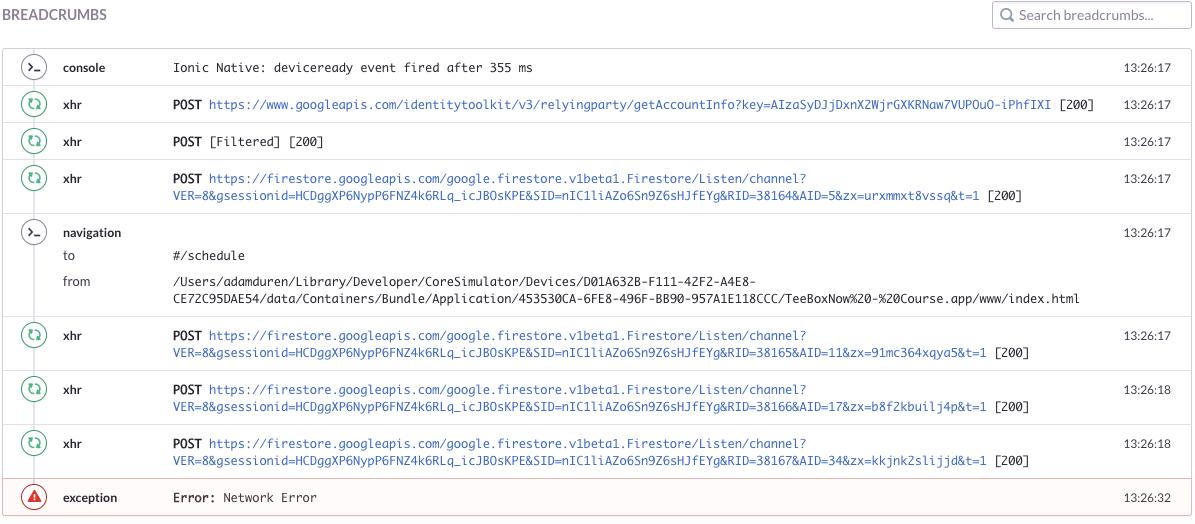
Here is a link to the block of code causing the issue for me along with a list of events that led up to the error from sentry. Using [email protected] now.
adamduren
on 27 Feb 2018
It's taking 15 seconds from app launch to happen which is probably the iframe ping timeout.
fireauth.iframeclient.IframeWrapper.PING_TIMEOUT_ =
    new fireauth.util.Delay(5000, 15000);
As far as I recall, we don't use the iframe in a Cordova environment.
bojeil-google
on 27 Feb 2018
I'm not familiar with the codebase but it appears the IframeWrapper is used by IfcHandler which appears to be used in this cordova test.
adamduren
on 27 Feb 2018
We just re-use some static method to construct the OAuth redirect URL: https://github.com/firebase/firebase-js-sdk/blob/bcc8983a0cae673bafc386935c64e9245c60c84c/packages/auth/test/cordovahandler_test.js#L1274
We don't embed an iframe in that environment as it is useless (we can't verify the origin of the parent page).
bojeil-google
on 27 Feb 2018
@bojeil-google I made a project to reproduce the issue. Instructions in Readme.
adamduren
on 27 Feb 2018
same here, with cordova.
 xam8re
on 25 Mar 2018
xam8re
on 25 Mar 2018
I configured the firebase fcm plugin and now im facing this issue too
 Vivek-abstract
on 27 Mar 2018
Vivek-abstract
on 27 Mar 2018
I found that the FCM Plugin does not play well with the Cordova Browser
tab... not sure if you are using the browser tab or not.
On Tue, Mar 27, 2018 at 9:36 AM, Vivek Gawande notifications@github.com
wrote:
I configured the firebase fcm plugin and now im facing this issue too
—
You are receiving this because you commented.
Reply to this email directly, view it on GitHub
https://github.com/firebase/firebase-js-sdk/issues/20#issuecomment-376527533,
or mute the thread
https://github.com/notifications/unsubscribe-auth/AGYUrw2LzBhLns87xGoBfeN2BjzaHb57ks5tikBvgaJpZM4Nh7wK
.
--
Jason C. Washo
Principal & Chief Architect
Sho Technology Solutions, LLC
201 Lackawanna Avenue, Suite 216, Scranton, PA 18503
(570) 499-1888
shotechnology.com
http://www.facebook.com/shotechnology
https://twitter.com/shotechnology
https://www.linkedin.com/company/sho-technology-solutions-llc
washowasho
on 27 Mar 2018
Nvm I fixed it by doing cordova plugin rm cordova-plugin-whitelist
cordova plugin add cordova-plugin-whitelist
Vivek-abstract
on 27 Mar 2018
Using cordova app as well, it suddenly stopped working. I'm getting same error. I tried what @Vivek-abstract did, didn't work. Was using <plugin name="cordova-plugin-whitelist" spec="^1.3.3" />
 vycoder
on 1 Apr 2018
vycoder
on 1 Apr 2018
Do not forget to allow apis.google.com within your csp, otherwise it won't work no matter how hard you try.
 CiriousJoker
on 6 Sep 2018
CiriousJoker
on 6 Sep 2018
Hi y'all. I would like to check if you are still having issues or clarifications here. Just leave a comment and we are happy to look into it.
 rommelpe
on 31 Jan 2020
rommelpe
on 31 Jan 2020
Hey @deoxen0n2. We need more information to resolve this issue but there hasn't been an update in 7 days. I'm marking the issue as stale and if there are no new updates in the next 3 days I will close it automatically.
If you have more information that will help us get to the bottom of this, just add a comment!
google-oss-bot
on 8 Feb 2020
Since there haven't been any recent updates here, I am going to close this issue.
@deoxen0n2 if you're still experiencing this problem and want to continue the discussion just leave a comment here and we are happy to re-open this.
google-oss-bot
on 12 Feb 2020
Related issues
 camden-kid
·
4Comments
camden-kid
·
4Comments
 honneygoyal
·
4Comments
honneygoyal
·
4Comments
 Kosai106
·
3Comments
Kosai106
·
3Comments
 wiesson
·
3Comments
wiesson
·
3Comments
 henrylearn2rock
·
4Comments
henrylearn2rock
·
4Comments
Most helpful comment
@bojeil-google I made a project to reproduce the issue. Instructions in Readme.