Filesaver.js: Saving an UTF-8 Excel blob
I'm trying to save a Blob of an Excel file, but the saved file is large double than the original, and Excel says it's corrupted.
var data // = data from AJAX response, 6854 bytes
var type = "application/vnd.openxmlformats-officedocument.spreadsheetml.sheet;charset=utf-8";
var blob = new Blob( [ data ], { type: type } );
FileSaver.saveAs(blob, "file.xlsx");
Chrome opens the file download modal, but the saved file is 11953 bytes large and Excel says it's corrupted.
 heruan
All 30 comments
The default xhr modifies the text response
There are a few options
- set the responseType to blob or arrayBuffer and use that instead
- use
fetch(url).then(res => res.blob()).then(blob => saveAs(blob, 'filename')) - override mimetype and construct it as you are doing (see link)
- don't use jQuery.ajax (it can only handle string & json - not binary like buffer and blob)
- use [a]download attribute instead
or better yet if you have control over the server
- Don't use FileSaver at all. Use
content-dispositionattachment header (you will get better support in safari and older browser)
FileSaver.js is only good for client side generated content and where authentication is needed to fetch some resource.
 jimmywarting
on 18 Oct 2016
jimmywarting
on 18 Oct 2016
I don't think this is my case: I'm passing to the Blob constructor a data variable which is 6854 bytes long, but the resulting Blob is 11953 bytes long. Why so?
heruan
on 18 Oct 2016
You need to show the full code of the ajax call
jimmywarting
on 18 Oct 2016
ä is a 2 byte character. but the length is still 1
new Blob(['ä']).size // 2
new Blob(['a']).size // 1
'ä'.length // 1
'a'.length // 1
Thank you, using the fetch API I've got the file saved right!
heruan
on 18 Oct 2016
If the json has complex array structure, then those fields in the exported files are empty if exporeted using file-saver. Can you please help me in this case?
 shikhaBasra
on 21 Mar 2018
shikhaBasra
on 21 Mar 2018
@heruan were you able to solve this ?
 bismoy2013
on 18 Aug 2018
bismoy2013
on 18 Aug 2018
@bismoy2013 maybe this will help: https://github.com/eligrey/FileSaver.js/wiki/Saving-a-remote-file
jimmywarting
on 18 Aug 2018
Hope it does because from api I am able to get stream buffer post creation of excel workbook, but once I try saving it with mime type of excel as @heruan , I got downloaded excel file (.xlsx) as corrupt.
bismoy2013
on 18 Aug 2018
show your code how you get your binary
jimmywarting
on 18 Aug 2018
C# Api :
```C#
[HttpGet]
[Route(Routes.ExportExcel)]
public HttpResponseMessage Export( ) {
var wb = new XLWorkbook(); // ClosedXML
// worksheets stuffs
// workbook done & it's coming up fine in the server end
MemoryStream stream = GetStream(wb);// The method is defined below
var result = new HttpResponseMessage(HttpStatusCode.OK)
{
Content = new ByteArrayContent(stream.GetBuffer())// (stream.ToArray())
};
//result.Content = new ByteArrayContent(stream.GetBuffer());
result.Content.Headers.ContentDisposition =
new System.Net.Http.Headers.ContentDispositionHeaderValue("attachment")
{
FileName = "samplefile.xlsx"
};
result.Content.Headers.ContentType =
new MediaTypeHeaderValue("application/vnd.openxmlformats-
officedocument.spreadsheetml.sheet");
return result;
/*this below snippet is only to check if it's able to convert the stream back to excel file in my local
machine.
byte[] fileBytes = new byte[stream.Length];
stream.Read(fileBytes, 0, fileBytes.Length);
Console.WriteLine(stream.Read(fileBytes, 0, fileBytes.Length));
stream.Close();
//Begins the process of writing the byte array back to a file
using (Stream file = File.OpenWrite(@"C:\Desktopdata.xlsx"))
{
file.Write(fileBytes, 0, fileBytes.Length);
}
*/
} // end of api snippet
Angular/Typescript (UI code)

[ constants.ts ]
```ts
import { HttpHeaders } from "../../../node_modules/@angular/common/http";

const endpoint = "http://localhost:5000/api";
export const constants = {
  getgroupname: `${endpoint}/v1/groups/{name}`,
  xmlheaders: {
    headers: new HttpHeaders({
      'Content-Type': 'application/vnd.openxmlformats-officedocument.spreadsheetml.sheet'
    }),
    responseType: 'text' as 'text'
  }
};
[ export-service.ts ]
import { constants } from "../constants";
import { Injectable } from "../../../../node_modules/@angular/core";
import { HttpClient, HttpHeaders } from "../../../../node_modules/@angular/common/http";

@Injectable()
export class ExportService {
  constructor(private http: HttpClient) { }
  exportData(groupname: string) {
    return this.http.get(constants.getgroupname + '/' +
    groupname, constants.xmlheaders);
  }
}
[ component.ts ] snippet
exportData() {
  this.exportService.exportData(this.selectedGroup.toString())
  .subscribe(data => {
    const strlink: string = 'localhost:5000/api/v1/groups/{some-name};

    //first trial , result : No file getting downloaded
    window.open(strlink, '_blank');
    console.log("File exported successfully");
    console.log(data);


    //second trial , result : corrupt file
    var type = "application/vnd.openxmlformats-officedocument.spreadsheetml.sheet";
    saveAs(new Blob([data], { type: type }), 'sample-file.xlsx');
  },
  err => {
    this.message = ['Couldn't export.'];
    console.log(err);
  });

}
The problem is that you return the file as text
// constants.ts
responseType: 'text' as 'text'
Set the responseType to blob and don't construct your own blob in component.ts
jimmywarting
on 18 Aug 2018
And the way i see it you got control over the server, so why don't you use Content-Disposition attachment response header to save the file and avoid FileSaver altogether? if i may ask
Also it would be helpful if you could update the wiki about returning a blob with the new Angular codebase (perhaps a ts and a es6 version)
https://github.com/eligrey/FileSaver.js/wiki/Saving-a-remote-file#diffrent-ajax-methods
jimmywarting
on 18 Aug 2018
just blob ? I am little confused with syntax here, tried changing ,
responseType: ResponseType.Blob
But then it throws error in export-service.ts . Yes you're right , api is cool, struggling only at the UI end, I'll keep trying , thanks for the inputs, hope it works out. Will keep you posted here, once things work out , will update the wiki.
bismoy2013
on 18 Aug 2018
also, if possible please do share any working code snippet or link that I can refer to.
bismoy2013
on 18 Aug 2018
I'm no expert at typescript or angular 2+
but it should be something like this:
@Injectable()
export class AngularService {

    constructor(private http: Http) {}

    download(model: MyModel) {
        this.http.get("https://httpbin.org/image", {
            responseType: ResponseContentType.Blob
        }).subscribe(
            response => {
                console.log(response) blob should be available here
            },
            error => {}
        );
    }
}
I think I am getting what you're trying to mean here, basically I need to stay away from creating my own blob. And the headers, should be fine with
application/x-www-form-urlencoded
Shouldn't I be using ? Or you may have added this snippet just for me to understand the flow :) Will try it out, let's see .
application/vnd.openxmlformats-officedocument.spreadsheetml.sheet
I added a snippet i found at stackoverflow
jimmywarting
on 18 Aug 2018
Thanks for that, let me just explore further and try whatever you suggested once.
bismoy2013
on 18 Aug 2018
Still unsolved. Made small changes in code, introducing blob(tried with arraybuffer too) as response
type but no help !
          import { Injectable } from "../../../../node_modules/@angular/core";
          import { HttpClient, HttpHeaders } from "../../../../node_modules/@angular/common/http";

          @Injectable()
           export class ExportService {
           constructor(private http: HttpClient) { }
            exportData(groupname: string) {
                       return this.http.get(constants.getgroupname + '/' +
                                            groupname, {responseType : 'blob'});
                         }
               }
On F12 I can see the below image .

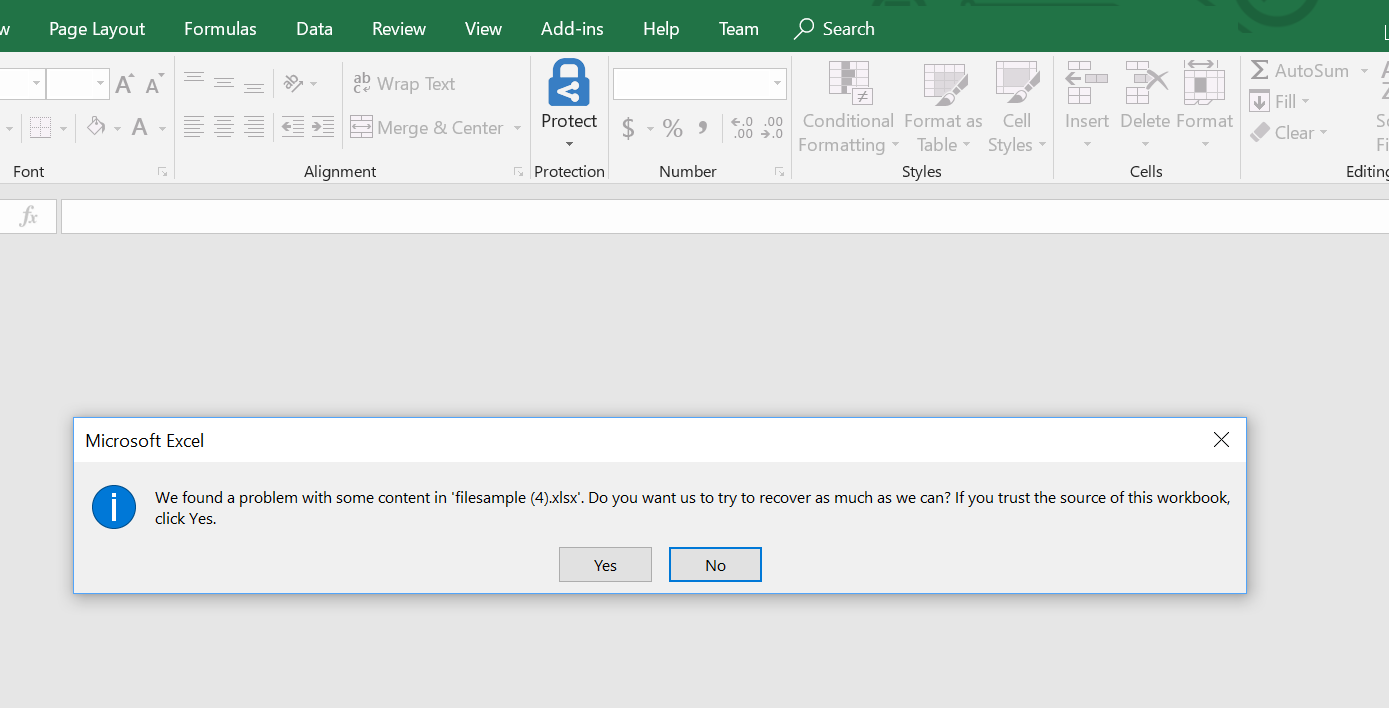
Post downloading, if I open, this is what I see.
bismoy2013
on 18 Aug 2018
Sry, don't know how i can help you anymore...
My suggestion is that you don't use angulars http module or FileSaver, just navigate to the url it does not look like you are making a POST request or sending any data to the server, quite frankly i don't know why you send Contet-Type header in a get request... have you tried just navigating to the url?
location.href = constants.getgroupname + '/' + groupname
perhaps just a link will do.
<a href="constants.getgroupname + '/' + groupname" download="sample-file.xlsx">
  download
</a>
if you still can't open it then maybe there is something wrong with the server code delivering wrong data
jimmywarting
on 18 Aug 2018
Yeah kinda strange, server seems fine to me. The codes are written keeping user experience in mind, so no url is used in my case, it has to be something like you select something from (dropdown) -> click Export button -> file gets downloaded.
bismoy2013
on 18 Aug 2018
anyways thanks for ur responses . I added my question here assuming someone else who is aware of such scenario in angular can respond :)
bismoy2013
on 18 Aug 2018
Jimmy Jimmy Jimmyyyy it worked haha . application/octet-stream saved me ! I can't believe the other mime types were full of sh* . (sorry I am sounding bit unprofessional here but couldn't control my emotions lol)
saveAs(new Blob([data], { type: "**application/octet-stream**" }), 'test.xlsx');
C# code :
        HttpResponseMessage httpResponseMessage = Request.CreateResponse(HttpStatusCode.OK);
        httpResponseMessage.Content = new StreamContent(stream);
        httpResponseMessage.Content.Headers.ContentDisposition = new System.Net.Http.Headers.ContentDispositionHeaderValue("attachment");
        httpResponseMessage.Content.Headers.ContentDisposition.FileName = "f.xlsx";
        httpResponseMessage.Content.Headers.ContentType = new System.Net.Http.Headers.MediaTypeHeaderValue("application/octet-stream");
Gfu, I would still just navigate to the file
jimmywarting
on 19 Aug 2018
Well agreed, but it's fine I guess. I am actually little surprised that application/vnd.openxmlformats-officedocument.spreadsheetml.sheet didn't help. Gosh, because of these small things, I had to spend so much time , almost giving up lol .
bismoy2013
on 19 Aug 2018
This is how my exportservice looks like (pasting it here for people facing similar problem in near future)
        service-method() {
                  return this.http.get("api_url", {responseType : 'arraybuffer'});
          }
@bismoy2013 thanks a lot, you saved my time!
 nguyenhoangnam123
on 6 Apr 2020
nguyenhoangnam123
on 6 Apr 2020
Haha cool guys . Glad it helped .
bismoy2013
on 6 Apr 2020
This is how my exportservice looks like (pasting it here for people facing similar problem in near future)
        service-method() {
                  return this.http.get("api_url", {responseType : 'arraybuffer'});
          }
This solution, works for me! Thank you!
 lapastina
on 14 Apr 2020
lapastina
on 14 Apr 2020
Related issues
 danielbronder
·
6Comments
danielbronder
·
6Comments
 rhyous
·
6Comments
rhyous
·
6Comments
 nomego
·
6Comments
nomego
·
6Comments
 Toterbiber
·
5Comments
Toterbiber
·
5Comments
 sangyeol-kim
·
5Comments
sangyeol-kim
·
5Comments
Most helpful comment
The default xhr modifies the text response
There are a few options
fetch(url).then(res => res.blob()).then(blob => saveAs(blob, 'filename'))or better yet if you have control over the server
content-dispositionattachment header (you will get better support in safari and older browser)FileSaver.js is only good for client side generated content and where authentication is needed to fetch some resource.