Files: accent color doesn't follow change on selected files
Describe the bug
When the accent color changes with the background image & with a slideshow, the color of the file selection doesn't change.
To Reproduce
Steps to reproduce the behavior:
- Go to Settings > Personalization > Background
- Select Slideshow (use folder with background with different accent colors) + "change picture every" 1m (fastest)
- Go to Settings > Personalization > Color
- Select "Automatically pick an accent color from my background"
Expected behavior
selected file background color should follow accent color.
Screenshots
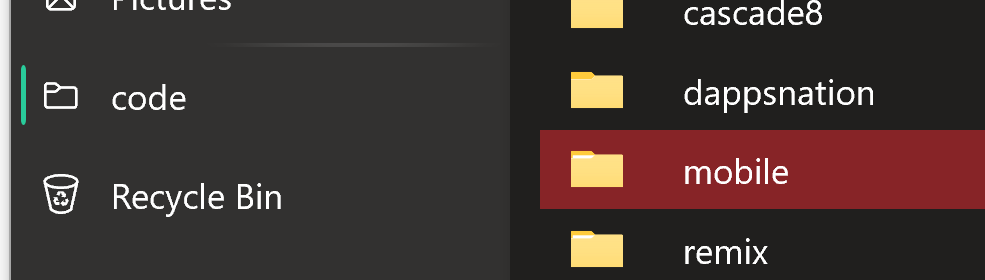
_On this image the red should be teal instead._
Desktop (please complete the following information):
- OS Version: Windows 10 Version 20H2
- App version: v0.13.1.0
Additional context
When reloading the app, the selected background takes the right color
Log file
2020-08-22 12:53:43.6826|INFO|Files.App|App launched|
2020-08-22 12:53:43.9151|INFO|Files.Filesystem.DrivesManager|Drive added: C:\, Fixed|
2020-08-22 12:55:19.5756|INFO|Files.App|App launched|
2020-08-22 12:55:19.9469|INFO|Files.Filesystem.DrivesManager|Drive added: C:\, Fixed|
2020-08-22 17:52:02.4177|INFO|Files.App|App launched|
2020-08-22 17:52:02.5427|INFO|Files.Filesystem.DrivesManager|Drive added: C:\, Fixed|
2020-08-22 17:52:56.7703|INFO|Files.App|App launched|
2020-08-22 17:52:56.8484|INFO|Files.Filesystem.DrivesManager|Drive added: C:\, Fixed|
2020-08-22 17:54:01.5681|INFO|Files.App|App launched|
2020-08-22 17:54:01.6619|INFO|Files.Filesystem.DrivesManager|Drive added: C:\, Fixed|
2020-08-22 17:55:52.5469|INFO|Files.App|App launched|
2020-08-22 17:55:52.8973|INFO|Files.Filesystem.DrivesManager|Drive added: C:\, Fixed|
2020-08-22 17:57:22.8853|INFO|Files.App|App launched|
2020-08-22 17:57:23.0556|INFO|Files.Filesystem.DrivesManager|Drive added: C:\, Fixed|
2020-08-22 18:25:24.6581|INFO|Files.App|App launched|
2020-08-22 18:25:24.8845|INFO|Files.Filesystem.DrivesManager|Drive added: C:\, Fixed|
2020-08-22 18:26:12.1884|INFO|Files.App|App launched|
2020-08-22 18:26:12.4430|INFO|Files.Filesystem.DrivesManager|Drive added: C:\, Fixed|
2020-08-22 18:33:23.5631|INFO|Files.App|App launched|
2020-08-22 18:33:23.9874|INFO|Files.Filesystem.DrivesManager|Drive added: C:\, Fixed|
2020-08-22 18:42:32.8668|INFO|Files.App|App launched|
2020-08-22 18:42:33.0391|INFO|Files.Filesystem.DrivesManager|Drive added: C:\, Fixed|
2020-08-22 21:38:08.9544|INFO|Files.App|App launched|
2020-08-22 21:38:09.1359|INFO|Files.Filesystem.DrivesManager|Drive added: C:\, Fixed|
2020-08-23 15:07:24.8032|INFO|Files.App|App launched|
2020-08-23 15:07:25.1076|INFO|Files.Filesystem.DrivesManager|Drive added: C:\, Fixed|
2020-08-23 16:53:31.5035|INFO|Files.App|App launched|
2020-08-23 16:53:31.8968|INFO|Files.Filesystem.DrivesManager|Drive added: C:\, Fixed|
2020-08-23 17:10:11.8866|ERROR|Files.App|Object reference not set to an instance of an object.|System.NullReferenceException: Object reference not set to an instance of an object.
   at Files.Controls.SidebarControl.Sidebar_ItemInvoked(NavigationView, NavigationViewItemInvokedEventArgs) + 0x132
   at SQLitePCL.delegate_function_aggregate_final.Invoke(sqlite3_context, Object) + 0x2e
   at __Interop.Intrinsics.HasThisCall__23[TArg0](Object, IntPtr, Object, TArg0) + 0x36
   at Files!<BaseAddress>+0x12d0103
   at System.Runtime.InteropServices.McgMarshal.ThrowOnExternalCallFailed(Int32, RuntimeTypeHandle) + 0x21
   at __Interop.ComCallHelpers.Call(__ComObject, RuntimeTypeHandle, Int32) + 0xb8
   at __Interop.ForwardComStubs.Stub_11[TThis](__ComObject, Int32) + 0x24
   at Microsoft.AppCenter.Utils.ApplicationLifecycleHelper.<.ctor>b__17_1(Object, UnhandledErrorDetectedEventArgs) + 0x3d
--- End of stack trace from previous location where exception was thrown ---
   at System.Runtime.ExceptionServices.ExceptionDispatchInfo.Throw() + 0x21
   at Microsoft.AppCenter.Utils.ApplicationLifecycleHelper.<.ctor>b__17_1(Object, UnhandledErrorDetectedEventArgs) + 0x75
   at System.EventHandler`1.Invoke(Object, TEventArgs) + 0x2e
   at __Interop.Intrinsics.HasThisCall__23[TArg0](Object, IntPtr, Object, TArg0) + 0x36
   at Files!<BaseAddress>+0x12a44a0

2020-08-23 17:10:18.0966|INFO|Files.App|App launched|
2020-08-23 17:10:18.2567|INFO|Files.Filesystem.DrivesManager|Drive added: C:\, Fixed|
2020-08-23 17:13:25.3821|INFO|Files.App|App launched|
2020-08-23 17:13:25.4684|INFO|Files.Filesystem.DrivesManager|Drive added: C:\, Fixed|
2020-08-23 18:15:34.4913|ERROR|Files.App|The process cannot access the file because it is being used by another process. (Exception from HRESULT: 0x80070020)|System.IO.FileLoadException: The process cannot access the file because it is being used by another process. (Exception from HRESULT: 0x80070020)
   at System.Runtime.ExceptionServices.ExceptionDispatchInfo.Throw() + 0x21
   at System.Runtime.CompilerServices.TaskAwaiter.ThrowForNonSuccess(Task) + 0x70
   at System.Runtime.CompilerServices.TaskAwaiter.HandleNonSuccessAndDebuggerNotification(Task) + 0x38
   at System.Runtime.CompilerServices.TaskAwaiter.ValidateEnd(Task) + 0x17
   at System.Runtime.CompilerServices.TaskAwaiter.GetResult() + 0xb
   at Files.Interacts.Interaction.<RenameFileItem>d__47.MoveNext() + 0x1b1
--- End of stack trace from previous location where exception was thrown ---
   at System.Runtime.ExceptionServices.ExceptionDispatchInfo.Throw() + 0x21
   at System.Runtime.CompilerServices.TaskAwaiter.ThrowForNonSuccess(Task) + 0x70
   at System.Runtime.CompilerServices.TaskAwaiter.HandleNonSuccessAndDebuggerNotification(Task) + 0x38
   at System.Runtime.CompilerServices.TaskAwaiter.ValidateEnd(Task) + 0x17
   at System.Runtime.CompilerServices.ConfiguredTaskAwaitable`1.ConfiguredTaskAwaiter.GetResult() + 0xf
   at Files.GenericFileBrowser.<AllView_CellEditEnding>d__26.MoveNext() + 0x15a
--- End of stack trace from previous location where exception was thrown ---
   at System.Runtime.ExceptionServices.ExceptionDispatchInfo.Throw() + 0x21
   at System.Runtime.CompilerServices.AsyncMethodBuilderCore.<>c.<ThrowAsync>b__7_0(Object) + 0x1e
   at System.Action`1.Invoke(T) + 0x28
   at System.Threading.WinRTSynchronizationContext.Invoker.InvokeCore() + 0x33
   at System.Runtime.InteropServices.McgMarshal.ThrowOnExternalCallFailed(Int32, RuntimeTypeHandle) + 0x21
   at __Interop.ComCallHelpers.Call(__ComObject, RuntimeTypeHandle, Int32) + 0xb8
   at __Interop.ForwardComStubs.Stub_11[TThis](__ComObject, Int32) + 0x24
   at Microsoft.AppCenter.Utils.ApplicationLifecycleHelper.<.ctor>b__17_1(Object, UnhandledErrorDetectedEventArgs) + 0x3d
--- End of stack trace from previous location where exception was thrown ---
   at System.Runtime.ExceptionServices.ExceptionDispatchInfo.Throw() + 0x21
   at Microsoft.AppCenter.Utils.ApplicationLifecycleHelper.<.ctor>b__17_1(Object, UnhandledErrorDetectedEventArgs) + 0x75
   at System.EventHandler`1.Invoke(Object, TEventArgs) + 0x2e
   at __Interop.Intrinsics.HasThisCall__23[TArg0](Object, IntPtr, Object, TArg0) + 0x36
   at Files!<BaseAddress>+0x12a44a0

2020-08-23 18:15:39.3807|INFO|Files.App|App launched|
2020-08-23 18:15:39.6194|INFO|Files.Filesystem.DrivesManager|Drive added: C:\, Fixed|
2020-08-23 18:18:17.2857|ERROR|Files.App|Could not find a part of the path 'C:\Users\grandschtroumpf\AppData\Local\Packages\49306atecsolution.FilesUWP_et10x9a9vyk8t\TempState\flutter_windows_1.20.2-stable_Extracted\flutter\.pub-cache\hosted\pub.dartlang.org\analyzer-0.39.12\lib\src\dart\resolver\function_expression_invocation_resolver.dart'.|System.IO.DirectoryNotFoundException: Could not find a part of the path 'C:\Users\grandschtroumpf\AppData\Local\Packages\49306atecsolution.FilesUWP_et10x9a9vyk8t\TempState\flutter_windows_1.20.2-stable_Extracted\flutter\.pub-cache\hosted\pub.dartlang.org\analyzer-0.39.12\lib\src\dart\resolver\function_expression_invocation_resolver.dart'.
   at System.IO.FileSystem.OpenHandle(String, Boolean) + 0x15a
   at System.IO.FileSystem.SetLastWriteTime(String, DateTimeOffset, Boolean) + 0x1b
   at System.IO.File.SetLastWriteTime(String, DateTime) + 0x3a
   at System.IO.Compression.ZipFileExtensions.ExtractToFile(ZipArchiveEntry, String, Boolean) + 0x117
   at Files.Interacts.Interaction.<>c__DisplayClass64_0.<<ExtractItems_Click>b__0>d.MoveNext() + 0x44a
--- End of stack trace from previous location where exception was thrown ---
   at System.Runtime.ExceptionServices.ExceptionDispatchInfo.Throw() + 0x21
   at System.Runtime.CompilerServices.TaskAwaiter.ThrowForNonSuccess(Task) + 0x70
   at System.Runtime.CompilerServices.TaskAwaiter.HandleNonSuccessAndDebuggerNotification(Task) + 0x38
   at System.Runtime.CompilerServices.TaskAwaiter.ValidateEnd(Task) + 0x17
   at System.Runtime.CompilerServices.TaskAwaiter.GetResult() + 0xb
   at Files.Interacts.Interaction.<ExtractItems_Click>d__64.MoveNext() + 0x710
--- End of stack trace from previous location where exception was thrown ---
   at System.Runtime.ExceptionServices.ExceptionDispatchInfo.Throw() + 0x21
   at System.Runtime.CompilerServices.AsyncMethodBuilderCore.<>c.<ThrowAsync>b__7_0(Object) + 0x1e
   at System.Action`1.Invoke(T) + 0x28
   at System.Threading.WinRTSynchronizationContext.Invoker.InvokeCore() + 0x33
   at System.Runtime.InteropServices.McgMarshal.ThrowOnExternalCallFailed(Int32, RuntimeTypeHandle) + 0x21
   at __Interop.ComCallHelpers.Call(__ComObject, RuntimeTypeHandle, Int32) + 0xb8
   at __Interop.ForwardComStubs.Stub_11[TThis](__ComObject, Int32) + 0x24
   at Microsoft.AppCenter.Utils.ApplicationLifecycleHelper.<.ctor>b__17_1(Object, UnhandledErrorDetectedEventArgs) + 0x3d
--- End of stack trace from previous location where exception was thrown ---
   at System.Runtime.ExceptionServices.ExceptionDispatchInfo.Throw() + 0x21
   at Microsoft.AppCenter.Utils.ApplicationLifecycleHelper.<.ctor>b__17_1(Object, UnhandledErrorDetectedEventArgs) + 0x75
   at System.EventHandler`1.Invoke(Object, TEventArgs) + 0x2e
   at __Interop.Intrinsics.HasThisCall__23[TArg0](Object, IntPtr, Object, TArg0) + 0x36
   at Files!<BaseAddress>+0x12a44a0

2020-08-23 18:31:11.0376|INFO|Files.App|App launched|
2020-08-23 18:31:11.1815|INFO|Files.Filesystem.DrivesManager|Drive added: C:\, Fixed|
2020-08-23 18:35:29.1545|INFO|Files.App|App launched|
2020-08-23 18:35:29.3750|INFO|Files.Filesystem.DrivesManager|Drive added: C:\, Fixed|
2020-08-23 20:15:02.0540|INFO|Files.App|App launched|
2020-08-23 20:15:02.2004|INFO|Files.Filesystem.DrivesManager|Drive added: C:\, Fixed|
2020-08-23 21:41:41.5901|INFO|Files.App|App launched|
2020-08-23 21:41:41.6994|INFO|Files.Filesystem.DrivesManager|Drive added: C:\, Fixed|
2020-08-23 21:48:02.9132|INFO|Files.App|App launched|
2020-08-23 21:48:03.0266|INFO|Files.Filesystem.DrivesManager|Drive added: C:\, Fixed|
2020-08-23 21:52:49.8627|INFO|Files.App|App launched|
2020-08-23 21:52:50.0518|INFO|Files.Filesystem.DrivesManager|Drive added: C:\, Fixed|
2020-08-24 08:16:40.5731|INFO|Files.App|App launched|
2020-08-24 08:16:40.8478|INFO|Files.Filesystem.DrivesManager|Drive added: C:\, Fixed|
2020-08-24 09:13:02.8089|INFO|Files.App|App launched|
2020-08-24 09:13:02.9772|INFO|Files.Filesystem.DrivesManager|Drive added: C:\, Fixed|
2020-08-24 14:42:24.2694|INFO|Files.App|App launched|
2020-08-24 14:42:24.4711|INFO|Files.Filesystem.DrivesManager|Drive added: C:\, Fixed|
2020-08-24 17:55:17.2047|INFO|Files.App|App launched|
2020-08-24 17:55:17.2917|INFO|Files.Filesystem.DrivesManager|Drive added: C:\, Fixed|
 GrandSchtroumpf
All 2 comments
Issue-Label Bot is automatically applying the label bug to this issue, with a confidence of 0.96. Please mark this comment with :thumbsup: or :thumbsdown: to give our bot feedback!
Links: app homepage, dashboard and code for this bot.
![issue-label-bot[bot] picture](https://avatars2.githubusercontent.com/in/27079?v=4&s=40) issue-label-bot[bot]
on 24 Aug 2020
issue-label-bot[bot]
on 24 Aug 2020
Thanks for this feedback item. I can confirm the issue as well.
I might add that from the log file posted there are at least 3 more serious issues though :)
- Crash when switching sidebar item
- Crash when extracting a zip file [maybe] due to path too long (extracting inside the package temp directory may not be ideal)
- Crash when trying to rename an open file
 gave92
on 24 Aug 2020
gave92
on 24 Aug 2020
Related issues
 DeDaMrAzR
·
3Comments
DeDaMrAzR
·
3Comments
 Francisco820
·
3Comments
Francisco820
·
3Comments
 yaichenbaum
·
3Comments
yaichenbaum
·
3Comments
 Dylan-Osborne
·
3Comments
Dylan-Osborne
·
3Comments
 eraychumak
·
3Comments
eraychumak
·
3Comments
Most helpful comment
Issue-Label Bot is automatically applying the label
bugto this issue, with a confidence of 0.96. Please mark this comment with :thumbsup: or :thumbsdown: to give our bot feedback!Links: app homepage, dashboard and code for this bot.